Desertcart purchases this item on your behalf and handles shipping, customs, and support to Japan.
๐ Power Your Productivity, Wherever You Go!
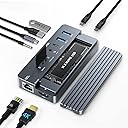
The ACASIS 10-in-1 USB-C Laptop Docking Station is a sleek, portable multiport adapter featuring a 4K 60Hz HDMI output, 100W power delivery, gigabit Ethernet, SD/TF card readers, and a built-in NVMe SSD enclosure supporting ultra-fast 10Gbps data transfer. Compatible with Mac, Windows, Linux, and Chromebook devices, it effortlessly expands a single USB-C port into a comprehensive workstation hub, ideal for professionals seeking speed, versatility, and portability.


| ASIN | B09L4LDXMS |
| Best Sellers Rank | #24,591 in Computers & Accessories ( See Top 100 in Computers & Accessories ) #1,051 in Laptop Docking Stations |
| Brand | ACASIS |
| Color | Light Gray |
| Compatible Devices | MacBook Air |
| Customer Reviews | 4.2 out of 5 stars 313 Reviews |
| Hardware Interface | HDMI |
| Item Dimensions L x W x H | 4.41"L x 2.2"W x 0.75"H |
| Item Weight | 145 g |
| Manufacturer | ACASIS |
| Mfr Part Number | AC-CM073 |
| Model Number | AC-CM073 |
| Number of Items | 1 |
| Number of Ports | 10 |
| Product Dimensions | 4.41"L x 2.2"W x 0.75"H |
| Total Number of HDMI Ports | 1 |
| Total USB Ports | 5 |
| Total Usb Ports | 5 |
| UPC | 714216233632 |
| Warranty Description | 1 Year |
| Wattage | 100 |
I**O
The king of USB-C Hubs.
Honestly, ACASISโs 10-in-1 USB-C Hub is like the king of all hubs. Purchased: March 2022. Ports I tested: โข NVME/SATA SSD (10Gbps) โข USB-A (5Gbps) โข USB-A (10Gbps) โข USB-C (10Gbps) โข Combo Headphone Jack โข SD/MicroSD โข Ethernet โข HDMI โข USB-C (PD - Power Delivery) โข USB-C (PC - Connect to host) Test device (host): โข iPhone 13 Pro โข iPad Pro (11inch, 2nd Gen.) โข Desktop PC Did everything work: Yes* (I only mention what had issues/workarounds; If itโs not mentioned, it worked as intended). โข iPhone 13 Pro: โข Required Appleโs Lightning to USB3 Camera Adapter. โข iPhone 13 Pro is not strong enough to power hub. โข External power required for hub to work. โข Ethernet was โslowโ for what I have available (1GB Service: Verizon - 330 Download, 220 Upload with Hub) (CAT 5e). โข HDMI did not work (Apple Adapter does not support video passthrough). โข Power Delivery did not work (Apple Adapter does not support PD). โข iPad Pro (11inch, 2nd Gen.): โข Ethernet was โslowโ for what I have available (1GB Service: Verizon - 500 Download, 390 Upload with Hub) (CAT 5e). โข Desktop PC: โข Ethernet was โslowโ for what I have available (1GB Service: Verizon - 730 Download, 600 Upload with Hub) (CAT 5e). Does hub overheat: Depends. โข After about an hour of constant use with everything connected as shown in the pictures, it does get warm. Do note, I added a custom skin so your results may vary. Do I recommend: Yes. โข For what it can do, itโs worth it. It has multiple uses and is lightweight/portable. I even connected another USB-C Hub (Anker) to see if itโll work together and it does (Shown in pictures). ACASISโs 10-in-1 Hub has much more use, that itโs replacing my Anker 7-in1 USB-C hub. โขโข Bonus โขโข Should you add a custom skin to it: Yes. โข I did it to prevent scratches, and just to give it a cool look. It took a few hours to cut the skin I applied and make it fit perfectly.
C**L
Does it all for remote rig
Case is aluminum alloy, a MUST! This accepts both SSD and SATAโ and cards. I put a 2Tb Samsung 980 Pro SSD into it as an extension to iPhone video and to handle the aux devices (mic(s), lights, PD power). Works well distributing power, linking devices, and disperses heat efficiently. Sturdy plugs all around; despite that USB-3/4 cables being less flexible, I would like to supply some further support (3-D printing to the task?). Velcro is your friend if using this on a remote rig. Featherweight, small: fits in a phone holder. CON: The silicone jacket fits the end plugs poorly, and must be trimmed; not a problem. Definitely not weatherproof, nor hopes to be. LED for connection is on end rather than on top. Minor cons on a major unit!
R**U
Goof Buy - HD Hub Good Versatility
Maybe a photo later. I was about to contact them to see why not TB4 they beat me to it. I ordered this for my phone when I traveled. I thought I would need to turn my phone into a computer while traveling. This little HUB/HD Enclosure was great. I only used it once while away my friend was as geeky as I was and offered me great accommodations which included a computer laptop. I did look into the requirements to run on my Note 20. What I discovered was that it required 100 watts of power so I ordered a replacement for my 68W power plug. It was (a 100W charger) misdirected in shipping so I never got it while away (be careful with Amazon shipping. However, my wife uses it on her 13" MBP (M2) I bought her and it works great. I have a 2TB M.2 SSD and it transfers at 10GB but she is happy with the speed and rarely uses it. I have it connected to her MBP using her 60W power cord and it works fine I have used the RJ45 for testing though and it works fine. I don't have an extra monitor but I will test it on my SS Q90 soon. I will give ya an update once I do. Oh power charger should arrive soon so I will have all I need to test independently of MBP power soon.
M**N
Died after five hours - the cable did, anyway
I am revising my review. My problem apparently was the cable the sent. It was junk. It turned this otherwise actually awesome device into a hot box that probably could kill an NVMe from heat. I thought it was the connector because it had to have the included cable held at an angle to connect. I contact them for support here, they never replied. I wanted this thing to work. So, I bought a very nice Thunderbolt cable and plugged it in. Now it isn't getting hot, it connects quickly and does all it should, the T-bolt to NVMe is screaming fast, like 20GB in ten seconds or so. I needed the micro-SD slot for flashing OS to Pi4/5, this has it. So, I would probably have gone 5 star on this had it included a cable that did not die in hours, and turn the thing into a heat machine so quickly, and had the company actually replied here. So buyer beware... yes, buy this box, it is wonderful especially for the price, but order it with a quality thunderbolt cable when you do, so it will work. That will add another 20% or more to the purchase, but at the price of it with the junk cable, it is worth it. If you bought one and it is getting really hot, try a quality thunderbolt cable and throw the one away that comes with. If they had included a really nice quality cable to begin with I would have gladly paid for more it. First Experience: I installed my NVMe with high hopes for this little dock, plugged it into the Mac Mini M4, copied 20GB of data in second, which was awesome and what I wanted. But within an hour it was super hot. then began to lose connection intermittently. Reseated cable, rebooted, all kinds of tricks plugging into different ports, reversing ends of provided thunderbolt cable, and it seems the connected itself is wonky because to get it to maintain a connection you have to hold the cable slightly up at the insertion point. I have not started a return yet and am letting the manufacturer reply via contact here on Amazon and will update this when they do, but I think it is either going back to Amazon or they have to ship another. We will see. Neat looking box with great features, but this one died pretty quickly. It still โworksโ if I hang this old garage door opener on it, which happened to be in a drawer, and it applies enough pressure to make the connection, but that isnโt a good solution!
G**Y
My favorite device
I bought another smaller port replicator/dock. I hated that it moved all over, was never flat and I had to reach back and hold it to add or remove a cable or flash drive. This one sits flat, has a rubber cover, and to me solves the frustration of the dangling flopping port replicator. PLEASE PLEASE UNDERSTAND THAT THIS TAKES LIKE 15 WATTS OF POWER TO FUNCTION. YOU WILL NEED A LARGER CHARGER THAN CAME WITH YOUR LAPTOP. I use a MacBook Air M1. The charger Apple supplied will charge the laptop without this dock. but it will not charge once running through this. I use an EHO brand high-wattage charger. If you plug in USB hard drives, optical drives, etc that are powered via USB, they take power to run. Get yourself a larger charger and you will love this. I have not had a hard drive in it until the last week. I added a m.2 nvme 512gb inside this. It was $18 and super super fast. Yes this is $100 and thats a lot, but overall with the drive in it, and that it sits flat, its the only one like it. I love it.
C**C
Worst SSD enclosure ever!
I bought this after researching and saw a YouTube influencer. How he rave about this 10-1 hub with NVMe enclosures. I bought into it and ordered it immediately. I got it and tried to install it immediately. It's giving me error and does not allow me to initialized the ssd card. Thinking it might me my computer, I tried it on a different computer and the result was exactly the same. I really like the hub, looks very sturdy. So I emailed the manufacturer. They responded and send me the write up of how to initialized that I already found in their web. So no help there. So I do not have any choice but to return it. Cannot waste more time as this is supposed to be plug and play... I bought a cheaper Ugreen NVMe enclosures, like 30% of the hub price. Got it, and immediately installed the NVMe drive and hook it up the computer. And its that easy, went to computer management and found the drive and quickly initialized it and format it. Just like that 3 minutes. When it works it works.
A**.
Easy to use, good quality
Really good small docking station, fast speed, iv got full speed reading from nvme ssd, not actually need extra power, working perfectly by itself
K**R
Things I wish I knew before buying: Video port is terrible and it gets hot
I wished I had tested the video port before my return window closed. Things I wished I knew before I bought it. The first thing is it gets hot and itโs hot enough that I let it cool down before I touch it to put it away. If you donโt put an SSD drive in it then it wonโt get that hot but it isnโt designed to โeasilyโ remove the SSD M.2 drive every time you use it. Yes the SSD is screwless and the lid is magnetic but even if you went through those steps to take it out. What do you do with the drive? Youโve just removed it from its carrier which isnโt convenient, even if you leave it on your desk. I wish there was a fan or some way to prevent it from getting so hot. I tested the video port of my laptop, I run Linux on the hardware and it works great. I tested the cable and that works, also the monitor works too. The port on this thing makes the video a mess and not usable. If I had an option to return it, I would.
T**S
Excellent HUB!
I installed a 1TB NVMe SSD and currently using this Hub with my 16โ MacBook Pro. Data transfer speed is as advertised and the wide variety of ports is convenient. One USB-C connects all my external devices. The hub does get quite hot when transferring large amounts of data. Hopefully, this will not cause damage to the unit over time. Maybe a couple of micro cooling fans would be a wise investment. The hub also works great with my iPad Pro.
A**Y
Great product
Things are as expected, the case is good and saves the device from scratches and bumps; the size is really compact and easy to carry.
E**.
excelente
excelente equipo, muy funcional y sencillo de operar
C**C
Product works with MacBook Pro 14" (2023).
Item received matched the product description.
E**T
Works like a charm with my 2021 Mac book pro
love the extra USB ports and the Ethernet port as well as the ssd drive and SD slots
Trustpilot
1 month ago
2 days ago