


🚀 Stay connected, stay ahead — the ultimate 5G powerhouse for pros on the move!
The Peplink MAX BR1 Pro 5G is a rugged, industrial-grade router delivering ultra-fast 5G connectivity up to 4 Gbps downlink, dual-band Wi-Fi 6 with 2x2 MU-MIMO, and versatile multi-speed Ethernet ports. Featuring patented SpeedFusion technology for seamless failover and bandwidth bonding, it supports major US carriers and includes a redundant SIM slot for uninterrupted service. Ideal for professionals demanding reliable, high-performance mobile networking.
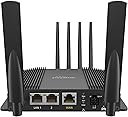
| Antenna Location | Business, Home |
| Antenna Type | Internal |
| Asin | B09K7SRMX4 |
| Box Contents | 1x 12V2A Power Supply, 1x BR1 Pro 5G, 1x GPS Antenna, 2x Wi-Fi Dual Band Antenna, 4x LTE/5G Antennas |
| Brand Name | Pepwave |
| Compatible Devices | Switch, Access Point, Computer, Smartphone |
| Connectivity Protocol | Wi-Fi |
| Connectivity Technology | 5G, Ethernet, Wi-Fi |
| Control Method | Remote |
| Controller Type | Switch |
| Customer Reviews | 4.2 4.2 out of 5 stars (69) 4.2 out of 5 stars |
| Data Transfer Rate | 150 Megabits Per Second |
| Frequency | 5 GHz |
| Frequency Band Class | Dual-Band |
| Global Trade Identification Number | 00710859517771 |
| Is Modem Compatible | Yes |
| Item Dimensions L X W X H | 15.2L x 12.7W x 5.1H centimetres |
| Item Type Name | Router |
| Item Weight | 580 Grams |
| Lan Port Bandwidth | 10/100/1000 megabits_per_second |
| Manufacturer | Peplink |
| Manufacturer Part Number | MAX-BR1-PRO-5GH-T-PRM |
| Maximum Upstream Data Transfer Rate | 150 Megabits Per Second |
| Model Name | MAX BR1 Pro 5G |
| Model Number | MAX-BR1-PRO-5GH-T-PRM |
| Number Of Items | 1 |
| Number Of Ports | 3 |
| Operating System | RouterOS |
| Other Special Features Of The Product | QoS, WPS |
| Ram Memory Installed | 128 MB |
| Security Protocol | WPS |
| Unit Count | 1.0 count |
| Upc | 710859517771 |
| Wireless Compability | 802.11ax |
User
Works very well but has a steep price
Dislikes: Price is extremely highLikes: Everything else. Pepwave is truly a leader in the technology. This device starts up quickly compared to older models, has a lot of good software features, and gives very good 5G speeds. I live in a very rural area at a very low elevation area near a creek with almost zero cell coverage. I am too far off the main road to get cable and satellite has too much latency for my needs. I built this cellular based system and placed it on top of the hill which has about 70ft higher elevation than my house . I have a 400ft buried Cat6 ethernet cable running to the unit. I'm using a 24V, 24W POE device and a POE splitter to send power to the unit (NOTE: the device does not have POE input). I added a 4 antenna directional device to get my MIMO setup. I am about 3 miles from the cellular antenna through a lot of trees but am getting a 5G signal with an RSSI of -64dB and 94MB download speeds. The performance is great for my needs. I highly recommend this device if you can afford the high price.
User
Awesome!
I live in the mountains and was getting 1 or 2 bars @ 300-500 Mbps on my Verizon inseego M2000 mobile hotspot. I connected the exterior antenna to my The Peplink MAX BR1 Pro 5G and now I'm getting 4 bars @ 1.2 Gbps. The unit is pretty easy to set up for someone who is familiar with networks. Once you plug in your hotspot sim card to the router it will give you a basic configuration. Be patient on initial startup, it takes a few to connect everything. Once you have all green lights on the device, sign in and there is a lot of settings to help you set up your security.
User
Amazing little router with 5G and WiFi 6,
I purchased this to use at home and also in my camper, using Starlink and T-Mobile 5G Business internet. Works like a charm out of the box while also giving you the ability to customize pretty much everything, from the routes traffic take to the cellular bands you can connect. Speedfusion - built in with 1T of data usage - is a game changer for those using Teams, WebEx and Zoom. IMHO it’s one of the best devices I have used in its class.
User
There are T-Mobile Problems!
The other gent was correct that the T-Mobile 100 GB data plan for $50 a month does not work with this. I spent hours with T-Mobile "tech" support trying to get my SIM card to work with this data plan but it would not connect. So finally I read the other gent's comment to the "T-Mobil tech support" that T-Mobile will work with their 50 GB per month plan for $50 a month, tech person then changed my plan to that and it connected immediately! On YouTube I saw that an outfit called FMCA has a T-Mobile deal for $50 for unlimited data on their web site so I signed up with that and hope that the deal (SIM card) works. You have to join FMCA for $50 a year. Also there is a caveat that since T-Mobile combined with Sprint that in high use areas they may limit you to 50 GB per month in that area!? The software with this device is buggy and will frequently hang up unless you use a mouse and not a touch pad. Also there are two SIM card slots that apparently can belong to two different cell providers and you can select one or the other or both but there is absolutely no explanation how this works that I could find. The so called "user manual" on the Pepwave web site is exactly two pages long for this device - showing only what the blinking lights tell you. The WAN connection directly from my home modem never was able to connect and I could not determine why. Seems like a serious bug? It only said it was "connecting" but never did - probably a configuration error on my part? I agree with another gent that Pepwave should have provided a 12 volt cigarette lighter power plug with this device - they sell for about $25 or so from third parties. If you have an RV and don't have shore power you shouldn't have to turn on your battery powered inverter to power this thing when battery power alone will do and save the extra energy drain when using an inverter. Another serious bug is that there is no "scroll control" on the edge of the software pages and therefore if you are just using a touch pad you have almost no way to scroll down a page! That requires a mouse with scroll button! The older Pepwave so called "Duo" has a lot more control over multiple SIM cards (four max as I recall) as well as signing up for the WiFi in a campground. Pardon my ignorance perhaps but I couldn't find any way to utilize a local WiFi signal in a campground and retransmit it over the WiFi on this device which of course includes 4 and 5 GHz. Even overpriced Winegard has this feature!! By the way I couldn't get the T-Mobile 100 GB per month data plan for $50 to work with the Winegard Gateway either! Be advised that certain of the higher end Winegard Ranger offerings don't mention that they won't accept a third party SIM card and will only allow you to use the pricey Winegard data plans. Buyer beware! One other issue is that you need to do a firmware upgrade. There is an obscure "firmware" selection buried in the admin software which you should click on. It will then check for upgrades and ask you to confirm. The upgrade is from 4.6 something to 4.8 as I recall. Trouble is the upgrade was started and then hung up at 709% completion so I feared I just bricked the device. So I went ahead and ignored the hangup and when I logged in it showed the upgrade was apparently complete and the device did work normally. Watch all the YouTube videos by doing a search on this and other Peplink offerings before you buy this and think about buying the older Duo style units which are much cheaper and offer many more control options with their software. The YouTube folks say that planned firmware upgrades will give this device more options in future.
User
Works with First Net
I wasn’t sure if this would be compatible with AT&T First Net 5G as it was not on First Net’s list of compatible devices. I took the risk knowing it would at least do 4G. It works great! We are in an area with limited 5G coverage with the towers a good distance away and it picks it up. Our phones don’t even do that. Speeds are around 80-100 mbps down and 10-20 up. Not great if you compare it to hardwired fiber or cable, but a HUGE step up from a smart phone hotspot or even a hotspot with a built in antenna like the Netgear Nighthawk M6. I will be getting a roof mounted antenna eventually but it works great for now!
Trustpilot
3 days ago
2 weeks ago