Desertcart purchases this item on your behalf and handles shipping, customs, and support to Japan.
🔵 Light up your desk, power up your productivity!
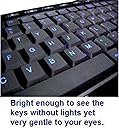
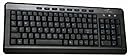
The iMBAPrice USB Backlit Blue LED Multimedia Keyboard combines a vibrant blue electro-luminescent backlight with 18 multimedia keys and cushioned silica gel keys designed for over 5 million presses. Its compact piano black design includes a full numeric keypad and is USB powered with PS/2 adapter support, compatible across major operating systems. Ideal for professionals seeking a stylish, durable, and energy-efficient keyboard that enhances both work and play.
| ASIN | B00CKF6ACK |
| Additional Features | Lighting |
| Antenna Location | as long as your computer has a USB port and recognizes standard USB input devices. |
| Best Sellers Rank | #4,237 in Computer Keyboards |
| Brand | iMBAPrice |
| Built-In Media | USB with PS/2 Adapter |
| Button Quantity | 18 |
| Color | Black, Blue |
| Compatible Devices | Desktop Computers, Laptop Computers, Gaming Consoles, Tablets with USB Ports |
| Compatible Operating System Family | Linux, MacOS, Windows |
| Connectivity Technology | usb |
| Customer Reviews | 4.1 out of 5 stars 682 Reviews |
| Enclosure Material | Plastic, Silicone |
| Global Trade Identification Number | 00616641737573 |
| Hand Orientation | Ambidextrous |
| Item Dimensions L x W x H | 16"L x 6"W x 1"H |
| Item Weight | 1.35 Pounds |
| Keyboard Backlighting Color Support | Single Color |
| Keyboard Description | Multimedia |
| Keyboard Layout | QWERTY |
| Manufacturer | MHL COMPUTER SYSTEMS INC, |
| Mfr Part Number | iMBA-SBL-BKB |
| Model Name | iMBA-SBL-BKB |
| Model Number | iMBA-SBL-BKB |
| Number of Keys | 18 |
| Number of Sections | 1 |
| Power Source | USB Powered |
| Recommended Uses For Product | as long as your computer has a USB port and recognizes standard USB input devices. |
| Special Feature | Lighting |
| Style Name | Contemporary |
| Switch Type | Membrane |
| UPC | 616641737573 |
| Unit Count | 1.0 Count |
| Warranty Description | 1 Year Limited |
G**A
I bought to use with a laptop....some keys are not full size, illumination and fonts are great.
I wasn't paying enough attention when I bought this, because I was focused on the illumination. I wish it was normal sized and not compressed. I bought to use with a laptop, so imagine my displeasure when I realized it sized close to my 17" laptop's keyboard. Many of the most oft used keys are undersized. This makes the keyboard more like a large laptop keyboard than a true full size. For example, shift, enter, space, etc. are all non standard sized, so I'm often hitting the wrong key adjacent, or having to spend time looking to see if I'm on the right key. It slows me down. I do like the key strokes. They offer enough feedback, and I like the included number pad which my laptop does not have. UPDATE: I've been using for a while, and the board has grown on me. I initially took stars off for the compressed keys, but really the picture shows the relative scale of the keys. As such, it is not like they are trying to hide anything. This board has been a good one to take with me (I hate most laptop keyboards), because it is light and a little smaller, but still has full keyboard functionality, including keys for media functions and most useful for me the numpad. I also like the large illuminated font. Even in a lit environment, the keys glow enough to enhance my view of them. I will be keeping this board. Happy to update my rating.
Z**J
Be aware the shift keys are not full size.
Nice size and look, but the shift keys are way too small for me. I purchased this to plug into my docking station to save wear and tear on my laptop keyboard, but the shift keys are too small and I am constantly hitting the keys next to them. They are about half the size of normal shift keys. Other than that it’s a great keyboard. Look and feel are good, and the lighting is great.
J**N
BEST keyboard I have ever purchased for daily use!!
Beautiful, quiet keys, compact, and has convenient hotkeys along the top including a one touch on/off key instead of a flip switch. No lighted board has actually got engraved into the key itself design that I can find. I purchased a lighted board about 2 months back from another dealer for a lot more than this one and found the keys rubbed off the black around the lighted fonts and the keys were horrible to press because they were large and tipped which created sticking both up and down which became extremely annoying. This keyboard is a great value and I definitely love it. I am thinking of ordering a few to keep on hand. I will see how well the fonts hold up against rubbing off and will ***update*** this review later to let everyone know. A solution to fonts rubbing off is to place a square of invisible tape on the key which allows the fonts to show, does not interfere with use, and will not wear off for a quite a while. ***UPDATE*** Get this keyboard, it is truly the best keyboard I have ever purchased. I have had this keyboard for about 2 months now and the fonts are still intact!!! NO smudged letters, NO slipping around, NO issues. There is only one tiny annoyance. The "Home" key is right next to a rather small "Backspace" so I accidentally hit it quite often and it takes me to the beginning of my sentence. When this happens I press the "End" key and it puts me right back where I left off. I just need to be more precise in my typing and then it won't be an annoyance at all and is certainly not what I would call a real flaw.
T**K
Compact, well made, looks nice, works with Zorin OS (Linux)
I was pleasantly surprised, at this price. No complaints at all, really. But then, I'm a two fingered typist. Way better than the junk $15 KBs I've been using where the letters wear off within months. No manual to speak of, tho. I discovered holding the Light button will turn the back-light off. Letters are large and not too bright. The piano black finish looks nice. There is no R Windows key to use as a Linux Overview button so I just remapped R Alt to be R Win with Input Remapper.
L**Z
Stay clear.
This was a horrible keyboard. I got it because I needed a back lit keyboard that was also compact... this was a terrible mistake. They keys were extremely hard for one. The 0 key on the number pad had to be pounded to get it to work. On top of that the re-sizing of shift, backspace and enter keys made it extremely difficult to type quickly (even not counting the problems with the keys being EXTREMELY hard). If that were not enough the re-arrangement of they keys to make it compact I found to be extremely unpractical. I got a DBpower keyboard that is basically the same price but 100% better.
J**R
LOVE the backlighting but very cheap construction.
I've been using an Apple keyboard (USB with numeric keypad) since 2007. A couple of the less-important keys (F13, F14) went out on me recently so while I like that keyboard a lot I figured it was time for a new one. I wanted USB/wired not wireless, backlighting, a numeric keypad and ideally a somewhat compact design since I do most of my work at a desk with a somewhat narrow keyboard drawer on which I also place my mouse pad and mouse. This "iMBAPrice" keyboard fit the bill and at only $20 looked like a bargain. The reviews were mixed but I decided to give it a shot. I do like the backlighting very much. My home office space is pretty dark even during the day and at night I don't like to work under bright lights. The orange color is nice with lights on in the room and the blue appears more muted to my eyes and so works nicely in the dark. My very old 2003 Mac PowerBook G4 has backlit keys and I loved them; that computer has been retired for a while but I always liked the backlighting and have missed it. The backlighting on the PowerBook is of much higher quality, though, with the ability to manually adjust the brightness, allow the brightness to adjust based on ambient light, and the high quality keys and key fonts never wore out. This keyboard has lights which are either on or off, orange or blue, and that's it – fine with me, although I would have expected things to get fancier in 14 years, not simpler. (Well, this is a $20 keyboard...) I do think the fonts on the keys are going to wear fast, though: In fact, two of the special function keys had tiny little pinpricks worn away before I ever touched those keys and while I was able to fix them with an application of some black magic marker that won't be possible once the key fonts start to go (as reported in other reviews). It's definitely less wide than my old Mac keyboard. The Mac keyboard was 17" wide (x axis) while this keyboard is a smidge under 16" wide. It is larger in both the y and z axis. Z (height) is another thing I need to get used to as it makes my wrist angle and elbow placement a little different. The keys themselves are a little larger than I'm used to but I've worked on keyboards with similar-size keys. The fonts on the keys are HUGE and I like that, it was a selling point for me and in practice it's certainly easy on the eyes – to the extent I look at the keys, which isn't often. I AM glancing at the keys a bit as I write this because the layout isn't 100% standard and since I started using it only today I'm not used to it yet. Just look at the pictures and you can see that in order to make the keyboard less long that the layout keys are clustered to the right of the main keys and some of the keys, such as the Enter key, are not standard size. I am a touch-typist so this is slowing me down but i do see getting used to it. People with less dexterous plasticity might find the non-standard layout frustrating and should look elsewhere. I'm using this keyboard with a Mac and while it's not a Mac-specific keyboard it works perfectly fine. System Preferences will allow you to reassign the Windows, Control, and Alt keys if you want to do that. I didn't as I'm OK with the keys being in different locations as long as they're labeled more-or-less for their actual assigned function. I own a copy of a lovely piece of software called USB Overdrive so I was able to assign all the special function keys (volume-up, play/pause, etc.) to functions that are useful to me, although most of them (such as the mail button opening my Mail application) worked right out of the box so should be fine for people happy with the default functions of those keys. None of the keys on my keyboard stick or rock or are hard to press. They all have a VERY long travel, though, and kind of clack-sounding when I'm typing at speed, and the size of the keys (a bit larger than I'm used to) is throwing me off a little. My main concern is that the entire thing feels cheap, the keys feel cheap as I depress them, and I'm concerned about how this low quality device might result in me working slower and introducing more errors in my work. I fully expect that things are going to wear out pretty fast (especially the fonts etched into the keys which allow the light to come through – boy, that will look terrible when they start to go) and I imagine the keyboard as a whole won't last very long. But you know, it's $20 and you do get what you pay for. A replacement keyboard of the exact same type I have been using for 10 years is still available from Apple for $50 but I'm already thinking that in the future, no backlight equals no way am I purchasing that keyboard. If/when this cheap backlit keyboard craps out I'd like to find an Apple-layout keyboard with quality keys and backlighting. They do exist but are over $100 which would be well worth it to me for something that would maintain its appearance and function for at least 5 years but most, even top-of-the-line keyboards such as the Logitech K800 (not Mac-specific, proprietary wireless instead of USB or Bluetooth, but only $65 or so) have a lot of reports of lifespans only in the 12-month range. Please note that my 4-star rating is based on the quality and price combined, my renewed love of keyboard backlighting, and the fact that it fits on my desk and the somewhat nonstandard layout is not a major problem for me. If not considering the price at all, I'd probably knock off a star; maybe two. Also note that this exact keyboard is sold here on Amazon under a variety of different brand names and prices. Look at the specs and pictures carefully to be sure and choose the one currently being sold for the lowest price; that's what I did. edit 2017-04-11: Knocking off a star because even though this is a compact keyboard the keys themselves are large enough that the distance my fingers have to reach to go from one key to another or to hold a modifier key and press another key with one hand is very large. Much more awkward than on any other keyboard I've used in the last 20 years. Thinking about going back to the Apple USB keyboard with keypad even though it doesn't have backlighting and costs $50. edit 2017-04-14: The long key travel and the huge space between keys have me working much slower and with less accuracy. The nonstandard layout and couple of nonstandard keys aren't a problem but I can't take this big a hit to my productivity. The keyboard is just too cheap; I guess i shouldn't expect any better from a $20 device. It's going back into it's little box and into my storage cabinet. It will be perfectly fine as an emergency replacement keyboard but I need to use something better for my everyday work and play.
R**7
First backlit keyboard...very functional
UPDATE: OK, after a year, I have decided to retire this keyboard. It functioned just as advertised and did not really do anything wrong. The thing that finally made me change was the small back key. In my original post I stated that I believed I would get used to the small key, but in the end, I would find myself occasionally hitting the "=" key or sometimes the "home" key...this was VERY AGGRAVATING! I guess, after 40 years of typing, I built up a certain habit that I just could not completely change. When I originally had read the reviews, I was warned about the small backspace key problem but I believed I would adjust...didn't happen for me, maybe you will be OK with it. I ended up with another backlit keyboard with the large print keys that I am very happy with...it has the standard large backspace key. I bought it through Amazon of course. ORIGINAL REVIEW: I don't like a bunch of lighting in the room when I am using the computer at night. Thought a backlit keyboard would be nice so when the old Logitech went south, I figured it was a good time to give one a try. Can't really tell you why I picked this one, probably the price and the review ratings. In any case, this keyboard worked out better than I had expected. The lighting is really clear and great for those times when you aren't sure which key is which for special characters. As others have mentioned, the backspace key is smaller than normal so I am still getting used to that, but already that seems to be less of a problem.
K**E
Keyboard is nice and bright
Keyboard is nice and bright, good price, good key action. The only thing I find annoying about it is there is a "home" key, right next to the Backspace key that will take you back to the top of the page/paragraph/line if you hit it. Most keyboards I am used to have a double wide backspace, similar to the size of the Enter key that is easier to hit. But, I am using this keyboard right now to type this without a hitch other than that home key issue....
A**L
Keyboard
Works well, easy to use and see with light up keys.
Z**N
Very nice and fast keyboard..great value
I have no complaints re this keyboard; it does everything it should. Backlighting is nice and bright, keys are a good size yet not "clunky". It would be nice to have bought this in UK format, but it takes very little time to adjust to the US format. All in all I am very pleased with my purchase. Thank you.
C**N
5 étoiles puisqu'on ne peut pas mettre un zéro mais 5 étoiles de honte
J'ai constaté 22 erreurs de touches sur le clavier et j'estime donc que c'est une honte pour Amazon de vendre un tel produit. François RUIZ-Vidal
J**K
Good keyboard
Fits my needs well
O**T
Large font backlit full keyboard
I have been using a similar one for 2 years now. It has the odd roll over due to age but it's a great keyboard. Bought two of these similar ones when on sale. The "LED" button changes backlit color and will turn off the backlit function when held for a few seconds. Key noise is moderate but the backlit is perfect when working in low light. I'm an old fart with reading glasses. I don't think that I can use anything else now...I'm spoiled with the large backlit font. :)
Trustpilot
2 months ago
2 weeks ago