Desertcart purchases this item on your behalf and handles shipping, customs, and support to Japan.
🚗 Navigate Boldly, Arrive Effortlessly — Your Ultimate Road Companion
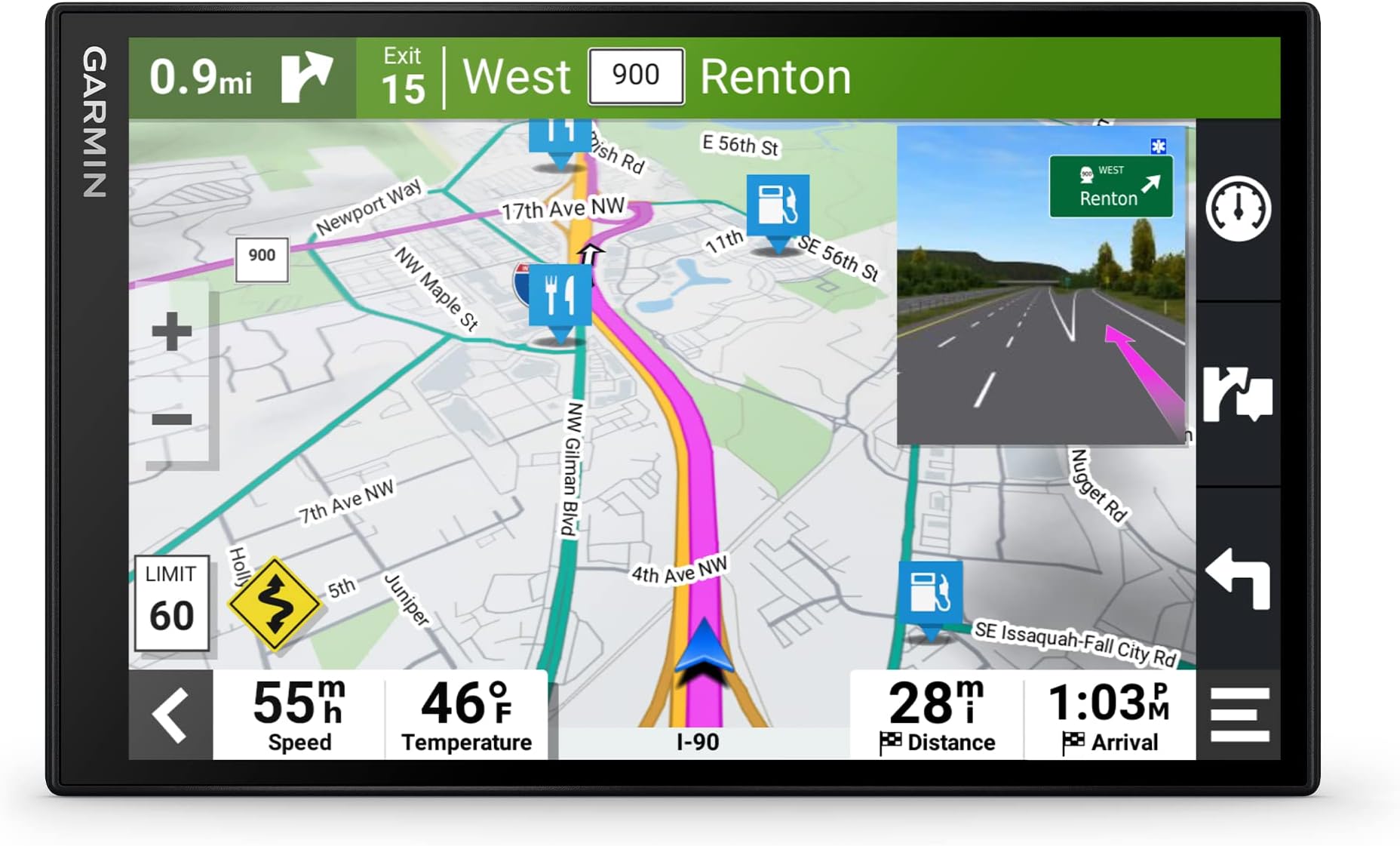
The Garmin DriveSmart 86 is a premium 8-inch GPS navigator featuring a high-resolution dual-orientation touchscreen, built-in Wi-Fi and Bluetooth for effortless map updates and smartphone connectivity, and lifetime North America map updates. It offers advanced driver alerts, hands-free calling, voice assist, and real-time traffic, weather, and parking info via the Garmin Drive app. Enhanced with Tripadvisor, National Parks directory, and HISTORY® database, it transforms every drive into a smarter, safer, and more enjoyable journey.


| ASIN | B09D5MQQKD |
| Additional Features | Driver Alerts, Find Places by Name, Hands-Free Calling, Large Display, Live Traffic and Weather, National Parks Directory, Smart Notifications, Traffic Cams and Parking, Tripadvisor, Voice Assist |
| Audio Output Mode | Stereo |
| Best Sellers Rank | #1,292 in Electronics ( See Top 100 in Electronics ) #1 in Car In-Dash Navigation GPS Units |
| Brand | Garmin |
| Built-In Media | Garmin DriveSmart 86, vehicle suction cup mount, traffic receiver/vehicle power cable, USB cable and documentation |
| Compatible Devices | Smartphone |
| Compatible with Vehicle Type | Car |
| Connectivity Protocol | Bluetooth, Wi-Fi |
| Connectivity Technology | USB |
| Control Method | Voice |
| Customer Reviews | 4.3 out of 5 stars 2,985 Reviews |
| Display Type | Multi-touch, Glass, WXGA Color TFT with Backlight |
| Human-Interface Input | Touchscreen |
| Item Dimensions L x W x H | 7.6"L x 0.77"W x 4.7"H |
| Item Type Name | Car GPS |
| Item Weight | 10.41 ounces |
| Manufacturer | Garmin |
| Map Types | North America |
| Mfr Part Number | 010-02471-00 |
| Model Name | DriveSmart 86 |
| Model Number | 010-02471-00 |
| Model Year | 2021 |
| Mounting Type | Dashboard Mount, Windshield Mount, found in image |
| Number of Items | 1 |
| Resolution | 1280 x 800 |
| Screen Size | 8 inches |
| Special Feature | Driver Alerts, Find Places by Name, Hands-Free Calling, Large Display, Live Traffic and Weather, National Parks Directory, Smart Notifications, Traffic Cams and Parking, Tripadvisor, Voice Assist Special Feature Driver Alerts, Find Places by Name, Hands-Free Calling, Large Display, Live Traffic and Weather, National Parks Directory, Smart Notifications, Traffic Cams and Parking, Tripadvisor, Voice Assist See more |
| Supported Satellite Navigation System | GPS |
| Touch Screen Type | Capacitive |
| UPC | 753759276591 |
| Unit Count | 1 Count |
| Vehicle Service Type | Car |
| Warranty Description | 1 year limited warranty |
R**N
Garmin has long demonstrated good QC and good product design, and this one's no exception.
Am very pleased with this the latest model. It has been improved from my previous model, which was a Nuvi, but some of the changes have not been improvements in my opinion. The most positive and notable improvements are those to the audible commands. The Garmin responds to them with greater accuracy, performance, and efficiency in that results are sorted by proximity and can ben easily saved and displayed in alphabetical order for future ease in finding. Also, the operator can call request that Garmin search by business name if desired (as I understand it but have not tried that yet). This Garmin version is huge (8") and is easily taken out of view by being placed between the console and dash for easy hiding if dash-mount is a bean-bag base, which makes its being covered out of sight to thwart those who would break glass and grab and run. I recommend spending the extra bucks for this one.
P**N
Best of both worlds (dedicated vs. smartphone)! Google traffic/POIs, Garmin nav
I've been using this for over a year, and it's been fantastic. In case this review is appearing in the wrong place (because for some reason, Amazon is grouping reviews for different Garmin devices together), I'm reviewing the Garmin DriveSmart 86. If you think this is your dad's Garmin, you couldn't be more wrong. It merges the best aspects of smartphone navigation (traffic updates, points of interests (POIs)) with the excellent Garmin features. If you don't drive a lot or don't use a GPS a lot, you don't notice the problems with smartphone navigation. But use it enough and you'll notice how much better Garmin is. Do I always think Garmin navigation is always better? No. But on average, I feel 60-70% of the time it's better. Now, if I'm in a heavy traffic situation or if I'm in a very unfamiliar location, I will run both at the same time and then decide based on my prior knowledge of the area and my instincts to determine which one to trust at any given moment. Here's some pros for the Garmin. You don't need any cellular reception in order for the navigation to work. This came in quite handy when I was in areas of poor reception like rural areas. Sure, with smartphones you can download maps but that requires some preplanning. The Garmin is still the best for letting you know ahead of time what lane you should be in which comes in handy when you need to switch multiple lanes multiple times in short succession. You can also have both the map and some text turns at the same time so you can see ahead of time what your turns will be. The 86 has a fast CPU so it doesn't get laggy like older Garmins. It looks great in both vertical and horizontal orientations and for the first time, I feel like the 86 works better in the vertical orientation because of the better viewpoint. The screen is beautiful. The response and touch is great. If you connect the 86 to your smartphone via the Garmin Drive app, you now get all the benefits of the smartphone with realtime traffic (provided by Google I think) and the much bigger database of points of interests. So if you ever thought the Garmin POIs were too small or out of date or if you thought the search engine in the Garmin device was too weak, you can search in the Garmin Drive app and push that location to the Garmin GPS. Same for traffic. Garmin real-time traffic was often too slow to update but now with Garmin Drive, you never miss out on traffic alerts. If it's in Google, you'll find it in Garmin Drive. Of course, if you use Garmin Drive, you will need cellular reception but only while you're searching initially for the location. Once the Garmin is navigating, no cellular needed. The Garmin has so many options on how to pipe the audio. You can separate what type of audio goes through the Garmin and what goes through your car. So if you want phone to go through the car but nav instructions to go to the Garmin, you can. If you want everything to go to the car, you can. If you want phone and music to go to the Garmin but nav instructions to the car, you can. I send nav audio to the Garmin and everything else to the car because I've always hated the up and down volume when smartphone nav sends out nav instructions. You don't have to worry about draining your phone battery. It's easy to use the phone while navigating on the Garmin. The Garmin now uses USB C and the car charging cable also has a USB passthrough if you wanted to charge something else. The only negative (and I don't know if the situation has changed) is that at the time, there was no dashboard mount for the 86. Only the included window mount. The window mount is good but if you don't regularly clean the windshield and the mount, the Garmin will fall off.
P**D
Great for Patrol
I use this for patrol everyday and it does a great job at updating the address rapidly. It also does a great job at updating the upcoming intersection. I’ve never had an issue with the hundred block or with connectivity. The “ok garmin” feature works very well too. I’ve responded to cover now calls for other agencies and was able to use the ok garmin feature to put in the address and get me there without ever touching the device. Will be using it all the time and I recommend it highly
G**E
It's a Garmin
I've used Garmin for a bunch of years. This one follows the Garmin line for quality in the device, but not the app. I wanted to try traffic, but when I got a USB Mini to C convertor, the GPS would go into connection mode and the screen would darken. So the cable is had for the previous 7 inch Garmin is useless, and they don't make a traffic cable for this model. They count on the app, and the app gets a terrible rating by practically everyone. It just doesn't work a large majority of the time. So if you need a GPS for live traffic, I can't say this would be your best choice, but if you need it for maps and directions, it is great!
N**N
Horrible Bluetooth and phone support
Updated score to one star from two stars. This device is Bluetooth is one of the worst I've ever seen. It takes ages to connect to Apple and Android devices. Every time you leave your car and come back it will have a problem connecting it doesn't seem to be a fix either. You have to restart your device, restart your phone, clear the app data, turn the Bluetooth, on turn it, off forget the device, and re-pair the device. I've had cheap $20 Bluetooth devices that have better connectivity than this. You need to be able to pair Bluetooth so that you can enter addresses from your phone, trying to enter an address into the devices self is slow and clunky. If you're only buying this to enter addresses directly into the device I would avoid because it just takes too long and does not work well ********** I do a lot of driving to different addresses and wanted something other than Google Maps which would constantly give me bad voice directions. I don't have an in screen Dash navigation system so I wanted something I could just have up to look at the directions instead of listening to them from my phone, or having Google Maps displayed on my phone if I am playing music. As navigation it does pretty much what I want it to do. The only issue is the absolutely terrible support with phones. Trying to search for an address on the unit itself is cumbersome and annoying, and much quicker to do it from the app and send that to your phone. Unfortunately it always loses Bluetooth connection and will not connect. You have to turn off Bluetooth turn it back on. Unpair and repair. Turn the GPS off turn it back on. This happens twice a day at least for me. I tried a different cell phone I had and had the same issues. If that app worked and the Bluetooth worked I would probably keep it but as it stands now it's far too annoying everyday to mess with the connection so I'll probably be returning this
W**S
More functions.
I loved my Garmin 2555 LMT, which is no longer supported. Bought the Drive smart 66 as a replacement. Many more functions than the 2555 and the screen is a bit larger. Same quality that Garmin is known for. Easy to set up and use. Don't need it every day, but when I am going somewhere I am not familiar with, the Garmin 66 gets me there without the stress. A good value.
M**B
Nice bright display, responsive touch screen, fast routing
I got this to upgrade my very old Nuvi model. On those old GPS displays, the touch screen is SO frustrating and you have to really press and wait for it to recognize each tap. The old one was also frustratingly slow to recalculate the route if I detoured for something like a rest area or exit to get gas. The voice saying "Recalculating" becomes a running joke on long road trips. So, enough about the old one... the new Garmin models have a much more responsive touch screen just like cell phones. The processor in there is a lot faster to recalculate if you're doing a detour (and without the annoying voice telling you about it). It also supports extra nav systems besides GPS which seems to help it be even more accurate (with 10 feet is usually what I got). The old one would sometimes lose signals in valleys or downtown between buildings and might show me a hundred feet away, but this model does a great job of showing where I really am. The voice navigation is amazing. It was so cumbersome to type in addresses on the old one but with the nice touchscreen, that's a breeze, but what I really loved was being able to say "Okay Garmin, go to Walgreens" or something and then pick which one I wanted to go to from the list. I don't know how thorough the database of locations is, but on my recent 3500 mile road trip, I rarely asked it for something it couldn't look up. Fast food and gas stations are just fine, I even asked it to go to a Verizon store when we needed a new phone and it pulled up the nearby locations. My one gripe is probably about the connectivity to my Android phone. The Garmin Drive app works, but the GPS keeps wanting to change the volume of my phone on its own. I also connect to my car radio over bluetooth to play music, and I've setup the Drive app and GPS appropriately for that case, but it seems like when the GPS connects it wants to lower the volume of my phone (and thus how loud it plays music to the car stereo). I can turn it back up, but that only lasts until the next time I get going again. Very weird. I also had problems where the GPS would keep showing "Galaxy S8+ disconnected" over and over. I think that was the power savings on my old phone putting the Drive app to sleep... maybe? I disabled it from being able to sleep, but I haven't driven long enough after that to see if it helped, and then I updated to a newer phone anyway so the jury is still out on whether that's still an issue. That doesn't concern me too much because when I'm driving, I don't really need the GPS linked to my phone although, if I understand correctly, it can get data through that phone connection for even minor things like weather updates or road conditions that maybe the traffic data doesn't get? Or using that tether for software updates too if I'm not within range of my wifi (which really only happens when it's parked in the garage anyway). Overall I'm very happy I splurged for the update. I miss my old Nuvi 1390's ability to connect to the ecoroute module plugged into the OBDII port so I could see the real time gauges right there on the GPS, but I do have a bluetooth dongle for OBD that I can use to see that on my phone. It was just handy because I'd use that whole ecoroute stuff on the GPS to keep track of my gas usage between fillups and it would show my MPG. I got an app for that now, it just means manually putting in my mileage instead of having the GPS already know that. It'd be cool if Garmin added a gas tracker app directly on the GPS... shouldn't be that hard?
R**N
Best mobile navigator I've owned.
I've been a TomTom customer for at least 30 years so I was very disappointed with my inability to find new product on Amazon. Tried a generic brand mobile navigator which worked OK but got tired of searching for audio route directions via FM radio signal. I chose Garmin as a last resort because I've always been biased toward the brand due to my preference for TomTom. After purchase I was quite surprised with the variety of features it has and how user friendly it is. • This model is the first mobile navigator I've owned which features Bluetooth compatibility. I really enjoy not having to sacrifice listening to my music playlist or music app to hear route instructions. THEY PLAY SIMULTANEOUSLY via my Android! • This Garmin even remembers locations I visit around the same time daily and issues a text prompt on the screen upon startup should I choose to visit the location prompted. • I also like the ease of inserting stops along the route to my final destination. • I originally feared the 6 inch screen would be too small since the generic brand screen of my previous navigator was huge. I needn't had worried. The screen image is clear, offers needed map information without excess and audio guidance is precise. At first I couldn't understand why I heard no audio instruction at all. (I'm one of those people who reads instructions as a last resort.) Took me a week to discover the mute/unmute setting in one of the menus. The only thing about using this Garmin that annoyed me was the windshield mount. I quickly replaced it with a compatible dashboard mount. Otherwise I have nothing but praise for the Garmin Smartdrive 66. Highly recommended.
A**O
Excelente herramienta
Muy bueno, no tan intuitivo en su manejo como los viejos Nuvi y es algo difícil de registrar el dispositivo y actualizarlo via Wifi, yo lo hice todo con el cable USB conectado a la computadora y con la aplicación de garmin (garmin express). SI TRAE MAPAS DE MEXICO. 100% recomendado.
R**A
o adaptador não foi o anunciado - VEIO OUTRO MODELO sem aviso prévio
No anuncio do produto está descrito que o adaptador 12V teria DUAS SAÍDAS USB e recebí um adaptador com UMA saída... O resto do GPS está OK.
T**Y
Garmin Drive
The Garmin DriveSmart 76 indicates that it has Australian maps however it does not have WA maps and has now been returned, Thank you
D**D
Fantastic but sometimes a little annoying
I admit, I was a little skeptical when it came to this GPS. However, I was pleasantly surprised. My first reaction was how smooth it was, however when I went to update it via Wifi, it immediately started having issues. The update had failed, and I had to connect it to my PC, which allowed the update process to work nicely. Unfortunately, ever since that incident, the GPS tends to restart the configuration process from scratch often times. That aside however, I do wish there were more voices to use and vehicles, as some sound too robotic. Still, besides all of that, it was incredibly accurate, wonderful display, and the mount makes it all worth it, since it's easy to take off and put back on. Some locations aren't found easily, and I have to use other landmarks, but still, it's better than nothing. Overall, besides the issues I've had which I feel may not be common, it's a very nice GPS and I have no regrets with it.
R**N
American model. Should be stated clearly.
On top of purchase price you then have to purchase at great cost NZ Maps.
Trustpilot
2 weeks ago
2 days ago