๐ก Elevate your VoIP gameโwireless freedom for the modern pro.
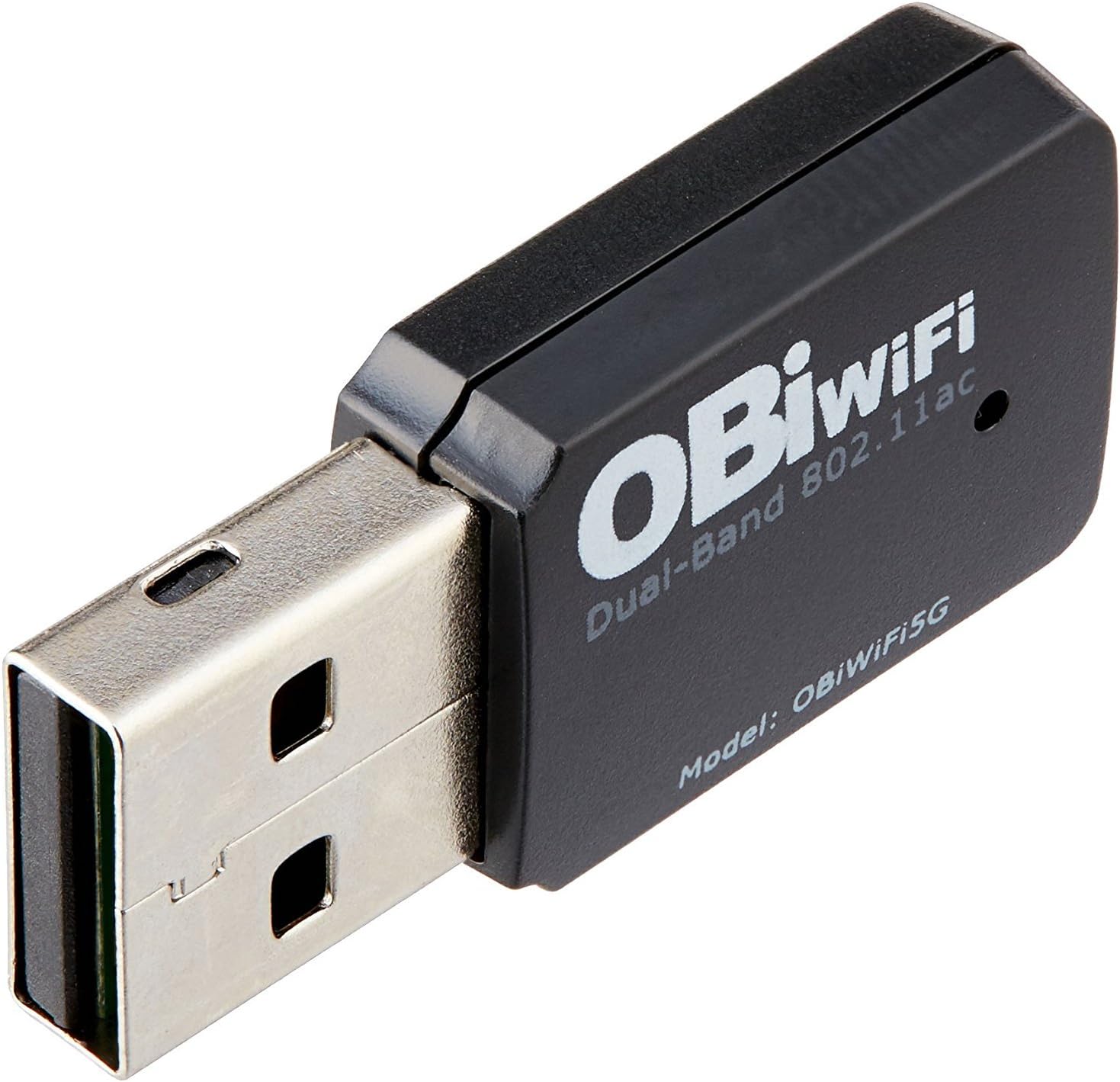
The Obihai OBiWiFi5G is a compact USB wireless adapter designed for OBi VoIP phone adapters and IP phones, enabling dual-band 802.11ac WiFi connectivity with robust security protocols. It liberates your VoIP devices from wired constraints, offering flexible placement and reliable voice and fax communication over secure wireless networks.
| ASIN | B01LXFA83I |
| Best Sellers Rank | #273,893 in Office Products ( See Top 100 in Office Products ) #108 in VoIP Telephone Adapters |
| Brand | ๏ผฅ๏ฝ๏ฝ๏ฝ๏ฝ๏ฝ ๏ฝ |
| Built-In Media | OBiWiFi5G dongle |
| Color | Black |
| Compatible Devices | Polycom VVX Series Phones |
| Connector Type | Micro USB |
| Customer Reviews | 4.4 out of 5 stars 605 Reviews |
| Global Trade Identification Number | 00682017335223 |
| Item Dimensions | 1.18 x 0.59 x 0.3 inches |
| Item Type Name | Obihai OBiWiFi5G 2.4/5GHz Wireless 802.11AC Adapter for OBi200, OBi202, OBi1022, OBi1032, OBi1062 |
| Item Weight | 10 g |
| Item dimensions L x W x H | 1.18 x 0.59 x 0.3 inches |
| Manufacturer | Obihai Technology, Inc. |
| Mfr Part Number | OBIWIFI5G |
| Model Number | OBiWiFi5G |
| Number of Items | 1 |
| Package Quantity | 1 |
| Power Plug Type | Type A - 2 pin (North American) |
| UPC | 682017335223 |
| Unit Count | 1 Count |
| Warranty Type | Limited |
L**R
Enables Me to Send/Receive FAX Documents and Talk Wirelessly
Here is the challenge that I bought this device to resolve: My wife and I live and travel full-time in our motorhome. The only wired connections that we have are the electric power outlets at campgrounds with full hookups but no cable or hard-wired Internet connections. Most of the time we can send scanned documents via email but we are sometimes called upon to send/receive FAX documents. Heretofore, we've had to use a nearby office supply store to send/receive such documents. Our smartphones give us Internet access via Wi-Fi and the ability to make phone calls but no Ethernet connection to establish VoIP with our OBi200. This Obihai Technology OBIWIFI5G wireless adapter now provides me with that capability. Although it was a pain in the backside to configure this device I was finally successful. First my OBi200 needed a firmware update in order to accommodate this wireless adapter. That required a hard-wired Ethermet Internet connection which I was able to obtain at the campground office where I am staying. Next, since my OBi200 had been loaned to my step daughter and then returned to me, it was registered to another user, which locked me out. Ultimately I was able to find how to do a "factory reset" for my OBi200, register it with my own Google Voice account and update its firmware. Once I did that, I was finally able to configure this wireless adapter to use my smartphone's Wi-Fi. Once the Wi-Fi link was established with this wireless adapter I no longer needed a hard-wired Internet connection and am able to quickly establish a phone/FAX VoIP connection through my cellphone via a 4G two-to-three bar Verizon Wireless signal. The ultimate test was the quality of the phone connection which is quite serviceable for voice but, more importantly, enables me to reliably send multiple FAX messages to distant locations such as New Jersey and Florida from a campground where I am staying in Prescott Valley, Arizona. The connection also works well to receive FAX documents. No doubt, there may be many other creative uses for this wireless adapter, but it solved a knotty problem for me.
S**H
Effective, reasonably priced, and reliable
With this dongle I get about 33% signal at the opposite corner of my house, which is good enough for calls as clear as calling from a land line. My router is an Asus RT-AC68U running Tomato firmware. I suspect the people who complain of poor call quality or poor connectivity have either a garbage router or an expensive router with garbage, buggy OEM firmware. Here's a litmus test: if you have to reboot your router once a week, then VoIP over wifi is not for you. I'm just pleased that a proprietary wifi dongle doesn't cost a premium. $25 shipped Prime is perfectly reasonable for a compact 802.11ac adapter. I was able to use this dongle to connect my OBi200 to my WLAN without the OBi200 ever having been plugged in via Ethernet. After getting the adapter attached to my wireless network per Obihai's documentation, I logged into my router, set up a DHCP reservation, then forwarded UDP port 10000 to the reserved IP address. My OBi200 was then able to register with Obihai, register with Google Voice, update its firmware, and make phone calls with zero errors.
M**S
The configuration instructions were not so easy to configure based on my setup of an additional Hotspot TP-Link router.
The OBIWIFI5G USB easy to insert, and works well after a not so easy configuration. It did take a while to figure out how to configure it to work on my Hotspot/TP-Link router network. The directions were not very easily understood for different configurations other than the one described. There is no more Ethernet internet cable required for the Obihai device to connect to my Verizon mobile data hotspot via my new - (3G/4GLTE TP-Link router.) The Obihai device is wireless now except for: 1. The (CAT 3 cable) to connect my Pansonic Cordless phone and 2. The (Obihai device power cord.) I also like the that The Obihai service via the dashboard page/service sends an email notification if your service is interrupted for any extended length of time.
E**A
Obi WiFi Adapter - Big Thumbs Up
The adapter works perfectly with my Obi 202 and the range is very good through several walls and to a second floor. Voice communications is just as clear as when wired to the network and faxes come through without a hitch. Setup however, was not as straightforward as I would have hoped. The adapter never showed it's blue light after following the directions exactly as written. I decided to set up the adapter via the Obi's GUI interface. Using a computer/laptop connected to the same network as the Obi I typed in the Obi 202 network address. This brings up the Obi GUI; from there, I selected the 'ObiWiFi Configuration' from the menu on the left of the GUI. From the drop-down menu I then selected 'WiFi Scan' and viola! The SSID information for your network should appear listed. Fill in the pertinent information and you're done. Don't forget to go back and disconnect your wired connection to the Obi and power cycle the Obi so it can pick up the new wireless IP addresss.
C**F
Works Easily
I have purchased 7 of these now to put on Polycom 250 phones with wifi enabled. They are automatically recognized and the polycom wizard makes them easy to install. They have freed us up from spending hundreds on cabling through walls. Make sure you have at least 3 bars of signal and you will not have dropped calls. They are small enough to not be a bothersome when connected to the phone's usb port on the side. Now the phone can be used anywhere in the office as long as you have an electric outlet. If you purchased your phones with POE planning - you will need the power adapter with this solution. Still a savings over running LAN.
T**9
Good device but no support
I ordered this device in August 2017 and it worked fine until March 2018 when it suddenly stopped working. I went back and forth several times with Obihai support by email and followed all of their instructions to get it working again without success. Finally, on March 21st I said enough is enough and it was time to send me a new device. Support then set up a phone call to discuss the matter on April 17th. I waited and waited, but there was no call and I have not been able to get any response since. Very frustrating! Maybe they will see this and resolve this properly. So, I cannot give this a good rating, but only because of the lack of follow through by support.
U**M
Let me put my phone where I wanted it
After switching to an OBi for phone service I decided I didn't want the phone next to my router. This little doodad let me move it to another room. The wireless connection doesn't deliver as consistent sound quality as the Ethernet connection did. But it's not my primary phone, and I can live with that.
T**Y
$25 for un-tethering my Obihai Obi200? SOLD!
We need a landline in our house because the cell phone service is not dependable enough inside to make work calls. That said, I hated paying for something we rarely used. For $50 I bought a Obihai OBi200 and tested it with Google Voice for a week. What's not to like? I didn't notice any variation in voice quality, though I missed having caller ID on my outbound calls. I did have to let people know my new number - no one picks up unknown callers no,w there is so much spam! Getting ready to "permanently" locate the unit I noticed the WIFI5G dongle. I was concerned a little about the voice quality, but I'm already running a Direct6.0 handset so how bad could it get? IMHO, there was no deterioration. I can locate my my multi-unit cordless base anywhere in my house now. Before, it was tied to my service provider modem location (my house isn't wired for POTS or convenient CAT5). I will gripe a little that setup was not as seamless as presented. While no expert, I have a background in network security and of course I set my own Webpage Admin Password back when I originally installed the Obitalk. Once I figured out the problem it was a breeze to setup. User: admin PW: (whatever you set - which you can find in the Device Configuration page with the Obitalk Dashboard - see posted pic). Handy things to know is dial ***1 to find out IP address of unit. You can also log into the unit from that address. Lots of customization available there. So basically for $75 and a couple hours time I have a eliminated my monthly phone bills and have a free landline for US/Canada calls I can also eliminate the internet service provider modem and buy my own instead of renting. Of course I could have done that before, but not the payback is 4 months instead of years. As an aside, Google Voice is a great way to create a portable permanent landline # that you can take/manage anywhere. It will forward calls to your cell phone, VoIP phone or a traditional landline. You can use it as a texting platform and it transcribes voice mail to e-mail for free! You need a cell phone to set it up, but I also highly recommend!
A**E
the only part of their system to work perfectly.
Entirely plug and play, of all of the issue i had with their other components, this at least does its job entirely.
C**D
Works great in my OBi202
Not too difficult to setup. Has been working great for the past year.
A**R
super simple to use
works perfectly with the Obi202
N**H
Four Stars
Works fine. - Maybe a little bit expensive... Simple to install. - Arrived two days later than promised.
A**R
Obihai Technology OBIWIFI5G Obihai OBiWiFi5G
This item works as described. In fact, works with other products as well.
Trustpilot
4 days ago
2 weeks ago