Desertcart purchases this item on your behalf and handles shipping, customs, and support to Japan.
🖨️ Print smarter, save longer, connect easier — the future of home office printing is here!
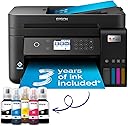
The Epson EcoTank ET-3850 is a compact A4 multifunction inkjet printer designed for professionals who demand efficiency and economy. Featuring ultra-high capacity ink tanks with up to 3 years of ink included, it delivers up to 14,000 black and 5,200 color pages, drastically cutting printing costs. With automatic duplex printing, a 30-page document feeder, and a 6.1cm color LCD, it streamlines your workflow. Full Wi-Fi connectivity and the Epson Smart Panel app enable seamless mobile printing and device management. Its heat-free Micro Piezo technology ensures energy-efficient, reliable performance with minimal maintenance.


| ASIN | B09GL13VHV |
| Additional Printer Functions | All In One |
| B&W Pages per Minute | 33 |
| Best Sellers Rank | 1,484 in Computers & Accessories ( See Top 100 in Computers & Accessories ) 4 in Ink Tank Printers |
| Box Contents | Printer |
| Brand | Epson |
| Brand Name | Epson |
| Color Depth | 24 bpp |
| Color Pages per Minute | 20 ppm |
| Colour | Black |
| Compatible Cartridge | Epson ink cartridges for model ET-3850 |
| Compatible Devices | Smartphones |
| Connectivity technology | Wi-Fi |
| Control Method | App |
| Controller Type | Android |
| Country of Origin | China |
| Customer Reviews | 3.9 out of 5 stars 890 Reviews |
| Display Type | LCD |
| Dual-sided printing | Yes |
| Duplex | Automatic |
| EU Spare Part Availability Duration | 3 Years |
| Global Trade Identification Number | 08715946683775 |
| Hardware Interface | Ethernet |
| Ink Colour | Black |
| Item Dimensions D x W x H | 34.7D x 37.5W x 23.1H centimetres |
| Item Type Name | Inkjet Printer |
| Item Weight | 6.7 Kilograms |
| Manufacturer | Epson |
| Maximum Copies Per Run | [Estimate] Varias centenas |
| Maximum Copy Resolution Black and White | 2000 dpi |
| Maximum Copy Resolution Color | 4800 x 1200 dpi |
| Maximum Copy Speed Black and White | 33 ppm |
| Maximum Print Resolution Black and White | 600 dpi |
| Maximum Sheet Capacity | 250 |
| Maximum Supported Paper Size | A4 |
| Maximum print Resolution Color | 4800 x 1200 dópi |
| Model Name | EcoTank ET-3850 |
| Model Number | C11CJ61401 |
| Model Series | ET(EcoTank) |
| Model name | EcoTank ET-3850 |
| Network Connectivity Technology | Wi-Fi |
| Number of Drivers | 2 |
| Number of Ethernet Ports | 1 |
| Number of Trays | 1 |
| Other Special Features of the Product | Auto-Duplex, High Yield, Mobile Printing Capability, Compatible with Mobile Phone & PC, |
| Output sheet capacity | 250 |
| Paper Size | A4 centimeters |
| Power Consumption Size | 12 Watts |
| Print media | Glossy photo paper |
| Printer Output Type | Colour |
| Printer Type | Inkjet |
| Printing technology | Inkjet |
| Processor Count | 1 |
| Product Warranty | 1 Year |
| Resolution | 4800 x 1200 |
| Scanner Type | Flatbed |
| Series Number | 38 |
| Special feature | Auto-Duplex , High Yield, Mobile Printing Capability , Compatible with Mobile Phone & PC |
| Specific Uses For Product | Home, Office |
| Unit Count | 1.0 count |
| Warranty Type | CoverPlus |
J**G
Great so far…
My old HP Multi-function printer was ruined during a house move so I was looking for a quality replacement. I have alway bought HP as I like the software and quality of the kit but was fed up with the cost of the ink and print head cleaning. After much research, I saw the Epson ink tank printers scoring highly in a number of independent reviews. It seemed to me that the initial cost of the machine was off-set by the low cost of ink over the long-term. The features of the ET3850 were exactly what I was looking for; quality printing (including auto-duplex), scanning and wifi printing from mobile devices. It was easy to set up and the ink filling process was easy and spill-free using the foolproof fittings which differed for each colour to avoid mistakes. Connecting it to my wifi network was also easy although it did take a little time to update its firmware early in the process. I have 2 minor niggles when comparing it with the various HP models I’ve owned: 1) the software is not as user friendly or as comprehensive, but it works, 2) pressing the off button does not switch the machine off, you have to then use the menu buttons to change an option and then confirm with the ok button before it switches off. Although some might find this a benefit, I find it annoying that I have to press 3 different buttons to switch it off. On the plus side, as well as good quality printing, the machine seems to be able to print decent quality when started up even when it hasn’t been used for a while. I found that the HPs often required head cleaning and test printing which wasted paper, time and expensive ink! So far, I haven’t had to do this at all. Overall, I think this model is good value when looked at over a two or three year period and hope it last much longer than that. Having owned and used it for a few months now, I would buy it again.
C**R
Epson at its best
Brilliant printer. Did everything I need and saves a forums in ink.
D**O
Not as good as many reviews make you think.
Had the Epson WF-2750 for years. It’s solid and been a real workhorse for home office use. Great scanner, paper cartridge, auto-duplex and importantly great prints. It’s pretty expensive on inks so I thought I would change to an eco tank version. BIG MISTAKE You can tell straight away that this printer is cheaper and flimsy. I thought I would give it a try anyway and loaded the app and started set up. Firstly the app isn’t great and neither are the paper intructions. Lots of arrows pointing at stickers and stuff to remove but all images and little instruction. The “Product is password protected” came up and it told me there was a sticker on the product. Can I find that sticker? No, so WiFi was impossible to set up. Paper feed is rear loading which is bad as it allows dust to be drawn into the printer and shortens the life. This was clear in the Amazon description. It says it has duplex but that is MANUAL!! That’s just plain stupid, any printer you can turn a sheet over and print the other side. Since when was that duplex printing? It’s not a feature!! Finally I got through most of the process when the app crashed and I thought I would at least try and print a test page. Immediately there is a blank part on the test page as pictured. 3 head cleans and it is still the same. I am going to return this really poor printer which is not worth the money at all. I would steer well clear and I’m not sure I would trust another Epson printer if this is how they have declined.
P**P
Great printer for ink management
This is a great generic printer/scanner/copier/fax machine (even ignoring everything past "printer"), although the colours are a little too washed out at times - the black isn't black enough, the colours aren't really VIBRANT (even on photo paper) For the way EcoTank works, this is fantastic, the ink levels being visible and being able to be topped up before they run out is a genius idea, and makes it a million times better than other colour printers, especially the ones where the colours are all in the same cartridge (which is a HUGE waste of money), which makes the ink management a breeze Strangely the setup wasn't as easy as it states in the box, I tried it on the mobile app but it never connected to the wifi, resetting it and plugging it in was MEANT to setup everything, but it was then "forced" to be used wired rather than wireless... but once it was setup and on the network (lots of manual entry) setup on my work Mac was stupidly easy, it just did it, while the Windows install was a complete pain in the butt! Once it's setup though it's really simple to print to, from multiple devices, and when it's on wifi it can live anywhere that's useful or out of the way My reason for not giving it five stars is a bit odd, as they don't properly "announce" my requirement, but more hint at it - I need to print on card stock, and this listed that it printed on 300gsm photo paper, so I thought it should print on 300gsm card, but alas, it did it once and then never fed the card again... trying 250gsm had the same result, but the only one that ACTUALLY worked is 200gsm, which is not quite stiff enough for real card printing
D**S
Fantastic printer overall
Build Quality The EcoTank ET-3850 feels pretty well-built. The automatic document feeder on top is probably the only part that isn't sturdy and feels a bit thin and flimsy, and it squeaks when moved. The design is fairly user-friendly, as it allows easy access to the ink tanks and paper jams. Be warned though that the scanner’s lid doesn’t have a dampener, so it'll slam shut if you don’t raise it slowly and make sure it’s in the locked position. Ink The Epson ET-3850 has four refillable ink tanks that yield a large number of prints, meaning it is a perfect choice for high printing volumes. It's easy to see the ink levels from the front of the printer. However, it is important to keep an eye on the ink levels as letting the ink levels run too low or emptying the tank can introduce air bubbles into the print tubes and damage the printer. Print Quality Print quality is pin sharp for black and white documents. Coloured is still good, although not as impressive as the black and white due to some graininess. It is still head and shoulders above a previous all-in-one printer I had. App Features The Epson Smart Panel app is very useful to have. It allows you to print, copy, scan (You can scan with both the scanner on the printer itself and scan something from your phone's camera). You can also carry out most maintenance tasks from the app, including nozzle checking and print head cleaning. Overall I considered several printers, including a Canon Pixma model, but decided with the ET-3850 in the end - while both offered outstanding page yields and low costs per print, the Epson was both faster at printing and produced higher-quality scans.
F**E
So Easy to Set Up - And A Great Price - Get the Epson Cash Back as Well
After having massive problems with a previous rival printer and connecting it to my internet, i was apprehensive about setting up this new printer. There was no need, it was so easy. Downloaded the app by using the scanner on my mobile; takes you through the set up process and it is a breeze. Just takes about 15 mins mainly to get the ink to 'charge'. Then set it up on my old (very) and new computers. Again so easy and quick. Printed a few pages and quality looks spot on. Nice display and easy to use controls. First days usage and so far impressed. Will update in a few weeks to let you know how i am going on with it.
N**R
First eco tank printer
A bit of a faff setting it up and still not got everything working from the pc but ok from the phone. Economical and does the job so happy overall
M**L
Difficult to set up, and many issues. It is clearly overpriced.
I got this to replace an HP printer that tied you into an ink contract. That I couldn't work with. I went with this Epsom because of the ink refil system. Which incidentally is very straightforward. The instructions for this Printer are very vague and even the removal of the safety packaging took hours of research on the internet with many other people having a similar issue and not getting an understandable response from either Epsom or anyone else. It refused to print photos which is one of the reasons I bought it for saying I was using the wrong paper. Bizarrely, It actually printed a perfectly good half page before deciding this. The scanner refused to work stating there was a paper jam. There was no paper jam! indeed there was no paper anywhere near the printer other than the document it was refusing to scan. After about 20 times going through to process to unblock a non existant paper jam. it finally started to work. I honestly cannot believe how much I paid for a very poor quality printer. It really is worse than the cheapest model around. I will in due course need to replace it, it simply isn't up to doing the job anywhere near as good as a printer coster £40 or so. I'll be interested to see how long the inl last which is possibly the only redeeming feature.
R**L
Kann man kaufen
... gerne wieder und habe das Gerrät immer noch und läuft ohne Klagen. Benutze es ca. 1 x im Monat
V**N
Parfait
S'adaptent parfaitement
M**S
Drucker
Das ist ein sehr gutes Gerät. Druckt hervorragend und hat mir schon eine Menge an Geld erspart an Tinten-Patronen.
K**N
Stopped printing within a month, still waiting for Amazon to return product been over two weeks
Printing blank pages
E**C
Économique à l'utilisation avec ses réservoirs
Très bonne qualité d'impression tant sur du papier ordinaire ou du papier glacé photo. Il faut juste s'assurer de bien régler les paramètres. Le recto verso fonctionne bien avec un temps de séchage entre les couches. Le scanner n'est pas très rapide mais très correct. Le logiciel de scan ne permet pas de réglages avancés mais il fait le travail. Fonction copie autonome bien pratique et plus vite disponible qu'une imprimante laser.
Trustpilot
3 weeks ago
4 days ago