Buy anything from 5,000+ international stores. One checkout price. No surprise fees. Join 2M+ shoppers on Desertcart.
Desertcart purchases this item on your behalf and handles shipping, customs, and support to Japan.
🖱️ Elevate your workflow—compact control, zero desk, all comfort!
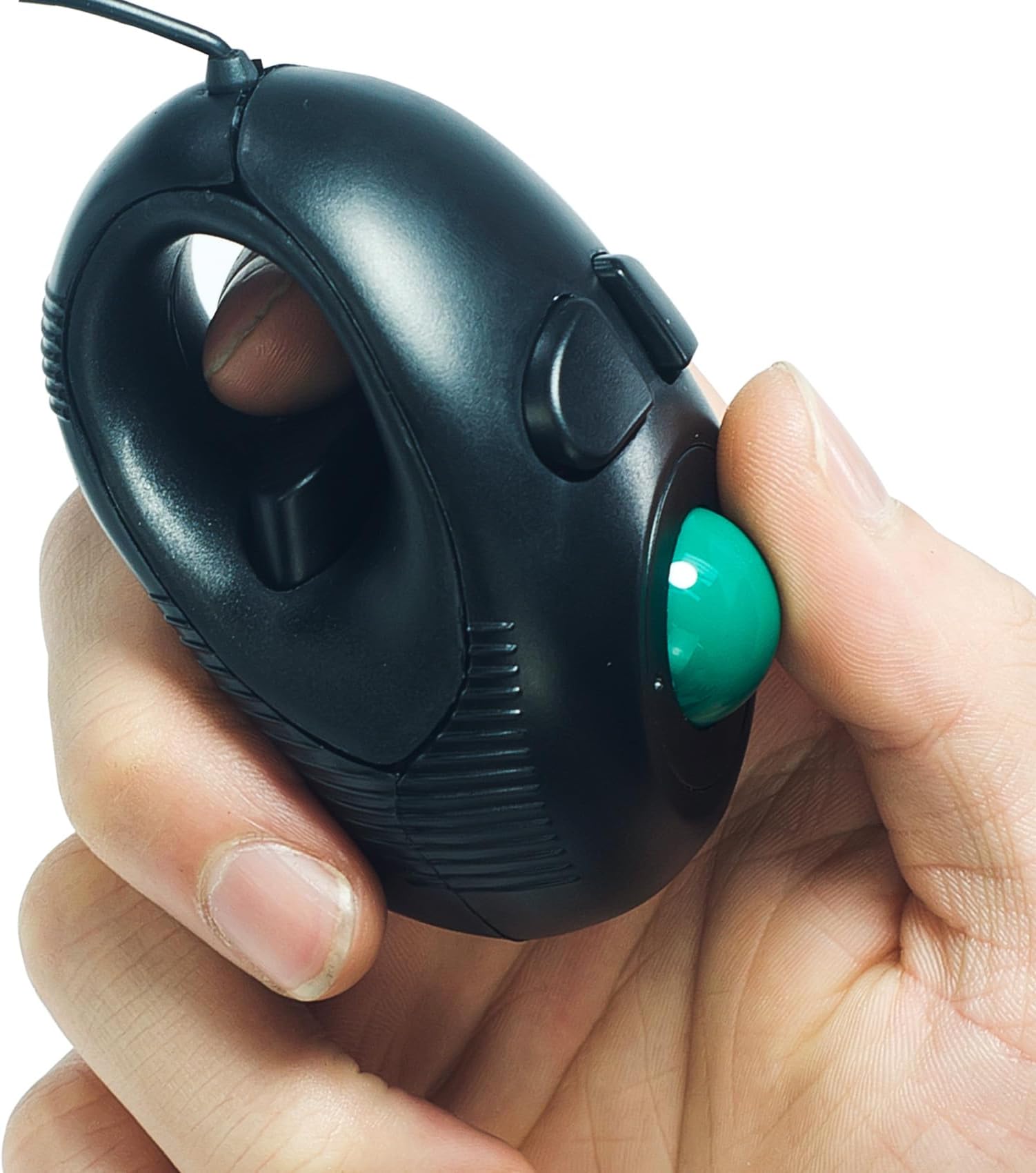
The YUMQUA Finger Mouse is a compact, wired USB trackball mouse designed for professionals who demand ergonomic comfort and space-free operation. Featuring 4D thumb scrolling, ambidextrous 3-button control, and plug-and-play compatibility across Windows, macOS, Linux, and Chrome OS, it reduces wrist strain while fitting seamlessly into any workspace or travel setup.
| ASIN | B00DT2Q9OM |
| Additional Features | Ergonomic Mini Finger Mouse |
| Antenna Location | Home, Office |
| Are Batteries Included | No |
| Are Batteries Required | No |
| Best Sellers Rank | #847 in Computer Mice |
| Brand | YUMQUA |
| Button Quantity | 3 |
| Color | black |
| Compatible Devices | Personal Computer |
| Connectivity Technology | USB |
| Customer Reviews | 3.6 out of 5 stars 646 Reviews |
| Enclosure Material | Plastic |
| Hand Orientation | Ambidextrous |
| Hardware Platform | Laptop, Mac, PC |
| Item Weight | 0.12 Kilograms |
| Manufacturer | YUMQUA |
| Mfr Part Number | Y-01 |
| Minimum Required Operating System Version | Mac OS X 10.0 Cheetah, Windows 10 |
| Model Number | Y-01 |
| Movement Detection | Optical, Trackball |
| Movement Detection Technology | Optical , Trackball |
| Number of Buttons | 3 |
| Operating System | Windows XP, Windows 10/8/7, Windows Vista, Mac OS |
| Power Source | Corded Electric |
| Range | 10.0 meters |
| Special Feature | Ergonomic Mini Finger Mouse |
| Style Name | Modern |
| Theme | Finger Mouse, Handheld Mouse, Handheld Trackball Mouse, Left Handed Trackball Mouse, Mini Mouse, Mini Trackball Mouse, Thumb Mouse |
| UPC | 702795806521 700358168505 |
| Unit Count | 1.0 Count |
R**D
Great for travel & commuters
So much better than the laptop’s touch pad especially in a commuter van or bus. I’ve loved “finger trackers” for years. Very small so easy to take along. Usable where a mouse or ordinary trackball isn’t. No battery to run down at the worst possible time. I’m ordering another because my wife just took my back-up to use with her MacBook Air on a two-day Amtrak trip. She’ll likely use it at her destination and return trip. I agree it’s not rugged. I’ve damaged, destroyed or worn out quite a few, one after only a couple months but one lasted well over two years. For the price, I keep a back-up because I like how it makes my mobile lifestyle more productive and enjoyable.
F**Z
Great when you cannot use a regular mouse.
Having Rotator Cuff Surgery and needed something to help out on the computer. Although this is ~not~ a mouse to use in highly interactive games it will work well for typical web browsing. The roller ball is kind of loose that makes intricate tracking hard but I found you can squeeze the mouse and push down on the roller ball to help exacting selections. The trigger button works well. The cord is a good length too. Price is good. For six weeks in a sling I am happy this is available and will keep me interneting with less frustration.
L**S
A mouse of little to no quality
I bought this for my Grandmother so she'd have a USB mouse for her new laptop, because she's not a fan of conventional mice. I've had a mouse with this basic design in the past that worked very well, so when I found this one I was excited. It's a trackball mouse, my Grandmother's preferred mouse type, and hand held rather than something that needs to be used on a flat surface. Once it arrived however, I'm sad to say I wasn't impressed. Upon opening the packaging for it, which is just a plastic box the mouse is free to roll around in, and taking it out I discovered that the trackball had fallen out of the mouse. It took about ten minutes to get the plastic locking piece to actually fit over and lock into place. That alone was bad, but it unfortunately gets worse. The cord for the mouse is very thin and weak, while the thinness means it can be moved into just about any position you may want to, its connection with the body of the mouse is fragile. It honestly looks and feels like it could detach very easily, which may be a good quality in some items, but not for the cord of a mouse. The overall construction of the mouse is iffy. It's decently heavy, which was a good thing IMHO, but the plastic it's constructed with feels weak. I wouldn't trust it to put up with a lot of heavy usage. All in all, I'm not sure how well this mouse will hold up. I'll update this review in the future for an extended use viewpoint. With any luck it may turn out working well. - - | U P D A T E | Nov 29, 2015| - - Once I finally was able to give it to my Grandmother after having it sit unharmed and unused in its box for a while it couldn't be used. After roughly ten seconds of use the trackball covering came off and the trackball fell out. I spent roughly twenty minutes before getting it to go back in place where it promptly fell off once more after a few seconds of use. Promptly returned for refund. I am terribly disappointed, I had a mouse like this when I was younger and it was fantastic quality, sadly this was nothing like that one in terms of quality.
J**E
I really love it. I put in long hours at work ...
I've been using this mouse for a couple weeks now and I gotta say, I really love it. I put in long hours at work and by the end of the day my fingers, palm, wrist and the muscles all the way down to my elbow, are in pain. I've been looking for something different than a typical mouse which require me to be in a constant uncomfortable position (right hand on mouse, wrist resting on mouse pad, elbow leaning on desk, back usually hunched). When I saw this mouse, the obvious physical difference told me someone really thought outside the box and I had to try it! It reminds me somewhat of a game controller with that little trigger button. When I first tried the mouse I noticed how incredibly light it was. It hardly weighs anything which may not seem like a big deal to some, but for someone like me who has weak wrists, it's a huge relief off the bat. The second thing I noticed is how it almost seems like size wise, someone made it just for me! It fit perfectly! Now, I'm 5'5, 130 lb female so if you're a 6" 200 lb man, maybe not so much. At first I thought the trackball was going to be overly sensitive, but I quickly got the hang of it and I've learned how to maneuver it. It can be a little touchy with fine point items, but I'm able to interchangeably use the new mouse with my older, traditional mouse so if I need something in a hurry I'm able to easily make the switch. The left click button when held down serves as a scroll button, but it mostly works on websites, Word and Excel documents. I don't know why, but it doesn't seem to scroll with PDF. For that, I have to actually click and hold on the scroll bar. Right click works the same as any other mouse. Oh, the thing I love most about this mouse- I can sit any way I want!!!!! No more having to sit slouched over my desk with my right arm propped on the mouse pad!!! I can sit leaned back with my hand on my lap or any other way and I can still utilize the mouse!!!! That alone has minimized my wrist pain considerably. Like I said I've only had it for a couple weeks so can't really say much about the longevity of use, but even if I had to replace it every few months, $20 for the mouse vs the cost and pain of surgery............eh, yeah, gunna go with the mouse!
T**T
Reduce Shoulder, Neck, and Forearm Pain
I've probably used over 15 different mice over the years, due to pain in my fingers, forearms, wrists, neck and shoulders. No single mouses alleviates all the pain but will help with a specific area. For this reason, I find myself alternating between mice. Just got the yumqua and have been using it for about an hour. There is of course a learning curve, but I would say after just about 15 minutes, I had it down pretty good. I'm sure with a little more time, I'll be even better until it loses all awkwardness and begins to feel completely natural. So lately I've been experiencing more forearm pain than usual, and I know it's the result of pronating my wrists downward and keeping my hands too close to the center of my body. This was required by the Rollermouse I had been using (and loved) for years. The Rollermouse did wonders in alleviating neck and shoulder pain. Unfortunately, after years of use, it's aggravating my forearm pain. Ergo, my search for another mouse that would not require my wrists to point down. This yumqua mouse if fabulous for several reasons: - you don't need to position it on a desk or any surface. It's meant to be held. This means I can hold it on my lap, which in turn means I don't have to work my arm or shoulder in moving a traditional desk mouse. NO ARM OR SHOULDER PAIN. This desk-free feature allows you to lounge on the couch while browsing your laptop. - you can pretty much hold it with your hand and wrist in any position. Your wrist can be pointed upward, downward or sideways. That means my hand and wrist can be turned in a more natural side position, which results in less forearm pain. NO FOREARM PAIN. - left or right handed. I'm right handed but have been using it with my left hand in order to give my more painful right side a break. And I don't find it any more difficult to use it left handed even though I'm naturally right handed. This is a great feature to allow you to alternate hands in order to give each side a break. - the buttons are for the most part intuitive. There's a little green trackball that you move with your thumb. You can use either your thumbpad or I find myself actually using the middle of my thumb so I don't have to bend my thumb so much. - your index finger goes through the hole and comfortably rests against a good sized button that acts as the right click. So move the mouse with your thumb and click with your index finger. This feels intuitive very quickly. - above the green trackball are 2 smaller buttons. The left button is the left click. Also intuitive. The right button opens up the scroll pad. And here's where the biggest con comes in . . . . CONS: - scrolling is harder than it needs to be with this device. To use the scroll feature, you need to press the little right button above the green trackball first to open up the scroll pad. Then you scroll with the trackball. Then you click the right button again to get out of the scroll mode. I'm hoping that with some practice, this will become more of an exact science, but whereas everything else felt pretty intuitive within the first half hour of use, the scrolling is still something I have to put thought and effort into. That's because 1) scrolling is a 3-step process here. Using the same finger, you first have to press the button and then move the trackball to scroll and then press the button again, and 2) there's a lack of control over the scrolling. I find myself either scrolling too far too fast, or else, scrolling too slow. Again, hopefully this will improve as I get used to it. One single improvement in the design would make this all better. If the trackball could be held down to scroll (like I've seen in other mice), it would eliminate the need for that right button and also provide more control I think. That one single change would really do wonders for this device. - because this is a hand-held device which relies on your fingers to do most of the work, it can increase finger pain. I do find my fingers cramping a bit after using this mouse. But like I said, no mouse is perfect and every mouse I've ever used has caused some kind of pain. Overall, I still give this mouse 5 stars because It's truly is a handy dandy gadget. Even the minor headache that is the scrolling doesn't offset the huge benefits. Definitely a keeper. Would like to see a wireless option. UPDATE: Have been using this mouse for less than a month and the "highlight" feature no longer functions regularly. My job requires me to highlight and copy text a lot so this is a deal breaker. Minus 2 stars and returning the mouse.
J**S
Excellent product. Works seemlessly.
Works very well (plug & play). No software to install, and strangely, device battery discharge seems slower while use 🤯. Unfortunately having one USB port makes charging while using improbable 😢. Can't have everything I guess. Highly recommend though.
S**R
very annoying when trying to select a word or click on ...
I bought this to use after my shoulder surgery. I thought it would let me use a mouse with my right arm in a sling, but there is no way this mouse will work. 1) The mouse ball is too loose, so it'll move as soon a you lift your finger from it or tilt the mouse even a little... very annoying when trying to select a word or click on a button. 2) The hole where you index finger goes is pretty small, so it's very easy to accidentally click the button. 3) There's no real way to hold the device steady so that you can scroll and click the button. In my first photo, I can click the buttons and move the ball, but the device can't be held securely so it moves around and it's impossible to accurately select anything on screen. In the second photo, sure the mouse is now secure, but I can't use my thumb to move the ball. I think if the device was longer, like a Wii nunchuck, then it could be held firmly in your hand. I will be returning this contraption. Maybe a normal trackball mouse will work.
J**S
Thank God for the mini-trackball mouse!
The wired small, handheld mini-trackball mouse, like this one, is the best mouse for people with weakness or poor shoulder/arm/hand control, where you have trouble doing multiple clicks quickly, or where you have trouble holding your shoulder up. (I had a stroke 16 yrs ago.) I have purchased and used EVERY other type of trackball device on the market, wired or wireless, handheld or desktop, expensive or cheap, and this exact type is still the best, easiest to use design. It is wired and it requires replacement every month or two, as all brands that I have tried reliably quit working. The larger, wireless versions of this mouse are cumbersome and hard to grip. I am able to grip and hold this type of mouse in my lap, clicking it with my right index finger and moving the cursor with my left thumb. I helped the smoothness and the responsiveness of cursor movement by replacing the ceramic 0.75" ball with a heavier 0.75" steel ball-bearing (cheap). You just unscrew the ring that holds the ball in by using an ink pen in the indentations, located at the 3 & 9 o'clock positions on the ring. This makes the cursor less sensitive to small movements and it gives the cursor momentum if you want to make a large movement, such as when you want to move across the entire screen, using just one flick of your left thumb. (If you want even more blunting of the sensitivity and more momentum when you want to move quickly across the screen, you can use a 0.75" tungsten carbide ball-bearing, which weighs 2.2 times as much as the steel one......and costs about $100!) Buy several, because they are cheap and really work well for those of us who have had strokes or injuries affecting our arms!
C**A
Prototype à améliorer
J'ai acheté ce produit parce que j'avais un syndrome de la souris, pour soulager mon épaule et mon poignet. De ce point de vue, cela a rempli son office. Je mets même une 2ème étoile parce que c'est ambidextre, ce qui est vraiment pratique. Mais autant c'est pratique au niveau du pouce pour déplacer la flèche, et vraiment très précis (+), autant la fonction "clic" est mal foutue. C'est avec l'index qu'on doit insérer dans l'anneau qu'on a l'effet clic gauche, ce qui oblige sans arrêt à enfiler pour cliquer et ressortir le doigt pour taper au clavier. Cela devient vite contraignant. Je ne comprends pas pourquoi ils n'ont pas placé ce clic au-dessus de la boule verte, à actionner par le pouce. Au-dessus de la boule verte qui sert donc à bouger la flèche, il y a pourtant 2 clics : le clic droit a les mêmes fonctions que sur une souris classique, tandis que le clic gauche extérieur sert ici à actionner la bande défilante (qui ne fonctionne pas sur tous les sites !!). Dernier point négatif, cette souris tombe facilement par terre et la boule saute à chaque fois. Heureusement, c'est facile à remonter, et ça fonctionne encore après réparation. Mais c'est quand même plutôt cameloteux sur la durée... Bref, un gadget utile sur Facebook quand on veut beaucoup cliquer, mais pas quand on a beaucoup de texte à écrire. J'attends un modèle plus adapté au niveau des boutons.
J**N
Good value for money - pity there is no scroll wheel.
This little trackball is ideal for use with a laptop. It is comfortable to hold and while it takes a bit of getting used to if you are used to a traditional mouse it is easier to use when you are working on your knee for example as you don't need a flat surface to use like you do with a mouse. I have tried several trackballs and this is the one that I keep returning to time and again. The only downside to it is the lack of a scroll wheel which can be annoying. Also if you drop it regularly the green ball can come loose but is easily replaced back into position. The obvious solution is not to drop it but I found a dab of superglue carefully applied prevented the problem as with two small children it inevitably gets knocked off! Overall I would definitely recommend this trackball for its value for money.
R**H
Sehr gut
Wenn man sich erstmal an die handhabung gewöhnt hat ist es eine sehr gute Maus
M**X
Prodotto pienamente soddisfacente
Avevo bisogno di un piccolo trackball da utilizzare in viaggio e questo articolo soddisfa pienamente le mie esigenze, dopo un breve periodo per abituarmi all'uso del tasto sinistro all'interno dell'anello mi sono trovato moto bene e il funzionamento è sufficientemente sicuro.
A**A
Brazo inmovilizado
Muy bueno, lo usé por una cirugía, sólo la esfera necesita un poco más de estabilidad porque al presionar el botón de click, se desplaza un poco.
Trustpilot
4 days ago
3 weeks ago