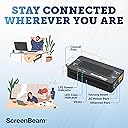
Given the minimal discussion of this topic, I found it pretty difficult to figure out how to set up my MOCA network when I set everything up as instructed and nothing worked. I literally had three separate Comcast technicians look at my new house to troubleshoot issues, and all three told me that MOCA is BS, makes no sense conceptually, and is just a marketing gimmick to sell devices like this. They were all 100% wrong, and as I write this, I have a functional MOCA throughout my house. But I hit some a few frustrating speed bumps along the way before I got my system up and running. In short, MOCA is a plug-and-play solution for using coaxial cable outlets in a room to provide a hardline ethernet internet connection. You can plug it directly into computers/TVs in those rooms in the same manner that you'd plug them directly into your router with a hardline connection, or can alternatively use it for WiFi extenders to expand coverage throughout the house. MOCA is significantly (think 2-3x) faster and more reliable than WiFi. If you're happy with your WiFi, no need to bother with this setup, but I'm glad that I did. In my experience, these adapters themselves are trivial to set up. You plug in the power, connect the coaxial cable from the wall to the adapter, and run an ethernet cable from the adapter to whatever you want to put on the Internet. That's it. The hard part is finding and eliminating the network bottlenecks in the system. My biggest issue was finding all of the cable splitters in my new house and installing the correct replacements, since the right kind of splitter for MOCA (i.e., splitters allowing high enough frequencies in the MOCA range such as up to 2300 MHz) are not standard equipment provided by ISPs like Comcast and need to be purchased separately. This will not work otherwise. Long story short, I had a couple different splitters hidden in different locations in my new house, and until I found them all, the MOCA system was entirely nonfunctional. I'll also note that I'm using an Xfinity XB-7 gateway (modem/router combo) with built-in MOCA support, which means I didn't need to use one of these adapters with my router. If you're in a similar boat and have a MOCA-capable router, make sure you actually enable MOCA mode on the router. You can look up how to do that online (e.g., search for how to change the settings on your Xfinity router). All of the above is, of course, just talking about my experience with MOCA generally. I'm not in a position to compare different adapters, but this product does exactly what it says it will do and provides high-speed internet all over the house via the coaxial outlets. That's a 5/5 in my book.