


๐ผ Elevate Your Entertainment Game!
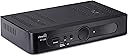
The ATSC Digital Converter Box AT-300 allows you to convert digital TV broadcasts to analog, enabling you to enjoy HD and Full HD channels on your existing TV. With a USB recording function, auto tuning, and a user-friendly program guide, this device is perfect for anyone looking to enhance their viewing experience. It also features parental controls and a 12-hour LED timer display, making it a versatile addition to your home entertainment setup.
| ASIN | B01MF9X5V9 |
| Best Sellers Rank | #755,156 in Electronics ( See Top 100 in Electronics ) #70 in Analog-to-Digital (DTV) Converters |
| Brand | ViewTV |
| Compatible Devices | Television |
| Connectivity Technology | Composite, HDMI, USB |
| Customer Reviews | 3.5 out of 5 stars 974 Reviews |
| Item Dimensions L x W x H | 9.53"L x 8.35"W x 2.2"H |
| Manufacturer | ViewTV |
| Media Format Digital Video | Micro SD, SD Card |
| Mfr Part Number | AT-300 |
| Model Number | AT-300 |
| Number of Channels | 1 |
| Product Dimensions | 9.53"L x 8.35"W x 2.2"H |
| Total Usb Ports | 1 |
| UPC | 848441046184 |
| Video Input | Composite, HDMI, USB |
B**A
TV Tuner Works Great for Me
I bought this back in 2017 after we shockingly discovered our new Vizio "Home Theater" did not have a built-in tuner. This unit fit the bill very well. I chose this unit over the others because it has an LED display showing the channel number right on the front panel. Most of the other units did not have this feature. Also, the remote control is quite large and well laid out for ease of use. So far, it's been working great. The setup was very easy and intuitive and it has been working perfect ever since. I leave it on 24 hours per day. It hardly gets warm at all which means it is using practically no energy, about 7 watts maximum. The picture quality is excellent. Also, I live in what is called a "fringe" area about 65 miles from the TV stations. I use a roof mounted antenna and this pulls in the stations as well or better than our previous TV. I have only two complaints with this unit. First, the channel selection is very slow. It could take up to 5 seconds to change stations. This is not much of a problem for us because we usually only watch one channel anyway. The second problem is that the remote has a very narrow beam. You need to point it directly towards the unit or it won't take. Once you get used to that, it is no longer a problem. This unit does so much more, but we haven't used most of the extras. We only use it as a tuner and it excels at that. Overall, I would say this unit is very well built and does the job of bringing in distant TV station in HD very well. I would recommend it for anyone who requires a tuner for a big-screen TV.
B**A
Very Good, Almost Great
The good: - Tunes all the ota channels I was expecting. - Recording (live and scheduled) and playback works very well (using a 64GB Sandisk Cruzer Glide, NTFS formatted) - Yes, other reviewers have said it says to use FAT32 only, but I've been using NTFS without a problem. Just be careful and use a decent flash drive. I tried a 128GB USB 3.0 Lexar and all of my recordings had stutters throughout where the file had been corrupted (this happened with FAT32 and NTFS). I'm guessing the Lexar was not able to handle the write speed that this box requires. - Plays back other media from USB, including .mkv! However, there is a catch to this for some media (see The Bad section) - On screen display shows the channel as 4 digits. For example, if your ABC affiliate is on channel 6-1, the display will show 0601 instead of an arbitrary number. - User interface and the remote button labels get the job done and I've been able to do everything I want to do on the device. However, the user experience could use a little polish and this might be a negative for some. The bad: - Media playback of other content that has an aspect ratio greater than 16x9, which is many movies in their original aspect ratio. If the media is encoded without black bars, this box will stretch the video to fill the screen instead of automatically inserting black bars at the top and bottom. Basically, it does not preserve the aspect ratio of the video and stretches it instead. None of the aspect ratio settings rectify this. The ugly: - Remote range is limited. From about 12 ft away I sometimes have to re-press buttons. Overall, I'm very pleased. I can watch ota HD on an older HD display that has no tuner and has no HDMI input. I can record and playback shows. I took off a star for the aspect ratio issue when playing back other media and the limited remote range. I did not take off a whole star for each issue because I see the playback of other media as a bonus and not the primary use for this device. I will be emailing support about these issues and will post an update to this review if anything changes.
W**H
It froze up like the other brand.
I wrote this same review for a Channel Master digital converter. This review includes a "continuing saga" which now includes the ViewTV AT-300 unit. Read on..... Channel Master: For about five minutes it was working OK. It booted up with no problems. But..... When I was deleting channels I did not want it: froze on one channel, the screen went blank, the audio was being broadcast of that channel and NOTHING worked to unfreeze the box or even shut off the box. So, I unplugged everything. When I plugged everything back together it automatically re-booted. And..... It continued being stuck on the same channel with no picture at all but the audio could be heard. Oh well. Sent it back. (I have two "real" Channel Master DVRs. They are $400.00 units. They are first and second generation units. I have had them for years. On occasion they freeze up and I have to unplug and re-boot them. Problem solved. Channel Master doesn't even list the CM-7003 on their website.) ***UPDATE*** I returned the Channel Master unit. ViewTV AT-300: I had previously purchased an Ematic digital converter box, Model: AT103B. It worked OK. It didn't freeze up and become useless. What I didn't care for on the Ematic unit was the poorly designed remote. The buttons for controlling the playback were almost an afterthought. They are: located at the bottom of the remote, each button is the same size, the buttons are tiny and they are not logically laid out. But the unit did work and I didn't know what I had: A unit that works and doesn't freeze up. So I returned it too. Soooo.... Next I tried a ViewTV AT-300 digital converter. And.... It froze up at the exact same channel as the Channel Master (Trust me: NO pun intended.) It also became useless and would not un-freeze. Many people have written in and described the EXACT same problem. So it is either a design flaw or evidence of problems in the manufacturing process. So now that one will be returned too. I tried calling the ViewTV 1-800 number and all I got was an answering machine. (A friendly voice said to leave a message and phone number. I didn't bother. Another Amazon customer said he left a message and never got a returned call.) I tried the internet and the website for ViewTV is not operational. Both dead ends. Now: Having been the (proud?) owner of three different units from three manufacturers, I can report that ALL three use the exact same chip/programming. Their screen images, set-up procedures, screen layouts are absolutely identical. So it probably doesn't matter what brand you buy. You will get the same hardware/software package. Why did the Ematic NOT freeze up? I have no idea. So I guess you get what you pay for. Any of these units for $30-$45 dollars is a bargain and great technology.....if they work.
R**5
AT-300 ( no audio w-HDMI )
ViewTV AT-300 - 5 stars As you can see from the reviews posted here, this is the page where the AT-300 was sold. But, at the moment, "currently unavailable". Information on the page changed over time, but still carried the terms, "AT-300" and (New Model). In late 2017, I received an AT-300 thru this page. But in early 2019, I ordered thru the link in My Purchases to this page, and received an AT-263 which I had to return. There was no error on my part, I checked the info on the page before placing my order. When this item arrived back in November of 2017, I tested the device with an analog TV that had composite video only, and was satisfied with the operation and performance. The box that I received - Model: ATSC / SW version: Oct. 28, 2016, 14:00:41 / HW version: 7802-ATSC-26. In February of 2018, I pulled the box from storage, and learned that when using an HDMI cable, the audio was silent. The settings in the box (and the TV) were not at fault, and I checked the HDMI for audio in PCM and RAW modes, but no sound. Changing the cable did not help. Still, I'm happy with audio & video thru the red/white/yellow composite wiring, and the box works great. But should COMPOSITE fail, I would not have the option of HDMI. The remote for this device has large dimensions, great buttons, and works fine. The only problem is, the remote must be pointed directly at the box. There are many buttons on the remote, and some of them serve dual purposes. For that reason, there may be several features, hiding among the buttons. The manual does not help with this. Included in the package, is a pair of AAA batteries, a rather stiff HDMI cable, (and unlike previous models) an A/C power supply that can be replaced. The AT-300 does not need or have vents on top, and is nearly twice the size of the smaller AT-263. The AT-300 case has a very nice appearance and a large green display. The software appears to be the same in both models. There are a number of lesser and greater bugs. Bug 1 - when playing files with the media player, every time a file is closed, the menu kicks the selection bar, back to the beginning of the list. To find a file and resume play, an annoying search must be conducted. Bug 2 - when the media player is in-use and the ASPECT button is pressed, "Invalid" is displayed on screen. The aspect feature does work, but only during a live broadcast. Together with Bug #1, this makes performance during playback, much less than expected. Bug 3 - when playing a recorded file, the info box that displays is too small. Add to that, a fuzzy shade of light gray, and little contrast shows, making the text hard to read. The date & time of a file in the pvrlist, helps with finding that file, and resuming play (as in Bug #1). Bug 4 - when viewing a live broadcast, the info box that displays, sits too low on the screen, and the extreme lower portion of the message box isn't visible. Bug 5 - bug 5 is scratched, cancelled, trash-canned. A "direct access to the book list" was found thru on-screen instructions. Just press EPG, then INFO, and the scheduled recordings (the book list) will appear. Bug 6 - the clock insists on displaying a time that is two hours later than my time zone. Bug 7 - occasionally, the EPG will display program start-times that are minutes earlier than top-of-the-hour, along with stop-times that are also minutes early. The clock is set to Auto. Is this faulty broadcast information, or does the clock lose sync with the broadcaster ? Bug 8 - the file sizes written to the flash drive are double what I expected. Bug 9 - the manual needs more detail concerning operation of the remote & box. There are buttons on the remote having a dual-purpose, but the functions are not listed in the manual. There is a PAUSE button and a HOLD button. The Hold is Full-Screen, not Pause, and that's okay. But the dual-purpose buttons have no label, and a hidden secondary function works only when a specific screen is displayed. The manual could help. The most unusual bug, and I still find this hard to believe, is that after 3 days of power-on, the menu is displaying bits of color. A green hi-lite bar appeared in the list of movies that lie outside of the PVR folder. The gray bar still made the selections, but the brite green bar marked the previous file, and that helped. In the EPG, a small orange dot appeared from nowhere, and marked each show (or book event) as I entered them into the Book List (schedule). A welcome feature, because I could now see what was programmed in the EPG, without going to the Book List. Perhaps there will be additional color embellishments that awaken soon. :) Here is an unknown feature that I discovered with the remote. Description: Using the on-screen keyboard, you can rename .mts files in the "pvrlist". Just press the PVRLIST button on the remote, then press the TIMER button, and the on-screen keyboard will appear. This is a lot like the remote command in Bug #5. Hit the PAUSE button on the remote during a live broadcast, and a blue/red indicator bar will appear at the bottom of the screen. Whatever you see from that point on, will now be recorded until STOP is pressed. Hit the PLAY button to see the recorded live video again, during the current broadcast. I believe this is the Timeshift feature. Whether the recorded file will remain afterwards, I don't know. I have the AT-300 connected to a digital TV. My main interest lies in recording, and using the box as a media player. During a book event (when the PVR is writing a file), I like to watch other channels. With no existing analog TV, the digital-to-analog conversion on Ch3/4 serves no purpose. So I have the loop-through function enabled, rather than Channel 3 or 4. LOOP THROUGH allows the aerial signal to be routed thru a second co-ax, and fed to the antenna connection on the back of the digital TV. Antenna-Composite-HDMI-(and others) can be selected from the TV input menu. In my case, COMPOSITE is the signal processed thru the AT-300 tuner, and the channel currently recording. By selecting ANTENNA from the TV input menu (and leaving COMPOSITE) all of the aerial TV channels can be viewed, including the one that is recording. That is the function of LOOP THROUGH. You can switch to the TV tuner & Antenna, while the AT-300 tuner is in-use. Or monitor your recorded channel with a second HDTV, if you wish. The AT-300 can write to a 64GB/USB 2.0 flash drive without any difficulty. I also tested a 32GB/USB 3.1 flash drive. You may find that flash drives under 64GB are best for recording, and larger flash drives are best for playing files (and storage). During a recording, a press of the info button will display the available write time (recording time). The available write time for my 64GB flash drive was 47 hours. 90 minutes of writing to this flash drive produced a 2.0 GB .mts video file at 704 x 480p, with a frame rate of 29.976 Hz. Note, I use an extension cable to prevent damage to the USB port when a large flash drive is used. I also switch to Windows 7 or later, when formatting a flash drive greater than 32GB. Examples of file sizes written by the PVR: 2 1/2 hrs (3.3 gb), 2 1/2 hrs (3.5 gb), 60 min (1.2 - 1.5 gb), and 30 min (625 - 725 mb). The last 4 digits of the .mts file name is the start-time stated in 24 hour format, preceded by the date. The time set by the AT-300 clock, the broadcast time shown in the EPG, and the time listed in TV schedules on the internet can cause scheduling errors. The problem is worse, when there are a dozen clocks in a home, and there is no time to adjust them all to Daylight Savings Time. The AT-300 will program directly from the EPG, and make the scheduling process fast and easy. Any book event (the channel-to-record, plus start/end time) can be set quickly and directly from the on-screen broadcast information displayed in the EPG. Examine display choices in "Sort". Press the EPG button on the remote and go directly to scheduling, or navigate thru MENU. Programming can also be done from the TIMER button on the remote. Just enter 01 to add a book event. All start/stop times can be edited. When the PVR begins a recording, a numerical display with a flashing yellow dot will appear in the upper left-hand corner of the screen. If you do not see this, the recording process has failed. Try starting with the box OFF. If nothing again, the book list may need to be emptied and refilled, good luck... If the box is ON, the channel in-use is displayed. If the box is OFF, the clock is displayed. The AT-300 displays channels in this manner: 3-3 is 0303, 10-2 is 1002, 15-1 is 1501, etc. (channels are no longer displayed as C001, C002, C003 as with the AT-263). If a book event is scheduled, and the box is OFF & displaying the time, the device will power-on, display the channel, start recording, and power-off when done ! The AT-300 works great, and only lacks refinement. Except for playing files in the pvrlist, operation thru the menu is never difficult. Also, the box is not slow or sluggish, and any channel can be locked out for dubious content. The picture quality seems to be quite good, but my viewing distance is less than 10 feet, and my TV isn't the size of a billboard. 480p looked very sharp to me, and I just can't see the need for anything over 720p. Watching recorded TV is much more enjoyable than watching 'live' TV. Never miss a minute, and come back to see a recorded show, right where you left off. Just look for "Resume or Cancel" at the top of the screen. The AT-300 plays many formats & recent codecs. There is a nice ViewTV logo when the device boots. A second AT-300 will allow recording on different channels at the same time, and you will acquire a spare A/C adapter and another remote ... think about it. For the features, the price, and the satisfaction, the ViewTV AT-300 gets a rating of 5. A new refined/enhanced/polished product at double the price would be quite acceptable ! .
W**G
Some good features, many BAD ones!
This unit has some glaring negatives and some positives. First off, I will say the seller has great customer service. I had a problem with the unit not booting, freezing and failing to re-start. They rushed me a replacement. First some positives. The unit has a PVR. The quality of the recording is excellent. Now on to the negatives and they are very hard to live with. The unit will arbitrarily change the aspect ration on it's own. No matter what settings you specify, it will change on it's own just a few seconds after setting the aspect ratio. When it does, it cuts off the lower portion of the screen and you cannot see the options displayed if you are in a menu. BAD! Next, it changes it's system time if you have a power failure or turn off the unit and turn it back on. It resets itself to EST which causes the recording timer to record at the wrong time which means you miss the program you had it set to record. BAD! It will recognize large USB devices but in my case, will only record one minute and 47 seconds then it stops. I reformatted and partioned my external USB drive to 64gb and it still will not record over 01:47. It works fine on a 16gb memory stick but because it records in HD it will only record 4 hours. Actually, just less than 4 hours since it used 4gb per hour of recording. BAD! I read the owners manual and it states that it may not work with all USB devices, some files may not play or display. Of course you have to buy the unit to get the manual which states this disclaimer! DOUBLE BAD! So, folks, there you have it. My advise is Buyer Beware!!! I would like to add that this company's Customer Service is without equal among Amazon sellers! They have gone above and beyond all expectations!
R**N
Amazing product. Great Picture, simple to setup and use.
This unit is a breeze to setup. I actually purchased it to use in my living room on my smart tv. These newer TV's don't have the standard RF input for a coax cable connection from a digital antenna. I purchased this to use a relatively inexpensive antenna and be able to pick up ball games, local channels etc that are OTA. There's really only one channel I can't seem to get but it's certainly not because of an issue with the box. The issue is I'm using a low end antenna. In fact, this low end antenna got put in a drawer because if it's inability to really pick up much reliably. With the AT-300 in the mix, I was shocked at how much better this low end antenna works and how crystal clear the picture quality is. The menu's are very straight forward and easy to use. The remote control that comes with it works great and and has some neat features such as listing your PVR List, getting info on a specific channel, adjusting aspect ratio etc. For cable cutters, this is a great product and well worth the price of the unit. I highly recommend it and in fact some of my friends that have come over to watch games etc have been extremely impressed. Great features, drastically improved channel availability and great picture quality makes this small unit a great purchase.
A**R
Not ready for the faint of heart
The best thing I can say about this product is the picture quality is superb - but that's more of a testament of over-the-air picture quality. After reading a lot of the reviews for this product, I thought I would take a chance (how bad can it really be?) FIRMWARE UPDATE: Some reviewers recommend updating the firmware. BEWARE. See the attached picture that shows the hardware and software version of my device. Nothing states this is an AT-300 product. I contacted the vendor and they told me to NOT install the "latest" firmware for the AT-300 from their website. REMOTE: Other reviews are spot-on. The remote "feels" like it isn't working most of the time. Another reviewer said to use a learning remote. I taught my Sony learning remote most of the buttons. That didn't help at all. Be prepared to be a little frustrated pointing and pressing buttons. USB MEMORY: I bought a 128GB thumb drive that came formatted as exFAT. It didn't work. I had to reformat it on my PC to use NTFS, which the manual states is not supported. USER MANUAL: Unfortunately it does not tell you how to do things like schedule a recording or playback a recorded show. I basically tells you what the buttons are named on the remote but not what they do. Yes - you really have to experiment with the buttons to figure out basic operations. For example see my guide picture to see how "OK/BOOK" means to schedule a recording. TIME ZONES: You have to set the clock manually to show times other that EST. Once I set the time for CDT, the on-screen guide shows start are stop times that are off by a minute - then anything you record may be cut off. See the enclosed picture. I asked the vendor how to use time zones (via email) and they gave me procedure that didn't work. I asked them if that worked for them and never received another answer. I left it automatic and pretended I lived on the east coast. GUIDE: Not even close to 2 weeks. For example my local CBS channel only showed 24 hour in advance. Also, I never could figure out how to display a guide for more than the current channel. PROs: It does record and playback excellent quality HD over-the-air tv shows. You can schedule in advance and turn the device off. When the time comes, it turns on, records, then shuts off all by itself. There is a real nice feature that tells you the quality of the channel signal coming in from the antenna. That could be real useful while figuring out where to locate and point your antenna. It did record and playback Dolby Digital sound (where available) through HDMI. You can pause and fast forward while watching a recording. Best thing is the price. BOTTOM LINE: I suspect all of the negative reviews are 100% accurate so read them all and decide if you can live with all the frustrating things mentioned about this product. If you can, then you cannot go wrong for the price. I eventually returned the product because it just got too frustrating to use. Your mileage may vary.
S**N
2nd go round with ViewTV, get the 11/18 Firmware Update to solve fast forward freeze issue!
I had a ViewTV AT-163 box for just over 4 years. As is common with that particular device, the internal power supply failed. Based on the reports from others, I am amazed I got 4 year out of that box. I pulled the cover and took a peek, sure enough, there was a a few melted components where the power cable goes into to the box on the very small and simple looking board. There was no danger of fire or anything, but the components finally gave up. Apparently per the reviews on the AT-163, I am not the only one to have it fail this way. Up until then, that device served me well in my quest to stick it to the Cable/Dish/DirecTV man. Selected this AT-300 device as it has an external "wall wart" power supply, which hopefully should be reliable, but if not a 5V supply like the one the unit comes with is easy enough to find. So far so mostly good with the AT-300. It has the same familiar basic and clunky but still navigable on screen menu as the old box and the remote is the same. The remote and it's commands are quirky as Hell, but I am completely used to them after 4 years. It is amazing what one can get used to - LOL! I did have problems fast forwarding through recordings if I went faster than 2X though. This was ultimately solved with the 11/18 firmware upgrade. Plugged in a 256 MB Sandisk USB stick in and was good to go. Shop around for that USB stick by the way, Best Buy wanted $199.99, they have a "Black Friday" sale on it as I write this for $49.99, I found it here on Amazon for that price and on eBay for $41.99 shipped. I have also used a mechanical 1TB hard drive left over from an SSD upgrade in a laptop, mounted in an external drive enclosure to mostly good effect with the old AT-163, but it had trouble seeing the drive as does the new box, I think due to a bad cable. It is probably easier to just use a large USB stick unless you record a ton of shows, then an external hard drive is the way to go. Each hour of 1080p programming uses about 7.4GB of space. That is a lot of space. It is also a lot of sweet uncompressed high fidelity. I have a good home A/V system and over the air TV truly is high fidelity, almost as good as Blu-Ray. About a week in with the AT-300 now, I believe they improved the firmware, mine is dated 5/18. I have seen other reviews which discuss a "boot loop" issue, which sounds like a nightmare. I suspect my recently purchased box with the 5/18 firmware is the latest iteration. Fortunately, it has had no issues recording shows and always boots up and turns off promptly. The one oddity and only real complaint I have has to do with setting the system time. The AT-300 has no provision for time zones and so far has not auto synced off the antenna. I went manual mode and set it using the 24 hour clock. For some reason the 12 hour clock would not allow the right date, it was stuck 5 days behind. Other than that curious PITA, which the older AT-163 did not have, the AT-300 is a nice incremental improvement over the older device. In the end, these boxes are dirt cheap compared to anything else that can record over the air TV and they do not require a subscription fee. They are basic, kinda clunky and quirky, but in the end they work, and that is good enough for me! Edit - New firmware out dated 11/18 to fix the fast forward freeze and some other issues. Use a USB 2.0 stick to upgrade, mine would not read it off the 3.0 stick that I have in it for recording TV shows. The updated firmware solved every problem except the wonky time setting. Still have to enter that manually. Have had no problems since updating it though, and I think this box will give even more years of service than the old one mentioned in my review.
K**K
Great for analogue reception of digital antenna signals.
Still have an old big screen, tube style, Toshiba. Works great on this TV. Allows me to watch over air signals on analogue TV. Easy to install.
R**N
Finicky remote & poor quality tuner
Update: ViewTV Box died completely on May 9, 2021, after only 7 months use. It was on and stuck on a channel....would not respond to the remote or pressing the front channel keys on the box. Unplugged unit to let it reset for a couple minutes, plugged it back in & it never turned on again. Contacted the manufacturer, ViewTV, and they said the product has a 1 year warranty BUT they don't deal with Canadians either selling product or fulfilling warranty claims. They also said, and I am quoting EXACTLY what their customer service rep told me, that they expect the seller of the product to fulfill any warranty claims and that for every unit the seller buys to resell, ViewTV gives them a second unit to use to fulfill warranty claims. So, I contacted the seller on Amazon whom I purchased the product from, Botley Store, and received a reply from Burt within a day. He said they would look into warranty prodedure with their supplier & get back to me. 2 weeks go by, & they never did. I sent them 2 more emails, stating that I was DEMANDING the product be replaced OR ELSE I was approaching Amazon & having them deal with Botley Store for not fulfilling their contractual obligations with ViewTV, & in addition I found YouTube reviews for this product & I will be warning everyone: DO NOT BUY THIS PRODUCT & STAY AWAY FROM BOTLEY STORE!!! This company is sleazy, & all they care about is ripping people off! Look at their store rating - why do you think it's only 78% positive?! Also, DO NOT BUY ANYTHING MADE BY ViewTV! Their products are Chinese made GARBAGE, poor quality, unreliable & don't last very long. Also, the company is unreputable - any reputable company handles warranty claims for manufacturers defects THEMSELVES! The fact they passed the buck onto the seller, who was so greedy & money hungry to NOT fulfill their contractual obligations to ViewTV proves this company is BAD NEWS! AVOID THIS COMPANY & ANYTHING THEY MAKE!!!!!! Original review: Bought this to use with a AmazonBasics tv antenna on a 2008 Toshiba LCD tv so I could PVR programs. While this is a good tv tuner, surprisingly it's not as good as the digital tuner built into my 2008 Toshiba! Unbelievable that a 12 yr old tv has a better tuner than this brand new one! I had to use 2 preamplifiers with this tuner just to get the same channels that I got with 1 amplifier on the Toshiba's built in tuner. In addition, the remote is VERY finicky and a pain to use. Many times, you have to point the remote "just right" at the box in order for it to get the infrared signal from the remote and work. And almost constantly, I am having to move & get closer to the box just for the remote to even work!! Also, when it DOES start working, the remote will jump over channels and over react when you press the button you want to work. I will also point out that before moving to get the remote to work, I am usually seated a reasonable distance away from the box that one would expect a remote to still work. So there's ZERO excuse for the remote not to work properly, let alone be as finicky as it is! I contacted the manufacturer, who reassured me that they knew of the issues I pointed out & would send a new improved remote when it becomes available. However, I was also unimpressed that they suggested I should use my smartphone & a app from their website to replace their junky remote control! As much as this box does the job and has more outputs than other tv tuner boxes available here on Amazon, until the manufacturer improves the quality of the remote & the tuner, I cannot recommend this product.
S**N
tv
sa fonctionne bien
B**H
I returned the defected item and still have not received my refund. It has been five weeks.
Do not like
J**L
Dead in 3 months - don't buy it
I received the ViewTV AT-263 ATSC Digital TV Converter Box April 15th and on the morning of the July 26th it died and won't power on again. Seller says they can't replace it. Better to choose a different product.
Trustpilot
3 weeks ago
2 months ago