🚀 Command the skies and stars with precision and style!
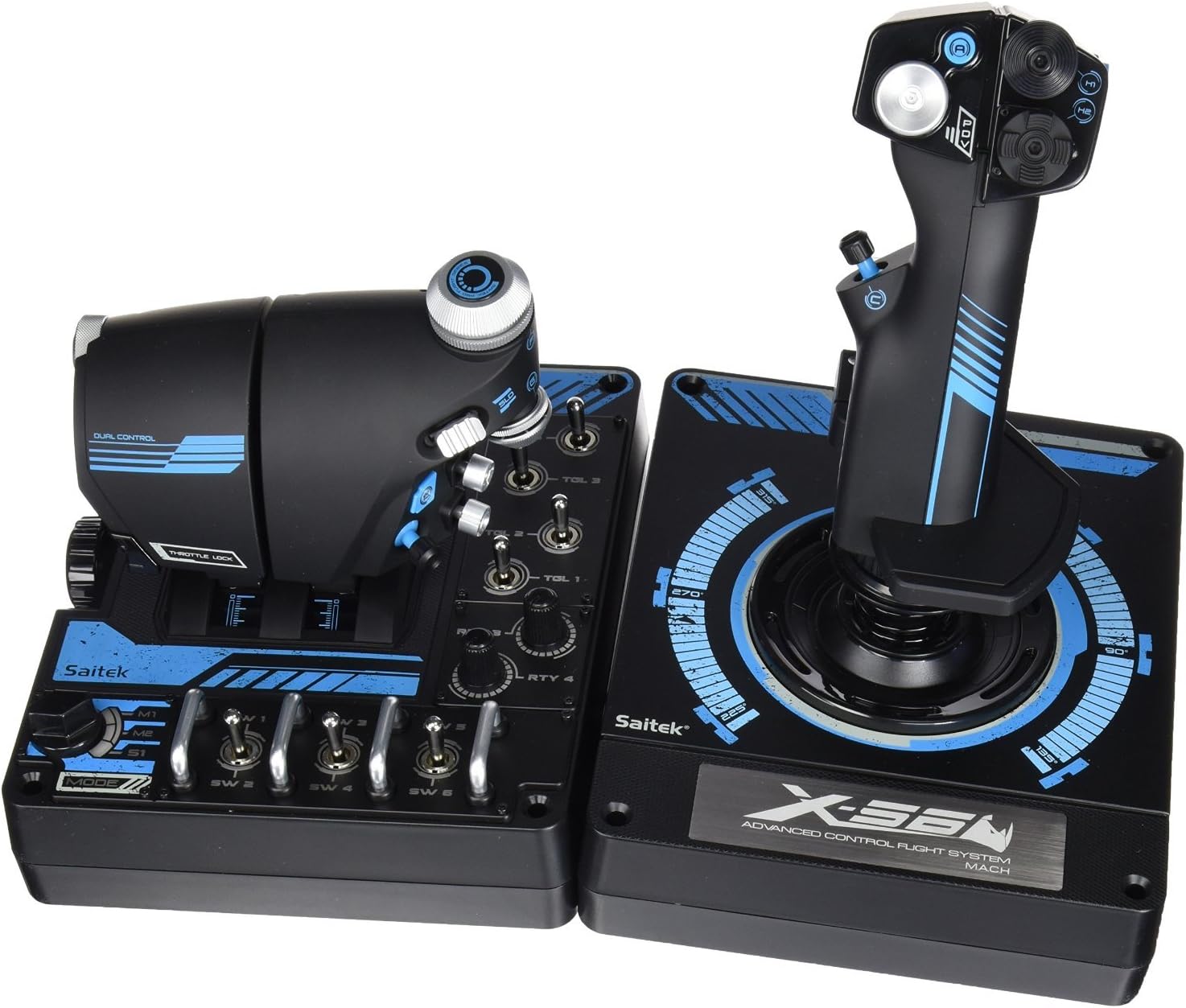
The Logitech G Pro Flight X56 Rhino HOTAS is a professional-grade joystick and throttle combo designed for serious flight and space simulation enthusiasts. Featuring 16 programmable buttons, dual mini analog sticks, and hall-effect sensors for precise 16-bit input, it offers unparalleled control customization. Its ergonomic design and adjustable spring tension make it ideal for extended VR sessions, while fully customizable RGB backlighting lets you sync your setup’s aesthetics. Durable metal switches and a stable base ensure a premium, long-lasting experience.
| ASIN | B01LX398IE |
| Additional Features | Ergonomic, Rumble |
| Best Sellers Rank | #42,342 in Video Games ( See Top 100 in Video Games ) #110 in PC Game Flight Controls |
| Brand | Logitech G |
| Brand Name | Logitech G |
| Button Quantity | 16 |
| Color | Black |
| Compatible Devices | PC |
| Connectivity Technology | USB |
| Controller Type | Joystick |
| Customer Reviews | 4.0 out of 5 stars 410 Reviews |
| Global Trade Identification Number | 00097855127860 |
| Hardware Platform | PC |
| Included Components | Palm Rest Spacer, X56 Stick Base, X56 Stick Handle, X56 Throttle, quick start guide |
| Item Dimensions | 7.3 x 8.9 x 10.5 inches |
| Item Type Name | Logitech G Pro Flight X56 Rhino HOTAS (945-000021) |
| Item Weight | 39.6 Ounces |
| Manufacturer | Logitech, Inc |
| Model Name | FBA_945-000021 |
| Package Quantity | 1 |
| Power Source | Battery Powered |
| UPC | 097855127860 |
| Warranty Description | 90- Days |
W**9
Great controller with solid, well made components.
I upgraded from a Saitek X-45 that had been getting me by for several years. The x-56 is definitely a major evolution. I never really liked the X-52 they produced, it looked/felt cheap and gimmicky but the x-56 is definitely not cheap or gimmicky. It's a very solid piece of gear that has nice weight and placement of controls (I'm 6' 2" with average sized hands for a man). Throttle cluster: ---------------------------------------- 1) The throttle cluster was a little stiff from the factory, however, that's actually a good thing. Other reviews have talked about having to shove it around to "loosen it up"/etc, I find that I really dislike a very "loose" throttle. I fly helicopter/flight/space sims and I appreciate some throttle resistance so it doesn't go flopping around. It does have a tension adjustment that may be useful years down the road, but overall it is very nice. All of the base toggle switches, mode switch, and rotaries on the base are backlit by LED's. 2) On the base of the unit, there are 7 momentary toggle switches that have two positions (up/down) and the resting neutral position. Having these toggle switches has been a massive upgrade and I've mapped everything from landing gear to fuel/cargo scoops (in elite dangerous) to many other key functions. They are crisp, solid metal, and the switches themselves feel quite solid and have a very nice heft to them when engaging them. In addition to the 7 toggle switches, there are two dial type potentiometers on the base (rotary dials) that also work/feel quite solid. 3) The right portion of the main throttle half has 2 metal rotary dials that spin freely throughout their rotation and have a centering detent/click and they can be pushed down/clicked as well. They are large and easy to reach with either your forefinger or in the case of the lower one, your thumb. The two hat switches on the lower right of this half of the throttle are easily reached by your thumb and have distinct profiles so they feel different to your thumb without having to look at them. There is a slider type switch and a square and very flat button on this half of the throttle as well. The slider on this half has a very short range of motion and is easily reached by your thumb. There is also a mouse-stick type device which is also easily reached by your thumb and works very well for something like free-look or other tasks. The mouse-stick is plastic, but it is well positioned, and the return spring is just the right mix of firm/easy that you don't keep accidentally moving it around and can be pushed down/clicked also. 4) The left portion of the main throttle half has a rotating dial with an infinite range forward/back that has a detent/click that stops the rotation of it in small increments. This will be familiar to anyone who has a mouse wheel that doesn't just freely spin, but rather clicks forward/backward a small amount as you rotate it. This is quite useful for scroll type menus or for doing something like cycling through a targets subsystems in Elite Dangerous for example. It is metal, feels solid, and is easily reached by your pinkie while your palm rests on the throttle. This half also has a single slider type toggle switch with two positions(up/down) and a resting neutral that is easily reached by your right finger. 5) The two throttle halves can be locked together and move as one, or, unlocked from each other and manipulated completely separately and as I mentioned in the opening, have a very nice feel in terms of resistance to both of them. 6) There is a 3 position mode switch that is vastly superior to all previous versions of their products. It's a Very solid 3 position rotary that requires deliberate intent to manipulate and has a very satisfying stop on each position. I really disliked the "mode" switch on the x-45 as it was extremely sloppy and would often get stuck between modes and require a lot of futzing with. 7) The base is solid and on a normal desk it won't go sliding all over the place as you move the throttle or engage the controls. Stick: ----------------------------------- 1) There are three hat type controls and a button switch on the upper sloped face of the stick. All are extremely unique in terms of feel and easily reached by your thumb from a normal resting/use position on the stick. They all have a very satisfying and positive feedback in terms of their engagement of the various positions and require deliberate effort to engage; they won't be flopping around or accidentally bumped into a different position like some cheaper controllers. The two hat switches on the right are standard 4 position hats while the one on the left is an 8 position. These are all plastic, but, solid and well made. All of the buttons/hats on this front slope are back-lit by LED's. 2) On the left side of the shaft is a mouse-stick type control that is plastic, well positioned and easy to manipulate with your thumb, with a firm return spring that requires deliberate effort to manipulate, this also wont be flopping around and randomly engaging even when you are dodging/juking your hardest trying to escape getting gunned down or, chasing that pirate back to wherever he was hiding. This can also be pushed down/clicked as another button, and I've also mapped this to various functions in the games I play. 3) The main fire switch is solid, thick, well made, and is in a natural position to be used. 4) On the right side of the sloped face, there is a button that is easily reached by your index finger. 5) There are two pinkie accessible switches. One is a standard button, while the other is a paddle type switch. They are both easily reached, make sense in terms of placement, and work very well. 6) The stick comes with a sort of spacer that you can put where the edge of your hand would rest on the base if you like a larger table/surface for it to rest on and for me, is very nice to have. 7) The stick comes with 3 extra springs of different weights so you can adjust the force required to move the main stick around. I tried them all, and ended up going back to the default spring as it felt the best to me but it is nice to have options should you want to change it up to suit a particular app/situation. 8) The base is solid and on a standard desk it will not go sliding all around even when you are dodging/juking away from or after a target. The software/drivers: --------------------------------------------------- 1) I'm running 64 bit windows 10, and both the drivers and the programming software installed in just a few seconds with zero issues. 2) The programming software allows you to change the color of ALL of the LED backlighting for the stick/throttle through an infinite range. It presents you with a standard gradient/intensity color picker and you can then set that color for the LED's. Set it to blood-red and hop in a tie-fighter. Crank it to a nice shade of green and cruise around in the plane of your choice. I spent several minutes just playing around with all kinds of colors/intensities just for fun. 3) the programming software lets you change how the response curves work for certain ranges of motion, how big the "deadzone" is, and a bunch of other parameters. I haven't really found a use for that, but, I'm sure there are some who would appreciate the customization. 4) Sometimes, windows thinks one or more axis' of your controller is not "centered"/etc and you end up spinning around in whatever vehicle you are flying. On older sticks (including my x-45) you could actually be stuck with that, with no way to set the "zero" of that axis due to quirks either in software or windows itself and you may have had to hold that axis manually at a certain point that it thought it was zeroed, talk about annoying! On the x-56, there is an actual reset procedure that entails holding down odd combinations of buttons then unplugging/replugging/re-calibrating that actually fixes all of that type of issue. I mention this because I had this issue with my X-56 after unboxing, where windows and some games thought one axis wasn't centered and no matter what I did in the windows controller "calibration" fixed it. The manual reset procedure DID and I was off into the unknown of space. I spent quite a while reading reviews/etc before buying and was a bit worried I would experience some of the odd problems some folks have mentioned such as pressing one button which causes one or more others to engage/etc. I have experienced none of this and all of the controls work just perfectly. I don't want to invalidate someone elses' experience they may have had, but, for me this controller set has been 100% problem free and works flawlessly. Overall, this is definitely a very solid controller, with well placed controls that are not cheaply made that all have good solid positive engagement characteristics. To be clear, when I describe the controls as requiring deliberate effort to engage, I do not mean it takes massive effort to make them work, but rather they aren't like some cheap versions on other sticks where if you sneeze at them they move around. You WANT controls that require deliberate effort to engage, unless you like slamming into a space-station because you mapped the fine landing thrust controls to a cheaply made hat/stick that engages if you breathe in their general direction. Yes, the controls are in a different position to your last controller, just like the case would be if you got into a different model plane/helicopter/etc; this is not a problem or drawback, but simply your new layout and will require time to acclimate to. I've had dozens of joystick/controller/etc over the past 15+ years and of all of them, I am enjoying the X-56 the most. It's got enough weight to be satisfying, well placed controls, a good layout and great customization/programming options.
B**O
Love this HOTAS, drivers need help.
I've had this for about 3 months and no problems with the hardware at all. The throttle is a bit sticky, even at the lowest resistance setting, but it isn't that big of a deal for me. One VERY IMPORTANT thing: I use this with Windows 10. EVERY TIME I reboot my computer, the driver gets screwed up and either the X, Y, or Z axis on the joystick either stops responding or is just pinned maxed out to one direction or the other. Unplugging the joystick and plugging it back in does not fix this. I've seen several negative reviews for this product complaining about this very thing. Logitech / Saitek suggested to uninstall / reinstall the driver & software, which will fix it, but that is not necessary. Here is what you need to do to fix it quick, without renstalling anything: 1. Open the configuration software and go into the settings (not programming) section for the joystick. 2. Click "calibrate axis". Sometimes this is all you need to do. Check the movement & centering in the settings for all three axis. If it's moving as it should, you're done. If not, go to step 3. 3. If you have an axis that is still not moving as it should, with that axis selected, change the Deadband setting by 1 and click "Apply". (I usually have my Deadband set to 50, so I'll adjust it to 51.) Repeat this for all axis that aren't working as expected. That *should* fix the joystick axis and keep your vessel from constant vomit inducing spinning. Occasionally though, the axis curve will also get screwed up. This is pretty uncommon, but I have had it happen. For the joystick, you most likely (unless you have a ship you just want turning in one direction) want an increasing S curve profile (straight line from bottom left to top right). Select the diagonal left-to-right S curve (just above the apply button). This will reset your Deadband, so you'll want to set that back to whatever you want, then hit apply. I hope that A) this helps out anyone else experiencing this problem (It took me several days & many hours of messing around to figure this out, so hopefully it saves someone some time), and B) that Logitech FIXES THIS STUPID BUG! It's really irritating to have to do this every single time Microsoft decides Windows must install updates and restart the computer, against my wishes.
T**N
Works Great... so far
The reviews for the x-56 are so bad that i didn't want to buy one, but I couldn't find a new x-55 to replace my broken one, and I couldn't afford the Thrustmaster Warthog HOTAS. Logitech appears to be pretty decent when it comes to exchanging faulty units, and Amazon offers a 3-year warranty... so i bought a x-56 and figured i'd just keep exchanging them until I got one that worked. It arrived two days ago, and I haven't had a chance to thoroughly stress test it, but so far it works flawlessly. All of the buttons and switches function. The stick has no drift. The throttle is stiff, but not nearly as bad as some people have described. I've read many reviews that say, "i have big hands, and even I have trouble reaching buttons." Either these folks' hands aren't as big as they think, or i have frikkin HUGE hands, because the X-55 was a great fit for me, whereas the x-56 flight stick actually pinches my fingers together a bit. I'm a really big fan of the analog thumbstick on the throttle. It replaces the utterly useless "mouse stick" that was on the x-55. Once my thumb gets used to it, I am going to LOVE analog control of my vertical and lateral thrusters!!! However, I am not a fan of the analog thumbstick on the flight stick. I must kink up my thumb at an uncomfortable angle to manuever the analog stick, and it operates so loosely that I cannot press it down to use its button functionality without activating a function mapped to one axis or another. I would have much preferred that they left the x-55's great big thumb button right where it was, and if they absolutely HAD to have another hat or stick, build it into one of the finger switches on the front of the throttle, as they did with the x-65f. I have every single function I use mapped to some buttton, switch, or hat. It is fantastic when used with a VR headset, because i almost never need to take my hands off the throttle or stick. Everything i need and most of what I want is under my fingers. Some folks have complained that the stick feels cheap. I don't even know what that means. It feels like it's made of plastic, because it is. If it bothered me, I'd wear driving gloves. Problem solved. Other folks have complained about the stick being noisy. Mine is not, but neither was my x-55 at first. I'm not sure when the x-55 started creaking, because i either play with headphones or 5.1 surroud sound, so I rarely heard the stick. I won't hear the x-56 whining either, if it starts. Other folks complain about the logitech software used to bind functions to the HOTAS. This isn't an issue for me because i typically bind functions in the game control panel, not in exterior software. In the few cases where I have needed the logitech software, it has worked well enough to get the job done. I'm giving it 4 stars instead of 5 because i really dislike the analog thumb stick on the Flight stick. I really miss my big grey pew-pew-pew button. So far, i've had no hardware or software issues of any kind. I love it, and I am so glad I bought it! I'll let you know if anything happens to change my opinion over the next few months.
T**G
Not Bad If Used Right
Okay so here's the deal. I've had the x56 for a week or so and I'm ready to give it a review. Before I get into the pros and cons, I'll say right off the bat that this HOTAS isn't worth a dime over MSRP. I considered returning it on principle alone because the MSRP is like.. 249.99 as per logitech's website. You won't find it for that price anywhere, however, due to opportunistic scum. Another quick note is that if you buy this, remember that you will be getting the old Saitek model with blue paint decorations, not the sleek black version that logitech advertises. I don't think there is much of a difference aside from aesthetics, but just be warned in case you were hoping for that newer look. PROS -Good ergonomics. If you have large hands like me, this HOTAS will feel very comfortable for you. The button layout is very deliberate and man I really feel like they hit that part out of the park. -The throttle is amazing. Smooth action, the cluster of buttons right where you need them, several heavy duty military-style toggle switches and knobs make for a cool, immersive setup. -The joystick has a POV hat, a d-pad hat and a witch hat. All of these things are within reach of your thumb - that's awesome. CONS -This whole HOTAS setup? The one I paid almost 70% more than MSRP for? It's made of cheap plastic. It creaks when you hold it. It's the strangest thing - it looks like it would be solid and heavy duty from photos but I assure you that it is not. I am very very careful with mine because I know that it could break quite easily from what I would consider normal use. -It's super springy in a way that makes it hard to use accurately. It can be done and this part isn't a deal breaker, but expect to need some practice to get good with this stick. -Z axis has a slight clockwise drift but the software has no way of calibrating the z-axis from what I've found. Maybe it's there and I'm not seeing it but I mean, I've looked. This isn't the end of the world - it basically just means your stick will yaw right while unattended to, but it works as intended when you're holding the stick so I guess it isn't a big deal. -Drivers are kind of awful, they aren't super clear on what to get and where. -The cables are short - you'll probably want some extenders. -Both stick and throttle are not sufficiently weighted down. Your X56 won't go sliding around, but you can feel that it isn't just cemented to the desk like other sticks can do because of their heavier bases. -This thing is a power hog. It's 2 usb 2.0s for the whole HOTAS system: one for the stick and one for the throttle. If you plug them both into the same USB bank, you'll likely have issues with button ghost pressing. I plug the throttle into an externally powered USB 3.0 bank plugged into one of the main motherboard USB ports on the I/O cluster. The stick just gets plugged into a USB 2.0 on the front of my case. I've never once had a ghosting issue.. But then again, I read a guide and went out of my way to be prepared for this by the time my x56 arrived. The last word: I don't regret buying it. I don't feel like there are a ton of options out there unless you're willing to drop a small fortune. This stick is good for a hobbyist - so hobbyists please buy it at a commensurate price. If someone tried to gouge you, just keep moving. You can always get a quality stick from VKB if these folks insist on continuing to hike up the price of what's essentially a toy.
R**N
Don't let enthusiasm get the best of you. This is not a Logitech product.
I would like to start by stating that I am an IT Director in charge of an enterprise level tech dept. I have close to 15 years of IT Service experience. I am also a life long gaming and tech enthusiast. I wish I had researched and read the reviews more closely before picking this up. If you do a bit of research you will find that the general verdict on this stick is that you should pass it up, and for good reason. I had purchased the stick as an upgrade to a Thrustmaster T-Flight Hotas X. I had wanted to play Elite Dangerous in VR, but the T-Flight didn't have nearly the on controller buttons needed to properly manage advanced maneuvers. Thankfully all of my issues spawned in training mode, and I did not risk any of my progress in the actual game. (I know, 1st world geek problems) Pros: Beautiful Design. RGB is a nice touch, but not well executed. Buttons and toggles feel solid. Amazon CS is awesome. Cons: Functionality is iffy at best. While it feels solid, within hours of using it I started having issues, that ended with my Z-Axis (left-right rotation) being permanently stuck in the rotate right position. After a full driver wipe and reinstall, the issue persisted, and when plugged into a different computer was unchanged. To be Clear. This is not a Logitech product. Logitech just purchased Saitek in Sept of 2016. This stick, the drivers, and the software are all produced by Madcatz, their former owner. I hope that with Logitech purchasing this company, it will be able to elevate the company back up the the quality level they had prior to the Madcatz purchase.
G**H
This Item worked perfect
I loved this item and it felt so good knowing it was not refurbished, it was new. The only thing is that the stick stopped working and I had to send it back. One thing, I forgot to put the tension springs in the box, and I never opened the tube they were in, when I returned the items to the manf. but I'm going to find out if I can mail it to them. I really loved the throttle because all of the controls on it worked perfect. I could actually feel where the buttons were without looking and the refurbished one I have I can't. I wish I could repurchase one of the items again from this company. I know it was new, and the blue color on both controls gave me more confidence. It was a "Logitech G Pro Flight X56 Rhino HOTAS ". It was a "Saitech Logitech G Pro Flight X56 Rhino HOTAS". Not just a "Logitech G Pro Flight X56 Rhino HOTAS" and like I said a "Saitech". And I never said I thought it was refurbished. I don't know who said that, because I never said I thought it was refurbished. I've sent it back and will be refunded by Amazon.com but I would love to purchase another one just like it. And again, I don't know what caused the stick to stop working. I still would like to know if the Company would like for me to mail the springs to them. I've never received anything that was packaged as good as these controls either. I couldn't put them back in the box when I returned them just like I received them. Again, I never said the items were renewed. Thanks alot, George Smith
G**D
Very nice HOTAS
This is a really well-made flight to stick and throttle! Apparently there had been some quality control issues in the past but based on mine I would say that the issues have been resolved. This HOTAS has superb functionality! Both pieces are made of plastic but they dont feel flimsy. This is a good mid-level HOTAS. If you spend $50-$150, you wont be getting all that this has to offer. The RGB is great! Crazy amount of colors. I play ELITE DANGEROUS and this thing has plenty of switches and buttons on it! The extra X/Y/Z thumbsticks allow me to maneuver in all kinds of ways! It really does bring the game to a whole nother level! Works great with other flying games as well!
A**R
so no easy or fast way to return
none of the buttons on the stick work right out of the box. Not a prime item, so no easy or fast way to return. Please save yourself some pain, stay away from this. -Update: tightened tiny screws in base of stick and was able to properly connect it. Works now. Will see for how long... I have now been using this for several weeks now, aprox 300 hrs on the stick. It is still working great and the control over 6 axis is excellent for space sims like elite dangerous. i hope i can use this stick for a long time.
Trustpilot
3 weeks ago
4 days ago