

Desert Online General Trading LLC
Dubai, United Arab Emirates
Desert Online General Trading LLC
Dubai, United Arab Emirates

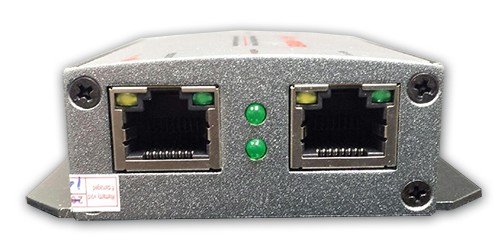

IPCamPowerPOE Powered 2 Port Switch & Network Cat5 Cat6 Midspan Cable Range Extender Repeater for IP Cameras
A**R
Impeccable pour le prix
S'installe facilement, je vous donne un truc pour l'installation, si vous n'avez qu'une caméra utiliser le trou numéro 2 et si jamais vous perdez le signal de sortie, retirez seulement le IN pendant 10 secondes et reconnetez et cela va faire un reset. Fonctionne très bien sur une longueur de 500 pieds (1 X 250 pieds, le repeater, et l'autre 250 pieds, ensuite la caméra) Vraiment un bon produit.
R**G
Works-ish
Works well... assuming some very important factors.For one thing, consider your total power consumption. My cameras are rated at 6.5W. The two together are 13W, obviously, but that doesn't factor in the power draw of the splitter, which uses power as well. Standard PoE is 15.4W. My cameras wouldn't work at night because the IR would draw the full 6.5W and overload the splitter. So I got a PoE+ injector, which has around 30W to give. Worked well for a while... the last few weeks, not so much. Cameras kept going offline. Opened up the enclosure to find the splitter was burning hot. Drilled some vent holes, but knew that wouldn't be enough. Then a coworker (I work for a security company) reminded me that standard PoE Ethernet uses only 4 of the eight conductors in an Ethernet cable. The orange/white pair are power, the green/white pair are data (assuming 568B termination and that the manufacturer follows a standard that can at least auto-negotiate to that pinout). So with a couple RJ-45 keystone jacks at either end of the cable, I custom terminated two PoE Ethernet jacks off one cable and bingo it works.So assuming your cameras consume low wattage and maybe don't have IR, and assuming the splitter is in a cool or at least well ventilated position, it works well. But maybe not as well as some keystone jacks $8.99 for a 10-pack Amazon prime), a punch down tool and a little understanding.
9**N
A must have item!
A unique and indispensable tool (no power required). Take any POE or DATA Ethernet cable and split it into two. Take any POE Ethernet Cable and extend it beyond the 300 ft length limit. A life-saver especially when dealing with POE cameras. EXAMPLE: You finish a surveillance implementation and find that you need another camera angle. Yes, you can run another cable (usuallya big hassle) -- OR if you have this nifty item, you can take an existing camera cable and split it in two. Just install this at the existing camera cable end-point and run two cables .. one to the originally connected camera and another to the new camera - DONE. We have installed this outdoors in a weather-proof box with no issues -- works great.
G**N
UPDATE: B01DOG3N82 **Replacement Unit DOES Work** w/ Ring Stick Up Wired Cameras
.UPDATE May 27 2019: **This review is for the model ASIN B01DOG3N82, and NOT the Gigabit Rated model which unfortunately has combined reviews of both models on these Amazon pages.** As of this writing the unit has been working with no issues. Configuration (Spring/Summer USA): 2 Ring Wired Cams POE connected to the ICamPower Unit ("The Unit") with max 80 yards buried Cat5e cable run on one cam); The Unit is mounted in a LeMotech ABS Plastic Dustproof Waterproof IP65 Junction Box (not buried); then a 50 yard run on Cat5e to one dedicated plug-in POE Injector, then connected to a POE multi-port Switch, then the router.UPDATE Apr 19 2019: Replacement Unit DOES Work with 2 Ring Stick Up Cams Wired using POE as so far tested within 3 feet of the product, POE injector and router. (Amazon made it right in returning the original defective unit and sending a new one).ORIGINAL APRIL 15 2019 REVIEW: Reluctantly, I write this One Star review, but customers need to know. This appears to be a well-built product but after several weeks of trying to get it to work with current model Ring Stick Up Cam Wired Cameras, the 2 Port Switch actually seems to REDUCE the required power needed to power (or video FROM) one Ring Cam via POE. At best the camera will come up on the Ring app but you get a totally black screen with the green phone and red phone icons but NO VIDEO.Note that the same result above was obtained when the following was used in conjunction with the IPCamPower 2 Port Switch: an AC powered POE Injector Switch hub at the router end, and; Separately, using a simple AC Plug In POE Injector at the router end, too.The only way to get the IPCamPower POE 2 Port Switch to work with the existing model Ring Cam is to ADD additional power input to the camera's USB port WITH the Ethernet POE cable still plugged into the camera. This is not tenable.Take Care,...GhillieMan
A**R
A great tool to have in your "bag of tricks"
These are great to keep in your bag of tricks. How many times have you been asked to wire up two desks in an office with only one POE jack? I know the correct thing to do would be to install a new run of cable back to the closest switch, but sometimes that's not practical or can'tr be accomplished in the required time frame. Just plug this into the POE jack, and now you have two POE jacks instead. No dealing with 5-port switches, power packs, power injectors, etc. This is a two port switch that delivers POE to both ports, AND gets its operating power from POE as well.These are sturdily built in metal cases so you can mount them permanently, or use them temporarily until you can install a proper cable run.Lights on all ports (1 input, 2 output) show operating status of the port.My only issue with these is that I feel they are a little pricey. But I think its worth having a least one in your tool bag for those unforeseen times when you need something exactly like this.
Trustpilot
3 weeks ago
1 month ago
2 days ago
2 weeks ago