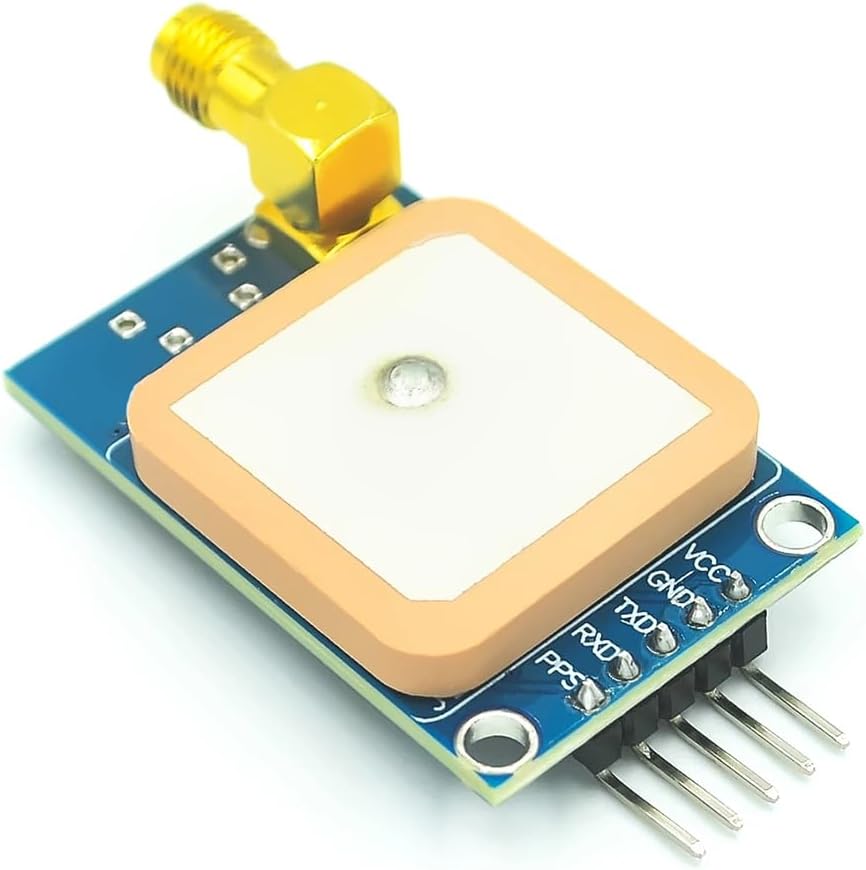
📍 Never lose your way—GPS precision that keeps you ahead!
The HiLetgo NEO-7M GPS Module is a compact, 51-channel satellite positioning device designed for Arduino, STM32, and C51 microcontrollers. Featuring a USB interface for direct PC monitoring, TTL-level serial communication compatible with 3.3V/5V systems, and an SMA port for external antenna upgrades, it delivers versatile and precise GPS tracking in a lightweight 39x25.5mm form factor.
| ASIN | B07X5GVW6Q |
| Best Sellers Rank | #58,832 in Computers ( See Top 100 in Computers ) #764 in Single-Board Computers |
| Item model number | 3-01-1541 |
| Manufacturer | HiLetgo |
| Product Dimensions | 3.9 x 2.55 x 3.9 cm; 15 g |
M**F
Neo 7m is not working even with sma external antenna
I had tried for hours and hours i just received the initial data but it not fixed and couldn't find the satellites. the light is always green. any help from who worked with them?!!
E**S
Para conectarse tarda como mínimo 1 hra
L**I
Il dispositivo funziona, ma solo se collegato ad una antenna esterna. Per cui procuratevi l'antenna (pochi euro anche qui) e mettete in conto di dover saldare il connettore SMA sulla scheda. C'è anche l'antenna ceramica montata direttamente sulla scheda, ma secondo me si sono dimenticati di collegarla: con quella da sola non otterrete mai il fix. Sarebbe da tre stelle per quanto detto sopra, ma ne aggiungo una per il convertitore USB onboard che rende superfluo il convertitore UART-USB indispensabile in molte altre schede.
M**Y
Worked Great. Yes you need to solder the SMA connector on it, and yes, you need an active GPS antenna. I Installed a different SMA connector than the one that was supplied (instead of angle one), installed the ublox driver (GNSS Sensor Device Driver), configured windows 10 to enable gps, and then started windows maps. GPS location worked right off. You can also use a Putty, or something that you can open a terminal serial window on the com port and see the raw GPS data. Everything worked as expected. To test with windows 10, look for the driver and how to configure, google "Connect a GPS/GNSS Receiver for Windows Maps " and this is the info I used. Thank you!
M**A
Great price for the module and it works well and is recognized in U-blox U-center. What should be mentioned though, in order to use the sma connector (external antenna) you need to remove capacitor C2. Otherwise both antennas are connected creating an impedance mismatch (bad reception).
P**D
Update: with this GPS antenna: (https://www.amazon.com/dp/B07R7RC96G?ref=ppx_yo2ov_dt_b_product_details&th=1) it appears to a get a lock almost immediately. Antenna is sitting indoors in a non ideal spot. With the built in antenna it didn't even work outside. So I'm raising my score from 1 to 3.5 stars. I am able to see the messages from the module via an Arduino, but it never gets a lock. I updated the agps data and provided an accurate location to help it warm up and obtain a lock, but it still does not. This is true even standing outside. As others have said I suspect the antenna is hot garbage. For comparison, the Adafruit ultimate GPS gets a lock *in my basement* with a completely cold start, with the built in antenna. The antenna on the Adafruit module is significantly smaller as well. I will try an a different antenna and see if that works. I want to use a u-blox module for my project because it (supposedly) can output frequencies other than 1hz on the PPS pin, eg 1MHz. With 1MHz I can get an ultra accurate 1us time tick directly vs having to interpolate 1pps with the much less accurate Arduino clock.
Trustpilot
4 days ago
2 weeks ago