Desertcart purchases this item on your behalf and handles shipping, customs, and support to Japan.
๐ฎ Capture Every Frame, Stream Like a Pro!
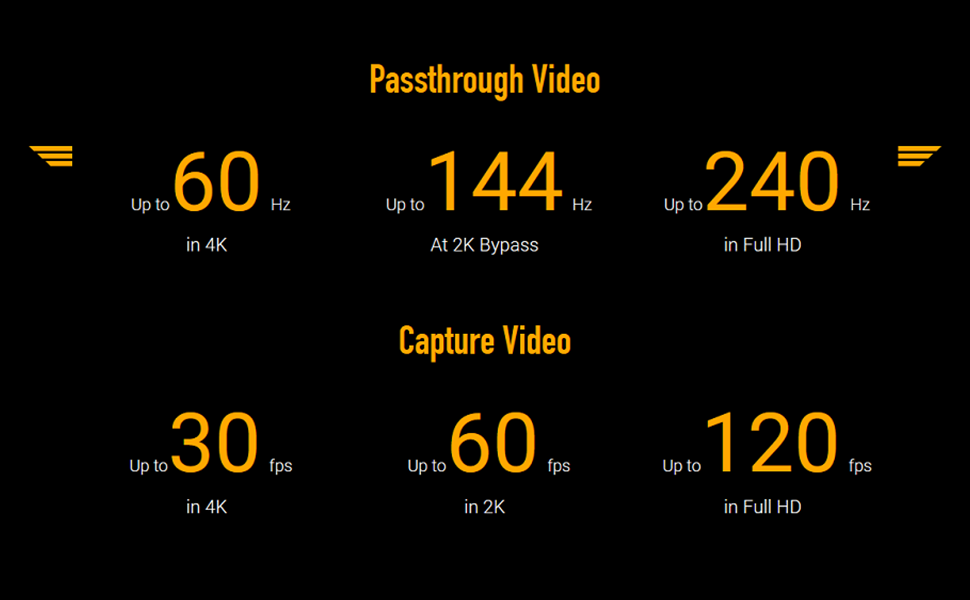
The ASUS TUF Gaming Capture Box CU4K30 is a professional-grade video capture card designed for gamers and streamers. It supports 4K HDR passthrough at 60Hz and records up to 4K at 30fps, 2K at 60fps, and Full HD at 120fps with near-zero latency. Certified for OBS Studio and featuring plug-and-play USB 3.2 Type-C connectivity, it delivers effortless, high-quality streaming and recording for PC and consoles including PS5, Xbox, and Switch. Its durable alloy shell ensures long-lasting performance in a compact form factor.


| ASIN | B096PPYZXV |
| AV Output | H.264, H.265 |
| Antenna Location | Video Recording |
| Best Sellers Rank | #218 in Internal TV Tuner & Video Capture Cards |
| Brand | ASUS |
| Built-In Media | Capture Card |
| Compatible Devices | Gaming Console, Personal Computer |
| Customer Reviews | 4.2 out of 5 stars 288 Reviews |
| Hardware Interface | USB, USB Type C |
| Item Dimensions | 6.4 x 5.5 x 2.5 inches |
| Item Type Name | Gaming Capture Box |
| Item Weight | 423 g |
| Manufacturer | ASUS |
| Mfr Part Number | TUF GAMING CAPTURE BOX-CU4K30 |
| Minimum System Requirements | A device with a USB 3.2 Type-C port, capable of handling the desired resolution and framerate, and meeting the system requirements of OBS Studio. |
| Model Name | TUF GAMING CAPTURE BOX-CU4K30 |
| Model Number | TUF GAMING CAPTURE BOX-CU4K30 |
| Number of Items | 1 |
| Operating System | Windows |
| Other Special Features of the Product | Plug-and-Play UVC, Certified OBS Studio Compatibility |
| Platform | Xbox |
| Recommended Uses For Product | Video Recording |
| Special Feature | Plug-and-Play UVC, Certified OBS Studio Compatibility |
| UPC | 195553150842 |
| Video Capture Resolution | 4 k |
| Warranty Description | 1 Year Warranty |
V**G
User friendly
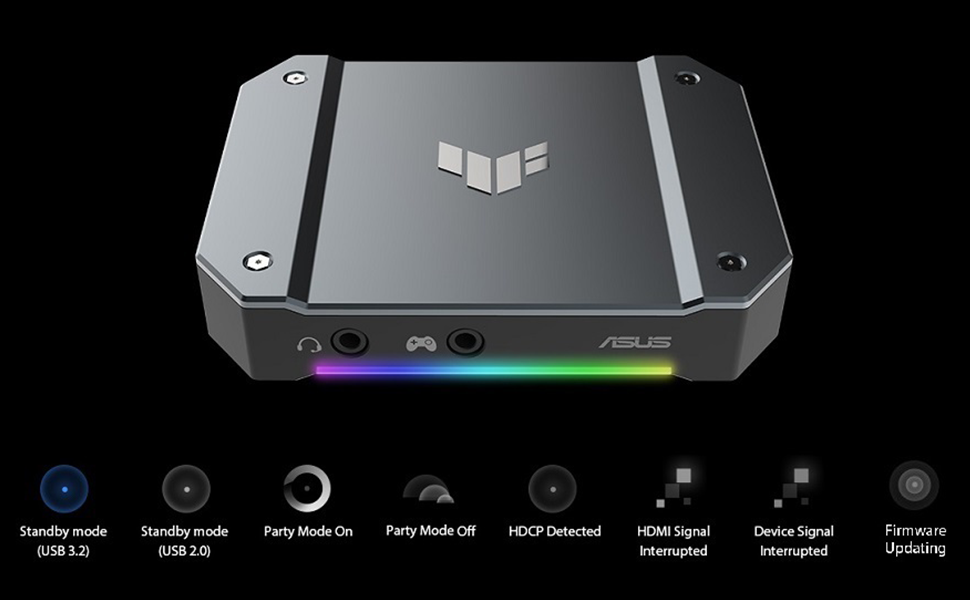
I originally tried an Elgato capture card, which I ended up having to return because it wouldn't read the sound no matter what I did. This card on the other hand is not only beautiful but very easy to troubleshoot and correct when issues occur. First of all, it worked so quickly right out of the box, only took a few minutes to get all the cables in place. The video and sound quality is great. No latency, and the framerate and resolution pass thru with no downgrading as long as your OBS settings are correct (make sure your properties on the capture card in OBS match the resolution and framerate your PS5 is running on) One of the best features of this card that I'd like to point out is the RGB lighting. It doesn't just look pretty, it has a function! If you check the product manual, the color/pattern of the RGB will help you troubleshoot what error the device could be experiencing if it's not working properly. Such a smart idea. And sometimes fixing it when you're unsure is as easy as just unplugging and then plugging it back in or a quick restart, nothing crazy or technical. I've used this for several streams and I love it! Worth the price for the low stress!
C**R
Absolutely AMAZING Capture Box by ASUS.
Hello Amazon! I have been a Twitch Streamer going on 5 years, and I had originally been running a Elgato HD60 Pro. Granted, there is nothing wrong with that, but I must say ASUS stepped up the game! Pros : Firstly, there is not any bloatwear that you have to run the capture box with, OBS picks up this ASUS Capture Box straight up with just plugging it in! No unnecessary slowdowns or stupid programs to run it through! Secondly, the build quality is fantastic! Solid metal casing, making it very durable for transporting if ever needed! Thirdly, I use this for a PS5, and the output is ran through to a 4K MINI-LED 240Hz panel. As I said, I have been streaming for many years, and I can truly say, this is the only capture device I have used that I truly felt ZERO latency! You can do some fine tuning in OBS for sound, toucb, and feel and it is absolutely fantastic!! Fourth, WHO DOESNT LOVE RGN NOWADAY?!?! CONS: The only con I had, was at first the sound was having an issue. The issue was that OBS was playing the sound back a solid 3 seconds late, in the end, it was just a simple click of changing the sound settings in OBS directly and it fixed it 100% For the price, it CANNOT be beat. Extremely well made product, and I would recommend this to ANYONE who content creates, or even just wants a nice way of connecting your console to your computer for a PASSTHROUGH. WELL DONE ASUS! 10/10! Twitch - MustangEd1ts
J**.
ASUS TUF Capture Card _ XBOX SERIESX _1440P 120HZ
This is probably the best external capture card I have owned, instant plug and play, recognized my Xbox Series X and monitor straight away 1440P at 120FPS, no messing with any software, just simply plug it in and your done. Main reason I got this is because I shrunk my stream PC down to an ITX form factor and of course with only one PCIE slot there is no room for the Elgato 4K60 Pro, so the ASUS TUF Gaming Capture Card is perfect. So if you are looking for an external capture card I would recommend the ASUS TUF Gaming Capture Card, no more messing around with the software like I had to every time I powered up the PC with the Elgato. Not a hater of Elgato just the ASUS TUF Gaming Capture Card has made my stream start up less complicated.
D**N
Not perfect, but the best Iโve tried
This is good, but it still intermittently cuts out or I find myself having to plug and unplug everything over and over until it somehow works again
M**N
Useless paperweight
Bought this $200 VCC to go along with my ASUS TUF laptop. Thought I would make it more user friendly. Supposed to be โplug and playโ. Well was I mistaken ! I have now been on the phone with ASUS tech support for weeks now NO HELP. I get an error message when I plug it in โ anomalous device detected call tech supportโ . I have had to buy a cheap VCC because this one is literally useless. Donโt expect any help with this device . Want to gamble $200 ? Buy this card โฆ but as a lifetime ASUS customer I will never buy another one of their products. And I highly recommend you donโt either . This is me tapping out of waisting anymore time and money on this terrible purchase/ company . Word to the wise
M**N
Best portable USB 4k Capture Card
I recently upgraded my streaming PC and it had two Elgato 4k capture cards. My new motherboard with my new CPU only has enough space for 1 Elgato 4k Capture Card. So I needed to look around for a new capture card with 4k capabilities and 1080p 120fps for my next-gen consoles. I found this ASUS capture box and thought I would give it a try! Let me say, I did not know that ASUS made a capture card/box. It got delivered and I got it all plugged up. I was surprised on how easy it was to hook everything up and get it working. This external capture card works just like an internal one that is on your motherboard. No hassle and very user-friendly! I have also been using this capture card/box for my Sony Mirrorless and it does a way better job at keeping my camera smooth and stable, unlike my Elgato Camlink. Really good purchase and don't regret any of it, as long as you don't mind external. Thankfully this capture box is really small. Thank you ASUS, you've made me smile once again!
B**X
Good... when it doesn't freeze...
After trying quite a few different capture cards, I landed on the CU4K30 with ASUS TUF, a brand I support all the time. However, do know that this device is NOT perfect. I wish to be part of the overwhelming group that supports this device, but I have had issues with it not long after purchase. When the device is running, it runs well. Great quality out the box. No setup needed to start streaming. And any changes to the device can be done very easily. This works well with OBS and has not given me any grief in the setup process at all. The issue is 100% a heatsink issue. This device is made of a solid aluminum casing that encloses a heatsink inside. The heatsink will, for the most part, dissipate heat if you are in a cool environment. However, if you plan on streaming for over 3 hours, or live in a moderately warm environment, then expect this device to freeze constantly. It does not dissipate heat well, and you can tell just by feeling the top of it getting uncomfortably warm. This gets rather annoying when you have to constantly stop the ASUS CU4K30 to fix the frozen video. I have already tried reaching out to ASUS support about the device. But it is apparent that this device is not something they are familiar with. I found myself giving the technician more answers on possible solutions, and even after we both agreed on what might fix the issue, there is still no sign of any replacement pieces for this device. Again, I have used many different capture cards and devices. This device has promise, but in its current state I cannot in good conscience recommend it to anyone. It works at advertised out of the box, and lots of videos give a nice 10 minute review of the product. But... give it a few hours, and the real problems will start appearing. Primarily... freezing. How did I fix it? Bought a phone cooler and set it on top of the CU4K30.
J**N
Works for new and old gen game systems!
Step by step: Download Video Capture Console from Asus website. Plug device in and go to update, mine needed a USB firmware update out of box. Done. You need USB 3.0, and it gets warm but nothing major. I'm very happy with this purchase thus far, it's been easy to use and seems very solid with the metal frame. RGB's are a cool effect, they tell you the "status" of the device (red-bad, blue-good, yellow-update). This works for Older devices from PS1-5, Snes, N64, and newer xbox.
R**J
Works well for PCs
Well designed, neat little product.
A**R
Works as intended, very easy to set up.
So first I bought an Elgato HD60S +, but it was dead out of the box. Returned that for this and couldn't be happier! It does everything that the Elgato does (except HDR10 capture) and does them just as well. Not really much to say, you simply hook it up and fire up OBS and it just works. Mine's connected to my TV, PS5, Series X, Switch and high end 2021 Alienware gaming laptop. No problems with anything and allows me to record 4K 30fps or 1080p 60fps gameplay to upload to my YouTube channel.
T**Y
Works great with M1 Macs
I stream from my XBSX through this capture card to an M1 Mac Mini running OBS. The ease of setup, quality of recording and streams is excellent. Iโve had no issues so far.
C**K
simply the best
don't even hesitate when it comes to choosing this over the elgato. easy to connects/setup, no latency and it looks very cool. it gets very hot tho but all capture cards do, so u might need a small laptop cooler pad underneath. 10\10 product!
R**Y
Asus tuf video capture
It is good very expensive
Trustpilot
1 month ago
4 days ago