Desertcart purchases this item on your behalf and handles shipping, customs, and support to Japan.
🔥 Stay cool, perform cooler — the ultimate thermal pad upgrade!
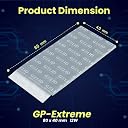
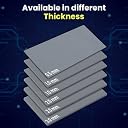
Gelid Solutions GP-Extreme is a premium 12W thermal pad measuring 80x40x1.5mm, engineered for efficient heat conduction and gap filling between heatsinks and electronic components. Its soft, flexible design enables easy, paste-free installation while ensuring long-lasting thermal stability across CPUs, GPUs, SSDs, and more—perfect for professionals and gamers demanding reliable, high-performance cooling.


| Asin | B06WWDT6RC |
| Best Sellers Rank | #4,433 in Computers & Accessories (See Top 100 in Computers & Accessories) #7 in Thermal Pads |
| Brand Name | Gelid Solutions |
| Cooler Heatsink Compatibility | Broad cooler/heatsink compatibility |
| Country Of Origin | USA |
| Customer Reviews | 4.1 4.1 out of 5 stars (3,353) 4.1 out of 5 stars |
| Importer Contact Information | XPGX QUIRGO PRIVATE LIMITED NO 11, DIAGONAL ROAD 3RD BLOCK, JAYANAGAR BANGALORE SOUTH JAYANGAR III BLOCK BANGALORE-560011 KARNATAKA |
| Included Components | Therma pad |
| Item Dimensions L X W X H | 8L x 4.1W x 1.5H Centimeters |
| Item Type Name | Thermal pad |
| Item Weight | 1 Grams |
| Manufacturer | Gelid Solutions, Gelid Solutions Ltd. Unit 602, 6/F, Tower A, Southmark, 11 Yip Hing Street, Wong Chuk Hang. Aberdeen, Hong Kong |
| Manufacturer Contact Information | Gelid Solutions Ltd. Unit 602, 6/F, Tower A, Southmark, 11 Yip Hing Street, Wong Chuk Hang. Aberdeen, Hong Kong |
| Model Number | 80x40x1.5 |
| Mounting Type | Panel Mount |
| Number Of Items | 1 |
| Packer Contact Information | XPGX QUIRGO PRIVATE LIMITED NO 11, DIAGONAL ROAD 3RD BLOCK, JAYANAGAR BANGALORE SOUTH JAYANGAR III BLOCK BANGALORE-560011 KARNATAKA |
| Part Number | TP-GP01-C |
User
Good thermal pad, but 0.5mm is difficult to work with
The Gelid Solutions GP-Extreme 12W thermal pad is a good-quality thermal pad and works well for small components around the motherboard.However, the 0.5mm thickness is extremely thin, so applying it can be a little difficult. It is also important to make sure you have proper contact between the component and the heatsink. In my case, the contact area was not as good as I expected because of the very thin pad.If your heatsink and components have enough clearance, I would recommend checking whether 2mm or 2.5mm is the correct thickness for your particular application. Make sure to measure the required thickness first, though, because using a pad that is too thick can prevent the heatsink from making proper contact with the CPU/GPU.One important point: I used this type of thermal pad for MOSFETs, diodes, capacitors and other components, not for the CPU/GPU die or VRAM. For those areas, use the appropriate thermal interface material.Overall, the pad itself is good quality and performs well. My main complaint is simply that 0.5mm is difficult to handle and may not provide enough thickness/contact for some heatsink designs.Good product, but choose the thickness carefully for your application.
User
Best for Macbook Air mod.
Used it for cooling my M5 MacBook Air 15 properly. The thermal pad mod on MacBook Air basically removes all the throttling the laptop has for being fanless. Using a thermal pad like this means trendsetting 60-80% more heat to the lower chassis than the original design.I was averaging out at 65degC before the mod. After the mod, the temps dropped down to ~42-45degC. That's a big jump.Although, the heat collects on the bottom of the laptop. If not moved properly, this heat might reach your fingers and the screen in no time.So I added a mini fan for heat convection. Hoteon table fan. This fan moves Air fast enough the CPU now stays at 33-35degC sustained. Benchmarks put my M5 Air's performance a slightly above M5 Macbook Pro performance now.Again, amazing thermal pad for MacBook Air. Gets the job done as advertised.
User
Decent, just make sure you order the correct thickness.
Using it to cool the VRMs on my GPU. Working well so far, more than a year into their use. Pad is pretty large too, so it'll last me for a while and for multiple devices in the future.
User
Excellent thermal pad, value for money, better than pastes
This is an excellent product and does what it says. I am running my raspberry pi 3b in the armor case. With stock thermal pads, my pi overheated in around 20 seconds while running the cpuburn test (temp > 85 degrees). Switched to Gelid pads and ran the test continuously for 40 minutes and the max temperature my pi reached was 65 degrees!I bought all the three variants, i.e., 1.5 mm, 2 mm and 3 mm for my future needs, though for raspberry pi 3b with armor case, 1.5 mm and 2 mm are sufficient. It is helpful to sand the thermal contact points of the armor case to remove the black paint it comes with.This pad is better than some of the commonly available thermal pastes, so go for it with eyes closed.
User
Refurbish
already cut sticker, first, I thought it’s used so many dust particle inside the packet. It’s very bad.
User
Massive GPU Upgrade – 20°C Cooler & 20+ FPS Boost!
My GPU, which used to run at 90°C, now runs 20°C cooler after pairing it with MX-6 thermal paste — love the product! I’m also getting 20+ more FPS in every game
User
Always buy in pair
I have a 5 yr old 1080ti, never opened it and it always ran under 75c.Then I decided I'd clean it and put some new paste + thermal pads just for the sake of it and even though it had a slim (1.0mm) white thermal pad which was worn out on many places, it still worked fine.Then I ordered, 1 of these 1.5mm ones since people had good experiences cooling even 3080FE and boy was I dumbfounded when I applied it. The 1000 series doesn't have memory temperature sensors, or at-least mine doesn't but they are running super hot, probably 80c on idle. Can't even game without GPU overheating and crashing the pc. Temps are reported 60c on idle and that is in ambient room temperature of 20c, in games they quickly rise to 85c. I triple checked the application and even put in more thermal paste the main gpu die, the same paste on the CPU reduced temps by 15c after a decent OC. I ran the GPU to its limit then checked for temperature and it looks like the MOSFETs are the hottest, which I wasn't able to envelop completely with the thermal pad.I wouldn't say this doesn't work, it does but 1.5mm and only 1 of these is a bad idea. Always order 2 and more thickness (+ a little more price, for me it was 2x) is a lot better than a dead GPU.
User
Does the job exactly as advertised.
Performs exactly as advertised, no mislabeling nonsense, and it genuinely works. Brought my RTX 3080 hotspot temps from 100°C down to ~65°C.I was thrilled with it in 2021, kicked myself for cheaping out on dodgy pads earlier this year, and had to buy the proper ones again before 2025 was over."
User
Impeccable.
Simplement parfait,Facile a poser et hyper efficace.Je l’ai utilisé sur ma carte graphique rx6800XT, en utilisation très intensive je suis passé de 110° à 80° en temperatures maximales
User
Super
Funktioniert
User
Sehr gute Wärmeleitpads – deutliche Verbesserung der Temperaturen
Ich habe diese Gelid Solutions GP-Extreme 2,0 mm zusammen mit der Gelid Solutions GC-Extreme Wärmeleitpaste bei meiner etwa 6 Jahre alten ASUS Dual RTX 2070 Super EVO OC verwendet.Vor der Wartung erreichte die GPU unter Last etwa 80 °C und die Hotspot-Temperatur bis zu 106 °C. Nach dem Austausch von Wärmeleitpads und Wärmeleitpaste liegt die GPU unter Last bei maximal ca. 73 °C und der Hotspot bei ca. 86 °C.Besonders erfreulich ist die deutlich geringere Differenz zwischen GPU- und Hotspot-Temperatur. Die Pads lassen sich gut verarbeiten und machen einen hochwertigen Eindruck.Für mich hat sich der Austausch bei der älteren Grafikkarte definitiv gelohnt.
User
Original
Original
User
Great Purchase
arrived as advertised, no issues at all
Trustpilot
1 month ago
2 months ago