Buy anything from 5,000+ international stores. One checkout price. No surprise fees. Join 2M+ shoppers on Desertcart.
Desertcart purchases this item on your behalf and handles shipping, customs, and support to Japan.
๐ Upgrade your Ender-3 V2 with zero hassleโconnect smart, print smarter!
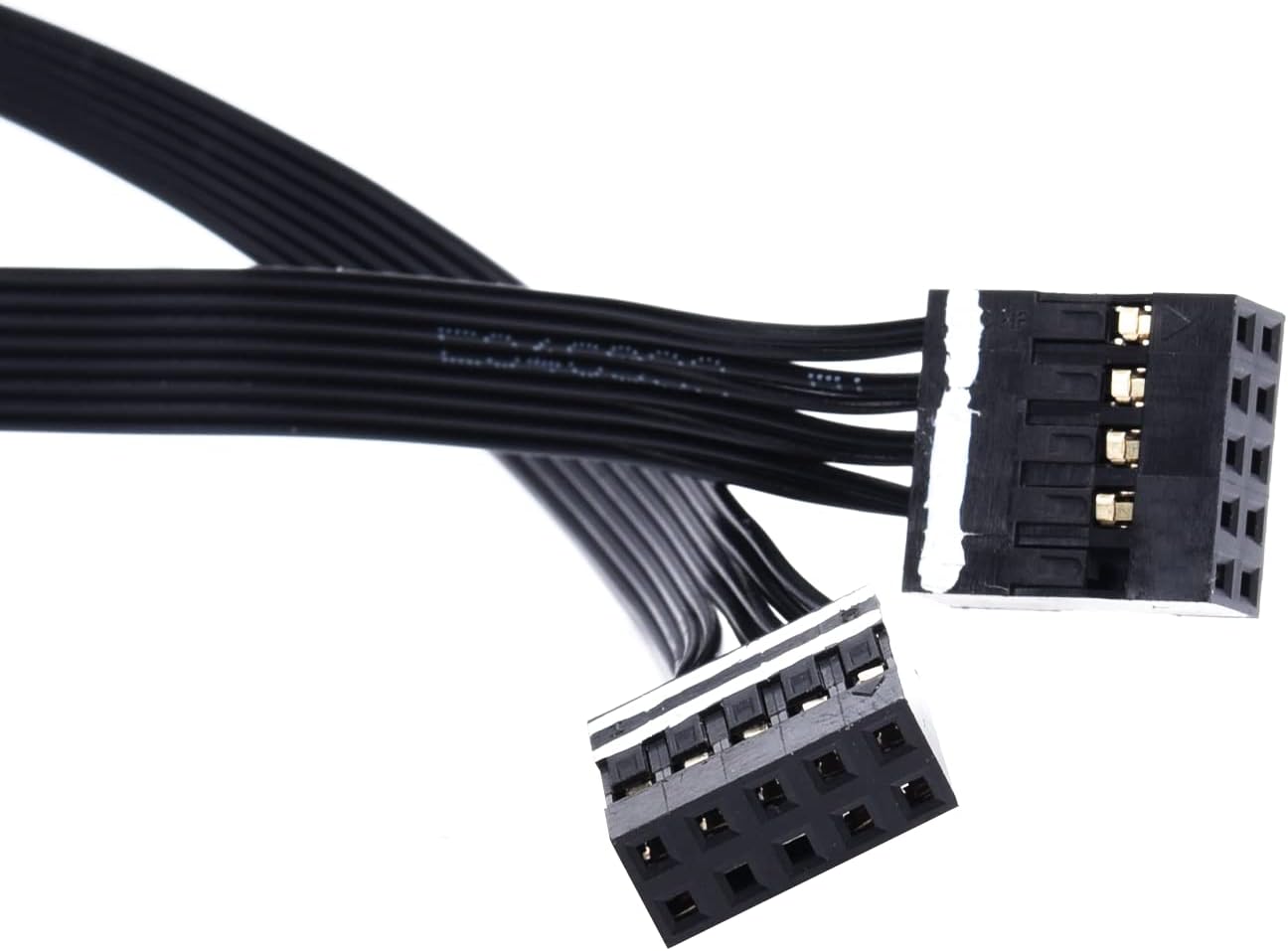
The BIGTREETECH Interface Cable is a precision-engineered accessory designed to seamlessly connect SKR Mini E3 V2.0 & V3.0 control boards with the Ender-3 V2 screen. Featuring clear directional markings for error-free installation and supporting 24V power systems, this ultra-lightweight cable ensures your 3D printer upgrade is smooth, reliable, and ready to perform.


| ASIN | B092JBHDYC |
| Brand | BIGTREETECH |
| Brand Name | BIGTREETECH |
| Color | Black |
| Customer Reviews | 3.9 out of 5 stars 98 Reviews |
| Display Type | LCD |
| Included Components | Cable For Ender-3 V2 Screen |
| Manufacturer | BIGTREETECH |
| Model | KINGPRINTER-ZZB000534 |
| Number of Packs | 1 |
| Part Number | KINGPRINTER-ZZB000534 |
| Smart Home Compatibility | Not Smart Home Compatible |
| Unit Count | 1.0 Count |
| Voltage | 24 Volts |
S**K
Worked as described!
Seeing reviews of it not working- if you orient it correctly it works! If itโs backwards it wonโt power on, if itโs upside down (white mark on bottom of pins) it wonโt work. Just connect it correctly and it will work! This was just what i needed! Worked with 0 issues
M**Y
Upgraded your Ender 3โs main board? You probably need this.
Solved all my problems with the Ender 3 v2 screen rotary control knob not working after upgrading the main board to a BTT SKR Mini 3.
T**N
Interface Cable Too Short
This review is for the BIGTREETECH Interface Cable (SKR Mini E3 V3 to Ender-3 v2 LCD) I purchased the SKR Mini E3 V3 when it first came out and love it. However, the LCD that comes with the Ender-3 v2 does not work with this board using the standard video cable. Fortunately I had a generic 12864 LCD which worked well. I recently found the BIGTREETECH Interface Cable on Amazon and ordered it so that I could return to using the E3 v2 LCD. Unfortunately, the cable is just too short. The original cable is about 50 cm and the cable that was shipped is around 30 cm. Additionally, the plugs on each end are not the same as the original in that they don't use a notch, which means you can inadvertently insert the cable backward. This fact is discussed in the product description on Amazon, but there are no instructions included with the product. I was able to confirm that the cable works by squishing it between the controller box and the controller box cover, and by removing the tool drawer that comes with the E3 v2. I upgraded my Ender-3 v2 by using several BIGTREETECH products and have been happy up to now, but this is disappointing.
D**G
Screen still didn't work
It's a good product but my screen still didn't work and my SKR about set my printer on fire everything's hooked up perfectly I triple checked everything and I was trying to put firmware on it I'll let it suck for a couple minutes on but my screen was still off and smoke started shooting out of the nozzle the SKR Mini e33.0 is now on the Shelf and I'm running my 4.2.2 board again.
A**S
Mainly purchased for noise level
Works as I planned, saw a review on the board and purchased it to quiet down my printer. It works great, was very simple to setup, just remember to label the wiring before removing the stock board. Mine came with the latest firmware update which was awesome, I recommend you check in your settings. This also ass the the option to add a new touch screen which is neat, but I wont go that route yet.
M**E
Easy swap, motors are much quieter.
Bought this when I was looking to hush the motors a bit, had dampeners ordered but figured this would be a better option since I will be upgrading more later. This gives me a better platform to continue making upgrades. Swap was simple, just read and follow directions.
M**E
X STOPPER NOT FUNCTIONAL - FIRMWARE FLASHING FUNCTION NOT WORKING
I am happy to remove this rating if someone can help me get my unit working. With the built in firmware, I had the unit installed and it appeared functional from the menu screen on my Ender 3 v2. Upon using the auto home feature, the extrusion bus moved to touch the X stopper, and began grinding against it loudly. The x stopping cable is plugged into the motherboard and the stopping switch. So I attempted to update the firmware, and now no matter what I try- including multiple variations of the firmware.bin file sometimes renamed to different file names, I am hit with the blue screen of death. I would appreciate some assistance. Otherwise, this motherboard appears to be fundamentally flawed. I'm still not sure if the x stopper will even work once the firmware starts functioning if it even can.
I**H
Board works perfect and quietly
Used it to run klipper and it was working amazing until I tripped on the cable and ripped the usb connector off the board
C**N
No incluye placa
Es un simple cable con costo superior a la placa. Y ese cuesta menos del 10% des costo publicado
D**.
Works perfectly on my Ender3v2
This cable worked perfectly on my Ender3v2 with BTT SKR Mini V3 mainboard. The original v4.3.1 mainboard by Creality was the one they created during the pandemic. Due to the chip shortages, they used low quality stepper drivers and it was incredibly loud. Now with the new BTT SKR Mini V3 mainboard it's silent.
Trustpilot
1 month ago
2 weeks ago