Desertcart purchases this item on your behalf and handles shipping, customs, and support to Japan.
⚡ Elevate your workspace with dual 4K or 8K power — future-proof your visuals today!
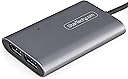
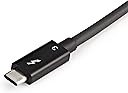
The StarTech Thunderbolt to Dual DisplayPort 1.4 Adapter delivers ultra-high-speed 40Gbps Thunderbolt 3 connectivity, enabling dual 4K 60Hz or single 8K 30Hz HDR displays. Compatible across Windows, macOS, and Ubuntu, it features a driverless setup and a built-in 18-inch cable for flexible workstation arrangements. Perfect for professionals demanding crisp, vibrant visuals and seamless multi-monitor productivity.


| Asin | B08KFMBQ21 |
| Best Sellers Rank | #2,430 in Audio & Video Connectors & Adapters |
| Brand | StarTech.com |
| Color | Silver |
| Compatible Devices | Monitor |
| Connector Type | DisplayPort/Thunderbolt 3 |
| Customer Reviews | 4.2 4.2 out of 5 stars (80) 4.2 out of 5 stars |
| Finish | Carbon |
| Global Trade Identification Number | 00065030888752 |
| Item Dimensions | 3.9 x 2.5 x 0.6 inches |
| Item Type Name | A/V Adapter |
| Item Weight | 4.8 ounces |
| Manufacturer | StarTech.com |
| Mfr Part Number | TB32DP14 |
| Model Number | TB32DP14 |
| Number Of Items | 1 |
| Number Of Ports | 3 |
| Package Quantity | 1 |
| Power Plug Type | No Plug |
| Specific Uses For Product | Monitor |
| Unit Count | 1 Count |
| Upc | 065030888752 |
| Warranty Description | 3-Year |
| Warranty Type | Extended |
User
Great product!
This is a great product! It works perfectly for me. I have a MacBook Pro with two external monitors connected via Display Port. I just connected everything up, and with no further action my monitors were running.
User
The only one that worked for HP 5K on Mac M1
Spent a lot of time trying to get a stupid HP z27 5K dual DisplayPort MST display to connect to a Mac M1. MacBook Pro M1 Pro actually, but prepping it for the arrival of a Mac Studio this week. I almost gave up after connecting both display port cables to an expensive thunderbolt dock, directly, to separate thunderbolt ports etc. none of this worked. The reason is because the monitor needs to be tricking the Mac into showing as one display. The dock had each display port port actually route to a separate thunderbolt port as it had 2 outs to 2 ports on left side of Mac. And the 3rd port was separate again intending to be plugged into right hand side thunderbolt. So this device has the 2 ports route to a single thunderbolt. And it did the trick. Not sure if my other hacks helped, as I did play with Display Overrides and plist preferences. I have mainly used hackintoshes for last 10 years if serious work at my desk and this was easy to fix there (have a boot flag with whatevergreen and lilu kexts) but on a real Mac this was only solution. So bottom line, get this if you have a bratty display. Not this did not fix my other MST single display port cable display, an Asus PQ321. This only appeared as a 1080p display. So I’m keeping this one on a hackintosh. There might be a solution but it’s not this adapter.
User
Love this Thunderbolt adapter
Love this adapter. I'm using it on a Mac Book Air. I'm able to output to dual 4K monitors via DisplayPort. I actually have it outputing to a KVM. I have a 32" main monitor and 27" secondary monitor. I use the Mac for work, the KVM shares with a Windows PC I use for gaming and photo editing, etc. This adapter maintains all the settings (scaled resolution, etc). All apps stay positioned correctly between the two monitors.
User
Didn’t Work and Overpriced (Zero Stars)
Didn’t work at all with my Microsoft Surface Book 2 or HP ZBook Firefly. Found a cheaper one with a single DisplayPort output from CableMatters that works great for less than $20.
User
Works perfectly with Razer Blade 17
After purchasing a 2022 Razer Blade 17 with dual Thunderbolt 4 ports, I wanted to find a way to drive a 4K/160Hz LG monitor via DisplayPort without relying on USB. Most DisplayPort adapters utilizing a USB-C connector are "Thunderbolt compatible", meaning they'll work with a USB/Thunderbolt port, but aren't actually Thunderbolt devices. The StarTech Thunderbolt 3 adapter is a welcome exception.Immediately after switching from a passive USB-C DisplayPort adapter to the StarTech Thunderbolt 3 adapter, I noticed the CPU load decreased significantly when playing 4K/60Hz HDR videos on YouTube. Playing video games, such as ARK: Survival Evolved, in 4K HDR also seemed to tax the CPU and NVIDIA RTX 3080 Ti video card a bit less.Overall, I am extremely satisfied with this *true* Thunderbolt to DisplayPort adapter.
User
Was working great for 2 years and 3 months, and then the signal starts to break
Very compact and solidly constructed and I really loved it.However after 2 years and 3 months, starting yesterday, it starts to transmit signals unstably. I had been connecting it to my M1 pro Macbook Pro and my Dell UP2715K 5K monitor and the symptom now is that the right side of the screen is blinking and after a while the whole screen would turn black. When I connect both DP cables to the graphics card on my PC, the signal is quite stable. When I connect the adapter to another M1 Pro Macbook Pro, the same symptom shows up. After I get a new adapter, the issue is not present with that adapter. So now clearly there is something wrong with this adapter.Since they offer a 3 year warranty, I just submitted a warranty request and will see whether they will help fix it.
User
Used this for x3 monitors on MBP
I was able to use this to connect x2 monitors (one at 164Hz, one at 60Hz) to the thunderbolt 3 connection on my MBP15 inch. I used the other TB3 outlet to run a DP 1.4 cable to another monitor that outputs 164Hz. Would not be able to achieve this setup at this price with any other hardware on the market. Strongly rec
User
too expensive, doesn't have power passthrough, otherwise works great.
I would like to see a newer version that does power passthrough and adds a single USB 3.0.This would be great and would be a single use professional dock for use with a KVM and pro desk setup.
User
Justo lo que necesitaba
Quería montarme un set up con mi MacBook M4 conectándolo a dos pantallas externas pero utilizando únicamente un USB C, si eso es lo que estas buscando este es el producto perfecto! Una de las pantallas en 4K y la otra es full hd y todo funciona a las mil maravillas, sin duda lo recomiendo.
User
Mac and Windows support
Works as multiple display for both Mac( tested on m1 and m4 chips) and Windows on a DELL laptop
User
Works perfect with MacBook Pro M1 Pro and Anker 777 Dock
After moving to DisplayPort KVM switch Tesmart DKS202-M24 my old docking station Anker 777 stopped working (since it has HDMI ports and converting HDMI to DisplayPort is a very tricky process). But thankfully it has a passthrough Thunderbolt port so I decided to buy this adapter in order to connect my 2 DisplayPort screens to thin KVM Switch (and docking station and MacBook M1 Pro as well).Turns out it works pretty well, screens work flawlessly, DDC/CI, VRR and 144hz on 1440p screens, everything is supported. Adapter is quite warm, but not overheating at all. Helps organising wiring on a desk, since you can hide this dock beneath the table and put thick DisplayPort cables in it, so the only wire you'll have on a desk is a small USB Type-C.Wrote this review since there were lots of reviews regarding this adapter itself, but 0 regarding connecting this adapter to docking station (which already has 2xHDMI on board).
User
Ne fonctionne pas en dual
Mac mini M1 2020.Branché sur le port Thunderbolt du Mac.1 seul écran LG prise DP 1.4 avec cable DisplayPort 1.4 (8K@60Hz 4K@60Hz) > fonctionne1 seul écran Dell prise DP 1.4 cable DisplayPort 1.4 (8K@60Hz 4K@60Hz) > fonctionneAvec les 2 écrans branchés sur les 2 prises > ne fonctionne pas.C'est le but du produit donc pour l'instant insatisfait.
User
Just works!
After struggling with numerous setups this worked like a charm! Super satisfied with this product, wish I had discovered it earlier, would have saves me the headaches. Just plugged in and it worked! Highly recommend it.
Trustpilot
1 month ago
2 months ago