Desertcart purchases this item on your behalf and handles shipping, customs, and support to Japan.
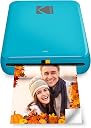
📸 Snap, Print, Stick — Memories Made Instant!
The KODAK Step Instant Photo Printer is a compact, Bluetooth and NFC-enabled device that prints vibrant 2x3” color photos using ZINK zero-ink technology. It pairs with iOS and Android devices, offering a full editing suite via the KODAK app for personalized prints. Lightweight and portable, it features a rechargeable battery capable of 25 prints per charge, producing durable, peel-and-stick photos resistant to moisture, rips, and smudges.


| ASIN | B08YFKSWWD |
| Additional Printer Functions | Print Only |
| B&W Pages per Minute | 1 pages_per_minute |
| Best Sellers Rank | #1,104 in Electronics ( See Top 100 in Electronics ) #5 in Portable Photo Printers |
| Brand | KODAK |
| Built-In Media | Printer and accessories |
| Color | Blue |
| Color Depth | 24 bpp |
| Color Pages per Minute | 1 pages_per_minute |
| Compatible Devices | Smartphones |
| Connectivity Technology | Bluetooth, NFC |
| Control Method | App |
| Controller Type | Android,iOS |
| Customer Reviews | 4.4 out of 5 stars 20,541 Reviews |
| Duplex | Simplex |
| Global Trade Identification Number | 00843812154406 |
| Hardware Interface | Bluetooth |
| Initial Page Print Time | 45 seconds |
| Ink Color | White, Black, Blue, Pink |
| Item Dimensions D x W x H | 1"D x 3"W x 5"H |
| Item Type Name | Kodak Step Instant Photo Printer |
| Item Weight | 0.07 kg |
| Manufacturer | C&A Marketing Inc. |
| Maximum Copy Resolution Black and White | 300 dpi |
| Maximum Copy Resolution Color | 300 dpi |
| Maximum Copy Speed Black and White | 1 pages_per_minute |
| Maximum Media Size | 2x3 |
| Maximum Print Resolution Black and White | 300 dpi |
| Maximum Sheet Capacity | 10 |
| Maximum print Resolution Color | 300 dpi |
| Model Name | Kodak Step Instant Photo Printer |
| Model Number | RODMP20AMZBL |
| Model Series | Step |
| Number of Trays | 1 |
| Other Special Features of the Product | Portable |
| Output sheet capacity | 10 |
| Paper Size | 2x3 |
| Print media | Glossy photo paper |
| Printer Connectivity Type | Bluetooth, NFC |
| Printer Output Type | Color |
| Printer Type | Zink Technology |
| Printing Technology | Zink Technology |
| Processor Count | 1 |
| Resolution | 300 x 300 |
| Scanner Type | Photo,Portable |
| Series Number | 20 |
| Special Feature | Portable |
| Specific Uses For Product | Instant Printer |
| UPC | 843812154406 |
| Warranty Description | 1 year limited warranty |
| Warranty Type | limited warranty |
| Wattage | 7.4 watts |
R**N
Easy printing!
The Kodak Instant Printer is a great little printer for anyone who loves having physical photos . It connects easily to my phone, and the prints come out clear and colorful. I like how portable it is, making it easy to print pictures anytime and anywhere. Even my child can print her own photos with it. Definitely worth it for preserving special memories and being able to print anytime! The only downside is that the pictures are one size and small, it would be awesome if you could choose the size.
M**A
Print and done
Perfect pocket size. Great for quick fun photos. Color quality is old school camera print style. It’s not today’s digital print quality but overall pretty good. Love that ink cartridges are not needed. Also prints pretty quickly and completely on the entire page.
L**H
Love but glitchy sometimes
I actually love this little printer. It’s easy use and travel with and the photo quality is actually pretty great. PROS: App is pretty cool, you can edit the photos and add frames if you want but another element to the photos. Small and easy to use. Perfect for scrapbooking, photos are about the size of a Polaroid picture, but a little smaller You can print off duplicates unlike a Polaroid CONS App can be glitchy sometimes. When I try to print a photo it just backs out and sometimes won’t let me print a photo at all unless I screenshot the picture and try again. It’s super weird.. Only comes with 5 photos to start with, and you need to buy more. With all of that being said, if you’re thinking about it, get it. It’s a great price, and fun to keep and share memories.
B**H
A fun little printer
I bought this so I could print pictures of our campsites through the year. I didn't need anything fancy and a 2x3 little retro style print seemed like fun. I wasn't wrong, they're pretty fun. I have dropped this printer on concrete on accident and it's still working, scratches and all. I guess that's a testament to the build quality. I wouldn't recommend doing that, but at least it didn't die. I'm a bit annoyed by the whole proprietary paper for a printer that uses the Zink standard. Maybe it's just a calibration thing but it's still pretty dumb. I'm getting tired of all these consumer products that find ways to screw the users out of functionality in the name of profit. I did discover that the Zink branded paper is often cheaper on Amazon than the Kodak co-branded Zink paper so if you happen to find a cheaper alternative, here's a possible way to make it work: use the Kodak calibration sheet with the off-brand paper. I tried Zink branded paper thinking it would work considering the Kodak paper is clearly the exact same thing but I was wrong. The printer threw an error about not recognizing the paper and while it still would print, the colors were pinkish. On a whim I took the rest of my non-Kodak paper and put it into the printer with the Kodak calibration sheet and sure enough, it works fine now. So all you need to do is keep a Kodak specific calibration sheet handy and you should be able to use another brand's Zink paper. Obviously I do not have any proof this works other than my own experience so try this at your own risk! But it worked for me and I didn't have to toss out the 30 sheets of Zink paper I bought. Back to the printer, I've printed off a bunch of pics of our dogs for my wife and she loves them. They're grainy, tiny, not great quality but that's part of the appeal. It's a lot of fun to use and I'm glad I bought it.
F**S
Ease of use and carry with you
Easy to connect with iPhone 17 Pro Max and the app is easy to navigate (compatible). It can print 10 pics in one round. Colors are gorgeous, it makes almost no noise The size is perfect and fits in my handbag and is readily available to print on the go
J**E
Won't even connect... (UPDATED)
I use the Android Galaxy 23+ Ultra and for some reason the device just doesn't wanna budge regarding bluetooth. I did all the steps they applied and it just won't work. I also seen somewhere that a user that was using the 22 had the same dilemma so if you want to use this device- i recommend probably having a device that'd out of date(?) I'm not sure. Nonetheless I'm sending this back. I love the idea of it but it just doesn't wanna work for me at all. UPDATE I was about to thrift this item considering it wouldn't connect. Maybe someone else would have better luck than me. But coming to find out, one of the workers figured out that it was just the wrong app i downloaded. The photos came out good- almost like a polaroid feel to them so that's a plus. Its perfect for anyone who wants to fit their photos into their wallets. I apologize Kodak for my mistake. You deserve 5 stars after my hiccup. I am sorry for leaving a bad review. Thank you for such an amazing, small, convenient and cute device.
P**P
Great for casual journaling
I ADORE my little picture machine. I just need it to add pics to my journal, and it's so much easier than having to go to Walgreens or something. The quality is about what you would expect from a small and relatively inexpensive printer but I'm not looking to hang gallery art here, it's more than good enough for journaling. I had a blast and used up all fifty of the extra papers I got on the first day. I have noticed that the color tends to lean toward pink by default, but if I take a second to edit the color values of a picture to be a bit blue-ish before printing then I can get the original photo color pretty accurate. After the first ten there came a bit of streaking but it went away. Anyway, highly recommend. It's easy to use and just what I need for daily, informal pictures.
B**N
Broken after a month, Kodak will offer no solution.
Update: Do not buy! When this product breaks, Kodak will do nothing about it. When I contacted them, their only suggestion was for me to purchase more paper to try and follow the same cleaning procedures I had already done, which was how I used up the last of the paper I already had for it. Basically, I told them my product was broken and did not work, to which they suggested I GIVE THEM MORE MONEY to buy accessories for a product that is broken and does not work. Uhm, no thanks? And now that I'm directly asking for a refund, they will not respond to any of my messages. As far as I'm concerned, this product is a scam. Kodak has scammed me, then tried to scam more money from me on top of that, and their customer service is terrible. Do not buy this. Also, on further research while trying to fix this broken hunk of junk, I discovered that the zinc paper photos apparently fade extremely quickly compared to other photo options. So it was never a good option to use in my journal anyway. Great. Original review below. I loved this when I first got it. The tiny photos printed on sticker paper were exactly what I was looking for to use with my journal, and it was great fun being able to add memories to it with such ease, sent right from my phone to the printer. Everything was perfect. Then suddenly after about a month, it just kind of stopped working? It constantly reads as out of being out of paper, despite having plenty. Adding more or less paper doesn't help. Gently flexing the paper to ensure that it is flat doesn't help. I followed the instructions from Kodak's support page to clean the roller inside, which basically involves wasting a sheet of Zinc paper, uncovering half the sticky on it, and running it through so the sticky side can pull dust and debris off. Having only had the device around a month and keeping it in a case when not in use, there wasn't much debris to clean out, and it was a waste of time and paper that solved nothing. I can sometimes get the printer to work if I hold it upright at a bit of an angle, so that the paper ejects out the bottom. Obviously not ideal, or the way it's intended to work. And it also does nothing to help the streaks the printer is now leaving on my photos, which aren't present in the original images. Either a single or white line, or many, as if it just didn't print in those spots. I've used up all the paper I had for it, a lot of it while trying to sort out the sudden issues with the device, and am now faced with buying more expensive paper for a printer that may or may not work, and now works badly when it does print. I have contacted Kodak's support, and will update if a resolution is reached. I absolutely do not recommend this product, as it went from perfect to essentially useless in a month.
C**E
Easy to set up and very nice quality
Brought this for my 12 year old daughter to start journaling and what a fantastic product. Easy to set up with the app and the print quality was far better than I expected from other reviews. Does the job perfectly. Super happy with this, it only arrived a couple of hours ago but it’s already printed about 20 pictures and they look fab! Would recommend!
E**C
Photoprinter met de beste afdruk!
Een fotoprinter waar je fotootjes mee afdrukt (paspoortformaat) Kan je bewaren en bekijken bv in je portefuille . Je installeert gewoon de app kodak step , en je laad snel op met de bijgeleverde oplader .Alles in kleur met het beste resultaat!Een printer om U tegen te zeggen! Fantastish!
M**A
Love IT❣
my daugther loves it ❣👍 but the film is a Little bit pricey 🥲
E**.
Easy to use, picture quality not brilliant but perfectly fine
Easy to use and connect to mobile app. It’s about the same size as a small portable hard-drive, and lightweight. Picture quality is great, not brilliant but perfectly fine for a relatively cheap mini photo printer. If you’re looking for something that prints top quality photographs, then a printer that uses non-zinc paper, like ones made by Canon would be better, though they are pricier. To place the photo paper in: Slide back off the printer and place the paper in with the blue calibration card first facing down and then the photo paper on top (back facing down - ie. plain white side facing up) App is downloadable on the AppStore using the QR code found in the quick start guide. There are several other Kodak apps, so make sure it’s the Kodak Step Prints app. NB: if you don’t have the QR code to hand, then simply connect to the printer via Bluetooth via your mobile settings (press and hold power button on the side of printer until white light shows) and it will take you to the AppStore link. Charges via USB, but no plug adapter is included, so will either need to plug directly into a USB charge socket, or use any other plug adapter (phone, camera etc) that has a USB port. Can’t speak for Android, but have had no problems connecting to the app using iOS. There size of the photos are 2x3, so may need to edit photos, but can do so easily in the app which has a useful indicator of what will be printed. There are other editing tools within the app and the ability to add borders too. Also included with the pack are five sticky borders that you can stick onto the photo. Very pleased with this so far! Only downside is that there are only five photos sheets included so will need to purchase more! Edited to add more info: Still going strong several months later - occasionally a thin line will appear on the prints. If this happens, just recalibrate the device with the calibration card. Also, the printer will take any 2x3 zinc paper so it doesn’t have to be the Kodak stuff. Only thing to note here is that you’ll need to keep the original blue Kodak calibration card as the other cards (i.e. Canon do not work).
İ**R
Kullanışlı
Ürün İzmir’e 1 haftada teslim edildi. DHL Express ile geldi, gümrükte 2 3 gün kadar bekledi ve %30 vergi ödemem gerekti. Benzer ürünler burada çok daha pahalı, vergi ile birlikte bile daha uygun oldu. İçinden 5 tane fotoğraf kağıdı çıkıyor. Telefona indirilen uygulaması ile fotoğraflar editlenerek baskı alınabiliyor, güzel ve kullanışlı.
Trustpilot
3 weeks ago
5 days ago