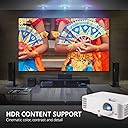
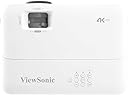
๐ฌ Elevate your space with 4K brilliance and game-changing speed!
The ViewSonic CPB701-4K is a high-performance 4K UHD lamp projector boasting 3500 ANSI lumens brightness, a massive 300-inch display capability, and ultra-fast 240Hz refresh rate with 4.2ms response time. Designed for both cinematic viewing and competitive gaming, it features a long-lasting 20,000-hour lamp life, dual HDMI ports, and a built-in 10W speaker for an all-in-one immersive experience. Its plug-and-play setup and advanced keystone adjustments make it ideal for professionals and enthusiasts seeking premium visuals and convenience.


| ASIN | B08L9SM2DK |
| Antenna Location | Gaming |
| Best Sellers Rank | #1,681,072 in Electronics ( See Top 100 in Electronics ) #2,048 in Home Cinema Projectors |
| Box Contents | Projector, Power Cord, Remote Control, Quick Start Guide |
| Brand | ViewSonic |
| Brand Name | ViewSonic |
| Colour | Black |
| Compatible Devices | Television, Gaming Console, Laptop |
| Connectivity Technology | HDMI |
| Contrast Ratio | 12000:1 |
| Control Method | Remote |
| Controller Type | Remote Control |
| Customer Reviews | 4.2 out of 5 stars 739 Reviews |
| Display Resolution Maximum | 3840 x 2160 Pixels |
| Display Type | DLP |
| Display resolution | 3840 x 2160 |
| External Testing Certification | FCC (ICES-003), cTUVus |
| Form Factor | Portable |
| Global Trade Identification Number | 00766907012408 |
| Hardware Connectivity | HDMI, USB |
| Importer Contact Information | Vieswonic Taipei Head Office 9F,NO 192 LIENCHEN ROAD CHUNG HO235 TAIPEI TAIWAN |
| Item Dimensions L x W x H | 22.1L x 31.2W x 10.9H Centimeters |
| Item Type Name | Projector |
| Item Weight | 2.81 kg |
| Lamp Wattage | 203 Watts |
| Light Source Operating Life | 15000 Hours |
| Lumens | 3500 Lumen |
| Manufacturer | ViewSonic, ViewSonic, Vieswonic Taipei Head Office 9F,NO 192 LIENCHEN ROAD CHUNG HO235 TAIPEI TAIWAN |
| Manufacturer Contact Information | ViewSonic, Vieswonic Taipei Head Office 9F,NO 192 LIENCHEN ROAD CHUNG HO235 TAIPEI TAIWAN |
| Manufacturer Part Number | PX701-4K |
| Maximum Display Resolution | 3840 x 2160 Pixels |
| Maximum Image Size | 300 Inches |
| Maximum Throw Distance | 10.96 Metres |
| Minimum Image Size | 30 Inches |
| Minimum Throw Distance | 1 Metres |
| Model Name | CPB701-4K |
| Model Number | PX701-4K |
| Mounting Type | Tabletop Mount |
| Native Resolution | 3840 x 2160 |
| Network Connectivity Technology | HDMI |
| Packer Contact Information | Vieswonic Taipei Head Office 9F,NO 192 LIENCHEN ROAD CHUNG HO235 TAIPEI TAIWAN |
| Picture Quality Enhancement Technology | 4K and HDR |
| Product Features | Speakers |
| Projector Maximum White Brightness | 3500 ANSI Lumens |
| Recommended Uses For Product | Gaming |
| Special Feature | Speakers |
| UPC | 766907007893 766907012408 |
| Unit Count | 1 Count |
| Video Encoding | H.265 |
| Voltage | 240 Volts |
| Warranty Description | 2 years warranty provided by the manufacturer from date of purchase |
| Wattage | 290 Watts |
ใซ**ใซ
Great for games!
I bought this about 5 months ago. I wanted a projector for a medium sized space, which I could play games at 4k, and watch movies, whilst also being able to switch between my PC and Nintendo Switch 2 (once it was released). I am more than happy with my purchase! Pros - - Can play 4k games - Large screen area (roughly 1.8x1.5m) - Can be mounted upside down. Cons - - Expensive - Fan noise is a little loud, but not overly so - 4k movies are not good to watch - the low Hz (60) makes them jittery Overall though, a fantastic buy! I would buy again if I was to relive the moment with my knowledge!
M**A
Buena opcion para proyeccion de diferentes medios
Hasta ahora, todo muy bien con este proyector. Relamente no necesita estar completamente oscuro para observar una imagen decente. La resolucion es muy buena y el contraste con los tonos oscuros es realmente bueno.
A**W
Works well as a computer monitor
I wanted to add a review for using this as a computer monitor in case others were thinking of the same. The unit is very bright. I don't have to close my windows if I'm looking at high contrast things like text. Color isn't maybe as good as more expensive projectors, but I found it to be fine. I found that using 1080p resolution for desktop use was better than 4k as the pixels are a bit fuzzy at that resolution which makes text not look as good. This is due to the pixel shifting tech used (any 4k projector sub $1600-2000 will use this). The screen is very detailed at 4k showing movies and games, however, and the pixel shifting kind of adds a bit of an anti-aliasing effect. I dare say I might actually prefer a pixel shifting projector for computer use as it lets you decide between 4k 60hz and 240hz 1080p with both modes having their own strengths. I feel I have two monitors I like for different reasons which is cool. There is just a slight perceptible lag on 4k, but its really not bad. I don't notice any at 1080p 240hz. And it really does go that high, the difference between 120 and 240hz is noticeable, and it looks really good at the high refresh rate. I actually prefer it over my 144hz 1440p monitor. I don't think this would be good enough for esports compared to a 240hz monitor, but its very close. Remember to use the game mode. Overall it works better than I expected as a computer monitor and I'm happy with it and feel it was a good value for the money. Other thoughts -I wish the power plug was longer. I'm not going to install this in ceiling, and I had to use an extension cord for it to reach down to a plug that is only a few feet horizontally away. -The remote is a bit old fashioned looking. Not a big deal to me but I think ViewSonic should update the design. -Sometimes the unit makes a strange whirling sound that is annoying. Usually it doesn't and it has done it less as I have used it. Its not the fan, it sounds like something is spinning that is not lubricated. When this isn't happening I found the fan noise to be fairly low and constant. -Its very easy to switch between modes like normal and eco, needing only one button to be hit. This is really nice since the bulb has a lifespan. If I know I'm going to step away from the computer for a few minutes or am going to just be looking at text I can switch it to super eco in two seconds. -SuperEco at 240hz flickers, changing to a different refresh rate fixes this. Some tips: -Dynamic Eco is basically as good as normal in terms of color and brightness at least when its showing a bright image. That's my main setting. I think it just dims when the screen is dark. It is better than eco (but not super eco) in terms of bulb life according to the manual. -Make sure your resolution is 1920 by 1080 if you want 240hz. If its 1920 by 1200 if will default to 120hz. -if the projector is located above you, make sure you turn the projector upside down. It will need next to no keystone correction that way which keeps the image at native.
A**N
Great for golf simulator
Outstanding product for the price. Excellent for my golf simulator.
D**O
Buon prodotto.
Basta settarlo e non spostarlo piรน.
Trustpilot
5 days ago
1 month ago