Desertcart purchases this item on your behalf and handles shipping, customs, and support to Japan.
🚀 Stay connected, anywhere, anytime — your ultimate travel Wi-Fi companion!
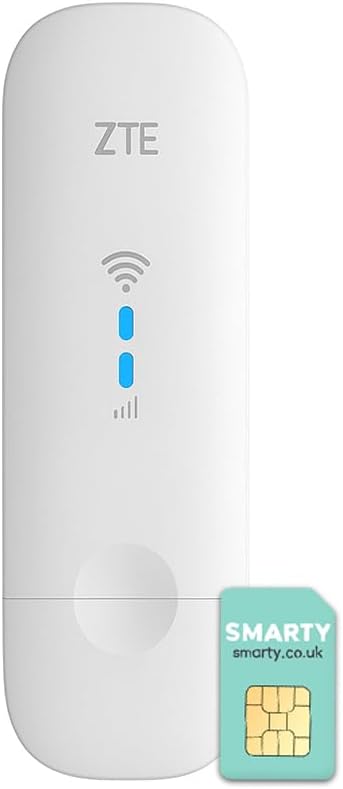
The ZTE MF79N is a compact, unlocked 4G LTE USB modem and Wi-Fi hotspot that supports up to 10 devices simultaneously. Delivering download speeds up to 150 Mbps and upload speeds of 50 Mbps on the 2100 MHz FDD-LTE band, it offers versatile connectivity via USB or Wi-Fi. Its pocket-sized design and external antenna ports make it ideal for mobile professionals and travelers seeking reliable, high-speed internet on the go, backed by a 2-year warranty.


| ASIN | B08WPXRTRL |
| Antenna Location | Travel, Work, Home Entertainment |
| Antenna Type | Internal |
| Best Sellers Rank | 9,032 in Computers & Accessories ( See Top 100 in Computers & Accessories ) 20 in Mobile Broadband Devices |
| Box Contents | 1 x Quick Start Guide, 1 x SIM Ejector, 1 x USB Charging Cable, 1 x ZTE MF79U (white) |
| Brand | ZTE |
| Brand Name | ZTE |
| Colour | White |
| Compatible Devices | Laptop, Personal Computer, Smartphone, Tablet |
| Compatible devices | Laptop, Personal Computer, Smartphone, Tablet |
| Connectivity Protocol | Wi-Fi, USB |
| Connectivity Technology | USB, Wi-Fi |
| Control Method | Touch |
| Controller Type | Touch, Computer/Laptop |
| Country of Origin | China |
| Customer Reviews | 4.1 out of 5 stars 1,079 Reviews |
| Data Transfer Rate | 150 Megabits Per Second |
| Frequency | 2100 MHz |
| Frequency Band Class | Single-Band |
| Frequency band class | Single-Band |
| Has Internet Connectivity | Yes |
| Has Security Updates | Yes |
| Is Electric | Yes |
| Is Modem Compatible | Yes |
| Item Dimensions L x W x H | 10.2L x 3.1W x 1.4H centimetres |
| Item Type Name | Dongle |
| Item Weight | 0.04 Kilograms |
| LAN Port Bandwidth | 100 Mbps |
| Manufacturer | Livewire Telecom Limited |
| Manufacturer Part Number | MF79U |
| Maximum Upstream Data Transfer Rate | 50 Megabits Per Second |
| Model Name | MF79U |
| Model Number | MF79U |
| Model name | MF79U |
| Number of Antennas | 1 |
| Number of Ports | 2 |
| Operating System | ZyNOS |
| Other Special Features of the Product | Unlocked; USB; Connect 10 Devices; Compact Design; 4G; |
| Router Network Type | Wi-Fi |
| Security Protocol | WPA, WPA2 |
| Smart Home Compatibility | Not Smart Home Compatible |
| Special feature | Unlocked; USB; Connect 10 Devices; Compact Design; 4G; |
| Unit Count | 1.0 count |
| Wi-Fi Generation | Wi-Fi 4 |
| Wireless Compability | 802.11b, 802.11g, 802.11n |
| Wireless communication standard | 802.11b, 802.11g, 802.11n |
Z**E
Works well with Smarty SIM
So far, very happy with this product. I got the ZTE MF79N, the dongle that allows you to connect up to 10 devices to what looks like a large USB stick. The product can be plugged into a computer OR into a USB charger straight into the wall. I got it to use with the Smarty unlimited SIM and it works very well. The dongle itself does come with a free Smarty SIM which was not clarified in the 'what is included' part. The setup can also be done with a macbook which wasn't clear from the instructions so it works for both PCs and Macbooks. The speed is fast enough to stream HD movies on my laptop and fulfils all of my data needs (I use cloud-based graphics software). HOWEVER, some advice: The Smarty SIM needs to get a strong enough signal in order to work well and it uses EE's network. If you're going to be fairly stationary and especially if you already have an EE phone SIM, you can check the reception of where you're planning to use the dongle on your phone. If you have 2 bars and above, you will have sufficient reception when you use the dongle as all it does is it amplifies that and creates a hotspot for your devices to connect to. Otherwise, I can guarantee that you just won't get reception. The same applies on if you have a different company's SIM and use the same one for your phone. About the range: I'm using the SIM in one room and I get full bars, but once I leave the room and close the door, my laptop and phone can't pick up on the dongle much if at all. This one is very much meant to be used in the room where you are, especially if the walls are insulated. I have yet to take it out on the proverbial road as I've been using it in some temporary accommodation where I don't want to get a proper router. I would say this is good if you're someone single living alone or people travelling in a group. Just don't expect it to work for a big house or even a flat with many different rooms... the signal just won't be strong enough.
S**L
Great buy :-)
Been looking for a dongle for a while now and this by far has been the best. Finally I’m able to connect to a reliable WiFi source and work from home without the connection being lost. I even bought a dongle from curry’s which was returned for to not working. So anyone wanting a reliable dongle is strongly recommend.
B**N
You can't get native IPv6 connectivity over this device.
Not 100% happy. It's an RNDIS device which does not offer any bearer IP to the host, and is locked to ZTE's proprietary forwarding plane; there is no e.g. PPPoE over USB CDC ACM for you to use. So you can't get native IPv6 connectivity over this device, at all, and IPv4 will require you to double NAT. It's only good as an emergency backup for that reason.
B**E
Shakey
Difficult to set up. live in stone built house so signal poor. Ensure you have good 4g signal before purchase
K**C
It does not work in USA
It does not work in USA with some of the services providers. Poor Wifi signal and speed
K**N
doesn't work and doesn't feature on ztedevices website so no support
Straight-forward to set up and is on power supply upstairs but 24 hours later still no wifi. I have another 4G router nearby which is working with 4 bars and from the same telecom provider - the status (despite registering the SIM and waiting 2 hours) has delivered literally no data. The device model doesn't seem to exist on the ZTE Support website so there is no real support for it.
S**6
Performance seems to degrade over time and it will start to overheat more often
I bought this from another amazon listing which was removed (it was around ÂŁ37 at the time) and I connected it to external aerials. I noticed the performance was quite eratic at time with varied speeds. The good news that it works fine in the USB port of GL.iNet GL-AR300M16 even when both are powered with just a single 1amp 5v supply (although it seems to require rebooting daily to maintain performance so best to use 2amps for better reliability) I noticed in the other listing someone said theirs overheated on holiday and they drilled holes in it to stop it overheating. I ended up doing something similar recently and it didn't really help with the overheating. It was noticeably hot to the touch which didn't seem to be the case a couple of months ago so it seems to have got worse. The weather isn't even particularly warm at all yet. So what I did was set it up with a couple of 4cm USB fans and splitter cable. It is all running on the same 2amp 5v adapter. It is no rock solid with the constant breeze of the two fans over it. I don't understand why it would degrade like this as it was more reliable before without the need for the fans. Holes in the case didn't help so I need to add the fans. I simply put everything in a small rectangular box which I mount inside a cupboard. I may need to buy something else as I don't really recommend it based on this.
A**R
The speed is so bad
It's so bad. My old phone reaches 40Mbps download speed, I put the sim card into this in the same location and this thing barely reaches 2Mbps. It's an unbelievably slow and weak signal.
I**N
Samma uppkoppling som mobiltelefon
Köpte denna som komplement att kunna surfa utan att vara beroende av bra Wi-Fi. Installera var hyfsat enkelt om man vet vad man gör, behövde göra en uppdatering på drivrutiner för den skulle funka i min MacBook Air. Stängde av synligheten för delad Wi-Fi så ingen frågar efter att få bli uppkopplad. Jag använder mig av Telenor surfkort och har då samma surf utomlands som hemma.
R**.
Stable and Fast device
Stable and fast Wingle. No hiccups or stutters during the use of streaming services on an iPad. Tested in France with several providers. Used a multi-network SIM in France that is optimized for dongles, IoT/M2M devices and GPS trackers. Would like to recommend the Bingfu 4G LTE 3dBi external TS9 aerial antenna. Used a 5V2A USB charger as a power supply.
F**D
Fais bien le job.
Cette clef 4g est utilisée avec un autoradio android. Elle a immédiatement reconnu mon réseau Orange Belge sans rien paramétrer. L’autoradio l’a reconnu comme si je faisais un partage de connexion en usb avec mon téléphone ( voir photo avec la bulle et la flèche). A titre de comparaison avec divers connexions voici les débit observé. Partage de connexion de l’autoradio en wifi avec un iPhone 4,97mbps Un Redmi note 9 branché en usb j’ai 57mbps Et cette clef me donne minimum 30mbps en étant cachée dans la console centrale. Même sans obstacle elle ne passe pas les 40 alors que mon téléphone monte a plus de 110 au même moment. Pas mal quand même pour ce petit objet.
B**M
Bonne qualité, debit OK et interface efficace
Très heureux de revoir des produit ZTE sur le marché ! Fonctionne très bien, simple à configurer une fois connecté a l'interface de configuration web. Wifi désactivable si besoin avec simplement l'utilisation en USB comme modem. Les débits sont bon, mais inférieur aux valeurs théorique de 150 Mbps, sur mes tests proche d'une antenne (en ville), avec obstacles, l'upload est très bon. (> à 20Mbps). Testé sous ubuntu & raspberryPI. L'interface à toutes les options nécessaires à une utilisation avancés. Dispose aussi d'une option de redémarrage automatique du module et configurable de façon avancé (horaires,dates,cycles,etc...) bien pratique pour des utilisation autonome sans accès (timelpases,camera surveillance,etc...)
O**K
Funktioniert einwandfrei, muss aber einmalig eingerichtet werden (SIM PIN)
Ich benutze den Stick als Ausfallschutz an einer FritzBox 7690. Die Zeiten bis zum Umschalten (DSL down => LTE nutzen, DSL zurück => DSL nutzen) sind im Fritz Web Interface konfigurierbar, ich habe beides auf 3 Minuten gesetzt. Umschalten und zurück schalten funktioniert automatisch wie erwartet - getestet durch DSL-Kabel abziehen. Der Stick hat 2 TS9 Antennenbuchsen, ich habe dort eine MIMO Dual Antenne angeschlossen. Außerdem gibt es einen MicroSDHC Steckplatz. Eine eingelegte Microsoft-formatierte (FAT) Speicherkarte ist dann in FritzNAS nutzbar. Die SIM Karte muss im Format MicroSIM sein. Eine NanoSIM mit Adapter-Rahmen hat funktioniert, aber der Hersteller rät davon ab. Das Gerät funktioniert auch unter OpenBSD 7.8 auf einem Thinkpad einwandfrei, nachdem es initialisiert wurde. Mit Linux oder Windows habe ich nicht getestet. Andere Einsatzmöglichkeiten sind: mobiler WLAN => LTE Router im Urlaub (mit lokaler Daten SIM Karte statt teurem Roaming), oder ein WLAN im Auto für alle Mitreisenden. In beiden Fällen ist eine USB-A Buchse zur Stromversorgung ausreichend, der Anschluss an einen Computer oder Router ist nicht erforderlich. Das Gerät arbeitet dann als 2,4GHz WLAN Access Point mit Internet Anbindung via LTE. Die beiliegende Installationsanleitung ist sehr klein gedruckt und nur in Englisch. Die Web-Oberfläche des Gerät ist ebenfalls in Englisch und kann auf verschiedene Sprachen umgestellt werden, aber leider nicht auf Deutsch. Wichtig: das Gerät muss einmalig eingerichtet werden bevor es funktioniert - das betrifft vor allem die Eingabe der SIM PIN. Dies geschieht über die eingebaute Web Oberfläche. Um diese zu erreichen, werden WLAN Passwort und Web Admin Passwort benötigt. Diese befinden sich auf 2 Aufklebern im Inneren, sie sind sichtbar wenn der Gehäuse Deckel geöffnet wird, um SIM und Speicherkarte einzusetzen. Sehr klein gedruckt, am Besten abschreiben oder Foto machen. Schritt 1: ein Notebook mit dem WLAN des ZTE Stick verbinden. Der WLAN Name beginnt mit "ZTE_", das WLAN Passwort steht auf einem der Aufkleber im Inneren. Schritt 2: im Browser "http://192.168.0.1/" aufrufen. Eine Login Seite erscheint. Benutzer "admin", Passwort steht auf einem der Aufkleber im Inneren. Schritt 3: nach erfolgreichem Admin Login erscheint als Erstes eine Seite, die zur Eingabe der SIM PIN auffordert. Mobilfunk Anbieter versenden üblicherweise PIN geschützte SIM Karten. Die PIN der Karte muss hier eingegeben werden, sonst funktioniert der Stick nicht, weil er sich nicht mit dem LTE Netz verbinden kann. Nach erfolgreicher PIN Eingabe erscheint die Standard Web Admin Oberfläche. Schritt 4 (optional): PIN Abfrage für diese SIM Karte deaktivieren - damit die SIM PIN nicht bei jedem Neustart wie oben manuell eingegeben werden muss. - 4a "LTE" Schieber auf OFF stellen - 4b "Advanced Settings > Others > PIN Management > PIN Status: Disable > Apply" - 4c "LTE" Schieber zurück auf ON - 4d Test / Restart Schritt 5 (nur bei Verwendung als FritzBox Ausfallsicherung): Da eine FritzBox in den meisten Fällen WLAN Netzwerke bereitstellt, ist das WLAN Netzwerks des ZTE Geräts nicht erforderlich und kann abgeschaltet werden. Vorteile: geringere WLAN Kanal Auslastung, weniger Funk Interferenzen, und der Stick wird nicht so warm. Nachteile: Schritt 1 (WLAN Zugriff auf Web Konfiguration) funktioniert nicht mehr. Aber Schritt 2 ist weiterhin möglich, wenn in der FritzBox Konfiguration "Internet > Mobilfunk > Internetzugang über Mobilfunk aktiv" ausgewählt wird. WLAN abschalten: "Wi-Fi > Settings > Wi-Fi Switch > Disable" Ich bin sehr zufrieden. Funktioniert für meine Einsatz Szenarien. Nachtrag: wir hatten vor Kurzem einen mehrstündigen DSL-Ausfall, und haben das anfangs nicht bemerkt, weil automatisch auf LTE umgeschaltet wurde. Der Ausfallschutz hat funktioniert wie erwartet. Die Übertragung grosser Datenmengen ist allerdings langsam (Home Office, LTE, und Geo-Software).
Trustpilot
1 week ago
1 month ago