Desertcart purchases this item on your behalf and handles shipping, customs, and support to Japan.
🎯 Small Screen, Big Impact — Stay Ahead in Every Setup!
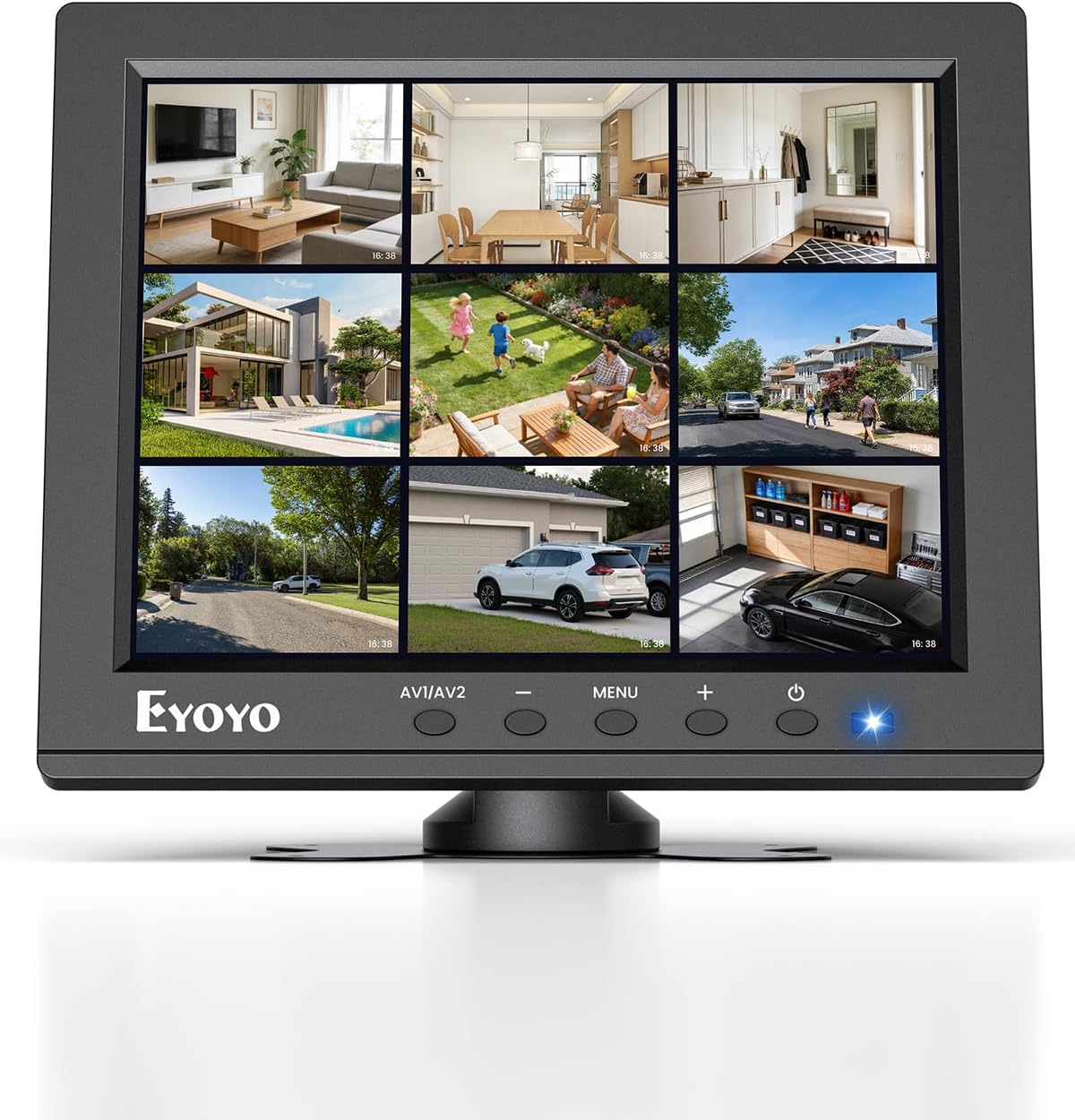
The Eyoyo 8" Small Security Monitor delivers a native 1024x768 4:3 LCD display designed for professional monitoring and legacy device compatibility. Featuring HDMI, VGA, BNC, and AV inputs, plus USB media playback and built-in speakers, it’s ideal for CCTV, server rooms, retro computing, and compact workstations. Its image flip function and versatile mounting options maximize usability in space-limited environments, making it the go-to compact monitor for multitasking pros who demand reliability and connectivity.


| ASIN | B01FHDL1DE |
| Adaptive Sync | G-Sync |
| Additional Features | Built-In Speakers, Eye Care, Height Adjustment, Image Flip Function, Small Screen Size |
| Aspect Ratio | 4:3 |
| Best Sellers Rank | #216 in Video Monitors |
| Brand | Eyoyo |
| Brightness | 250 cd |
| Color | Black |
| Color Gamut | 72 |
| Compatible Devices | Camera, Desktop, Gaming Console, Laptop, Tablet |
| Connectivity Technology | HDMI |
| Contrast Ratio | 400:1 |
| Customer Reviews | 4.1 out of 5 stars 728 Reviews |
| Display Resolution Maximum | 1024 x 768 pixels |
| Display Technology | LCD |
| Display Type | LCD |
| Hardware Connectivity | AV Port, HDMI, USB 2.0 Type A, VGA |
| Image Contrast Ratio | 400:1 |
| Included Components | BNC/HDMI/VGA/AV input |
| Item Dimensions D x W x H | 1.29"D x 7.87"W x 6.49"H |
| Item Weight | 1.8 pounds |
| Manufacturer | Eyoyo |
| Model Name | EM08B |
| Model Number | EM08B |
| Mounting Type | Desk Mount & Wall Mount |
| Native Resolution | 1024x768 |
| Number of Component Outputs | 1 |
| Picture Quality Enhancement Technology | LCD Screen |
| Pixel Pitch | 0.12 |
| Power Consumption | 12 watts |
| Refresh Rate | 60 hertz |
| Resolution | HD+ |
| Response Time | 6 milliseconds |
| Screen Finish | Glossy |
| Screen Size | 8 inches |
| Screen Surface Description | Glossy |
| Shape | Flat |
| Specific Uses For Product | Desktop, Gaming, Surveillance |
| Total Number of HDMI Ports | 1 |
| Total USB 2.0 Ports | 1 |
| Total Usb Ports | 1 |
| UPC | 889251067525 |
| Unit Count | 1 Count |
| Viewing Angle | 140 degrees |
| Voltage | 12 volts_of_direct_current |
| Warranty Description | 1 Year Manufacturer |
| Warranty Type | 1 Year Manufacturer Warranty |
M**C
The only small 4:3 monitor with proper PAL support
I had this TFT version of this monitor for 5+ years and I just ordered and received another one. It has a relatively bad picture and the colors are way off (especially blue). Viewing angle is also bad. The LED indicator of the monitor ON/OFF is not working on both of my monitors (I actually prefer this -- i normally mask the annoying light). However I am using it with my Amiga 600 over Composite and since its small footprint and an excellent stand it can sit on the computer giving it a nice laptop feel (see the picture). No, it is not 15KHZ compatible over RGB to VGA (that is a tall order and only a small number of LCD monitors can do that) cable BUT it has a fantastic feature: automatic NTSC/PAL detection and proper display ("shrinking") of the PAL signal, with PAL colors, which is super rare these days. If your requirements are: 1) small 2) native 4:3 ratio 3) LCD 4) automatic PAL support 5) new (not used/refurbished) 6) cheap then THERE IS NOTHING ON THE MARKET to buy except this model. I bought all models available on Amazon and tested them all on my Amigas and this is still the only one that satisfies them all. So i had to order another one and might even get a third one as a backup. At that price there is simple nothing better on the market. So even though the picture is bad compared to modern panels i simply have to give it 5 stars. I will also keep the newer IPS version of this monitor (amazon link: https://www.amazon.com/dp/B0BG77R6ST, i left my review there too) since the picture is way better but alas Eyoyo removed the PAL support!!! (It detects the signal but the picture is black and white and it stutters -- unwatchable). With PAL support that IPS model would be my dream monitor and i would be willing to pay way more for it since the picture is fantastic. I will use it on my Amiga 1000 which is incapable of producing the PAL signal so all is good. FOR EYOYO IF YOU ARE READING: PLEASE ADD PAL SUPPORT TO THE NEWER IPS MODEL!!!
R**T
Supports HDMI, RCA, VGA. Bonus USB power out and OK sound. Perfect for Pi-like deployments
In a world of monitors the size of a bedsheet, it's easy to overlook that sometimes small tasks call for small monitors. This is not a primary monitor for a thousand column spreadsheet or a CAD modeler. It's great for passive monitoring like status indicators for a build or for carrying to setup servers that will spend most of their lives without a monitor. My favorite feature of the Eyoyo is that it has every video input that matters. HDMI is there, of course. but it also decodes the older analog input from RCA jacks or a VGA DB-15 connector. If you're hooking up a "classic" gaming console or tiny computer (Original Pi, the C.H.I.P, or even a video iPOD (cable not included) having that RCA composite video input is super handy. It also supports HDMI, which provides sound and video on the contemporary connector. You can leave all the video connections plugged in and switch between them via the on-screen display. The unit is small enough to keep in your bag of tricks if you're having to enter the pre-boot environment, such as BIOS for a server upgrade or backup recovery for a normally headless system. Text was clear and bright. As a bonus, there is a 5V/1A USB output for power. This is useful for things like an LED "ring' light (not for the camera itself), powering Single Board Computers, or powering network gear. This is a power-ONLY USB-A. I could never really get the aspect ratio right when testing on my iMac. I think that MacOS just hasn't had to support 4:3 in so long that it just doesn't. Honestly, that's a bit of a silly combination and I didn't research it much. This monitor Just Worked in high resolutions on all the tiny computers (CHIP, Pi, Pi Zero, old desktop Linux, UNIX systems, game boxes and more. Text mode, though tiny, worked as well as all the respective GUI environments. It does come with a bracket that's probably best mounted to a wall. The wires at the bottom edge can be a bit crowded when the cables have to exit and them make a right turn to miss the desk. In all, I appreciate the size because I share it between several systems that are USUALLY network connected. Picture quality was good and the variety of hardware connections is handy for a gadgeteer.
P**.
Small, utilitarian display is cheaply built, but definitely functional and worth what it costs
I have a PC and a Macintosh that share a monitor and input devices through a KVM switch. I purchased this little monitor as a secondary display on my Windows PC, to display photo slideshows and my iTunes song data while the main monitor is displaying my Mac desktop. The Eyoyo doesn't have a great deal of contrast. Even at the the extreme limits of the brightness and contrast settings, it's a bit dull and washed out, but given my intended use that really doesn't concern me. I did try both the VGA and the HDMI connections and they both worked instantly and flawlessly. This is definitely cheaply made: the OSD and control buttons are terribly unintuitive, and the thin sheetmetal base is flimsy and crude. It comes with a double-sided adhesive pad. To protect my desk, I stuck some little stick-on silicone feet on the edges instead. I quickly discovered that I had to put another foot in the center to keep the whole thing stable and prevent the bracket from bending. Given the footprint and extremely low cost of the monitor, the overall performance is more than adequate, as long as you intend a suitable use for it.
B**R
Decent small monitor for the money. Here are Raspberry Pi config.txt settings to get it working.
I bought this monitor for a Raspberry Pi 3 in order to configure the system if network connectivity were not available. The screen is sharp, bright, and has a decent viewing angle. The stand is just tall enough that the HDMI cable doesn't cause the screen to tip over. The on-screen controls are a bit of a pain to work with, but generally you don't need to mess with them. I did a bit of experimenting to get the right settings for this monitor; out of the box the Pi rendered the screen with a squashed image. Don't change the monitor's internal (via the menu) aspect ratio settings from 16:9 to 4:3. The 4:3 aspect ratio seems to be yet another layer on top of the signal, and I had to switch back to 16:9 to see anything again. On the Pi, you will need to modify your /boot/config.txt to correct settings to get the most out of your screen. There are two modes you can run the screen in: - Video-only = 1024x768 resolution. Noticeably sharp pixels; best image quality. No audio. - Video + Audio = 960x720 resolution. Muddier pixels; degraded image quality. Has audio. Below are the /boot/config.txt settings you need to set for both modes above. This only list the changes from the default settings, or settings of note: -------- Begin config.txt for Video-only mode: ############################### # DVI mode settings : # uncomment this if your display has a black border of unused pixels visible # and your display can output without overscan disable_overscan=1 # uncomment if hdmi display is not detected and composite is being output hdmi_force_hotplug=1 # uncomment to force a specific HDMI mode (this will force VGA) # 2 = standard VGA resolutions: hdmi_group=2 # 16 = 1024x768 @ 60hz: hdmi_mode=16 # uncomment to force a HDMI mode rather than DVI. This can make audio work in # DMT (computer monitor) modes # DVI mode = 1 # HDMI mode = 2 # force to DVI mode for PIXEL: hdmi_drive=1 -------- Begin config.txt for Video + Audio mode: ############################### # HDMI mode settings # uncomment this if your display has a black border of unused pixels visible # and your display can output without overscan disable_overscan=1 # uncomment the following to adjust overscan. Use positive numbers if console # goes off screen, and negative if there is too much border # These settings ensure that all pixels are visible: overscan_left=34 overscan_right=34 overscan_top=24 overscan_bottom=24 # uncomment if hdmi display is not detected and composite is being output hdmi_force_hotplug=1 # uncomment to force a specific HDMI mode (this will force VGA) # 2 = standard VGA resolutions: hdmi_group=2 # 16 = 1024x768 @ 60hz: hdmi_mode=16 # uncomment to force a HDMI mode rather than DVI. This can make audio work in # DMT (computer monitor) modes # 2 = HDMI mode hdmi_drive=2
T**E
Lasted over a year
The initial thought on build quality was that this monitor was pretty robust. But it in the last few weeks starting having an issue with the plug in power port where the AC adapter inserts. I have an older Apple TV and a Gamecube connected to it. It is in a studio workspace where year round it is between 60 to 75 degrees, with low controlled humidity. I was extremely pleased with it's overall performance, maybe not the harshness in color reproduction, but shows were watchable, and my gamecube looked fine on it. There was no additional strain, nor breakage to the port, as it had from day one been attached to a monitor arm, had plenty of ventilation, with the cord having excess room so as to not break. It just suddenly at random begins to flicker, and messing with all of the other connections yield no reaction, only when I begin to slightly unplug or touch the ac port. I keep ALL of my equipment very clean, and safe, perform no modifications, nor use anything but the included power supplies/cords included. IF you choose to buy this, you may get just over a year of pretty good performance out of it. That is disappointing as using it as a small secondary monitor to be able to watch tv on, or take a game break with, while still working at my workstation, was a wonderful option. Alas, it seems that there is at least one or two parts that are not made to last with this monitor.
D**N
Native resolution is not available on MacOS; all supported resolutions have an incorrect aspect ratio
This device is advertised as a 1024x768 resolution display. However, when I connect it to a Mac (running High Sierra) access the extended "Scaled" menus in Desktop (Option-Click the option for a menu with all of the resolutions that the display supports), the options include: 1024 x 576 800 x 600 720 x 576 640 x 480 1080p 1080i 720p 480p Notice what's missing? It's not just weird that the complete list of supported resolutions does not include the native resolution for the display; it's actually a big problem because none of the other resolutions match the aspect ratio of the display. Even the ones that *should*, like 800x600 (which is 1.333 just like 1024x768), force the display into a weird, arbitrary scaling down to a different aspect ratio. As a result, every mode listed above produces output with an incorrect aspect ratio. The output is either vertically stretched / horizontally squashed (tall, skinny letters) or vertically squashed / horizontally stretched (short, fat letters). It looks awful and there's no good solution. The unit I received was also defective: the middle 2/3 of the display is discolored. It's noticeable even with a completely black screen. I presume that this was a manufacturing error (and normally I wouldn't penalize a review for that; even Apple occasionally ships a DoA unit), but figured I'd mention it as part of this review.
D**Y
Perfect Project Monitor!
I purchased this because I needed a small monitor in this display ratio that would fit inside the case of an antique Apple MacIntosh 512K. I coupled it to a Raspberry Pi. After removing the old CRT, motherboard and floppy drive, I was able to secure the monitor with hot glue. It worked fine with the RPi running Raspbian. No modifications were necessary, though you can change the display settings if you wish after booting into the desktop. Sound works fine, and if you want a traditiona monochrome display, you can use the monitor menu to de-saturate the colors and change the contrast. Add a HappyMac image as your wallpaper and you are all set. I can think of all kinds of projects for this one, not even counting a stand-alone monitor for whatever applation is needed. For this price, I expected much less. When the Mac 512K was new, I wanted one but could not afford it. Years later I got one for free as obsolete "junk", and for less than a hundred bucks, I have a machine in the same package that is considerably more useful than the original would have been in the 1980's.
J**S
Nice Little Monitor
This small, 8" monitor fills the bill for uses where you want a small monitor. You could use it for security applications, with either BNC or RCA composite input, or for monitoring video that you're streaming or previewing when you don't want a big monitor (HDMI or VGA). If you just wanted a small monitor rather than watching a bigger screen, say on an airplane, or lying around in bed or on the couch, hook it up with the HDMI. I tested all of the inputs. The only one I couldn't figure out was the component (YPbPr). If I get that figured out, I'll update the posting. I don't think it's that important, because, why bother? To get the aspect ratio right, be sure to set the device resolution to 1024 x 768, otherwise the picture is a bit more square (width compressed). Playing back a DVD, the picture was that way also. You probably could set your DVD player to the correct aspect ratio, but I didn't have the patience, and I mean watching a DVD on an 8" monitor, who cares if it's a bit narrow. The monitor can also be set to 800 x 600. The manual lists 640 x 380, but I didn't try that. It also has two mounting methods, a "butterfly bracket" and a "crescent bracket." It says both are optional, but mine came with the butterfly. The threaded holes on the back appear to be VESA standard 75mm spacing, however the butterfly mount doesn't match those and instead comes with a matching foam pad with double-sided adhesive. The mount has a tripod head type of attachment (see picture). PS: It played back video from a VCR perfectly :), but then who's going to do that? Maybe if you're archiving your videos and want a small monitor.
J**R
Gran compra
Muy práctico y con excelente calidad de imagen, bastante útil y por el precio muy económico
G**O
works well
The monitor is very good quality it takes all types of input from USB to HDMI . It was delivered on time . I would buy from these people again.
E**Y
High quality product and service!
Bought to use as monitor for backup camera. When I couldn't get a picture this company helped me even though it wasn't their product that was faulty! The screen was perfect and camera was partially defective. They gave me some ideas to work around the problem and I finally got an image. As you can see the quality of the image is excellent. Above and beyond which is rare these days.
B**L
Stopped working after a week
Stopped working after a week and the adhesive stickers for the mount aren't that adhesive making it not fit for purpose. Waste of money.
8**E
Cheaply constructed, poor QA. Display is crooked.
The display is crooked meaning that if using for a computer display where there are clear horizontal rows of graphics or text near the screen edges, it's very apparent that the image is crooked. Tested with multiple inputs. It's not clear if there is any way to fix, the panel is actually glued to the front case and even if the adhesive is cut, there doesn't look to be a lot of wiggle room to make an adjustment to the alignment of the panel within the case in order to straighten the display. Edit: I was able to detach the panel from the case after disassembling it, and reattached it with better alignment. It's not perfect but it's OK. Not really OK that you need to disassemble it to fix their QC issues.
Trustpilot
3 weeks ago
3 weeks ago