


Desertcart purchases this item on your behalf and handles shipping, customs, and support to Japan.
🚗 Capture Every Angle, Day or Night — Your Ultimate Roadside Witness!
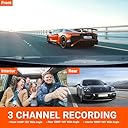
The Vantrue N4 is a premium 3-channel dash cam system featuring simultaneous front (4K/1440P), inside (1440P), and rear (1080P) recording with wide-angle lenses. It boasts advanced Sony STARVIS sensors and IR night vision for crystal-clear footage in all lighting conditions. Designed for continuous 24-hour parking surveillance with motion and collision detection, it uses a durable super capacitor to withstand extreme temperatures. Compatible with up to 256GB memory cards and equipped with G-sensor emergency lock and loop recording, the N4 is ideal for professional drivers and safety-conscious vehicle owners seeking comprehensive, reliable video evidence on the road.




| ASIN | B083V6K8RH |
| Are Batteries Included? | No |
| Auto Part Orientation | Front and Rear and Inside |
| Auto Part Position | Front Inside, Rear |
| Best Sellers Rank | #1,031,544 in Electronics ( See Top 100 in Electronics ) #1,089 in Car On-Dash Video |
| Box Contents | Hardwire Kit, Memory Card |
| Brand | VANTRUE |
| Brand Name | VANTRUE |
| Colour | N4-O |
| Compatible Devices | Personal Computer |
| Compatible with Vehicle Type | Car |
| Connectivity Technology | Infrared |
| Control Method | Touch |
| Customer Reviews | 4.1 out of 5 stars 6,246 Reviews |
| Display Type | LCD |
| Field Of View | 160 Degrees |
| Flash Memory Supported Size Maximum | 512 GB |
| Flash Memory Type | MicroSD |
| Frame Rate | 30 Frames Per Second |
| Item Dimensions D x W x H | 18.9D x 16.7W x 12.3H Centimeters |
| Item Type Name | dash cam |
| Item Weight Unit of Measure | 800 Grams |
| Manufacturer | VANTRUE |
| Manufacturer Part Number | N4 |
| Maximum Aperture | 1.4 f |
| Memory Slots Available | 1 |
| Memory Storage Capacity | 256 GB |
| Model Name | N4 |
| Model Number | N4 |
| Mounting Type | Adhesive Mount |
| Number of Items | 1 |
| Number of Packs | 1 |
| Optical Sensor Technology | CMOS |
| Other Special Features of the Product | G-Sensor, Night Vision, Parking Monitor |
| Photo Sensor Size | 1/2.3'' or 1/2.5'' |
| Real Angle of View | 155 Degrees |
| Screen Size Unit of Measure | 2.45 |
| Special Feature | G-Sensor , Night Vision, Parking Monitor |
| Supported Standards | 4K |
| UPC | 193368000710 |
| Unit Count | 1.0 Count |
| Vehicle Service Type | Car |
| Video Capture Resolution | 1080p, 1440p, 4K |
L**E
Nice video quality!
I recently purchased the Vantrue N4 dash cam for my Chevrolet Trax, and I'm impressed. The installation was straightforward, taking less than an hour. Despite lacking GPS and Wi-Fi, this dash cam delivers impressive video quality, especially at night. The loop recording feature ensures continuous recording without missing any crucial moments. Overall, the Vantrue N4 is a solid option for Chevrolet Trax owners looking for a reliable and easy-to-install dash cam.
B**B
خردة
تاخذ حيز كبير و التعامل معها صعب داخل مقصورة القياده توقفت عن العمل بعد ٥ اسابيع ولا يوجد لها ضمان داخل المملكه تجربة سيئه يوجد منتجات بثلث سعرها واجود منها
C**1
This is a perfect dash cam that covers all bases....
First of all you get 3 cameras, all with fantastic video. I have hardwired mine using the hardwire kit from Vantrue and also the GPS mount. I was having trouble with Parking mode at first but I think I did not understand how it worked but now that I have paid more attention I went out and checked all the files and found out that Parking mode is working perfectly. It then switches to normal recording once I enter the car and turn it on. Installation was breeze, taking less than 3 hours and that included the search for a constant power connection. I have tried other dash cams but this one is the most fantastic one I have ever seen and with all the features, auto night view, auto turn off of LCD screen, Parking mode that works no matter which camera detects the motion, Collision Detection, etc., I cannot think of a better deal. I thought I was going to have to find a mobile power bank to get Parking mode to work, but after I studied how it works, I realized that I do not need it and that my camera is working fine right out of the box. The manufacturer is very good at responding to a question or complaint within 24 hours as advertised and they also take your phone number so I assume if there is a need, they are willing to call you to straighten out a problem that cannot be fixed through email. I give this product 5 stars for all these reasons. ***Edit*** I wanted to add to this review, mention of the Vantrue Video Player. Not as impressed. First, let me say this. It works. But when you have video set to maximum on the front camera, the video is very jerky. I have a new computer with 32GBs of RAM and over 3TBs available space with an Intel i9 CPU Yada yada. It isn't my computer. Now at 1080 resolution and 30fps it is smooth. But just so you know, I have seen some people say that you have to use their dedicated player to get the GPS and speed stamp to show on he video. NOT TRUE! I replayed several videos in Windows Media Player and the stamp showed. The only thing you miss out on is the video information stamp, such as resolution, fps, etc. I like using WMP because if there is anything you need a good look at you can edit the video and create a slow motion snippet of an important part. Now, here is another part that is really aggravating. In the manual they do not explain this but kudos for the support staff getting back within 24 hours to explain. I tried to follow the manual and I added the power through the GPS unit when connecting to the computer. You cannot do this. You have to plug the cable from the computer into the rear camera slot to get it to play directly from the camera to the computer or to copy files over. Remember that, it is not in the manual. Next, I found that if you do not want to remove your camera from the car, just remove the card from the camera and insert it into a full size SD adapter, set the adapter to write-protect and insert into computer. Now you can access all your files on the card and copy them over or just play them. When done, you just reverse everything to put card back into camera. I recommend that you format the card if you copied the files over and do not need an extra copy on the camera anymore. Another advantage to using WMP over the Vantrue Player is that WMP plays the videos a lot more clearer and the audio is much better. Now the worst of the worst (but still not horrible). When you go into the settings for Vantrue and reset KM/H to MPH and the default folder for the files to be found in, every time you close the program and restart it, you (or at least I did) have to go back in and change the settings again. Worst of all is that once you reset the default folder, when you click on the folder symbol to open one, it does not go to the folder you set. It goes to the installation folder where the program is installed. Why? I need to open videos, not see where the program is installed. I cannot think of one way that the Vantrue Player exceeds WMP. WMP is smoother and allows editing and creating slow motion videos, etc. It also saves all settings when it is closed. Plus, the absence of important details in the manual as to how to power up the camera by using the rear camera slot is not there is a big points off. As is the absence of information as to how you can write-protect the card and just insert it directly without having to remove the camera from your car. So, my recommendation to Vantrue is to update the manual, and make the player save settings and improve the algorithm for playing videos so that it can be at least competition for WMP. Until they do that, the product still gets a 5 star review, but the Player only gets a 3.5 stars rating. I hope this helps. Do not allow the Player's problems stop you from buying this camera. They are a very dedicated group and I am sure they will get the player fixed. In the meantime, the 3-camera setup is the most beautiful dashcam setup I have ever owned or even seen. UPDATE: I have figured out how to use the Player. As I told you above, they are a dedicated group, and they have updated the Player since I purchased my N4. I am able to save my settings now and I do not know if they updated the algorithm for playing videos, but now the jerkiness that I reported above is much better and rivals WMP. So now the recommendation I make is to use the Vantrue Player as it adds the abilite to track the speed and GPS with a map. Now, the map may lag behind where you your location is actually at that moment in time, but at least it has that ability where WMP does not. So again, my new recommendation would be to use the Vantrue Player. If you need any advice on how to use it, I have gone through all the headaches with figuring out everything and will be glad to offer help to anyone who posts a question. Oh, my new rating for the Vantrue Player is 4.5 stars. The half star missing is due to the lagging in the map. My computer is extremely powerful and so I know it isn't that. If they can fix that last issue, I will give the player 5 stars like I do the dashcam which I still recommend as the best choice on the market.
G**L
Excelente producto. Recomendable.
Hasta ahora excelente. Buena calidad. Funcionan los tres canales sin problema y con buena definición. Esta cámara NO se conecta al WiFi, así que para descargar videos estando dentro del vehículo (en tiempo real), se recomienda tener a la mano un pequeño lector de tarjetas microSD con adaptador de USB C. Ya con este aditamento (no incluido por Vantrue), se pueden descargar sin problema videos al celular desde la tarjeta de la cámara... Yo traigo uno en el llavero. La garantía es proporcionada directamente por Vantrue en su portal, así que es importante dar de alta el producto. Ya sea que se desee realizar la instalación por cuenta propia o encargarsela a algún proveedor de servicios, se recomienda ampliamente adquirir el Kit de cables de Vantrue (hardwire) para tener una instalación limpia... Claro, a menos que no le importe tener el cable de alimentación atravesado en el tablero y conectado a la entrada del mechero. Yo detesto los cables atravesados, siempre causan accidentes... Saludos.
ᖇ**ᑎ
No App be careful
There is no App with this product and it’s not convenient to view videos
Trustpilot
1 month ago
3 days ago