Desertcart purchases this item on your behalf and handles shipping, customs, and support to Japan.
🚀 Elevate Every Meeting with 360° Smart Focus & Sound
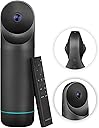
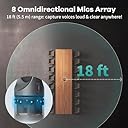
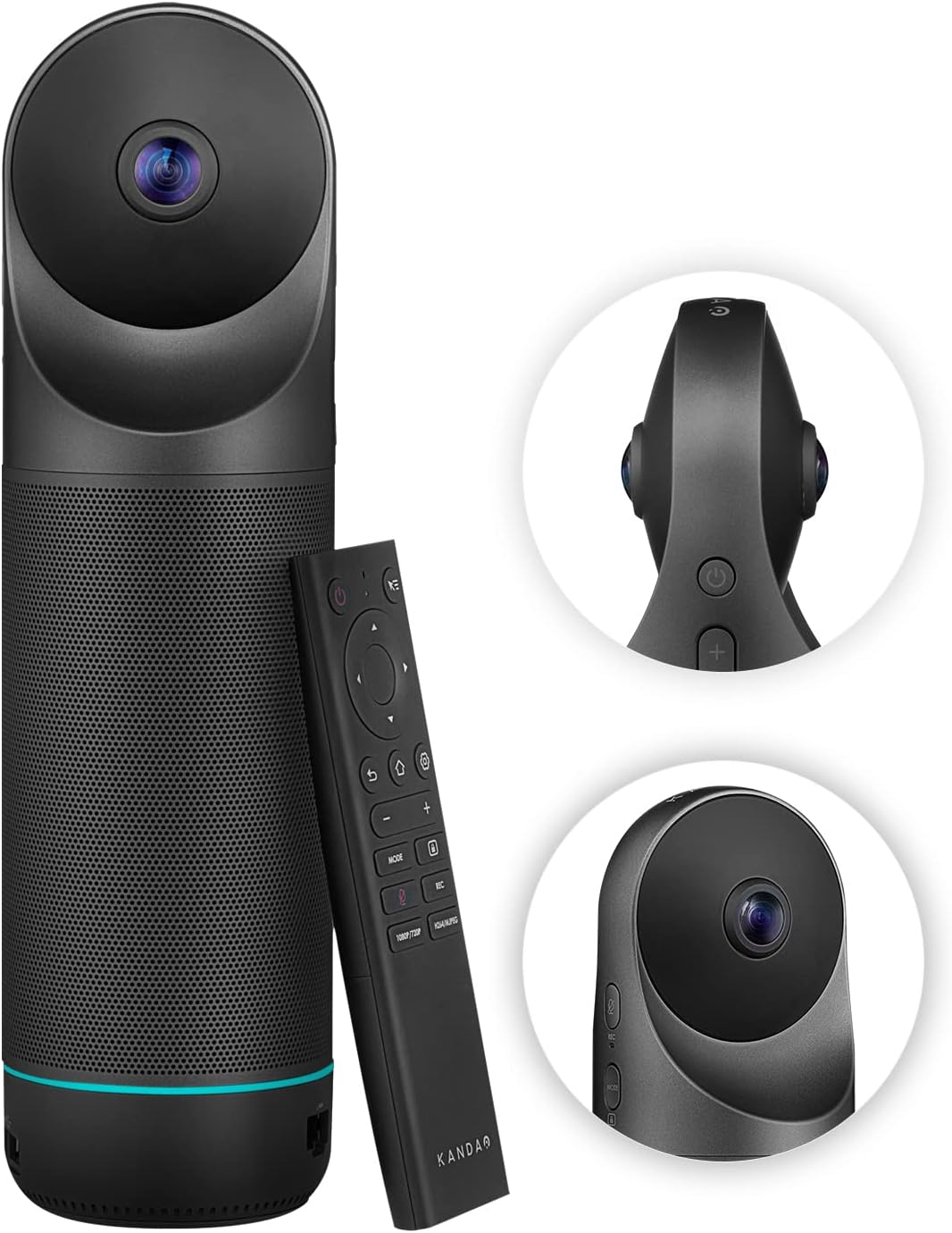
The KanDao Meeting Pro is a cutting-edge 360-degree video conferencing camera system featuring dual 195° wide-angle lenses, AI-driven face and voice tracking, and an 8-microphone array with noise cancellation for crystal-clear audio. Designed as a standalone device with built-in Android OS, it supports Wi-Fi, USB, and HDMI connectivity, local 1080p recording, and multiple smart modes to optimize any meeting style—all while ensuring data privacy with no cloud storage.


| ASIN | B0B8YH2CTJ |
| Best Sellers Rank | #649 in Webcams |
| Brand | KanDao |
| Built-In Media | Camera Body, Camera Body*1 |
| Camcorder Type | Webcam |
| Color | Black |
| Compatible Devices | Computers, smartphones |
| Connectivity Technology | USB, Wi-Fi |
| Customer Reviews | 4.2 out of 5 stars 104 Reviews |
| Effective Video Resolution | 1080 |
| Exposure Control Type | Automatic |
| File Format | MP4 |
| Flash Memory Bus Interface Type | SD |
| Flash Memory Speed Class | C10 |
| Flash Memory Type | Micro SD |
| Flash Memory Video Speed Class | Micro SD |
| Focus Type | Auto Focus |
| Form Factor | all in one |
| Image Aspect Ratio | 16:9 |
| Image stabilization | Digital |
| Item Weight | 1.8 kg |
| Lens Type | Wide Angle |
| Manufacturer | KanDao |
| Maximum Aperture | 2 f_stop |
| Maximum Focal Length | 9.42 millimeters |
| Minimum Aperture | 2 f_stop |
| Minimum Focal Length | 9.42 millimeters |
| Model Name | Meeting Pro |
| Model Number | MT0822 |
| Number of Speakers | 1 |
| Photo Sensor Technology | MP |
| Sensor Type | MP |
| Shooting Modes | Automatic |
| Special Feature | 360 Degree Capture |
| Style Name | Minimalist |
| Supported Audio Format | [POSSIBLY] Lossless audio formats |
| Supported Image Format | CMOS |
| UPC | 840128700693 |
| Unit Count | 1 Count |
| Video Capture Format | MP4 |
| Video Capture Resolution | 1080p |
| Video Resolution | 1080p |
| Viewing Angle | 360 degrees |
| Warranty Description | 1 Year Manufacturer, 1 year manufacturer, China |
| Water Resistance Level | Not Water Resistant |
| White Balance Settings | Auto |
A**R
A solid offering for the price
I bought the Kandao Meeting Pro to give it a try for having online meetings for our group. It turns out that it works pretty well, definitely above my expectations. The Pros: Kandao names it Meeting Pro so I guess they want you to know that it has Pros. Indeed I found a lot of them. The design is simple and elegant. The two fisheye lenses take a commanding stance on top of the unit, while when you cover them with the ear warmers style protector it looks kinda cute. The building quality is excellent. The whole thing feels solid and well built. The details are well considered. The bottom of the unit is a big pad of soft material making it slippery-proof and preventing scratches on your table surface. There is even a screw hole in the bottom for tripod mounting. The connection and setup are easy enough, just like an android phone. Apps like Zoom can be installed very easily. It comes with a remote control, with a pretty generic design. One feature of the remote control I really like is that, if you click on the top-right button, it shows an arrow on your screen and turn your remote control into a pointer. Although it probably won’t be the best pointer you’ve ever used, it does make input of letters and numbers much easier. It provides a 360-degree view of the whole surroundings. There are different modes to switch between different numbers of separate highlighted windows. The image quality is definitely sufficient for online meetings. Don’t expect movie-like clarity though, it’s just not gonna happen with those fisheye lenses. The machine did a very good job of stitching scenes taken by those fisheye lenses together. The image stitching works perfectly when you are 2 feet away or further. While you are getting too close, at the angle right between those two lenses, you will start to see artifacts. The speaker is loud with good sound clarity. When you mute the mic, the ring indicator light around the lower part of the unit will turn red, which is another nice feature to have that will give you the peace of mind knowing that the curse words you just said won’t be heard by people on the other side of the meeting. The Cons: I have to say that the image quality can be better. But I also understand that there probably are some physical limitations of the fisheye lens for resolution. At this price point I think it’s not fair to ask for too much more. But still I wish the image quality can be better. The figure tracking feature works well on most occasions, but sometimes it can be slow to respond and adjust. Overall, I believe this is a solid offering for the price.
S**R
Great tool
Works very well. We use it on zoom and online attendees say it really helps hearing and seeing what goes on in meetings. Very comparable to the owl we use at Church.
Y**I
Good conference Camera/Speaker/Microphone
I’ve used the Kandao Meeting Pro for a little while now, mostly for Zoom meetings. Overall, it provides a nice enhancement to the meeting experience. The microphone picks up voices from all directions in a sizable conference room well. The speaker delivers the voice of the remote participants clearly. Noise and echo are nonexistent. People in view got tracked individually and the active speaker is identified. This algorithm works OK but the accuracy has room for improvement. The unit has a built-in Android OS, which allows it to function independently. The control is via a remote that comes with the unit. In this mode, an HDMI display/TV must be connected. Apps such as Zoom and Skype can be installed and used on the unit. However, in this mode, Zoom doesn’t seem to support HD. The unit can be connected to a computer via USB-C to function as an external Camera/Speaker/Microphone. In this case, Zoom (running on the computer) supports HD. When it is connected to a computer via USB-C, it actually charges the computer quickly, which is a very useful feature.
Q**.
A decent VR camera for conference rooms
Well built camera. Great 360 view. The video quality is superb. Very easy to switch between a few different view modes. The audio is also clear and loud. It can be used either as a standalone device with the built-in android system, or as a standard usb external camera by connecting to a computer. The only downside is that the built-in android system feels so-so. Though the remote control has a pointer mode for input, it is still awkward to input without a mouse and keyboard. Google services also need some extra setup, which may not be very user friendly if you are not tech savvy. I mostly use it as an external camera with a laptop, which works great with all popular meeting apps such as Google meeting or Zoom.
J**.
Great product for dedicated purpose of doing 360 meeting with multiple people
The product is great for the sole purpose of doing 360 meeting where there are multiple attendees. It quickly captures who is in the conversation and creates a focused shots within the screen. Complain is the use of remote control. Especially the mouse mode is awful. You have to move your remote to move your mouse around the screen. It is very difficult to use. Wish they just use joystick or touch pads like the AppleTVs’ Love the ability to use it as external camera of your PC connected via USB (A or C), OR individual stand alone mode which doesn’t require PCs to operate. In stand alone mode, it has ability to connect with zoom, Teams, GoogleMeet, etc. and supports most of the Apps that I need. Is it worth the price? I think it’s little overpriced. $500 range would make me recommend this product to others for sure.
R**G
Definitely worth it. I love my meeting pro
I recently bought the Meeting Pro camera for our online conference, which undoubtedly improved our conference experience. The quality and function of the camera have improved our virtual conference and provided a more attractive and professional atmosphere. I've had my eye on Meeting pro for a while, and finally decided to try it out in the office. the 360 degree view is really cool. The AI feature is great, autofocusing on the speaker. Great sound, clear enough for everyone to hear. It was super easy to set up with a very intuitive, user-friendly. I'm satisfied with the purchase and will order a 2nd one when the time is right. great product so far.
E**E
Excellent hardware, but crippled by lack of Google Certification
The image and audio quality of the Kandao Meeting Pro are outstanding, but the device has a critical flaw for an "all-in-one" solution: it is not Google Play Protect certified. Even though it runs on Android, Google blocks access to the Play Store and many integrated services (like Google Meet or Teams) because the device is uncertified. While the manufacturer provides a manual workaround to register the GSF ID, it is a tedious process that doesn't always work and is something an end-user shouldn't have to deal with at this price point. If you plan to use it in "Host Mode" connected to a PC/Mac, it is an incredible camera. However, if you are buying it specifically for the standalone Android functionality, be prepared to struggle with manual APK installations and constant compatibility errors. It is a shame that such solid hardware is held back by poor software licensing management.
W**G
Great conference camera/microphone
I saw this camera somewhere online and thought to give a try. To my surprise, it works really well! The AI tracking for speaking people is great. Bluetooth mouse and keyboard can be connected to the camera for efficient input. The remote control has a pointer mode (like the old wii's controller) that helps for input as well. I connect the camera to my Macbook pro via USB-C, it also charges my mac during the meeting which is very thoughtful to prevent the mac from running out of battery. The camera does have two blind spots on the sides that is perpendicular to the lens axis during the two-screen mode (top and bottom split views to cover 360 degrees). Overall, it is a great camera and worth the money.
E**E
Perfect
Works ok
S**R
Awesome Camera
This is a really good bit of kit and is a world apart from the old Polycom round table camera I used to use. The round table with 4 individual participants gives remote users a really good appreciation of the meeting allowing them to pick up on the visual ques of up to 4 participants and not just the speaker. The AI in the camera follows speakers round the room with ease, though when there were fewer people in the room it locked onto a plant and a filing cabinet. The stitching of the video from the 2 cameras is so good, you can't see the join! Audio quality is good as is the range for picking up speech up to 5m away. The size, weight and carry case mean that the camera is not confined to the meeting rooms and will go out on the road when needed.
M**H
Endlich mal was gutes gefunden
Da wir für unsere virtuellen Meetings eine Kamera gesucht haben, die auch bei Hybrid-Events eingesetzt werden kann, sind wir nach einigen Test auf diese gestoßen. Ich kannte den Hersteller nicht und war gespannt, ob die Kamera die 360 Grad Abdeckung und das Tracking hinbekommen würde. Und in der Tat, nach einigen Tests und Recordings sind wir alle absolut positiv überrascht. Sowohl das verfolgen der aktiven Sprecher, sowie das fokussieren und feststellen von Positionen hat uns vollends überzeugt. Schade ist lediglich, dass bei den installierten Apps kein BigBlueButton dabei ist. Ich habe auch keinen Weg gefunden, dies zu integrieren. Ansonsten wurde die Kamera aber immer bei BBB sofort erkannt. Als Webcam und auch als Tonquelle. Im Vergleich zu Jabra Panacast und auch zur Meeting Owl Pro - kann ich KanDao Meeting Pro 360° absolut nur empfehlen. die 360 Grad deckt die Kamera perfekt ab.
M**Ž
Great 360 camera
Nice crisp picture, works great
J**K
Très bonne solution immersive
Très bon produit facile d'utilisation.
Trustpilot
2 weeks ago
2 weeks ago