

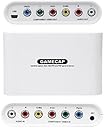


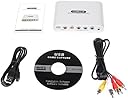
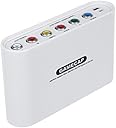
Gamecap HD Recorder - PlayStation 3/Xbox 360/PSP
Product ID: 264772
🎤3.5mm mic input for live commentary
🎮720p HD capture @30FPS
🔌RCA/Component input support
🎥 Capture. Commentate. Conquer. Your gameplay, your spotlight.
The Gamecap HD Recorder is a compact, lightweight capture device designed for Xbox 360, PS3, and PSP gamers. It supports RCA and component video inputs, records gameplay in 720p HD at 30FPS, and features a 3.5mm microphone input for live commentary. Compatible with Windows XP through 7, it enables easy uploading of gameplay videos to popular social platforms, making it ideal for content creators and competitive gamers eager to share their highlights.
| ASIN | B00B1OK3TC |
| Customer Reviews | 3.7 3.7 out of 5 stars (178) |
| Date First Available | January 16, 2013 |
| Is Discontinued By Manufacturer | No |
| Item Weight | 0.01 ounces |
| Item model number | W727 |
| Manufacturer | Gamecap |
| Product Dimensions | 9.06 x 6.3 x 2.36 inches; 0.01 ounces |
| Release date | December 6, 2013 |
| Type of item | Video Game |
A**8
Works and is affordable
This capture card works amazing there are a few miniscule things I have to complain about it on though it gets hot easily it only supports av output/input and it seems to conflict with other video devices that are not built into the PC so unless you have a webcam built into your PC do not expect to have a facecam all that said it basically turns your PC into the TV which is great in conjunction with screen rec software (or if you just need a screen that is not the TV)
A**R
Fantastic, Dont listen to the bad reviewers
This product is awsome, the haters are mad because it isnt 1080p of course itsince not it's using component/composite cables. Once you tinker with sharpness and saturation and other settings, it's quality is really good i think the res go's up to 720p, and the youtube quality is really good. I RECOMMEND THIS PRODUCT FOR ANYONE WHO POSTS TO YOUTUBE AND DOESN'T MIND NOT HAVING 1080P PERFECT FOR MY CHANNEL. Don't listen to the bad reviewers who are butthurt cause theyou didn't know how to set it up or they expected the god of all recorders. AMAZING PRODUCT.
B**A
Okay Device but Improperly Listed by Amazon
Despite all the negative reviews, this isn't even a horrible capture card, it's decent actually. However, it is improperly listed. This is NOT a high definition capture card. It utilizes the eMPIA 2828X "USB Grabber" video chip. This chip maxes out at 480i. This capture card was clearly designed to capture standard definition video and not high definition. Any signal above 480i will not be registered by the video chip. I couldn't even get 480p to record. Now, that doesn't mean the capture card is horrible. Some people, like myself, don't care about high definition video capture but wanted a device to capture old, retro video game consoles like the original PlayStation and Nintendo 64. Assuming you're one of these people, how does this stack up? The outside is designed pretty well, actually. This is the first capture card I've had with a pass-through, meaning, your video signal comes in one end and leaves the other end. This is great because it defeats the need for a splitter since the signal will pass through the device to your television. This device also has a port for a microphone, which is a neat little addition if you don't have a microphone port, and the form-factor is nice. My Easycap would damage my USB ports since it was such a heavy dongle, while this uses an external USB cable to connect to your computer so no weight is actually placed on your USB port. The inside is where most people's complaints come from, mainly the eMPIA video chip. This chip maxes out at 480i, so if you were hoping for 480p or even 720p/1080i video recording through the component ports, that's not going to happen. The deinterlacing also isn't very good, so interlacing is very noticeable in the actual recordings. The recording also look a little washed out. All in all, the video quality is not good, but it's not atrocious. If you are streaming something like the Wii or original Xbox, it will be quite noticeable because those games visually look great, but if you go something really old school like N64 or PS1, or even NES or SNES, the video artifacts become less apparent. I am fine with the video quality on this device as someone who records and streams retro games very very casually. You should definitely not get this card if you are expecting to high quality professional-level recordings, it won't give you that. A lot of people have had trouble getting this device to even work, I've had no trouble. It works fine in my experience. The issue is that the eMPIA drivers are Windows-only and are required to be installed from the installation CD. There's no Linux support (believe me, I tried) and to my knowledge no Mac support. This is by no means a plug-in-play device. After you setup the divers, you should easily be able to import the device into OBS for recording and streaming. If you switch between using the component jacks or the composite jacks on the Gamecap, you have to open up VivaStation and switch the input source and then restart OBS. OBS won't automatically be able to detect the change and will just give you a white screen. Also, don't forget that this cannot record above 480i. So if you are still getting a blank screen, make sure your device does not have progressive scan enabled. I bought this device for standard definition recording as someone who extremely casually does so. The video quality is not amazing but it is good enough for someone like me. The device is very nicely designed with the pass-through video ports, the external USB connection and the additional microphone slot. But the video chip is not the best and it's annoying when software isn't plug-in-play because it takes some time to setup and does not work on every machine. I think Amazon really needs to fix their listing for this device. I think this device would get much better reviews, at least 3 stars, if the listing wasn't so misleading. This isn't even the developer's fault. The device never claims to be an "HD recorder" on the box.
P**E
Possibly the worst Item on Amazon
Take it for what you will. 0/5 stars. Photos of what it looked like when I got it too. Of the Box: http://i1273.photobucket.com/albums/y402/ArtepSkywork/D1497E18-6D66-4CB0-8F5E-1BBB83ED817E_zpscaiad9lu.jpg How the device looked inside the Box: http://i1273.photobucket.com/albums/y402/ArtepSkywork/91462A57-CBA6-4D48-8E76-68801E2E2047_zpsnyr1gsvb.jpg What was inside the Box: http://i1273.photobucket.com/albums/y402/ArtepSkywork/1715BE66-BB1D-45C8-9A7D-7E30DC34D650_zpshlicaaqd.jpg ---------------------------------------------------------------------------------------------------------- As for the review, I would like to point out, the audio of when I pull out the R/L channels seems to have fixed itself in the recording, but in live time the audio was actually messing up on the computer side live, not recorded. The card itself does does work. I tried composite and component, but worked however the card itself is where the issue lies. Whatever encoder or software inside of the capture card, it is causing the issue of really, really! Really bright colors and missing colors. Composite was fine, however the screen was shaking and jittering around. So let me clarify the device does work but not the way it should or at least my device anyway. I'm willing to try out another device or take a refund but to anyone else save yourself the cash and go get the Diamond Multimedia Component Capture Card for 49$ or the Roxio HD for 54$. It's a shame either are expensive since it's component but I guess that is what you get when you go cheap. *Any positive reviews on the product are false and misleading, most likely companies trying to make the product look good to grab money.* Pros: - Worked - Small - Component - Can use output as long as you have another pair of cables Cons: - Doesn't work correctly - Hissing, audio distortion and buzzing, bending of the audio - Very cheap quality - Painful to set up via Computer - Imitation (Copycat) of Diamond Multimedia and Roxio software - Constantly has issues, the software has a mind of its own. (Was changing the settings by itself) So if I could 0/5 but I can't so 1/5. This capture card is pure garbage. Part of me was hoping this product would work but I guess you get what you pay for.
A**R
A little HELP
This product is fine. Now although here are some things that buyers may want to know. This the software may not currently work with windows 10, though I am sure you can get drivers if you tried. I am also not sure if it works on mac, though you can test that out for yourself. Another thing is when you use this you may ask, "WHY IS IT NOT HD!" Well you have to tinker with settings. I suggest using the software's Debut Video Capture or Virtualdub, VirtualDub is my prefered. However you will have to set it to be hd and use something called deinterlace to get rid of lines you may see. You can get programs that deinterlace live so you can livestream. In fact if you livestream with only that you should be fine. I would recommend this product.
N**R
The issues... The headaches... It's going back.
It captures pretty well and the video quality is acceptable for the price. The sound has issues. It's true what other reviewers have said about the capture software being horrible, but it IS fully compatible with Opensource Broadcasting Software (OBS), which is completely free online. You need to open it in its designed software to change settings for the device's hardware, however, so you still need it. Mine produces an annoyingly high pitched whirr if the sound is set at a higher level than "really low", but that's fine as I need to keep the sound low anyway to talk over it. Putting this through to the computer and then having the computer display on the TV resulted in dropped video quality, which is far more noticeable on a very large screen, so I'm getting splitters for the individual RCA connectors to connect to the television and computer separately, sold on this page: Cable Matters 5-Pack, Gold Plated RCA Split Adapter (All negative reviews of the item involve people using them for the opposite of their intended purpose, so I know they're solid. I'll update this when I know for sure.) Edit: I had no idea this thing had so many problems until I tried to capture a game that WASN'T super smash brothers. I figured Super Smash Brothers Brawl, with its high framerate and tendency to push the Wii to its limit, would be the best test. Well? It had serious, SERIOUS issues with... Miss Pac Man. No, I'm not kidding. And Mario Kart. Any game where any amount of black is on the screen regularly. It had some incredible problems with dark colors, the image would go completely bananas. I've included a screen capture of the Mario Kart pause screen from the device... The top half of the screen with the decal and blue sky are fine, but the dark road... A big thank-you to Amazon Support for allowing me to return this thing just outside the usual return window, as it was a big deal to me. I have no idea whether this is how they normally are, unable to handle the colors black and grey, or that my device was just defective, but for those considering: You have been warned. TEST WITH DARK COLORS.
B**X
Perfect to start a YouTube channel with.
For what it sells for, it's perfect. Works as description says. It not only works for the consoles listed. I've got my Wii hooked up to it and it captures it just like it would for a Xbox360. I say this device is perfect for the YouTube that's just starting up and needs a low priced capture device.
D**A
This product is great! I can record 1080P quality and have crystal ...
Don't listen to these people! This product is great! I can record 1080P quality and have crystal clear mic quality with this! Its super easy to setup and you can start recording your games in a matter of minutes.
Trustpilot
2 weeks ago
3 weeks ago