🖨️ Don’t let clogged nozzles kill your workflow — clean smart, print sharp!
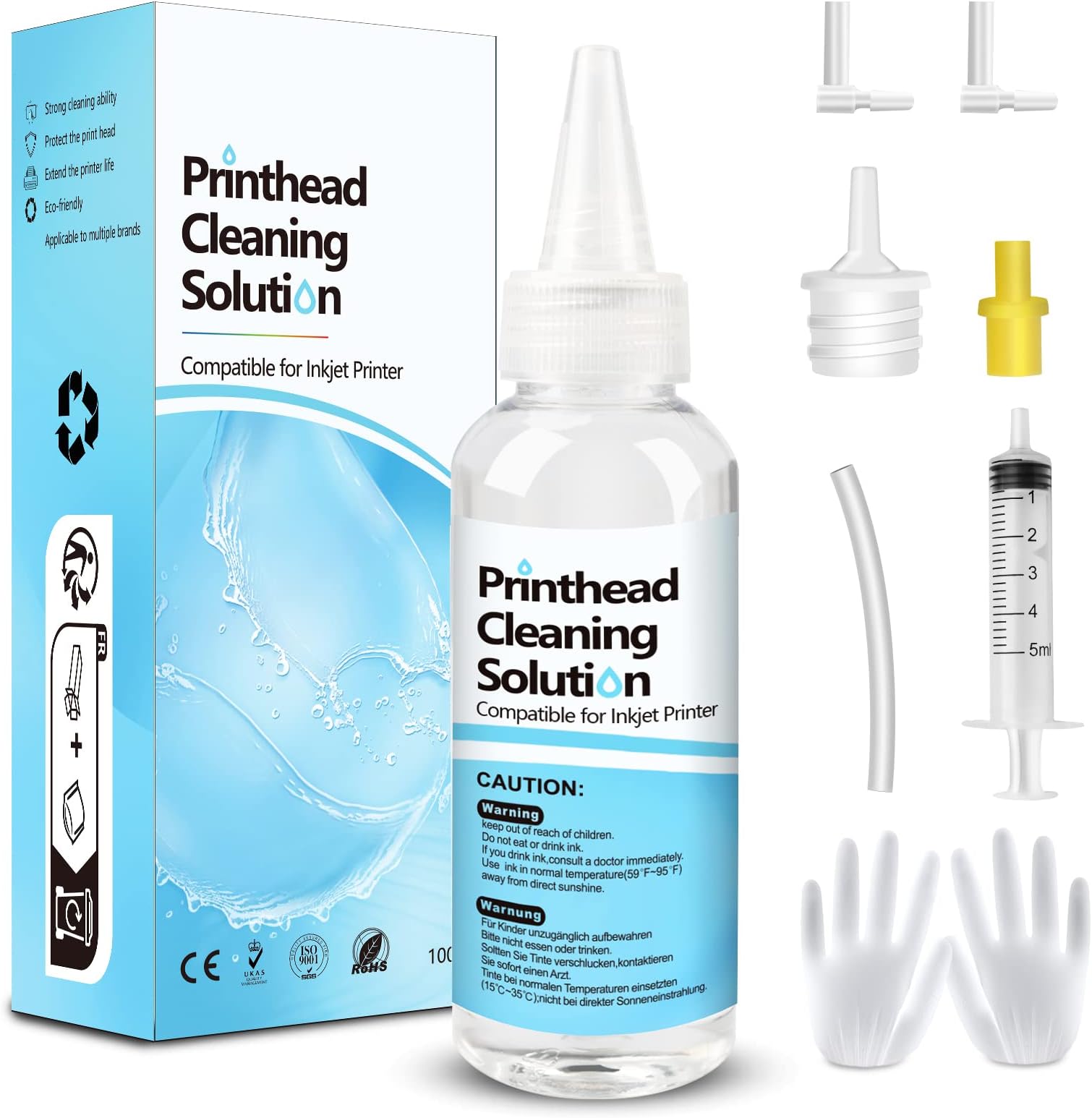
The Fosgoit Printhead Cleaning Kit offers a 100mL specialized solution and precision tools designed to dissolve hardened ink and unclog printheads across Epson, HP, and Canon inkjet printers. This all-in-one kit ensures easy, effective maintenance that restores print quality, extends printer life, and saves you from costly replacements — a must-have for professionals who demand flawless prints and uninterrupted productivity.


| ASIN | B08P18Q9WV |
| Best Sellers Rank | #1,604 in Office Products ( See Top 100 in Office Products ) #96 in Inkjet Printer Ink Cartridges |
| Brand | Fosgoit |
| Color | Clear |
| Customer Reviews | 4.3 4.3 out of 5 stars (2,461) |
| Date First Available | November 20, 2020 |
| Ink Color | Printer Head Nozzle Cleaner Kit |
| Item Weight | 5.6 ounces |
| Item model number | Inkjet Printer Cleaning Kit |
| Manufacturer | NUOK |
| Manufacturer Part Number | UN-UN100ML-T01-1PACK |
| Number of Items | 1 |
| Product Dimensions | 5.91 x 2.36 x 1.97 inches |
| Sheet Size | A4, Tabloid (11x17 inches) |
| Size | Printer Cleaning Kit 100mL |
P**E
Very good investment WOW
I tried printing a copy of a printer purge file that had all colors and check which color was having a clog. Two colors had a 100% clog. I tried printing several times with the same result. Then did a light head cleaning (3 minutes) and that did not work. Stoped doing the 7 minute clean up until I tried this product. I reluctantly purchased it as a last option before I gave up on the printer. Was already looking for new printers. When it arrived, i was ready but my ET-4700 did not readily lifted up to get to the printer heads. You have to remove two little screws right above where the printed page comes out. Then the top part goes up and you have full access to the printer heads. You have to put something to keep the top of the printer opened. The next step is to put paper towel right under the printer heads. You have to fold the paper very tightly as there is not very much clearance between the printer head and the bottom of the printer. The syringe can eject 5mm at a time. This is good so that you don't flood the bottom of the printer. The bottle comes with 100mm and it is recommended to flow no less than 20mm into each color head with a possible clog. After the paper towel is in placed between the printer bottom and the printer head, you have to gently take the soft plastic tubes out of the cassette (a little reservoir box where the ink passes right before it prints to the page) that sits right on top of each printer head. You have a choice to make as to where you plug the tube that comes out of your syringe. 1st Choice: Place the syringe tube on the same place as the soft plastic tubes that flow the ink from the big reservoir. 2nd Choice: Remove the cassette (a little reservoir box where the ink passes right before it prints to the page) that sits right on top of the print head and connect the syringe tube where the cassette makes contact with the print head. I chose the first one as it seemed the most thorough option. The videos I saw stat that it is almost always right on the head but I though why not clean anything in the cassette as well. Plus the syringe connection to the print head did not all that tight (worried about leaks). We did 4 flows (as the syringe has 5mm) for each troubled color (we had Yellow and Cyan with a complete clog). I had to be careful when i replaced the plunger after I filled the syringe with the clear fluid that came with the product. The plunger seems to have a very tight seal and I was afraid of shooting the liquid really fast as I replaced the plunger. After you shoot 10mm of liquid; move the head towards the other side of the paper towel to get that side ready for the other 10mm of clear liquid. If you see the paper towel completely soaked in ink. Then replace it. I recommend using the gloves (plastic bag material) that came with the product of use your own nitrile gloves. The paper towel will be very saturated with a clear solution and remaining ink. Move the head to the left or right and remove the paper towel. Use another paper towel for the next color but if you see too much liquid, clean the printer bottom before moving to the next clogged color. We only had two colors to do so, we used a few more paper towels to clean the bottom of the printer when we were done. Replaced the soft tubes that go to the cassette (gentle and slow proces) the tubes felt pretty delicate. We went ahead and did the full printing head clean regardless (7 minutes). You have to turn the printer off and then hold power button + help button for a few seconds to turn on into full cleaning mode. I had full ink on the tanks before I started this process and then seven minutes later I saw that all had gone down, mostly the black ink for some reason. Test post-product: Printed the head alignment page and surprise!! I SAW ALL FOUR COLORS in all their glory! Then printed a personal document and it was perfect. Very good product and resulted just as intended. Will definitely have this on hand and also use the printer more often from here on. Satisfied Customer.
T**.
Great product
Product worked great on my epson printer. The cyan wasn't printing at all and this product cleaned the printhead so it works now. The you tube video i watched was really helpful.
R**K
Take your time and allow extra time for print head to dry!!
Worked after several cleanings- had to wait 48 hours for print head to finally dry out still needs additional cleanings but did remove the clogs and printer is working again
P**L
Printer Cleaning Kit
I usually wait a few months to write a review on a product to see how it works. I had to clean the print heads on my Epson Eco Tank printer. I replaced the print box, it made no difference. I was ready to buy a new printer $300.00, when I saw a video online about this kit. I was fairly easy to do, the instructions are OK, but there are more detailed videos online, that make the job easier. I took me about 15 minuted to do it and the printer has worked perfectly ever since. I highly recommend it! It saved me $300.00
Z**N
Amazing product! Works great!
This brought my 8 year old HP Officejet Pro 6968 back to life after the heads had clogged from very dry air in my new home and me not using the printer as much. I'm very please I don't have to buy a new printer after all. Note: Despite the size of this bottle, I found the tube elbows to be too flimsy to be reused after all the pressure I needed to use to push the liquid through to clear the clog. One elbow busted and another one I accidentally dropped and can't find it anywhere. Too bad there isn't a spare. Nevertheless, I don't have to get a new printer or get different ink cartridges so it's worth using.
M**S
Maybe the cleaning kit works,... for you?
After my workhorse HP OfficeJet Pro 8600 Premium decided to add stripes to everything requiring cyan ink, I hit the "Clean Printhead". And then again. And again. After reviewing the how-to sources (YouTube, ChatGPT, heck even HP), I decided printhead cleaning needed to go to the next level. Which was soaking the business end of the printhead in distilled water. Which I did, um, three times, All to no avail. So, next up was buying this kit. I thought since you actually squeeze the cleaning solution through the printhead and out through the little holes, it would do the trick. It didn't. After going through the cleaning process three separate times (followed by the recommended "Clean Printhead" steps built into the printer menu, the result was basically the same as when I started. Sigh. I got the cleaning kit as the step before buying a whole new printhead. This is now my next step--and it's a way more expensive step. So I don't begrudge buying the cleaning kit; had it worked it would have saved me a lot of money, Since it didn't it cost me a little money. So, why three stars, if it didn't work? Three reasons: 1. It seems the printhead on this printer has run its course. The cleaning kit can't be blamed for this and the printhead on my 8600 has printed a LOT of pages over the dozen or so years I've had it. It's just end-of-life. 2. The cleaning kit might well work for you,. It's inexpensive so worth a try. 3. It's a logical step between the printer inbuilt cleaning routine and buying a new printhead (or even a new printer). Last thoughts: when handling the cartridges and printhead do use the supplied disposable gloves if you don't want to have to scrub your hands clean of ink for the next few days. Using disposable vinyl gloves would be even better, Ditto for keeping the cartridges and printhead off and surfaces: first cover with something impermeable (like a plastic shopping bag), then a layer of paper towels, then a clean sheet of printer paper or two, and then rest the printhead and cartridges on this layer. The reason for this order is: + The printer paper won't push paper paper particles into the printhead ports (which the paper towel might do). You're supposed to not rest the printhead with the nozzles down, but its easy to forget that. + The paper towel better absorbs the ink that leaks through the first layer. + The plastic shopping bag stops any ink getting though to whatever surface you put the stuff on. So there you have it. The cleaning kit did not work for me, was a lot of rather messy work for me, but might work for you.
F**S
Fill up the toner waste part and cause more issues. I am done in owning printer
J**E
Cumple con lo esperado
J**S
Excelente, cumple con lo ofrecido. Realizar la limpieza con mucho cuidado y siguiendo detalladamente las instrucciones para no dañar tu impresora, pero vale la pena el resultado
L**S
Todo llego a tiempo, el producto funciona a la perfeccion ya lo use y si destapa los cabezales que tienen burbujas de aire.
Trustpilot
1 month ago
2 months ago