Desertcart purchases this item on your behalf and handles shipping, customs, and support to Japan.
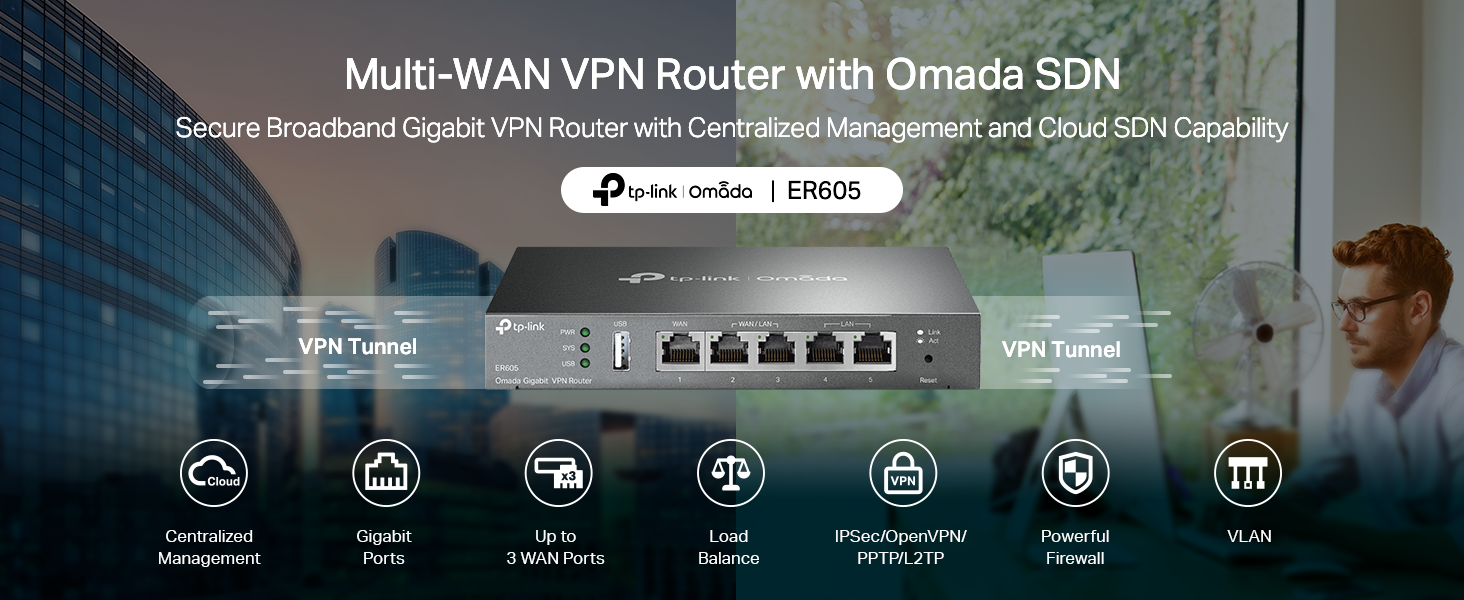
🚀 Elevate your network game with TP-Link ER605 V2 — where speed meets security!
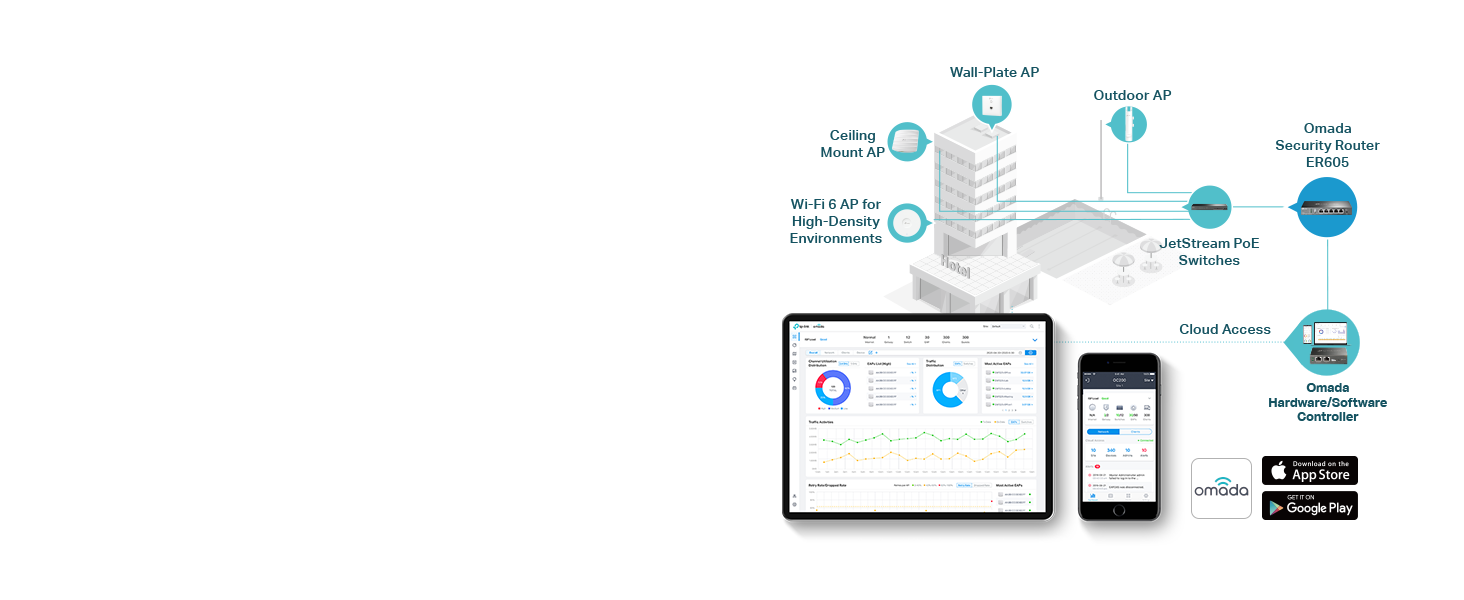
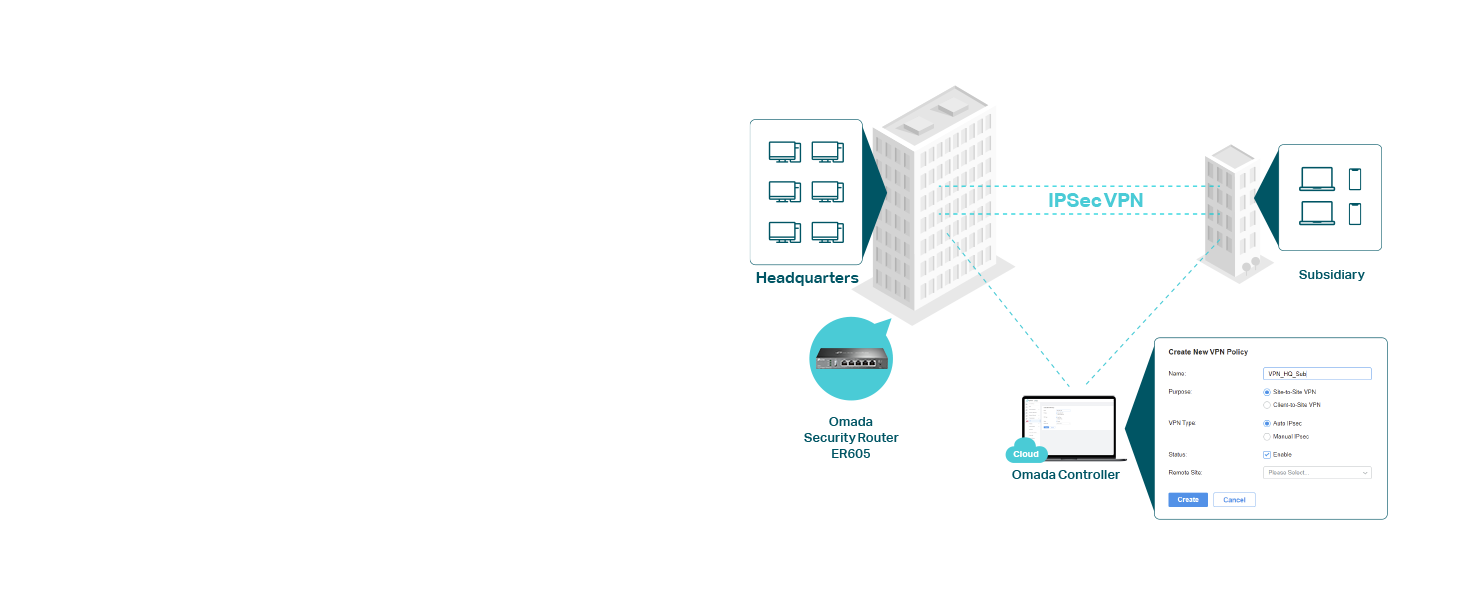
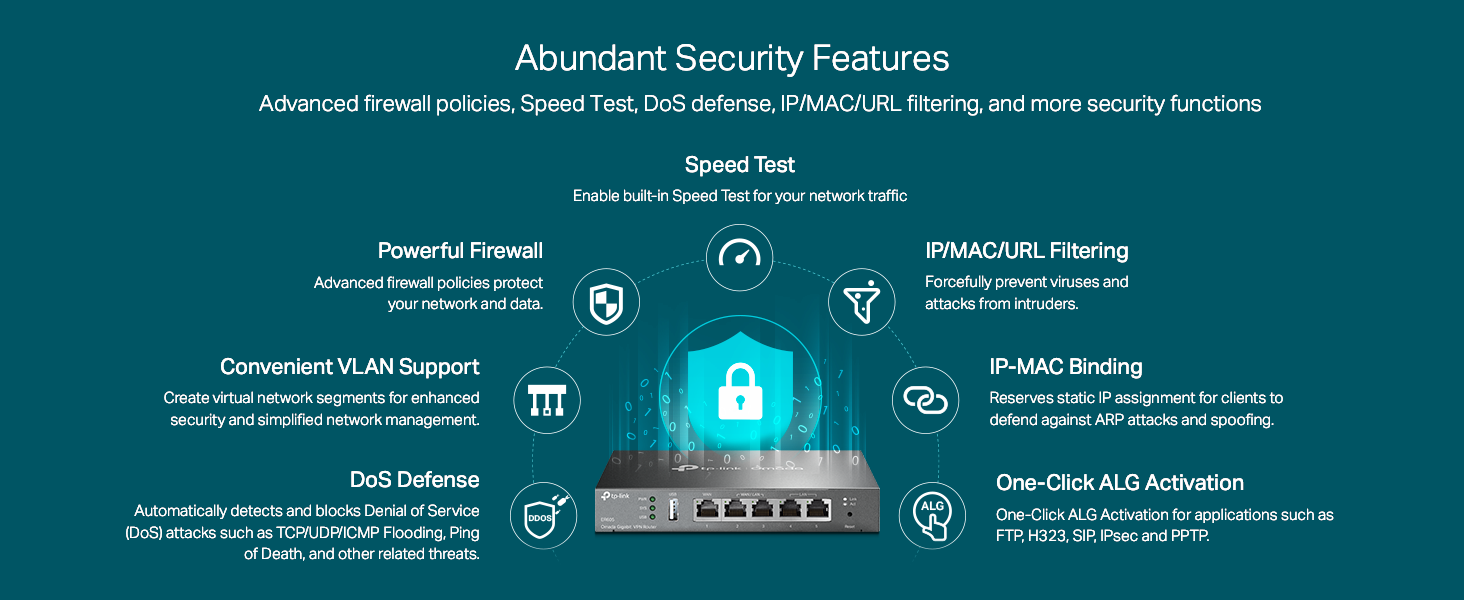
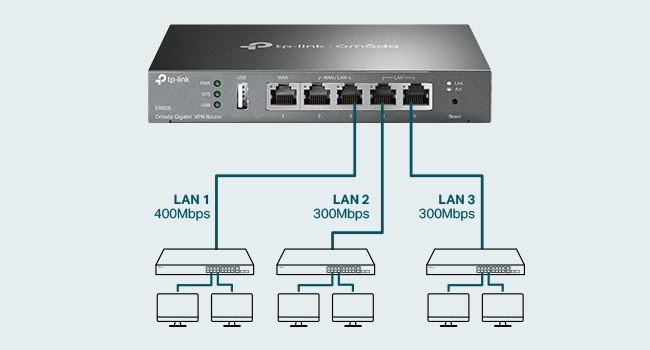
The TP-Link ER605 V2 is a wired Gigabit VPN router featuring five Gigabit ports, including 3 WAN ports for optimized bandwidth, and a USB WAN port for 4G/3G backup. It supports up to 52 VPN tunnels (IPsec, OpenVPN, L2TP, PPTP) and advanced firewall protections, making it ideal for secure, high-performance multi-WAN networking. Compatible with Omada SDN for remote management, it ensures robust, reliable connectivity with a 5-year warranty.


| ASIN | B08QTXNWZ1 |
| Antenna Location | Home |
| Best Sellers Rank | #227 in Computers & Accessories ( See Top 100 in Computers & Accessories ) #20 in Computer Routers |
| Brand | TP-Link |
| Built-In Media | Gigabti VPN Router ER605, Power Adapter, Quick Installation Guide, RJ45 Ethernet Cable |
| Color | silver |
| Compatible Devices | Personal Computer |
| Connectivity Protocol | Ethernet |
| Connectivity Technology | Ethernet |
| Control Method | Remote |
| Controller Type | Switch |
| Coverage | Multi-WAN and VPN supported connectivity |
| Customer Reviews | 4.4 out of 5 stars 4,943 Reviews |
| Data Transfer Rate | 1 gigabits_per_second |
| Frequency | 5 GHz |
| Frequency Band Class | Tri-Band |
| Global Trade Identification Number | 00845973089597 |
| Item Dimensions L x W x H | 6.22"L x 3.98"W x 0.98"H |
| Item Weight | 12.64 ounces |
| LAN Port Bandwidth | 10/100/1000 Mbps |
| Manufacturer | TP-Link |
| Maximum Upstream Data Transfer Rate | 4000 megabits_per_second |
| Mfr Part Number | TL-R605 |
| Model Name | ER605 |
| Model Number | ER605 |
| Number of Items | 1 |
| Number of Ports | 1 |
| Operating System | Windows |
| Other Special Features of the Product | WPS |
| Router Firewall Security Level | Advanced |
| Router Network Type | wired |
| Special Feature | WPS |
| UPC | 840460604635 845973089597 |
| Unit Count | 1 Count |
| Voltage | 240 volts |
| Warranty Description | 5 Year Manufacturer |
| Wi-Fi Generation | Wi-Fi 6 |
| Wireless Communication Standard | 802.11ax |
| Wireless Compability | 802.11ax |
S**E
TL:DR- Initial Integration Issue But Worth It
Unit arrives with IP 192.168.0.1 which is annoying and makes plug and play integration not possible for many networks. The Omada Controller see’s the unit but cannot provision it. Once you change your terminal device to some IP like 192.168.0.X, you can log into 192.168.0.1 and change the router IP to be on your network. Not sure why they don’t just select 192.168.1.65 or some other random IP. Anyway, once I did that the router provisioned and I was in business. It’s faster than my older Edgemax 5 port, integrates really well, and has a bunch of other features. The full blown Omada control interface (not standalone mode, I have an Omada controller, a separate box that plugs into the network) takes some time to understand. Not a knock on Omada as there are many features and options for all devices. The way it all integrates is pretty powerful and easy to navigate after you ingest it all. The router stand alone UI is fine, too, if you just need a pretty fast and feature rich home router. So I have two wall mounted access points, a POE switch, an outdoor AP, and this router (all Omada). Adding the new router made a noticeable improvement to overall improvement and the system does seem to optimize very well. My only gripe is the initial setup could be a little more seamless for the router. Every other Omada I have integrated perfectly. I would also like it to be POE powered but that’s a “nice to have.” Some background if interested: I’ve been gradually moving my wifi system over to the Omada ecosystem. My first purchase was their wall mounted access point, which mounts in a junction box and has a couple Ethernet ports. Great product. After that experience to picked up an Omada POE switch to directly power the APs. Then I got an outdoor AP. AP Performance was (and is) great in a very challenging urban SF environment. There are so many wifi networks on my block. I was coming from a Google wifi which was ok at first but after more networks popped up or a SW update it would just grind to a 3Mbps halt. The Google isn’t flexible at all. With that said I know some people have great success with it in suburban environments. The Omada APs just work and it’s been great. The Omada controller box is also worth it. The whole system is a bit overkill for a residential system, but overkill is underrated and I have a bunch of cameras on switches spread all around. I tried Ubiquity but had some issues and didn’t like the cloud interface. I prefer the Omada interface and the Omada controller box isn’t hundreds of dollars. Hope this helps.
A**N
Router Installation
I made purchase of this item because my mikrotic got damage in a lightning storm. I could not get any LAN from however i had store this item in cart for a long time and have been watching itso finally it was baught. I had no doubt about if or not it would work having experience with TP-Link i felt 100% confident in their products. I have been using one of their access point in organization for a couple years now it works perfectly fine. This router is solid from the company going with their switch i baught last year. I was amaze with their soft ware even my cousin was taken back becaus he loves another brand but he loved the set up inside. It can take in up to two ISP it wasn't hard to set up quick and easy to log in create new password and in the quick set up to get internet set up. I didn't have to read the manual for that. Once your all set you will experience a new smooth service right off the bat, there few things to keep in mind it is a home and business router so it has high end set up inside so it is capable of handling DHCP, VPN, 2WAN and other smart set up. In some cases may need someone experience to set it up properly depending your desire. NOTE it is not a POE router meaning it cannot send that extra power for cameras that may need POE I would recommend it at anytime for small set up like mind because i have multiple tv, cable box, access points, routers and printer so its a for a home set up which handles alot of load at time. So i have a dedicated switch for that too which is a TP-LINK. Because of that this router can handle that load and also has lighting protection. You can also down load the app and control it from cloud so you don't really need to be physically around to login and make adjustment. There are videos on you tube that can help with that set up. Make sure the device is on a good ups for protection read through notes before buying make sure the setup you are doing is the correct set up for this router and then if it is an know your going to enjoy your purchase.
G**Z
A Robust Router with a Quirky Interface
Our home is 4,000 sqft on two levels and the wifi distribution was built using an older Netgear wifi/router with a first generation Rockspace wifi mesh. As more smart devices, tablets, IOT's and such being added, the system really began to choke and just couldn't handle the load. That's when I decided to rebuild the topology using a standalone router and upgraded wifi mesh. There isn't a huge selection of standalone routers in the home networking category, and the selection came down between Ubiquity and TP-Link. I settled on the TP-link ER605 and am very pleased with the overall results, though it did come with pretty steep learning curve, due to its (in my opinion) confusing GUI interface. For instance: setting a DHCP address pool is hidden within a category called "Network List". All that is displayed is a Network Name "LAN", the IP address of the router, and a couple other parameters. You must select an edit icon to expand the display which will allow you to customize your LAN set up. It's subtle, and easy to miss if you don't understand the GUI design intention of the programmers at TP-Link. The MAC/IP Reservation controls are straightforward, but there is no obvious way to sort the list by IP or MAC address. I have nearly 70 devices hanging off my network, and not being able to sort the lists makes for a tedious effort when looking for a specific device. I contacted TP-Link support about this and told me that, no, you cannot sort the DHCP IP listing, but you can if you use their add-on OMADA Hardware Controller (at a cost of about $100), but I really don't want another layer of hardware or complexity to deal with. There are other quirks in the interface that slowed my setup time, only because I had to spend more time just to find where the specific option I was looking for is buried within the GUI. Now, anytime you migrate to a new topology, there will be a learning curve, but most of the quirks I ran up against could easily be addressed with a bit of effort on the GUI design. Things like Port Forwarding (Called "Virtual Servers" in the GUI), Dynamic DNS, and OpenVPN services are all there and are fairly straight-forward to set up. So, overall, this little modem has delivered everything I expected and need and this, coupled with the new wifi mesh system (Eero 6+ with 4 nodes with backhaul to the router) has dramatically improved our overall network and wifi service throughout the house. The ER605 modem has proven to be very well suited and is a fast and efficient workhorse of a router. With a bit of pain, effort, and patience to get through the learning curve of the interface, there will be only a few minor disappointments in the interface.
A**R
Nice but not perfect
Bought it for its dual-WAN ports, low cost, and no WiFi. I needed a failover for my relatively unreliable AT&T connection. The good: Works well (so far); updating firmware was a breeze (you need to do it for security purposes). Extensive menus where you can configure pretty much everything. NOTE: It assumes you know what you're doing, it's not for an everyday home user (unless ChatGPT comes to help). The bad: Very slow UI. Annoying password restrictions (i.e. need upper case, special characters, etc.), why? Type in the wrong password often enough and a factory reset is needed. The ugly: When a Wireguard VPN server is configured, I could not block access to the admin interface (e.g. 192.168.0.1) even when the rules are set to block it. Would love to figure out how to do it...
D**Y
Stick with built in web UI - If you can.
This review is for the TP-Link ER605 V2 Wired Gigabit VPN Router B08QTXNWZ1 I bought this router with only one thing in mind. Setting up VLANS. I have transitioned to a "Work from Home" position. I did not like seeing work equipment on my network or vice versa. My home router would separate WiFi with a guest option but some equipment was not wireless. Setting up VLANS wasn't too difficult but I had to do a to of research first so I knew what to expect going in. You will also need a managed switch capable of handling VLANS. I found a Netgear GS305E here on Amazon to work with the router. I may use the VPN at some point to just connect remotely when I'm away. I used the built in interface. I did not want to have it paired with software running on a PC. My router from work has a similar option and if the PC goes down, you can't connect. Read the bottom to find out what firmware is required and update it first. When you set it up initially, you type a web page address in your browser. Once everything was set up, my browser kept trying to connect to that website as if it was on the WAN and not the LAN. I kept getting redirected to adds to buy that domain. After the initial setup, just used it's IP address to connect. There was an odd quirk. I saved the login information in my browser. It wouldn't let me log in that way. When I looked at my browser the password was a extremely long random string. Maybe it's an added security layer. You may need to edit it in your browser manually and when prompted to update it, click not now. It has just enough ports to connect everything not going through the VLAN but you could add an un managed switch to one of the ports on the your managed switch. I could not find anything that does what this does for this price. So far it's been a good value. Some reviews were bad but it's working well for what I need. Most issues I saw reported were related to the VPN functionality. I'm not sure if this is a result of rebooting my spectrum modem but after adding the router and rebooting, a speakeasy speed test had my up speed at 20 MBS where it was only 10 before.
K**S
Solid little router with useful features
This TP-Link ER605 V2 has been a solid router for my network setup. I like that it gives me more control than a basic home router without being overly complicated to get running. The wired gigabit ports have been reliable, setup was straightforward, and the interface is easy enough to work through once you know where the main options are. The VPN and network management features are useful, especially if you want something more flexible for a home office or small business style setup. It is compact, looks clean on the shelf, and has handled regular traffic without any issues. For the value, ports, speed, and ease of use, it has been a dependable little router.
C**S
Avoid. Missing key features and has poor performance
I spent a TON of money on this ER605 and an OC300, along with several switches (24pt and several 8pt units), a lot of WAPs and more based on the positive reviews here. Well the reviews must be padded or fabricated by the company (who apparently doesn't read and certainly doesn't respond to any of the reviews here) because this unit pretty much SUCKS. Latency is terrible, turning 14ms pings into 44-540ms on average. It regularly freezes, hiccups and otherwise requires reboots in the middle of the day, even though the logs show little to nothing in the way of problems and the ISPs attached remain in an unchanged, running state. This is truly frustration in a box… The fail-over feature is a joke; spotty at best with large lag times IF it works at all (very rare that it works at all and when it does, it takes several minutes to do so no matter the settings.) Aggregation doesn't work in any way, shape or form. And the real icing on the cake is there is NO local DNS solution provided AT ALL. This is a basic feature that even the cheapest, worst equipment brands supply, yet TP-Link seems to think isn't necessary to include. It IS NECESSARY - by very definition!!! Unless you like going back about 30 years in network capability... AND, the entire Omada promise is reduced to almost nothing without it, unless you like remembering or documenting every single device’s IP address… HUGE DISAPPOINTMENT. For the load balancing feature, if you want the unit to test all ISPs/WAN connections to suggest and implement a load balancing formula, the speed testing algorithm often gets hung and will 'spin' for hours or days if you let it. You can just enter the balancing ratio yourself (which most likely you will be forced to do because the auto-ratio speed test routine will probably just loop forever as mentioned) because even when the auto-ratio test does actually complete, the ratio it suggests is grossly inaccurate relative to known statistics. I purchased all this TP-Link equipment to replace an older Ubiquiti infrastructure because Ubiquiti's newer UniFi products have become garbage themselves, and Ubiquiti doesn't seem to care. Perhaps both companies are secretly one and the same because TP-Link's products are just as bad or even worse (i.e. no local DNS - at least UniFi gear DOES have that, as it should!) and their support is about equal - non-existent. Calls (well messages left), emails, posts on their support forums, etc. that are requests for support go unanswered. The few answers that do come offer little to no help, and a “just wait, we’ve put in a request” is the best I’ve seen in about a year’s time. So the supposed TP-Link "lifetime warranty" is basically useless. A lifetime warranty with no one to honor it is no warranty at all. As the headline says - AVOID! Unless you LIKE continuous frustration, outages and below lackluster performance... If you do, this gear is definitely for you; go for it and good luck with that! I am beyond disappointed and feel I wasted thousands of dollars in a system that I cannot trust. As much as I hate to say it (and I do), I guess I’m going back to Ubiquiti and scrapping all this TP-Link junk. Update Sept 2023: I didn’t go back to Ubiquiti, but instead purchased a Peplink Balance Two (WAY more expensive than the ER605 mind you) to replace the TP-Link ER605, and it actually WORKS. And it has expected basic functionality, like local DNS resolution, etc. I’ll be converting all my TP-Link equipment as time and budget allows since removing the ER605 dilutes the Omada management platform value proposition close to entirely. My advice: unless you just want unmanaged network equipment, stay away from TP-Link.
J**N
Reliable, Stable, and Feature-Rich Networking Gear
Before switching to the TP-Link ER605 V2, I was restarting my cable company’s modem/router combo once or twice a week due to constant dropouts and poor Wi-Fi performance. Since installing the ER605 and putting the modem in bridge mode, it has been running flawlessly for over 3 years—the only reboot I’ve done was after making configuration changes myself. At home, I use the ER605 with a TP-Link EAP610 for Wi-Fi, managed via the OC200 controller. At another property I manage, it’s paired with a TP-Link EAP225, controlled through the Omada software running on Proxmox. The entire Omada ecosystem—covering load balancing, firewall, VPN, and network management—is stable, intuitive, and enterprise-grade yet budget-friendly. If you need more ports with VLAN control and Omada integration, the TP-Link TL-SG2008 is an excellent choice. This smart managed PoE-in switch supports VLANs, L2/L3/L4 QoS, static routing, IGMP snooping, and link aggregation. It integrates seamlessly with the ER605 and is perfect for home labs or small business networks requiring flexibility and control. If you don’t need advanced management features, the TP-Link TL-SG108 is a simple, plug-and-play option. It’s unmanaged, fanless, built tough, and just works right out of the box—ideal for quickly expanding your wired network without fuss.
S**E
Very good product. Works well.
This product is very good, did latest bios update and working perfectly. It has multiple vpn support which works perfectly, but the only issue is with the wireguard vpn that it doesn't work in full mode, so had to setup openvpn which has lower speed alongside the wireguard which works in full mode and solved my purpose fully. Was unable to configure the mobile app though but it doesn't matter to me much.
J**A
Top dos top
Salvou minha internet, não sei como não havia comprado antes, justa até 4 internet e mistura em 1 só. Vc pode optar por ter as 4 disponíveis e ele gerencie a que estiver com maior sinal para te conectar ou (a que eu prefiro) que ele junte as velocidades de todas as internet e disponibilize o somatório, ou seja, vc não precisa ter um plano caro de uma operadora, mais sim, uns 2 ou mais planos baratos, pois ao juntar, terá uma velocidade top, e quando uma cai as outra continua normalmente e vc nem percebe. Obs: ele não tem conexão via Wi-Fi, logo eu tive que instalar após ele, um roteador para que todos meus dispositivos da casa se conectassem, mas comprem um roteador gigabyte (10/100/1000) para que ao juntar 3 internet de 300 mega, o roteador possa dispa velocidade total via wi fi. Podem comprar sem medo. Equipamento crucial para que tem qq tipo de comércio e tb para uso residencial) meu caso).
F**Z
Muy útil para enlaces redundantes
La solución más simple para configurar un enlace redundante. A demás, ofrece muchas herramientas para VPNs. Lo recomiendo para casa o incluso empresas y negocios medianos.
J**N
Excellent routeur fiable avec failover efficace
Très bon routeur pour le prix. Le TP-Link ER605 est facile à configurer et l’interface est claire. Je l’ai acheté principalement pour le failover WAN, et cette fonctionnalité fonctionne très bien. Avec un léger ajustement via le policy routing, on peut obtenir exactement le comportement souhaité. Stable, fiable et efficace — excellent choix.
S**T
Easy to setup and use
Great product
Trustpilot
3 weeks ago
3 weeks ago