


Desertcart purchases this item on your behalf and handles shipping, customs, and support to Japan.
๐ Upgrade your wired world to wireless wonderโfast, secure, and effortlessly sleek!
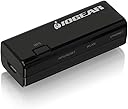
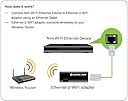
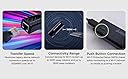
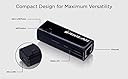
The IOGEAR GWU637 Universal Ethernet to Wi-Fi N Adapter delivers up to 300Mbps on 2.4GHz, enabling Ethernet-only devices to connect wirelessly with easy push-button WPS security. Its compact, USB-powered design revives legacy devices like printers and AV receivers, offering a clutter-free, high-speed Wi-Fi solution for home and office environments.







| ASIN | B018YPWORE |
| Best Sellers Rank | #10 in Laptop Network Adapters |
| Brand | IOGEAR |
| Built-In Media | 1 x Ethernet Cable (3ft), 1 x Ethernet-2-WiFi Universal Wireless Adapter, 1 x Quick Start Guide, 1 x USB Power Adapter, 1 x USB Power Cable |
| Color | Black |
| Compatible Devices | Audio Video Receivers, Desktop, Laptop, Printer, VOIP Phone |
| Compatible Operating System Family | MacOS, Windows |
| Customer Reviews | 4.0 out of 5 stars 2,516 Reviews |
| Data Link Protocol | Fast Ethernet |
| Data Transfer Rate | 300 megabytes_per_second |
| Global Trade Identification Number | 00881317513335 |
| Hardware Interface | 802.11 b/g/n |
| Item Dimensions L x W x H | 2.56"L x 0.75"W x 1"H |
| Item Type Name | IOGEAR GWU637 Ethernet-2-wifi Universal Wireless Adapter, Bridge, 802.11B/g/N, Desktop, Black |
| Item Weight | 22.68 g |
| Manufacturer | IOGEAR |
| Mfr Part Number | GWU637 |
| Model Number | GWU637 |
| Number of Items | 1 |
| Number of Packs | 1 |
| Product Dimensions | 2.56"L x 0.75"W x 1"H |
| UPC | 782386489319 881317513335 731215286797 |
| Unit Count | 1 Count |
| Warranty Description | 1 Year Manufacturer |
S**M
Highly recommended, best I found out of three different brands. Easy setup, works flawlessly, and it is a top notch performaer.
I rarely rate products as five star. This one earned that rating. I have been struggling for about a week to find a good solution for a recent switch from Frontier FIOS to Spectrum Cable. Frontier allowed and enabled Moca, which allows networked devices to use the Cable as the network delivery medium. We use Tivo cable tuners and DVRs, which have to have access to the network to communicate with one another. One room out of five in my home that had a TV in it, did not have a network jack. I was using the Moca on cable to fill that gap. That went away when I switched over to Spectrum. I tried a couple of really nice wireless network adaptors, but both of the others that I tried created subnets for the device they were meant to service. This puts those devices on a separate network that passes internet through your main network. This did not work for the Tivo network tuners as they rely on all of their devices being in the same subnet. They apparently cannot be manually configured to find the other Tivo's using network addressing for the other boxes. So this remote box ended up isolated. I had to have something easy to use and configure that would give me an ethernet port that was on the same subnet, and act as a true bridge device. This unit did that, and was so easy to use that I wish I had tried it first. It is worth noting that this is a Tivo Mini, which relies on the network to watch everything, as when watching TV it uses the tuner built into a Tivo DVR in another machine. It has to have a high speed network to support streaming the TV shows, or to use any Internet based video service. This is also a high def TV, so its bandwidth requirements are high. Setup was very easy, just plug it into the network port of a pc, follow the instructions to hook it into your wireless network, and you are done. The range for me is about 50 feet. No issues with that at all. I plugged the configured unit into my remote Tivo, ta da, it worked! And it worked flawlessly. I do wish it had 5G wireless and not just 2.5G. That would allow for faster communication with my other Tivos. But it does support Wireless N, and that really does help a lot. My wife, who uses this Tivo tuner, really didn't notice any lowering of the network rate, and I was able to get somewhere in the neighborhood of 50mbs to 100mbs. So certainly no slacker even with 25G wireless. My home network is all GigE (1000mps), so I still want to get a network jack installed in that room. But this will bridge the gap really nicely until I can arrange to have that done.
G**E
Is a bridge not an extender which is good
so far so good . works as I hoped, as a bridge not a 'wifi extender' . Once configured the device has no 'presence' on the network . In other words the device itself has no ip . It just passes traffic from the ethernet port to the wifi connection . Others have complained about it running hot .I'll have to monitor this . One thing that is bs is 'Speeds of up to 300Mbps' . The devices network interface is 10/100 .
E**.
One trick pony -- but works reliably
If you need to connect an ethernet device that doesn't have Wifi, this adapter seems to do it fairly simply/reliably. I had problems with other brands that offered all kinds of different operating modes -- but found that re-connects after power cycling was very slow and haphazard at best. This product (at least for me) has worked quite reliably -- but don't expect all kinds of hotspot or multi-connection options. The included instructions were a bit complicated but since it has a WPS button and my router also accepts WPS connections I found that it was easiest to just ignore the Mfg instructions instead.
S**Y
Works great!! Install straightforward (not plug and play)
SHORT VERSION: PROS: * Works great!! So far solid connection, no drops * Faster than the Panda usb wireless adapters (see screenshot) * This specific computer (Windows 10) didn't even recognize the Panda USB wireless adapters consistently, so had to move to something else CONS: * Searching for ethernet to wireless, this is the only product I could find, could be a CON if you're looking for choices * Setup is straightforward, but may not be easy. Easy for me since I am in IT. Non-IT, it could be easy, it could require some patience * NOT plug and play, and the manual is a bit hard to read (smaller print). You can probably make your way through it, the screenshots are too small to be helpful * Setup did not work with Chrome, had to switch to IE, so beware of that. Background: We had some Panda USB wireless adapters for our desktops, one is a Dell Optiplex 780, one is a Dell Optiplex 5040. The 780 runs Windows 7. The 780 we upgraded to Windows 10. For some reason the Panda Wireless USB adapters would just not work with Windows 10. Windows 10 would recognize it only randomly, random internet access NO GOOD!!! Tried powerline, got much slower speeds than is practical. So then found this for ethernet to wireless Setup is easy enough for me being an IT person. For non-IT it is straightforward and some people may find it easy, some people may need a bit more patience. The instruction booklet is REALLY hard to read, at least the screenshots. Or else I'm getting old. :) :) Or both So far so good, and will enjoy having my main computer at home not drop internet anymore. Price: could be a pro or a con, it definitely is pricier than most usb to wireless adapters, enjoying that I can plug the ethernet cable right in Lastly: Requires USB for power (whether your computer or an outlet) So far so good!!!!
E**N
Beware the hidden MacBook issues!! And then there's the non-existent support
I bought the product to enable wifi on an ethernet enabled device. I have a MacBook. Issue 1: we don't have an ethernet port on the MacBook. We need an adapter. Issue 2: As best I can tell, this requires a hardwired connection to the router for setup. (see tech support complaints, below.) I can't make a hard connection to my router. If it is possible, I suspect I need yet another adapter because the supplied ethernet cable doesn't have a USB connector-end and all the connections on my router require a USB. This device costs $45. If I'm right on why setup is stalled, the peripheral connections will set you back around $100. Maybe more. During installation, everything went fine until I needed to enter a web address, an IP that is a private internet protocol address. The site could not be reached. I suspect it requires a hard connection my router but whatever it is, I can't get to where the instructions tell me to go. So I'm blocked. The device is worthless. Contacted tech support: explained the problem and asked for help. They sent me the instructions out of the manual. That's it. The IP still won't load and that's a complete show-stopper: the blocked site is supposed to enable me to log in to the administrative control panel for my router so I can connect the adapter to my network. I am not pleased with the product or the tech support. Both are useless - and by the time you spend all that money on external ports for a MacBook, it's a very frustrating place to be.
M**Y
Difficult to install
WPS does not work, but then again, I've never been a fan of configuring new wireless devices using WPS due to security concerns. I'm an IT manager of 15 support techs for a Fortune 100 company with over 40 years experience and it took me about an hour and a half to get it figured out and working properly. I used a laptop with limited USB connections, so I ended up connecting a USB hub, a USB to Ethernet adapter, and used the manual configuration method. But you have to be aware of which ethernet adapter you are actually configuring or you'll end up configuring the laptop's wireless adapter with a static IP address, which then locks you out from your home wireless on your laptop when you're all done. Most will not know what I'm talking about, but a few will. If there's a mistake to be made, I'll make it along the way with these types of setups. Some things are a little bit intuitive, while other configuration issues seemed to work magically with a reboot. I kept getting an error when trying to connect the IO Gear to my home network and was just about to give up and disconnected it, only to say to myself "give it one more try" and I powered it up and BOOM!, the adapter's configuration was populated correctly. I connected it to my ethernet connection on my home security system and had to wait about 60 seconds and then it came up online. If you understood what I just wrote, this will end up being a pretty good adapter for you. I'll come back if I have more problems in the future.
K**.
Easy Setup and connected to the WiFi in minutes!
I have been looking for one of these for a while and this device was perfect!.. originally looking for a way to connect my VOIP phone to a wireless router but then i was given a printer that did not have wifi so i pulled the trigger on this immediately and it worked out great! two ways to setup the device (push button) but i did manual setup which was super easy. - Turn off wifi, set ethernet adapter to the same range as the device (192.168.1.254 so use 253) - open web browser (i used safari on my mac) and point to the device in the address field - go to "Search" to find your SSID Wireless network - supply the password to join and save the config. - device restarts and then it can be used wherever I plugged it into the enternet port of the hp laserjet and then was able to find the printer and get on its management page as well. Easy Peasy! Highly recommend this device
T**E
Brought my 10-year-old printer into the wireless era
Worked perfectly on the first try. The setup failed in Firefox, so I had to use an InPrivate Edge window to complete the initial installation. Once everything was set up, it immediately behaved exactly the way you'd expect. My 2012-era HP Laserjet (M1212nf MPF) only has Ethernet connectivity. I needed to move it to the other side of the room, but I didn't want to run wiring to the new location. Unfortunately many of the wifi/Ethernet bridges I've found also include a wireless repeater, which adds to the problem of our already overcongested RF neighborhood. This does not; it's a direct wifi/ethernet bridge that simply connects an Ethernet jack to your wireless network. The setup process took only a few minutes. Once everything was up, my printer had no problem obtaining an IP and accepting print jobs. The device gets slightly warm to the touch, but not hot. I have no concerns about leaving it plugged in all the time. UPDATE: Two years later and this is still going strong. Everything continues to work perfectly. If you have an old printer or other device that has an ethernet jack and you want to make it wireless, this does the trick and does it beautifully.
C**N
Todo bien
Todo bien
V**V
Easy setup, works well
Takes 2 minutes from unboxing to full ready
H**Y
worked like a charm...
After a software update the WiFi in my LG 4K OLED TV ceased to work... Ethernet was ok, so I added the IOGEAR Ethernet-2-WiFi Universal Wireless Adapter and it's all good... and with WPS it was super simple to make it go... with excellent speed...
L**E
IO GEAR
It works but the documentation needs to thoroughly touch all aspects of setup, else non-technical users will think it does not work.
L**E
Nickel !
Facile a installer avec un PC pour configurer l'appareil. RAS sur le fonctionnement pour connecter une TV sur une BOX en WIFI.
Trustpilot
1 month ago
1 week ago