Desertcart purchases this item on your behalf and handles shipping, customs, and support to Japan.
🎮 Compact control meets sleek wireless freedom—own your workspace, anywhere.
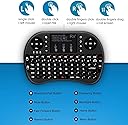
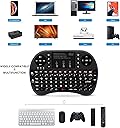
The Rii i8+ is a compact 2.4GHz wireless mini keyboard with an integrated multi-finger touchpad and LED backlit keys. Featuring a rechargeable lithium-ion battery and plug-and-play USB receiver, it offers up to 25 meters of reliable wireless range. Designed for versatile use across PCs, Smart TVs, gaming consoles, and Android devices, its ergonomic game-handle design and multi-functionality make it a must-have for professionals and gamers seeking portable, stylish control.
| Asin | B00Z81U3YY |
| Best Sellers Rank | #127,846 in Computers (See Top 100 in Computers) #1,124 in Computer Keyboard & Mouse Combos |
| Brand | Rii |
| Button Quantity | 92 |
| Color | Black |
| Compatible Devices | PC |
| Compatible Operating System Family | Android, Linux, Windows |
| Connectivity Technology | RF |
| Customer Reviews | 4.2 4.2 out of 5 stars (6,776) 4.2 out of 5 stars |
| Enclosure Material | lithium |
| Hand Orientation | Ambidextrous |
| Item Dimensions L X W X H | 8.9L x 1.3W x 12.7H centimeters |
| Item Weight | 3.2 Ounces |
| Keyboard Backlighting Color Support | Single Color |
| Keyboard Description | Multi Functional |
| Keyboard Layout | QWERTY |
| Mfr Part Number | FMKRFL1-IV2 |
| Model Number | Rii I8+ |
| Number Of Items | 1 |
| Number Of Keys | 92 |
| Number Of Packs | 1 |
| Power Source | Battery Powered |
| Switch Type | Membrane |
| Theme | No Theme |
| Unit Count | 1.0 Count |
| Upc | 602716813006 703546912454 739027528951 |
| Water Resistance Level | Not Water Resistant |
User
Works great!
Works great on my devices with a USB port, especially Android TV Box. Good feel and well laid out.
User
Perfect...just started using
I received the product today..here are my initial impression about the productThe build quality:It is perfectly built,feels very handy and has a soft feel,light weight nice grip,this model now comes with micro usb not usb 2.0 which is greatConnectivity:There is a receiver compartment at the back,just plug nd play it's that simple the range is good and very responsive the no lag in the operationKeys and touchpad:Keys are backlight and has 2 step brightness,keys are soft and easy to press feels good and the touchpad is super responsive great touchpad.The device goes into sleep mode if not used for about 3min and wake up by pressing any key,a good feature to save battery... speaking of battery it has an inbuilt battery.My initial impression is great about this device
User
تصميم مثالي جودة ممتازة مقابل السعر ولكن..
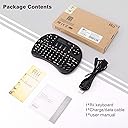
السلام عليكم ورحمه الله وبركاته،اشتريت لوحة مفاتيح لاسلكية صغيرة 2.4 جيجا هرتز من ري تعمل باللمس (النسخه المحسّنه)محتويات المنتج كالتالي:- لوحه المفاتيح- كيبل ميني USB للشحن- USB رسيفر- دليل المستخدم باللغه الانجليزية•لوحه مفاتيح مصغرة مع لوحه اللمس تتميز بالأبعاد التالية:- 145 مم (14.5 سم) للعرض- 100 مم (10 سم) للطول-18 مم للسمك- الوزن 200 جرام تقريباً• يوجد 3 لمبات رئيسيه بالكيبورد من المهم تعرف معناها:ازرق : يعبر عن حاله البطاريه، اذا كانت شغاله معناته الجهاز بطاريته ممتلئه. اذا كانت تومض معناته الجهاز بحاجه لإعادة شحناحمر: يعبر عن حاله الشحن، اذا كانت شغاله معناته الجهاز باقي يشحن. اذا انطفئت معناته الجهاز فلل ومعد يحتاج يشحنأصفر: يعبر عن حاله الاقتران، بعد تشغيل الكيبورد اذا ما اشتغلت معناته أن الجهاز تم توصيله بنجاح، برضو اللمبه الصفراء تشتغل عند ضغط اي زر أو لوحه اللمس• طريقه ربط الكيبورد بجهازك:في خلف الكيبورد موجود الرسيفر قم بتركيبه في الجهاز المراد التحكم فيه وشغل الكيبورد من السويتش في الاعلى على جهه اليمين،اذا اللمبه الصفراء طفت، معناته أن جهازك اقترن خلاص وتقدر تستخدمهملاحظة:في حال استمر اللمبه الصفراء بالوميض، معناته لازم تربط الكيبورد بجهازك يدوياً، بالنسبه لطريقه الربط اليدويه تابع الخطوات التاليه:الخطوة 1تأكد من الكيبورد أنه شغال بشكل طبيعي، اللمبه الزرقاء لازم تكون دايم شغاله وهذا يعني أن البطاريه مشحونه، في حال كانت اللمبه الزرقاء تومض حاول تشحن الكيبوردالخطوة 2تأكد أن البي سي او تلفزيونك شغال،اضغط وعلق على زر F1 بالكيبورد وثم شغل الكيبورد وانت مستمر بالضغط،اللمبه الصفراء رح تستمر بالوميض بسرعه في هذا الوقت ركب الرسيفر بالجهاز المراد ربطه والمفترض أن اللمبه الصفراء تطفى وبكذا تم ربط الجهاز بنجاح• تم تصميم لوحه المفاتيح للتتوافق مع اغلب الأجهزة (بي سي/لاب توب/ماك/لينكس/اي بي تي في/جوجل اندرويد/ويندوز 7، 8، 10) انا شخصيا جربتها على ويندوز ١٠ وتلفزيون TCL بنظام اندرويد وكانت شغاله تمام التمام• لوحه اللمس تتميز بالابعاد التاليه :48 مم (4.8 سم) للعرض34 مم (3.4 سم) للطول• طريقه التحكم في لوحه اللمس:نقرة باصبعين = الزر الايمن بالفارةنقرة وحدة = الزر الايسر بالفارةالسحب باصبعين = تحريك الشاشه لأعلى وأسفل• يحتوي الكيبورد على 93 زر تحكم تتميز بالاضائه ويمديك تتحكم في قوتها عن طريق الضغط على زر المصباح• جميع الاختصارات بالكيبورد موضحه باللون الاحمر كل اللي عليك تستمر بالضغط على زر Fn وتضغط عالاختصار• هذي بعض الاختصارات:FN+F7: طباعه الشاشةFN+F8: تفعيل/تعطيل لوحه اللمسFN+F9: F11FN+F10: F12FN+Enter: CTRL+ALT+DELFN+Space: تعديل سرعه لوحه اللمسميزة السكون والنشاط التلقائية :• يوجد خيارين بالنسبه للسكون (الخيار الاول يدخل وضع السكون بعد 3 دقائق, الخيار الثاني يدخل وضع السكون بعد ساعتين)• اذا ضغطت اي زر رح يتنشط الجهاز، للاسف ما يتنشط من لوحه اللمس• يمديك تتحكم في خيارات وضع السكون عن طريق الضغط على FN + Esc سواء 3 دقائق أو ساعتينككل الكيبورد جودة مقابل سعر (42 ريال) صحيح في بعض الاشياء كان من الممكن تكون افضل لكن أنا سعيد جدا بالمنتج الحاليتحديث: الكيبورد يتأخر في الكتابه خصوصا لو كنت سريع بالكتابه ويكرر حروف احياناً وهذا سبب كافي آني اطلب له إرجاع
User
perfetta
arrivata entro il tempo prestabilito possibilità di tracciamento del pacco. Funziona perfettamente retroilluminata adatta se si usa al buio. funziona su pc e ps4
User
Love, love, LOVE it!!!
I was going to buy a dedicated HTPC to have computer access on my 60" HDTV in my living room and some that I looked at came with a similar wireless keyboard (but without the backlight). For now though I decided to use one of my XPS laptops connected to HDMI instead of buying a new PC. Problem is that is was a real pain to go into the media cabinet and pretty much crawl on the floor to control the laptop every time I wanted to locate, start, or stop a movie, etc.I decided to order this wireless keyboard/touchpad combo instead since it was a lot less expensive then buying a new computer. I am SO glad I did and am VERY IMPRESSED with this little device! It is super easy to use and gives me complete control over my computer, even from across the room. The backlighting is also wonderful and works very well. The keys have a very nice 'click' to them and I can easily and quickly type using my thumbs. The keyboard is very comfortable to hold and use. Even my wife loved it after using it the first time and she had no problems using it either.I have a very large living room and our chairs are more then 20' away from the media cabinet and we have no issues with connectivity with the included USB receiver. The laptop is inside a media cabinet behind heavy wooden doors and there are all kinds of other pieces of equipment in there, including some that are wireless. One note though is that when I had the receiver plugged directly into the USB port I would occasionally lose connection for brief moments; however, I decided to use the USB extension cable that came with the keyboard and put the receiver closer to the front of the cabinet and in that location it never loses connection at all.The touchpad is also very nice and easy to use. I love the layout of the keys and there are multiple options for left and right click. Scrolling and multi-finger gestures work perfectly.My one and only minor compliant is that there is no auto backlight mode option (i.e. having it turn on automatically when a key is pressed and then turn off after a certain time.) The way it is you have to manually turn on the backlight by pressing a button; it then stays on for a preset amount of time after no key is pressed. Next time you want backlight, you have to press the backlight button again but nothing happens, and then you have to press a second time to turn on (it does not reset the state after it turns itself off). I wish you could just set it to turn on when a key is pressed, then turn off by itself, then on again next time a key is pressed. This is only a minor issue though and the device is so nice and so well thought out that it is not a deal breaker.I would definitely recommend this product to anyone who needs a great, compact controller for a HTPC or similar device.UPDATE 11/8/2015I found out through trial and error that once you activate the back light the first time it will come back on automatically when you press any key OTHER THAN THE BACK LIGHT KEY), even after the keyboard goes into sleep. If you press the back light key then it does turn it back off and would require a second press to turn back on. So, just press it once to turn on and then it will come back on by itself when you press a key. Note, if you turn the power switch off you'll have to turn back light on again when to first turn the keyboard back on.I've upped my rating to 5 stars now as it's perfect for me. Still have no issues at all and still on my initial charge.Still love it!!
Trustpilot
2 weeks ago
5 days ago