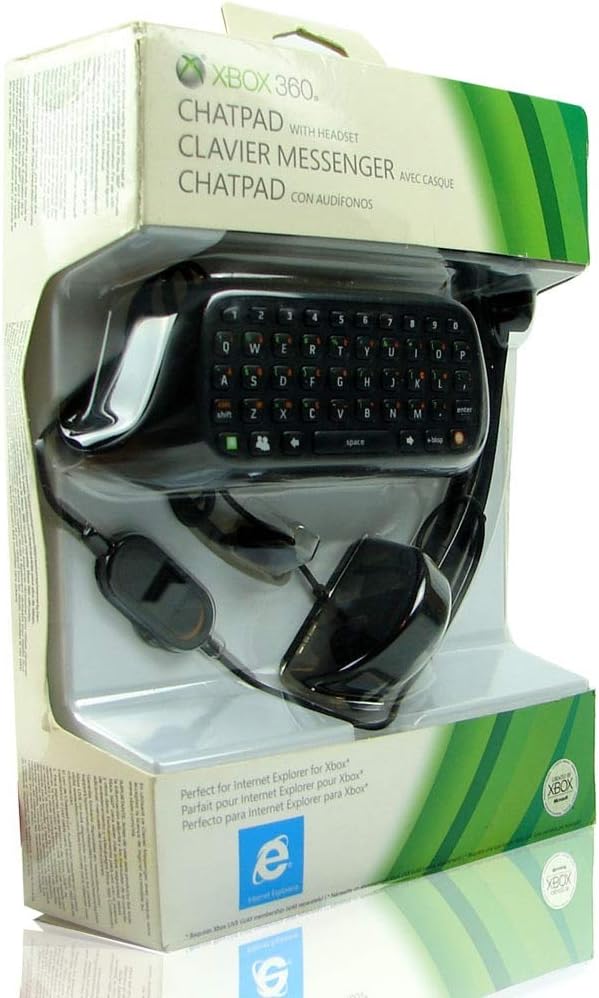
Xbox 360 - Chatpad
Product ID: 255936
🎮Xbox LIVE compatible
🔗Instant Messenger support
⌨️Quick messaging
Buy anything from 5,000+ international stores. One checkout price. No surprise fees. Join 2M+ shoppers on Desertcart.
Desertcart purchases this item on your behalf and handles shipping, customs, and support to Japan.
💬 Level Up Your Chat Game!
The Xbox 360 Chatpad enhances your gaming experience by allowing quick and easy communication with friends on Xbox LIVE. Its snap-on design ensures seamless integration with your controller, making it perfect for social media updates and instant messaging.
V**N
Great Chatpad - Not So Great Headset
Chatpad [A+]This is the exact same chatpad as the old XBOX 360 classic white chatpad. This black version has hard keys that are easy to find with your fingers without having to look at the chatpad and the keys don't go sideways on you like the soft key chatpads I've tried (and regretted). The individual letters light up just like the white version. It also has the light behind the orange and green symbols and buttons. If you like the old white chatpad, this is the one to replace it with.Headset [A]Comfort:You'll probably need to bend the headband to stretch it out. After a while it will feed like you're not wearing it. It's very lightweight compared to some of my headsets (that have two speakers). You can wear it on your left or right ear - the mic wand rotates all the way around to both sides.Quality:It's decent. The Friends in the Parties I've been in have all said it's fine and sounds just like the headset I normally use. I like the one-ear when I want to hear other things that are going on in the room, when I have music playing, etc. If you don't want to hear anything except the game and people in chat, then get a two-ear set and keep this headset in a drawer somewhere for when you need a backup.Complaint About Plug:This headset has the new standard single audio plug - not the old style plug with two plastic things on each side. The mute switch is large and slides On/Off. It's on a dongle in the middle of the audio cable along with the rotating volume control dial. I prefer the old style where mute and volume were at the base of the plug and you always knew exactly where it was at instead of having to look down and try to find the dongle on the cable like you have to with the new style.Overall [A]I'm very happy with the purchase. I would've paid $20 for the chatpad by itself. It's easily worth that much. Having the headset thrown in is a nice plus.
N**D
Does the job. read on for "how to plug it in"
+My main reason for buying this one is well 1st ofcourse because I had the black controller so buying the white one would be a stupid mistake (atleast for me). and because it took quite some time to write even a sentence with moving the cursor around and clicking on letters\numbers,etc.So since I bought this I started replying\sending messages so fast and with extreme ease. sometimes even during play I could find a safe spot or when I spawn and type fast and get back into action (ofcourse this chatpad is used with the thumbs only).There is also a nice touch which is the back-light (like some pc keyboards or high end laptop keyboard). it`s very convenient for those very smart who plays in the dark (yes sarcasm, it`s very bad to your eyes to play in the dark or even a low dark room). anyway back to the review, the back-light is`t on always. its automatically turned on when you press a key on the chatpad and then automatically gets turned off after few seconds of not typing on it. so it`s great for not consuming the battery of the controller.-There is 1 draw back for me with this chatpad, it`s with 1 button the problem that is (for me it`s the V button, and others have same problem but with other button\s). it`s not that it`s not working, it does work but it requires more pressure than the rest of the keys, so for example if am writing fast "it`s very nice to meet you Victoria" it would come out like this "it`s ery nice to meet you ictoria". so it`s annoying when you have a sentence with some "v" in it and then you have to move back and type the "v" because it did`t register when you pressed the button. so depends on your luck if you got this problem which makes you press the "usually" one button hard to register. or if your lucky and your chatpad had no problem with any key.Now to the somehow tricky install of this chatpad (only for the 1st time though).1st align the chatpad male rca to it`s socket at the bottom of controller.2nd turn the controller to the back side (where the battery is).3rd do you see the screw socket on the bottom right and bottom left?. push the chatpad up so that it "click" by click I mean the plastic screw in the chatpad with the it`s socket on the controller. the right and left side both have to click and when you look you`ll see that it`s connected perfectly and when you press any key on the chatpad the back light will light up.5th to unplug the chatpad. turn the controller upside down (Y button down and A button up). and push the chatpad up with your thumbs to unplug it. OR hold the controller normal like if your playing, and with your thumbs on top of the chatpad frame push down. but do it on a table preferably so the chatpad dos`t get thrown up\down and gets damage when it hits the floor.have fun texting.
R**O
Must Have for XBOX360 Owners!!
It took me a long time to realize this product was available to me and boy to I regret my ignorance... The Chatpad is amazing! I have to be honest - I never have used the headset that came with it, but the keypad itself is well worth your time, money, and attention. I use it all the time for Netflix, HBOGo, Chatting, Messaging, Searching, Binging, Gaming - you need to spell something it can do it! Don't know how I survived so long with using the joystick to spell things out... If you play a lot of RPG's that ask you name things a lot, this makes that process soooo nice!Pros:- Sleek design fits perfectly with the controller- Sturdy when connected- No apparent drain on battery life- Plug and Play (no brains needed)- Does not interfere with gaming- Great for large-handed individuals (like myself)- Decent value for branded gearCons:- So far I have found only one game where the shift button will not work when typing.
Trustpilot
1 month ago
2 weeks ago