Desertcart purchases this item on your behalf and handles shipping, customs, and support to Japan.
⚡ Light up your game with precision and style!
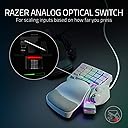
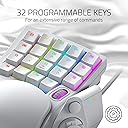
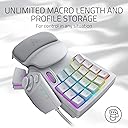
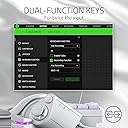
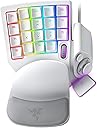
The Razer Tartarus Pro is a Mercury White gaming keypad featuring 32 programmable keys with 1.0mm optical switches for ultra-fast actuation. It includes an 8-way directional thumbpad for ergonomic control and supports fully customizable Chroma RGB lighting with 16.8 million colors. Designed for gamers and creative pros alike, it offers advanced macro programming via Razer Hypershift and seamless integration with popular gaming ecosystems.


| ASIN | B081BWMFWP |
| Additional Features | Backlit, Ergonomic |
| Antenna Location | Gaming |
| Best Sellers Rank | #6,486 in Computers ( See Top 100 in Computers ) #124 in Computer Keyboards |
| Brand | Razer |
| Built-In Media | Tartarus Pro |
| Button Quantity | 32 |
| Color | Mercury White |
| Compatible Devices | Gaming Console |
| Compatible Operating System Family | Windows |
| Compatible devices | Gaming Console |
| Connectivity Technology | USB |
| Connectivity technology | USB |
| Customer Reviews | 4.3 out of 5 stars 13,252 Reviews |
| Enclosure Material | Plastic |
| Global Trade Identification Number | 00811659035325 |
| Hand Orientation | Ambidextrous |
| Is Electric | Yes |
| Item Dimensions L x W x H | 15.1L x 20.2W x 6.4H centimeters |
| Item Weight | 0.81 Pounds |
| Keyboard Backlighting Color Support | RGB |
| Keyboard Description | Gaming |
| Keyboard Layout | QWERTY |
| Keyboard description | Gaming |
| Manufacturer | Razer |
| Mfr Part Number | RZ07-03110200-R3M1 |
| Model Name | Tartarus Pro |
| Model Number | RZ07-03110200-R3M1 |
| Number of Keys | 32 |
| Number of Sections | 3 |
| Power Source | USB |
| Recommended uses for product | Gaming |
| Special features | Backlit, Ergonomic |
| Style Name | contemporary |
| Switch Type | Linear |
| Theme | gaming |
| UPC | 811659035325 |
| Unit Count | 1.0 Count |
| Warranty Description | This item is eligible for 1 year of warranty provided by the Manufacturer /Brand from the date of purchase. You can contact Manufacturer/Brand or Seller for more details |
| Water Resistance Level | Not Water Resistant |
O**N
تغيير 180 درجة في اللعب للالعاب القتالية والاسلحة
الجهاز ممتاز جدا وافضل من لوحة المفاتيح العاديه ويعطي اولوية في اللعب
M**R
Stops connecting
Might be a software issue but have to reinstall the software every now and then.
P**A
Good for gaming
Would be great if I could replace the number keys with actual letter keys
M**D
love the ease
i play csgo and battle bit with this absolutely amazing experience. the colour and the rgb also go well with my steelseries equipment
L**E
Not just for gaming, but also for art and work.
This is the second time I've purchased this keypad, and not because it's bad, but because it's one of the best controllers for working with art and drawing apps that I needed one for another drawing setup. The value at the price offered is unmatched, offering an artist like me access to all of the necessary shortcuts, including a scroll wheel and d-pad that can be programmed to perform things like canvas navigation, rotation, or adjust brush sizes. The ergonomics are tried and true, letting me work all day without breaking flow. The only downside I can think of is that if you're a left-handed artist, this keypad won't be friendly for you, as it's clearly only designed for a left hand to operate. The sound is nice if you're looking for audible feedback and tactility. However for my case, I removed the click leaves from each key for a more silent operation. Overall, a great keypad that's fully customizable and programmable. Although designed for gaming, I found it far more useful for doing work and art. The price of this compared to other artist-oriented alternatives makes this a solid choice.
D**Y
Leider zu kurze Lebensdauer
(geschrieben von meinem Mann nach 6 Monaten Gebrauch bei Schadensfall ) Das kompakte Design ist gut für längeres Spielen. Die unterste Tastenreihe ist nicht gut erreichbar. Die Tasten haben nach meinem Empfinden einen langen Weg bis zum Druckpunkt. Beim Tastendruck entsteht ein deutlich hörbares Geräusch, ich finde es laut. Die Beleuchtung ist mMn. Unsinn und störend. Aber das ist natürlich Geschmackssache. Weil es hin und wieder bei Berührung aufleuchtet, wenn ich es nicht spiele, habe ich es oft abgezogen. Die Software zum Konfigurieren finde ich sehr gewöhnungsbedürftig. Manche Begriffllichkeiten erschließen sich mir nicht. Treiber und Software laufen zuverlässig und machen keinerlei Probleme im Betrieb (Windows 10). Das Handbuch zum Pad (PDF) ist leider für mich an vielen Stellen zu oberflächlich. Die angepriesenen "Mecha-Membranentasten" scheinen aber normalem Spielbetrieb nicht stand zu halten. Ein Bekannter der sein Pad fast zeitgleich kaufte, hatte es bereits wegen einer toten Taste in Garantie. Bei mir ist jetzt nach 6 Monaten ebenfalls eine Taste am Daumenjoystick funktionslos (tot). Von anderen Kunden habe ich die gleiche Problematik auch schon gelesen, sogar hier in einer Rezi. Ich rechne damit, dass auf mein Pad ganz knapp aus der Garantie raus ist, wie bei einem Kunden hier. In dem Fall werde ich kein Pad mehr von Razer kaufen, obwohl ich mich gut an das Gerät und die Software gewöhnt habe. Bewertung mit nur einem Stern, weil: Ich meine, bei einem schon recht beachtlichen Preis für nur 20 Tasten und einen Daumenstick - im Vergleich zu einer vollständigen gaming-Tastatur - ist die gebotene Qualität zu schlecht, für meine Ansprüche. 6 Monate Lebensdauer für ein Gaming-Produkt ist zu wenig. Mein vorheriges Gamepad eines anderen Herstellers hatte immerhin um 4 Jahre gehalten und war im Preis günstiger. Nur weil es nicht mehr hergestellt wird und Razer überall positiv dargestellt wurde, habe ich mich zum Kauf entschieden. Die Entscheidung war für mich nicht positiv.
C**R
Works GREAT with small hands! Records double modifiers! +6m, +1year, +2.5 year updates
I have small hands, 6.5 inches from palm to middle finger tip and ring sizes 4.5-6. I'm able to use this but I did need to shift my hand position to the right so I could use the thumb buttons. I swaped the directional keys to correspond and added some textured gaming keycap stickers to help me learn the new keybinds. I am able to use all of the buttons easily except the top row which requires a little stretch to reach but that's fine with me, I just make those the seldom used keybinds. I needed more pinky modifier buttons as well as thumb accessible modifier buttons (the D-pad is perfect for that). I use this for gaming along with a G600 mouse, it works wonderfully and solved the problem I was having with needing more modifiers and being able to hit binds faster/more reliably. You can record double modifiers with this such as Alt+Shift, I needed that feature specifically. It looks amazing matching my mercury huntsman mini and I love having a separate keypad for gaming rather than using my keyboard. It allows me to have crazy re-mapped keybinds without losing the ability to type normally. I use W A,S D,Q, and E; all the rest of the keys are re-mapped to numpad or modifiers. The space bar key (20) is a bit low and the distance makes it unreliable for me to use quickly so its in the seldom used keybind category. I re-mapped the circular button above the D-pad to map, the D-pad is space bar and 3 modifiers. The little D-pad thumbstick attachment is really great, too! <> - 6 month update- I absolutely love this thing. I've adjusted to using it all the time for gaming and it is so incredibly comfortable. The wrist rest is my favorite part in regards to comfort and the hand positioning in general is relaxing, the shorter keycaps help with this. I found some better gripy texture tape for my most used keys. The joy stick for the D-pad has become pivitol for my gameplay. I love this thing so much that I got a second one for couch gaming. Synapse 3 doesn't support 2 of the same device running at once so I had to get a USB splitter. I purchased both devices "Used like new" and they have been wonderful. Both arrived in perfect condition with no blemishes or malfunction. - 6 mo th update on the second I purchased in "Like New" Condition. One of the keys broke out of nowhere while I was using it. The device had not been damaged while in my care. Razer does not sell replacement keys for this item and refuses to provide them. Keys are not covered in the warranty, so if they break you are out of luck. However, I was able to find these keys on Amazon that replace the low profile Tartarus keys perfectly -amd they are very affordable: X-keys Keycap Cherry MX Compatible -2.5 year update: STILL AWESOME lol. No issues whatsoever. I have 3 now, send help. I made the #20 thumb usable by making a booster seat for it. Took off they key and traced it on firm 1/4 inch thick foam, cut out the exact shape (took a little notch out to keave room for the D-pad thumb stick to clear it), then doubleside taping it to the key- works like a charm now. I use the Tartarus for every game ( FPS, MMO, Competitive) and will never go back to using a keyboard for gaming.
S**O
Perfeito!
Perfeito! Para quem vem da geração de vídeo game, ele oferece o uso do mouse sem o conforto de andar no direcional.
D**E
Easy to use
really comfortable
Trustpilot
5 days ago
2 months ago