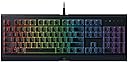
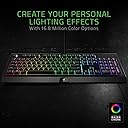
โจ๏ธ Level up your desk game with Razer Cynosa Chroma โ where style meets unstoppable performance!
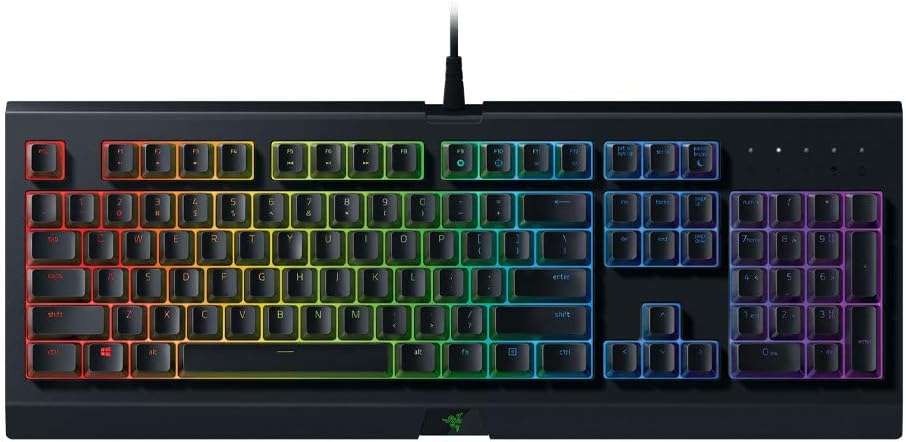
The Razer Cynosa Chroma is a spill-resistant gaming keyboard featuring individually backlit RGB keys with 16.8 million colors, 10-key rollover anti-ghosting for flawless command execution, and fully programmable macros via Razer Hypershift. Designed for durability and comfort, it supports up to 80 million keystrokes and syncs with over 30 partner devices for an immersive, customizable experience.


| ASIN | B075KMZ4MX |
| Additional Features | Lighting |
| Antenna Location | Gaming |
| Best Sellers Rank | #116,737 in Computers ( See Top 100 in Computers ) #3,212 in Computer Keyboards |
| Brand | Razer |
| Built-In Media | gaming keyboard |
| Button Quantity | 104 |
| Color | Black |
| Compatible Devices | Gaming Console, PC |
| Compatible Operating System Family | Windows |
| Compatible devices | Gaming Console, PC |
| Connectivity Technology | wireless |
| Connectivity technology | wireless |
| Customer Reviews | 4.7 out of 5 stars 16,967 Reviews |
| Enclosure Material | Plastic |
| External Testing Certification | Nรฃo aplicรกvel |
| Global Trade Identification Number | 00814855024636, 08886419343875 |
| Hand Orientation | Ambidextrous |
| Is Electric | Yes |
| Item Dimensions L x W x H | 46.3L x 15.4W x 3.1H centimeters |
| Item Type Name | Razer RZ03-02260100-R3M1 Cynosa Chroma, RGB Gaming Keyboard, Fully Programmable Individually Backlit Keys |
| Item Weight | 948 g |
| Keyboard Backlighting Color Support | RGB |
| Keyboard Description | Membrane Gaming |
| Keyboard Layout | QWERTY |
| Keyboard description | Membrane Gaming |
| Manufacturer | Razer Inc. |
| Mfr Part Number | RZ03-02260200-R3U1 |
| Model Name | RAZER USA LTD |
| Model Number | RZ03-02260200-R3U1 |
| Number of Items | 1 |
| Number of Keys | 104 |
| Number of Packs | 1 |
| Power Source | USB power |
| Recommended uses for product | Gaming |
| Special features | Lighting |
| Style Name | Cynosa Chroma |
| Switch Type | Membrane |
| Theme | Gaming |
| UPC | 814855024636 |
| Unit Count | 1 Count |
| Warranty Description | 1 year |
| Water Resistance Level | Water Resistant |
P**L
Great Keyboard, Subpar Software
I have a love/hate releationship with Razer products. I will stay away from any laptops/tablets that they make going into the future and have a KOTOR headset that has barely worked out of the box and now has no support because it's been discontinued. HOWEVER, their mice and keyboards are my pride and joy. This is my second Razer keyboard and my first Chroma product. I also have 3 different Razer mice and I'm looking at buying the new version of the Naga. I am not a fan of mechanical keyboards at all, so to find an affordable membrane keyboard with the extra LED effects was a no-brainer purchase for me. It's still a little louder than I generally like from other chiclet keyboards that I prefer (Razer Deathstalker Expert), but I got this mainly for my kids to learn how to type on so the chunky keys were a must. The amount of customization and effects that you can program on this thing are amazing and the software makes it relatively easy. Unfortunately, the Synapse 3.0 is still in beta so it has some quirks. Certain layers don't always like to load on my Chroma lighting setup, I can't add older devices from the Synapse 2.0 era to manage in 3.0 so I have two different Synapse programs installed and running at the same time. My biggest issue to date is that it does not seem to allow multiple instances of the same program to run across different user accounts on Windows 10. Allow me to explain: I have a Win10 PC setup with my account and two children accounts (microsoft accounts). Each of our accounts has our own Razer Synapse account associated with different emails. If I boot up and log in to any one of the three accounts, the Chroma profile works just fine and all lights are as I programmed them to be. However, if I remain logged in but lock one user account and log in with another, it will not allow Synapse 3.0 to open and load my Chroma profile associated to that account unless I go back and log out of the first account OR close Synapse 3.0. There is also quite a bit of bleed between colors that are next to each other. Would be nice to have an option to turn off the outlining LEDs and just have backlit keys so I can have a yellow key next to an orange key next to a red key and be able to visually tell the difference. As it stands, I have to separate like colors strategically to give my kids a good visible template for learning touch typing. I am still giving this a 5-star rating because it works as advertised and my two gripes are minor gripes and I have found workarounds (log out instead of locking account/separate like colors on my keyboard layouts), but I would definitely like to see improvements made on these aspects over time as they continue to improve the Synapse software. UPDATE: The issue with switching between user accounts has resolved itself. :)
P**U
Best Razer in this Price Range
Been using for about 5 months now, working flawlessly. The accompanying Synapse software makes adjusting the LEDs a breeze, there are many cool lighting schemes, all fully customizable. The typing feel and feedback is very easy to get used to if one is transitioning from a generic HP/Dell type keyboard. Very reasonable price point for getting into the Razer family, the best part is probably that if you have any doubts or problems, its easy to seek help/technical support from other users in the Razer online forums, which is a huge community. Very impressed with this product!
A**W
Overall is very nice, but typing is difficult.
The key board is well made and feels that it will last with the heavy gaming usage, but time will tell on that. Only down side is, The letters on the keys are to thin and don't allow much light to pass though compered to the gap between the keys, This results in a brightness difference that i can't resolve with out external lighting. Making typing difficult if you need to see the keys to type.
J**Y
Treated myself
Although a huge gamer i wanted a backlit keyboard. Went middle of the road and it's a great keyboard. Very standard layout, very natural to use, quality built with full colour and brightness range. No regrets.
L**A
Good enough
It's the best keyboard in this price range
Trustpilot
5 days ago
2 weeks ago