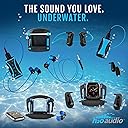
🌊 Swim Beyond Limits with Sound That Moves You
The H2O Audio Sonar IPX8 headphones combine advanced bone conduction technology with an 8GB MP3 player and IPX8 waterproof rating, enabling swimmers and underwater athletes to enjoy high-quality, open-ear audio up to 12 feet underwater. Designed to clip securely onto swim goggles, these wireless headphones offer up to 7 hours of battery life, making them perfect for long training sessions or workouts without the hassle of cables or phones.


| Additional Features | Attaches to swim goggles. |
| Age Range Description | Adult |
| Antenna Location | Swimming |
| Asin | B08NCHYNW3 |
| Audio Driver Type | Bone Conduction Driver |
| Battery Average Life | 7 hours |
| Battery Charge Time | 7 hours |
| Best Sellers Rank | #196,732 in Electronics (See Top 100 in Electronics) #7,283 in Earbud & In-Ear Headphones |
| Bluetooth Range | 3 feet |
| Bluetooth Version | 5 |
| Brand Name | H2O Audio |
| Built In Media | Bone Conduction Headphones, MP3 Player, Earplugs, Clips for Goggles |
| Cable Features | Without Cable |
| Color | Black, Blue |
| Compatible Devices | iPhone, Android, Smart Watch, Apple Watch, Garmin, Fitbit, Samsung |
| Connectivity Technology | Bluetooth |
| Control Method | Touch |
| Control Type | Volume Control |
| Controller Type | wireless |
| Customer Package Type | Package |
| Customer Reviews | 3.7 3.7 out of 5 stars (871) 3.7 out of 5 stars |
| Earpiece Shape | Flat on-ear |
| Enclosure Material | Plastic |
| Eu Spare Part Availability Duration | 2 years |
| Global Trade Identification Number | 00850000259188 |
| Hardware Interface | Bluetooth |
| Headphone Folding Features | Bone Conduction headphones |
| Headphone Jack | 3.5 mm Jack |
| Headphones Ear Placement | Open Ear |
| Input Device Interface | Bluetooth |
| Manufacturer | H2O Audio |
| Mfr Part Number | BCH-MP8-BT_AMAZ_VC |
| Model Name | SONAR Underwater Headphones |
| Model Number | BCH-MP8-BT_AMAZ_VC |
| Noise Control | None |
| Number Of Items | 1 |
| Specific Uses For Product | swimming |
| Style Name | Sonar |
| Theme | Video Game |
| Unit Count | 1 Count |
| Upc | 850000259188 |
| Warranty Description | H2O Audio will only warranty the H2O Audio-branded products (collectively the “H2O Products”) against defects in materials and workmanship under normal use for a period of one (1) year from the date of purchase by the original end user (the “Warranty Period”). In the event that you discover a defect in materials or workmanship relating to the H2O Products, and you deliver to H2O Audio the defective H2O Products prior to the expiration of the Warranty Period, H2O Audio will, at its sole discretion (a) repair the defect in materials or workmanship at no charge to you, or (b) provide you with replacement H2O Products that are substantially similar to the defective H2O Products, or (c) provide a refund of your purchase price for the H2O Products. |
| Water Resistance Level | Waterproof |
| Wireless Technology | Bluetooth |
User
Far better than the Finis
This is a detailed review of the device. It is not a superficial critique of bone conduction technology. Some people prefer bone conduction, some don't. Inevitably, many negative reviews critique the bone conduction technology vs. standard speakers, rather than the devices themselves and their implementation of bone conduction technology. This is like buying a sports car and complaining that it doesn't get good gas mileage. I prefer bone conduction technology for my open lake swims and want the absolute best bone conduction headset specifically designed for swimming. I have tried them all, and the Sonar is at present the best available.I was a longtime Finis customer. I used their bone conduction SwiMP3. I kept 2, so I would have a backup in case 1 failed. Both failed within a week. They were older, but the rapid failure of the brand new (but older) backup device seemed curious. I could not get Finis to help me troubleshoot. The person at Finis I talked to was surly and argumentative. I did not expect warranty replacement of the Finis, it was old, but I paid more than $100 for it and wanted to understand the problem. I believe the problem was a short in the power cord that fried both devices. Finis does not sell replacement cords on Amazon and the cords were exorbitantly priced on their site. I didn't want to buy new cords at exorbitant prices for dead devices until I knew this was the problem. It again appears that a short in the power cord on the Finis fried both devices. The cord was pristine, not cut, damaged, frayed, etc. Bottom line, the entire process with Finis disgusted me and I will never buy another one of their products just on principle.The one glaring deficiency in the old Finis, besides abysmal battery life, was the lack of folder support. You must dump all the files into one directory and this makes it difficult to play different music selections at different times. The simple ability to create different folders and then move to another folder while swimming is a HUGE plus and I consider this feature mandatory in any swimming mp3 player I buy now. Finis does not have this folder support. It seems to be offering the same product from 5 or 10 years ago and resting on its laurels.The Sonar is smaller than the Finis and louder and clearer sounding. I have used both for hundreds of hours in the water. The battery on the Sonar lasts longer. The storage space is double the Finis. The Sonar has folder support, the Finis does not. The Sonar is quite simply superior to the Finis in every aspect, while having a retail price of $99.99 vs. $120 for the Finis, not that retail prices mean anything anymore. I never would have tried the Sonar if my Finis hadn't failed, so their shoddy products and awful support actually did me a favor. In the future, I'll pass on the garbage legacy Finis with half the memory, shorter battery life, a larger cumbersome size, no folder support, which will fail with NO support from the company. This is my honest opinion and no one paid or compensated me for it.I do long 1-3 hour open water swims and music is essential. Earpiece players are simply too much of a pain for me on long water swims, versus something I simply attach to my goggles, which stays put, and which provides steady and continuous sound even if I get pummeled by waves or wind.The actual resonator on the Sonar, the speaker for lack of a better term, is smaller than on the Finis. Because this is not a literal speaker, bigger is not necessarily better (not that it always is with speakers). So long as the device sits on the bone leading to the ear, the bone in front of your ear, it does not need to be huge to achieve the desired effect. Rather, I find that the smaller resonator on the Sonar produces louder volume than the Finis, perhaps because it can resonate more intensely with similar power at a smaller size. Regardless, I was pleasantly surprised to find that the sound of the smaller Sonar was louder and clearer than the Finis. The battery also lasts longer than the Finis, again perhaps because the smaller resonator takes less power to drive.Overall, if you know what bone conduction is, and want it, this is the best swimming player currently available. Given how much time I spend in the water swimming, having the best player possible is a pretty big deal. This is the best bone conduction player period. I actually dealt with tech support at the company to try and get additional charging cords and they were the exact opposite of Finis--friendly and helpful in other words. A better product, better support, Sonar wins hands down.I consider the bluetooth feature in all devices like this a waste of time and wish they would simply offer devices without it. Bluetooth doesn't penetrate water. Such features inevitably work sporadic at best, unless you have a phone or something right next to the pool. Some people doubtless love this feature, I could care less and I wish there were a way to turn it off permanently on my device. It does not impede simple, normal playback of songs loaded onto the device, however.
User
TLDR: Unreliable. Poor Charger Design. ZERO Customer Service.
Alright, for me to write a review, I have to love it or hate it. In this case, it's a sad amalgam of both. I am dispositionally incapable of writing laconically so, for those who don't want to read the following, the headline pretty much says it all. For those interested in the details, read on:I used these headphones for many months before writing this review but am, as of the time of posting, still well WITHIN the warranty period for this device. I spend a lot of time working underwater at depths less than 10 foot deep, and am not in chlorinated water. I bought these headphones to make better use of my time down there than simply ruminating on how to save the world or on whatever stupid thing I said to someone within the last six hours and, for that purpose, they were in no small way absolutely revelatory. It's wonderful to be able to digest a several thousand page book while working underwater for hours on end and, while they worked, these headphones beautifully permitted such activities. I could listen to music with remarkable sound resolution and clarity, given the environment, and the interface was relatively easy to learn and employ. All things considered, this was a very worthwhile product and purchase...on its face.A few months into ownership, I began to have difficulty with the charger. The charger is also the upload cable that allows you to connect the headphones to a device for new uploads, and it is a four-pronged magnetic connector that, unfortunately, becomes increasingly spotty in its connection with time. Now, I diligently washed these headphones in fresh water after EVERY single use, as I would just take the mask with me into the shower when I got home and rinse them off. I could visually see that there was no corrosion on the contacts, but that didn't seem to make an ounce of difference, as I would sometimes spend many minutes clipping and unclipping the charger to the headphones in an attempt to get them to engage the little connection LED - sometimes I would just give up and move on with the rest of my night. I tried the eraser trick for the contacts, a cleaning cloth, all of the usual tricks one might employ, but I've finally decided that it's just a terrible design, as many others (including an employee) corroborated this finding with their own set of these headphones.Accepting the charger as a significant but tolerable annoyance on an otherwise great product, I continued to employ them until this previous December, when one side of the headphones spontaneously began to quit functioning. It began cutting in and out, then altogether failed, leaving only one side functioning. There are piece of music that operate in stereo, where I could miss entire parts of the song, as they were broadcast through the failed side of the headphone...this was no longer a tolerable annoyance. So I attempted to contact the company. As ever, Amazon doesn't exactly make it easy to do this, but the company does provide an email to contact them directly for product assistance. Given that I was well within the warranty period, never abused the product (doesn't have a scratch on it), and have diligently cared for it, I didn't think there would be a problem in procuring a replacement. Spoiler alert - there was.The problem? I couldn't get a response from the company AT ALL. I contacted the company email, followed up to the email, attempted every way I could think to get in touch with them, but have gotten exactly ZERO response from the company at all. Two months later, these headphones dangle uselessly off the handle of my nightstand, and have been relegated to eventual trash status, as there is no product support to get them back online and, though I can see no sign of a leak or other damage, they have malfunctioned to the point of uselessness.So, do I recommend these? Well, that's really your gamble, but I don't personally recommend products when the manufacturer provides no support. So sadly, I'm going to have to climb down off of my initial elation with these, and recommend against purchasing them. There are other options, and some of those options have reports of better product support and reliability. I'd look elsewhere.Verdict? A few great months, but in the end, a significant waste of money.
User
Great switch from waterproof headphone and READ THE DIRECTIONS…
I was hesitant at first… used bone mic tech in the military and it’s great when you can use it. Finally pulled the plug with a discount and coupon. I was very impressed. I was very comfortable in the water with them. Above surface sound is not what it’s designed for. Sound is great for being underwater. It is a little muffled (hey, you’re underwater you land dweller) but totally clear enough and what I would expect being underwater and swimming hard. Fit on goggles rocks. Barely felt them on my temples and they didn’t move with surface/sub-surface swimming. Controls are easy to manage. Perfect solution. You can wear earplugs to keep the water out of your ears or not. Totally more comfortable then jamming waterproof earbuds in your ears.Loaded music works great… put it on shuffle and go. Used it with my Apple Watch on land w/no problems. That’s the next test run.Biggest issue I read about was the connection when you’re putting your music in the memory space. Set yourself up for success. Tape your cord down so it doesn’t move. Set your desk up so it’s out of the way. The magnet pull between the charger and ‘headphones’ was stronger then I was lead to believe. Just set the time aside to test and manage your music upload. Also take the time to test these with your Apple Watch. Yes, the bluetooth works better through gas molecules then liquid molecules (atmosphere vs water). Be prepared to rehearse the connection at your desk and in the tub.Biggest takeaways from this are: 1) Have patience when you’re setting this up the first time. If you do it right there are no problems you can’t troubleshoot, immediately recognize why you’re screwing it up, and correct. You will then know how to manage it from there on out. Review the directions before using. 2) Do a dry land rehearsal (with music on the memory and your Apple Watch) so you master the connection and controls so it doesn’t cut into your workout. If you abuse your Apple Watch, double check the integrity of your watch so it’s still waterproof (within accepted norms of use). If you’re thorough try them in the tub! Rinse them off after every use so they don’t succumb to repeated exposure to chlorine, etc… I haven’t tried them in salt water yet. 3) Read the directions. There are a few pointers that will make your usage a lot easier.Life’s better with music… rock out…
User
The Good and Bad
Do not usually write reviews but I thought I could be helpful with this one as I have swam with it everyday for a few months. Identify the strengths I enjoy and also some deficits so consumers can decide whether they can live with them or not. First the good: This unit is really well constructed. I would imagine it could take some serious drops or banging around. Very solid. It is easy to attach to your goggles and delivers above avg sound after you monkey with the positioning on your skull. Display buttons are large and "grailed" so no problem locating them on the side your head. People have said there is no random setting but if you quickly tap twice on the power button it goes in to that mode. Defaults back to alphabetical when you power off and then back on. This is my 2nd H2o product and they are an American based company that is very responsive and individualized when you make an inquiry or request a return RMA. Now the bad: Loading music from your PC is problematic. It will stop loading a long selection of songs midway sometimes whether you jostle it or not. I will disconnect it from usb port and reconnect a few seconds later and pick up were I left off. A bit inconvenient. This is the worst bugaboo this unit has, but I can live with it. The power level that is verbalized by the unit is inaccurate. When it says you are at 50% the 1st time you have maybe an hour left tops. Not that big of a deal. The commands that require a double click have to be done very fast or it will not recognize it. Something to get used to I guess. Over all I think this unit has many more pluses than detractions and I think it will last a long time and give you hours of enjoyment.
User
Good, but could be better
first, sound quality is fairly good. Easy to charge and set up (are cable). The downside is that it plays your list from the beginning everytime. There is no shuffle mode. There is no 'next' button. If you want a to start at a different place each swim, you need not log on to your computer and adjust your list each time.If the device offered a feature to change things up on the fly, it would better. In today's technology world this is a pretty major flaw.
User
Best underwater headphone solution (I use for podcasts), and crucial info for Mac OS users
I had been using in-ear Underwater Audio headphones for a couple of years, and they worked well, but hurt my ears (I had to jam them in pretty good just to make a good seal, and then turn the volume way up to hear past the rushing water). These H2O sonar bone conductor headphones are a step up. I love that I don't have to wedge anything into my ear (apart from my usual and very comfortable Mack ear plugs), and that the sound is better when moving through the water. Better, but not perfect, of course. Any splashing, bubbles, strong pushes off the wall, etc., will get in the way of the sound a bit, but not as bad as in-ear headphones.That lack of perfection in clarity is expected (and it's still the best out there that I've tried), and only an issue if you're listening to podcasts while you swim, as I like to do. You might miss the odd word or phrase from the narrator, but generally you can follow along. If music is your thing, you'll be more than fine.Just a word of caution or advice for Mac users on OS Big Sur or later who want to transfer podcasts to their Sonar: Podcasts are stored in a separate podcast app now, which no longer lets you grab and drag shows/episodes and move them onto the desktop or into a separate drive (like the Sonar). Here's the current workaround:- in Finder view, click on "Go" and when the drop-down menu appears, hold down the "Option" key- with "Option" held down, click on "Library"- open "Group Containers"- open the folder tagged "groups.com.apple.podcasts" after some alpha-numerics- open "Library"- open "Cache" and there you will see your podcasts; they'll be listed with random alpha-numerics so you won't readily be able to identify the episode you want, but there may be pictures to help, and download date will help, too. You can also double-click the file and listen to it to help identify the episode/podcast. From here you can grab and drag to your desktop / drive.I don't know why Apple disabled the grab and drag feature from the podcast app itself, but it's super annoying, and please submit feedback to them (as I have, and many others) to restore this feature to the app.Oh, and no, the swimmers around you can't hear these headphones in operation, though it will feel that way because of how loud they are!
User
Great - takes a little getting used to though
I first purchased the ear bud model from H2O but couldn't keep the water out. I loved the clip for my Apple Watch. Switched to the SONAR and love it, although it doesn't have a clip for my watch. The work-around for the Apple Watch is you take off the band and simply slide the watch under your swim cap in the back or a side - the closer to your ear the better. BlueTooth doesn't work under water, so you need your smart watch a couple of inches from the ear pieces.It could use a shuffle button, that would be great. The sound is loud although it was tough to understand a book from Audible underwater so I switched to music only. My issue was it was hard to get the music on my Apple Watch playing, then start my swim app for measuring my distance. Start the music, check. Start the swim app, check. Put the phone square only - under my swim cap, check. Swim. Check my phone post swim and it seems someone the swim app only measured one lap then stopped. Decided to download songs directly, which was simple.I'm all Apple and iMac - attached the charging cord to the SONAR, then into the USB port. In a couple of seconds the SONAR icon appeared on my desktop. I opened it, then opened my iTunes and simply clicked and dragged my songs onto the SONAR app, done.Hopefully this helps others with the same issues.
User
Waterproof paperweight!
The sound is very good but the USB connection flakeyness makes them unusable. When I first took them out of the box I read the directions that essentially tell you how flakey they are by telling you not to touch them once connected. And they follow up by telling you that if the connection to the USB is lost then you have to cycle the power on your computer AND the headphones to get them to work again. Right out of the box they connected for a moment but even as I VERY gently set them on the desk to charge for the first time the connection was lost. I rebooted the computer and the headphones...still no connection for data. Charging works just fine though. Their last hint was to try a different USB port...so I did that mor gently that I have EVER done with any usb device as not to disturb the the connector on the headphones...and it worked! I moved my keyboard far from the overly sensitive headphones and began to transfer some podcast mp3 files along with about 20 songs. The instructions say that you can organize your files into folders like “podcasts” and “music” so I did that. All the files transferred but strangely very slow. After they finished charging I took them to the pool excited to give them a go! Well...this is where the disappointments really started. The instructions to tell the player to go into the first folder (click the “M” button twice) did absolutely NOTHING! No mater what I did - nothing in the music or mp3 folders could be accessed. The only thing that worked is the stock files in the root folder. I thought, well that is “blanked” but decided to dry off and put the music in the root instead and give it another try. I plugged the dry headphones back to their little SUPERSENSITIVE little magnetic connector so as to ensure nothing was going to disturb them AND...nothing. Would not connect at all. Ok...I rebooted (cycled the power all the way off and waited 30sec before turning back on) the computer and the headphones. This time I first connected the magnetic connector to the headphones to ensure they would not move at all when I plugged the usb end into the computer. I ever so gently plugged them in again and....NOTHING, again. So I very gently unplugged the USB end and tried all the 5 other USB ports - each did...say it with me now...NOTHING! So most people would pack them up and ship them back, but me, nope...I’m way to stubborn than that. I tried the power cycling thing at least 8 more times. Note that the power charging function of the USB connection never failed once, just the data. I even cleaned all the contacts with electronic contact cleaner and a q-tip. Can you guess what happened...NOTHING!!! So I thought, maybe turning them off over night might do something, anything, to make them connect. This morning (the next day) I gave the computer and the headphones one more shot from a fresh, rested evening of both being shut down. Yep, h2o Sonar headphones are brilliantly consistent in their design and quality...NOTHING happened again. So I thought maybe my USB ports are confused (as hinted at in the directions because it couldn’t possibly be the design) and needed a reset. So I looked up how to reset the usb controller on my Mac...I’ll give you a moment to contemplate what happened next...nu...nu...”NUTHING”, LOL!Why is it that these can connect via Bluetooth but they don’t have a way of loading using that data stream...seems like a much better idea for waterproof items (and clearly more reliable than the current method). C’mon engineers - you really need to figure this out.Lastly - the bluetooth streaming works just fine but it’s next to useless when swimming because Bluetooth can’t penetrate water. Ive got much cheaper and better sounding options for non-swimming headphones.I’ve ordered a replacement to see if this was an isolated experience. I’ll update the review if anything new comes of it.
User
THANK YOU! MUCH BETTER THAN OPENSWIM
HEY! It's incredible how much more comfortable i am than the overear openswim ones, i dont need to wear a cap and its amazing.Just a few things* You can use any goggles that have a silicion band (Most defaults) however its better if its in a Y shape towards the end (image attached 1) however youc an use any, can just be fussy (my speedo vanisher 2.0 is frustrating as it bungles up)- biofuse 2.0 is a good option to show how it would easily fit, as the vanisher has very thin sides and feels kinda bad to put on, but have never had it slip off once.There are folders you can put shit in, so usually i start with music to a podcast.
User
Works well
Does the job well. Good battery life and decent enough sound quality. People around you may be able to hear your music at full volume.
User
Sonido bajo el agua perfecto!
Lo uso para entrenar en alberca, y su sonido es espectacular. Es un tanto incómodo ya que va sujeto a la liga de los goggles, pero nada que interrumpa el entrenamiento.
User
Right side stopped working after 7 months of use
Bought it 7 month ago, used for 3 hours a week. Recently it started developing issues: no sound on the right side, turning off by itself from time to time.
User
Great headphones for swimming
This product is great for listening to music whilst swimming laps. I did have an issue with them after about a year but sent them back and they were replaced for free. Great customer service!
Trustpilot
2 months ago
2 weeks ago