


🚀 Elevate your desktop WiFi game—fast, reliable, and ready to dominate!
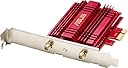
The ASUS PCE-AC56 is a high-performance dual-band PCIe WiFi adapter delivering up to 867 Mbps on 802.11ac. Designed for professionals craving seamless gigabit wireless, it offers superior range with a high-power antenna and robust security protocols. Easy to install and compatible with multiple Windows versions, it transforms any desktop into a powerhouse of fast, stable connectivity—perfect for streaming, gaming, and remote work without the clutter of cables.






| ASIN | B00JNA337K |
| Best Sellers Rank | #924 in USB Computer Network Adapters |
| Brand | ASUS |
| Built-In Media | External magnetic antenna base, Low Profile Bracket, PCE-AC56, Support CD, Warranty card |
| Color | Multicolour |
| Compatible Devices | Desktop |
| Compatible Operating System Family | Windows |
| Customer Reviews | 4.4 out of 5 stars 5,291 Reviews |
| Data Link Protocol | IEEE 802.11ac |
| Data Transfer Rate | 1300 megabits_per_second |
| External Testing Certification | CE, FCC, C-Tick, IC |
| Global Trade Identification Number | 00809394253388, 00886227504763, 04716659504856, 04716659504863 |
| Hardware Interface | PCI Express x1 |
| Item Dimensions L x W x H | 4.72"L x 3.54"W x 7.09"H |
| Item Type Name | Asus Wireless AC1300 PCIe Adapter (PCE-AC56) |
| Item Weight | 3.68 ounces |
| Manufacturer | ASUS Computer International Direct |
| Mfr Part Number | PCE-AC56 |
| Minimum Required Operating System Version | Windows XP |
| Model Number | PCE-AC56 |
| Number of Items | 1 |
| Product Dimensions | 4.72"L x 3.54"W x 7.09"H |
| UPC | 809394253388 886227504855 012300426107 012303195413 803982825087 886227504862 724627231912 731215289071 886227504763 983184724422 |
| Warranty Description | 3 Years |
M**L
Buying my third one now....and not because they break
I don't usually take the time to do reviews for things unless they are horrific or terrific. This is obviously a terrific device. Long story short, we bought a new house and changed over to Fios. At my old house I had my "office" (adult playroom) in the basement and had Ethernet. I'm on the top floor now and the WiFi router is in the basement in the utility room. I had to buy a wireless card for my main PC so I opted for this as it sounded pretty good. Installed it and about 20 minutes later I was ordering one for my son. I had no idea that WiFi was this fast. I had plans to get extenders or repeaters and stuff like that because of the distance and low signal, but the antennas do a good job allowing you to tweak it in (I think that the Windows store has a strength meter) so I saved the hassle and cost of doing that. Plus I don't want my WiFi bleeding over to the entire neighborhood. Anyway the wife's computer just took a dirt nap and we put together a new box for her and installed an old WiFi card.....it works....technically, but it is not even close to the same level of performance (due to being only 802.11n capable). I'm paying for gigabit Ethernet and Verizon delivers the full speed; why would I not want to have as much of that available as possible? There are cheaper alternatives out there....they may work fine, but this is one of those items that I researched that I half expected to deliver about 50-70% of what it advertised and it delivered about 90-95%. I hit over 400Mb/s down and about 350-400Mb.s up over 5G (using Ookla) and I'm far enough away that other 5G devices that I own can barely connect. I love these things. As far as installation and drivers are concerned I opened the box, slapped it in, rebooted and connected. Now I don't know about specific MB configurations creating issues, but I didn't install any of the official drivers or utilities because it did everything I needed with the Win10 stock stuff. I believe that my son checked out the Asus ones and their utilities, but said that there was no difference. I can't guarantee that everyone will have the same experience, but I've got a new card coming in a few hours and will be installing it into a third computer and expect to have the same hassle-free, extremely gratifying experience. If not I'll update my review. There's just not a lot of stuff out there that really lives up to the sales hype or even the full level of the basic standards. This is one of those devices that does in my opinion and it's worth the cost. Couldn't be happier with the performance and ease of installation. It just works. No screwing around, no digging into special settings or menus or such....plug it in and connect to your WiFi. Its how stuff is supposed to work.
A**N
Excellent Wi-Fi PCI Express Adapter
I've had bad experiences with wireless setups before. Many of problems with wireless is slower internet speed, internet cutting out from time to time. Its just been a hassle. To everyone reading this, steer far away from USB adapters! I broke my brand new Netgear and decided to open it up, it has the smallest receivers inside. This Asus card is at least two to three times more powerful! I'm very pleased as I came from Netgear USB dongles that would drop connections randomly throughout the day/week. Ever since I bought this, no problems at all, not a single connection dropped! Streaming and gaming is flawless, I couldn't have asked for more. However, if you are a hard core gamer, this may not be for you, as your probably looking for a direct Ethernet connection, otherwise its fine. If you are not tech savy and can not open up your computer and install it, you may have some difficult times. However, there is nothing wrong with the product as thats how it is supposed to be. After all, its a PCI-e internet adapter. Excellent PCI Express Adapter. I'm very satisfied with my purchase. I own the Asus RT-AC68W and difference is NIGHT AND DAY! I have much greater range than I used, however it does not beat a direct connection with Ethernet, however I'm very impressed. Here are the pros and cons. Pros: Easy to install if you know what your doing Lights indicate that its working Simple software install and your up and going, it took me 5 minutes to install and get the card working. Superior range and speed compared to adapters like Linkys and Netgear. Good quality, 95% of it is pure metal casing. Cons: Requires access to inside the computer. Not suitable for a non-tech savy person. Besides that, I think its an awesome card. It really does preform well over other brands. I would recommend this to anyone who is able to install this on the motherboard.
L**D
Easy to install. Works perfectly with Windows 8.1. It can be made compatible with Linux.
I just got this in and installed it in a desktop computer that I had purchased without WiFi. This card was easy to install and is working perfectly. What more is there to say. The antennas can be attached directly to the card, or the box came with extension cables to set the antennas up around 3 or 4 feet from the computer. User choice. I simply attached them directly to the back of the card. Update a few hours after posting the Above on March 19, 2016 I got the Win 8.1-64 setup with the WiFi card without any problems. Then I attempted to setup a Linux Mint partition for it. Linux Mint can't locate this card. I reduced my rating by 1 star to 4 stars because this card does not seem to be compatible with Linux. Update March 22, 2016 I said before that this adapter is not compatible with Linux. I was wrong. The ASUS website says that it only works on Windows operating systems. And you have to search for the information. But I found out that it will work on Linux Mint and Linux Ubuntu systems using the Broadcom STA drivers. I tried it out on Linux Mint 17.3. The down side is that you need to have a cable connect to update your drivers before you can use this card. But you can use it with a testing CD. (I don't know why the drivers don't transfer from the CD to the hard drive when you install Linux Mint. I have to temporarily setup and run 200 feet of cable for a line Internet connection.) But anyone who has used any version of Windows 8, or Windows 10, will know that both Windows 7 and Linux are much more safe and fun.
S**N
Must go to windows device manager to get 5ghz as default or it will be on 2.4ghz and slow
Works fine. It hooked up to the internet quickly but ran slow dowload speeds like 60mbps until I installed the drivers from the disk then it got up to 175mbps which is ok. My other system get's 256mbps or more so fhis one isn't as fast, can't figure out how to get it to run on a different frequency other than 2.4ghz so that might be the problem. For now I'm deducting a star for the speed and not swithching to faster frequency. On edit - still leaving at 4 star because the Asus tool for managing the card won't let you pick the preferred band and it defaults to 2.4gh which is slow. To get it to switch to 5G I had to set the preferred band to 5.0 you need to go into the device settings in Windows 10 by right clicking on your 'This PC' icon in your file folder then click manage in the drop down then left click on 'Manage' jhen left click 'Network Adapters' the left click 'Asus PCE-AC56' then click the advanced tab at the top, then scroll to preferred band then set it to 802.11a and you are done. Nothing in the instructions on this at all, total Fail Asus for an otherwise nice inexpensive wifi card.
B**C
Absolutely Impressed. Highly Recommend. (40-60mbps) 50+ ft from comcast modem. (Worth Every Penny!! :)
I was looking for something for my desktop to connect with wifi, I found this and I have always like Asus products, Anyways It was very easy to install on my compaq stock desktop I currently am running on windows 10, I did not even have to use the CD that comes with the wifi adapter, once I booted the comp up the card was detected. I did have an issue connecting to my wifi networks As I was originally running it off of the xfinity hot spots. I am now running it off a comcast modem/router from about 50-75 feet away and with the antennas just on top of the tower ( love the magnetic antenna stand) I am getting 40-60 mbps, granted with current xfinity service only allow a max of 100 mbps being hard wired. So for being 50+ feet away with just this asus wifi adapter and getting 40-60 mbps im very very impressed, Runs games very smooth, stream netflix and comcast live tv with no problems no lag very stable connection.. Well worth money spent I would highly recommend this for anyone needing to connect with wifi.
S**D
Excellent performance so far. Problem free installation/detection on Win10.
JUST installed this card so this is a somewhat premature review but so far I'm impressed. I am an IT professional and needed to move my aging gaming PC (Sabertooth 990FX rev 1 motherboard) to another location in the house where I could no longer be hard wired anymore. Initially purchased a Fenvi card but it had immediate driver/detection issues. Decided not to go to great lengths to make it work and returned it and bought this card instead. Worked immediately and even through the floor where I'm only getting 702 Mbps connection out of a possible 867 I was able to max out my internet speeds at 360mbps down and 25mpbs up. Further experimented moving large files to/from my NAS (wired device) I was able to achieve speeds up to 65MB/sec (~520 MegaBITS per second). Latency increase is ~3ms over wired. Excellent performance considering i'm not at 100% signal strength and there is always encryption overhead and signal interference in my area. For those curious i'm using a Nighthawk X4S R7800 wireless router in AP mode and WPA2-PSK (AES only). The card was auto-detected and driver installed by Win10 as a Broadcom chip (driver date was 2013) but I installed the driver/utility from ASUS support site. Driver date is now 2015 FWIW. I may update this review later with results from a location with 100% signal strength but for now I am already impressed that this card seems to be outperforming
D**D
Great product, after a bit of work
5 star product, but there are a couple of caveats. This WiFi adapter works very well, but it did take some time to get it running properly, and at least one of these things should be made clear in the documentation. 1) Plug and Play with basic Windows drivers did not work reliably. Multiple disconnects and slow speeds. My connection is 90-100Mbps, and I was getting 20-30. 2) Download the driver package from the ASUS site, but DO NOT INSTALL THE UTILITY, ONLY INSTALL THE DRIVER. The utility is very buggy and made for an unstable connection. With just the ASUS driver installed, it has been very stable. 3) 2.4GHz connection was laggy and slow, numerous disconnects during gaming sessions. Not sure if this was an issue with my router (other device's wireless connections on the 2.4GHZ are fine). Switched over to the 5GHz network, and it has been fast and rock-stable since. Took a couple of hours of troubleshooting to get things working, really not a big deal, and not worth docking a star.
S**H
Runs flawlessly at 2G. Trying to get this to run at 5G will be a nightmare.
What can be said about this product. It looks nice and worked for exactly 1 min in the 5ghz range before never working correctly again. I was very excited to purchase this card, as my older card is 2G and does not take advantage of the 1000/mb up and 1000/mb down provided by my ISP. So I ordered this, having been very pleased with the motherboard I have purchased from this company many years past on an old gaming rig. Product arrived in an envelope, and the contents inside were strewn about. While everything looked new(and had that new electronic smell), absolutely NOTHING was sealed, with each vacuum sealed bag opened. This was a red flag that I should have returned this product immediately instead of wasting 10 hours of my time trouble shooting. A device like this should be plug and play...period. And at first it certainly seemed that way. Windows 10 recognized the device straight away and switching to it and disabling my other integrated card was as easy as a few clicks of a mouse. I run an internet speed test, and it shows speeds of what I have always had in the past. 28mb/down and 30/up with a ping of 5. Ok, no big deal it was just broadcasting in 2g. So microsoft drivers aren't going to be enough, and I need to download the companies drivers and I do so in quick order. The next test blows my mind. A ping of 0! Download speed 785! Upload of 1000! I was thrilled, and then my computer crashed in a way I have never had it crash before. A forced restart. This would be the first of a dozen, each one taking 5 min to resolve, or never resolving at all. I tried every trick in the book to get this card to work, and it never worked correctly again. Forum after forum, sliding back drivers, I even did a reinstall of windows. From that point on the card would connect to my network for 25 seconds at a time and then disconnect in a never ending loop with a random restart thrown in for good measure. So if you enjoy wasting your afternoons, and having blazing fast speeds for half a minute at a time this card is for you! I had been warned about ASUS' dip in quality, but I had hoped it was just bad luck on the part of my fellow pc enthusiasts. I do not think I will be purchasing any more products from this company in the future. A shame really, they used to be the gold standard for quality. I have over two decades of computer experience and feel that I did absolutely everything to get this product running as intended. Very disappointing.
M**.
Top bis jetzt
Aufgrund eines Umzugs in einen Altbau habe ich hier nicht mehr die Möglichkeit ein Kabel zu meinem PC zu legen, daher musste eine WLAN-Karte für den "großen" her. Ich zocke regelmäßig auch Multiplayer-Online Games, wo hohe Pings und besonders disconnects sehr sehr schlecht sind und einem gern die Laune verderben. Anfangs habe ich nicht die Notwendigkeit gesehen mir ein high-end Produkt zu kaufen, da die Rezensionen der weit billigeren Produkte trotzdem gut ausfielen. Also hab ich mir die CSL - 300Mbps Wireless PCIe Netzwerkkarte gekauft, für 15€. Die Karte funktioniert auch meistens gut, allerdings kommt es an manchen Tagen random zu vielen Disconnects hintereinander, an manchen gab es gar keine. Ich habe einiges versucht auch den Router habe ich als Fehlerquelle nicht ausgeschlossen und firmware updates gemacht. Alles umsonst. Erst der Kauf dieser Karte hat das Problem behoben. Die Installation ist einfach und hat super funktioniert (Win10 64 Bit). 95% der Pings zum Router bringen <1 oder 1 ms, 3% etwa 2-4 ms und nur etwa 1% sind Ausreißer oberhalb. Mehr als 16 ms hatte ich nie dabei, allerdings ist WLAN störanfällig (Metallteile, Transformatoren, andere WLAN-Geräte usw.) daher kann man nunmal keine Kabelqualität erwarten. Allerdings kann diese Karte das trotzdem fast bringen. Habe die Karte seit einer Woche verbaut und hatte nicht einen disconnect vom Netzwerk, bin komplett zufrieden mit dem Kauf bis jetzt. Sollte sich etwas ändern, werde ich das hier updaten.
L**E
Perfetto per eliminare i cavi dalla propria scrivania
Il prodotto consiste in una scheda di rete Wi-fi per pc di alta gamma ed elevate prestazioni. All'interno della confezione troviamo tutto il necessario per una corretta installazione: - scheda di rete - due antenne - cd e manuali di installazione - prolunga per le antenne - coperchio retro case ***QUALITÀ GENERALE*** Il prodotto presenta un ottima fattura, il corpo è interamente in alluminio, la scheda di rete come già accennato è ad alte prestazioni, assicura copertura su 2.4 e 5 GHz, con velocità assicurate fino a 867 Mbps. Ottima anche la prolunga con base magnetica che si può installare al lato del case per non perdere potenza del segnale wifi, utili anche le antenne orientabili. Il prodotto presenta una tecnologia tale da potenziarne le prestazioni su canali a 5 GHz. ***MONTAGGIO*** Non sono necessari ne avvitatori ne viti, la scheda è plug in quindi si collega alla scheda madre e si poggia sul case nella parte posteriore, per l'installazione del software basta inserire il cd e seguire la procedura, facilissimo. ***PRESTAZIONI*** La mia abitazione è dotata di fibra 1000 Mbps, il pc è distante 10 m dal router con un paio di pareti nel mezzo, nonostante ciò lo speed test assicura 5ms ping e 535 Mbps sul canale a 5 GHz. ***PREZZO*** Acquistato in sconto e secondo me vale fino all'ultimo centesimo. ***CONCLUSIONI*** Il prodotto è molto valido, rispetta quanto promesso e risulta essere molto abbordabile, quindi se anche la vostra postazione pc è distante dal modem questo è il prodotto che fa per voi
W**.
Vraiment belle surprise
Cet avis est authentique, pas un avis chinois truqué blabla. Je viens d'enménager en appartement , dans un vieux batiment refait a neuf à l'intérieur, j'ai testé des prises CPL qui ne m'offrait pas vraiment un débit à la hauteur de ma souscription Fibre Sosh. J'ai utilisé des vieux CPL, pas très concluant je tournait à 50 Mbps en ascendant/ descendant, je pense que j'aurais pu avoir mieux avec des CPL tout neuf, mais je pense que je n'aurais pas dépassé les 100 MBps, peut être du au réseau electrique. J'ai pris cette carte en me fiant aux avis sur différents sites (ldlc, materiel.net, amazon... forum) , ce n'est pas la dernière carte sortie, ni la plus vieille, mais je me suis fié a l'expérience des autres. La carte fait vraiment "robuste", bonne qualité, on voit que c'est pas un truc a 15euro. L'installation se fait plutot facilement, je ne suis pas bricoleur et j'ai réussi en 10min top chrono. Pas besoin de forcer, il faut juste clipser la carte et ensuite visser. Ma connexion actuelle est désormais de + de 270 Mbps en descendant et + de 220 en ascendant, le jour et la nuit, je peux télécharger un film en 2min50 et tout mes contenu tourne en full HD 1080P, la connexion est stable. Honnêtement, au vu du prix, je la rachèterai les yeux fermés, pas besoin de prendre la dernière carte sortie a 200 euro, celle ci fait largement l'affaire.
E**S
Buena recepción de señal
Es buena antena que recibe bien la señal, solo que en mi caso yo prefería quitarle las antenas, porque se me hacían estorbosas, y aun así recibía señal, claro que no la usaba para jugar en línea, solo para descargar o ver algunos videos o películas sin problema.
V**R
Extremely appropriate for gaming. Flawless.
I wanted to see what it would be like to wifi enable a desktop gaming computer. I got rid of long wlan cables, patched some holes in the wall and turned off intel lan adapter in my BIOS. Ever since, it feels like it's still directly connected to the router, because of the excellent pings I get in different games. Note that the screenshot was taken on an North American server while I'm living in North America. I always get about 24-32 ping which is great. Downloads are extremely quick, everything pleases me about this little pci card. This is definitely a reason to go wireless. I would say something about the software but I don't use it. It's a plug-n-play card, you install it and windows finds and updates the drivers immediately so you can get to browsing/doing whatever you do online. Foolproof, extremely quick, latency/ping is always steadily very low, so are downloads. I have a Bluetooth chip right under my antennas and there is zero interference. F***ing flawless, ASUS
Trustpilot
4 days ago
3 weeks ago