Desertcart purchases this item on your behalf and handles shipping, customs, and support to Japan.
๐ Scan smarter, work faster, stay ahead.
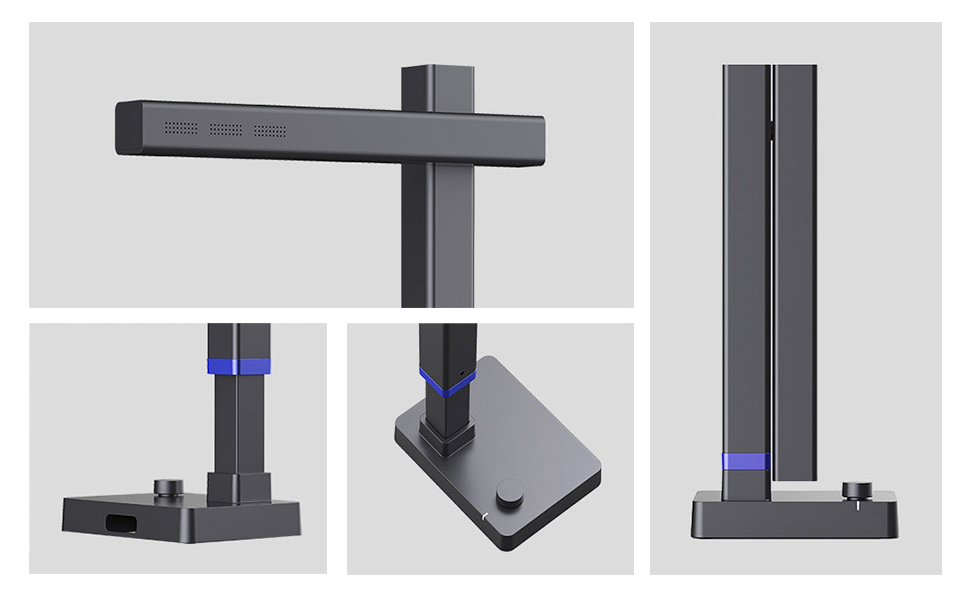
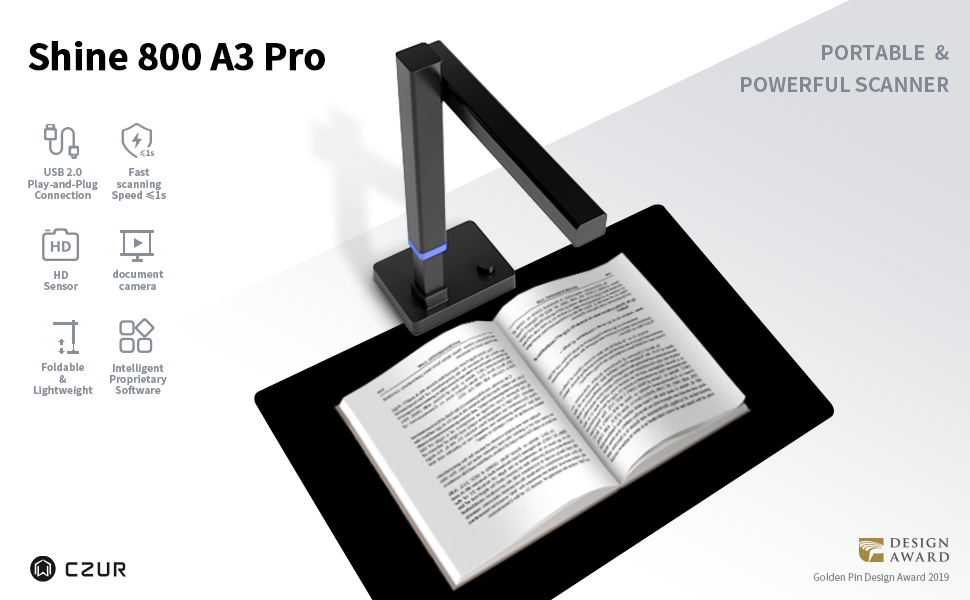
The CZUR Shine800A3 Pro is a cutting-edge 8MP document scanner and USB camera designed for professionals who demand speed, precision, and versatility. Compatible with Windows and macOS, it scans A3 and A4 documents in under a second, featuring AI-powered OCR supporting over 180 languages. Its lightweight, foldable design with height adjustment and foot pedal makes it perfect for both office and remote work, delivering crisp, editable scans with smart auto-cropping and paging technology.


| ASIN | B08JLQ8SNN |
| Best Sellers Rank | #35,561 in Office Products ( See Top 100 in Office Products ) #24 in Document Scanners |
| Brand | CZUR |
| Color Depth | 24 bpp |
| Connection Type | USB |
| Connectivity Technology | USB |
| Customer Reviews | 4.2 out of 5 stars 90 Reviews |
| Item Weight | 2.2 pounds |
| Light Source Type | LED |
| Manufacturer | CZUR |
| Media Type | USB |
| Minimum System Requirements | Windows XP; Windows 7 or later; Mac (Apple Silicon): macOS 13 or later; Mac (Intel): macOS 10.13 or later |
| Model Name | CZUR Book Assistive Cover |
| Optical Sensor Technology | CMOS |
| Resolution | 300 |
| Scanner Type | Document, Photo |
| Standard Sheet Capacity | 1 |
| Unit Count | 1 Count |
B**O
Archives? Home use? This scanner has you covered!
This is an excellent product that is very handy for graduate students. If you are working with archival sources, taking this portable scanner along to the archive will make it much easier than using a phone or camera. You can pack it in most backpacks and carry it around with your laptop, which is the only other thing you need. It is quite small and light, but also can scan up to A3, which means you can put more documents together. The scanner is quick, readable and has many customization options for the scans (size, dimensions, OCR). It is also quite affordable and you get the proprietary software, as well as the excellent support for the scanner. Taken together, highly recommend for professional research use (recommended it for many colleagues), or even at home if you need to scan some paperwork.
A**R
Great Scanner
I love my new scanner!!! So glad I got it! I was going to a Craft weekend and scanning different size photos from small up to 12x12 and it worked great!!! So easy to set up and start working on my projects!!! The foot pedal is the greatest!!! How easy to put the picture don on the mat and hit the foot pedal!!! So Easy!!! I got so much done that weekend - can't wait to do more!!! I just brought it in the box it came in and it worked out great! - very portable! Great value and was an Amazon Choice! Would recommend!
R**G
Fast As Light
I bought this to replace my old Epson flatbed scanner, using it to scan sheet music into the computer. The Epson flatbed served me well for 25 years, even though it took about 30 seconds to scan one page. When you're doing a 30-page score, it was a real chore. This CZUR Shine 800 A3 is for larger target sizes. Perfect for sheet music and songbooks. And it is fast! Merely step on the footswitch and you're done. No worry about light bleeds, crooked scans or holding down the scanner lid for those thick books. The only negative part of the install process was the driver. The installation CD was blank. No problem. Finding the driver on the Internet, however, involved cross-checking serial and model numbers. Why companies force customers to type 20-digit numbers on a piece of hardware, I'll never know. Neither does the software support standard CTRL-C and CTRL-V copy/paste functions. Once you pass the driver installation, simply place your source material on the black mat, mash the foot switch, and save to your drive. If OCR is your game, there is a wide variety of export formats, including PDF, DOCX, etc to choose from. The only available graphics format is JPG, unfortunately. Not an issue with today's modern graphics packages, but PNG would have been nice. Last but not least, is the book scanning feature. While CZUR puts a lot of faith into the "smart" features, I found it difficult. The songbook I used as a test just didn't scan well. The idea for the footswitch was driven by the user having to hold the book edges, holding both hands hostage. Still, you end up with a nasty curve at the top and bottom of the double-page document. The only solution (besides living with it) is to buy a piece of heavy glass to lay on top of the book. Plexi-glass tends to get foggy and scratched with constant handling. BOTTOM LINE: If you're into speed and quality, this scanner is optimal. Even with the sub-optimal software, it's a great piece of hardware.
M**E
Fast, great quality
Very fast, great scanner, good pictures. Just make sure your security setting on your computer is off.
D**Z
Decent camera, old software requires lots of editing
This is a camera + software. I had an old manuscript that was ~175 pages long and wanted to digitize it. The camera is fine, but the software seems like it has not been updated in 20 years. This is made to use with books and printed materials, and it only creates JPG images, which are sub-optimal for text on pages and line-art. It needs an option to save to PNG files as they'd be way sharper. The OCR is ok, but it does not retain page layouts. And it cannot capture graphic images at all -- it tries to interpret them as text and it gets random words in odd places with lots of gibberish, and cannot tell its a diagram or drawing. My scans needed lots of editing. It might have been quicker to just read it in as audio and have Google transcribe it. Support was like most today -- they just kept repeating what the specs are and didn't care what I was saying. "It only supports JPG." "I know that, I was hoping it supports PNG." "It only supports JPG." "But PNG would be a lot sharper." "Here is how you can adjust the sharpness...." They keep coming out with better hardware, but their software is horribly outdated and not easy to use for lots of pages.
C**E
Better than expected
As a school librarian, I needed something that would work well for archiving old materials. Also, in this time of COVID, this works excellently as a document camera for still images, and recorded videos. The greatest surprise to me is that this includes a microphone, making it also suitable as a webcam for remote teaching. All in all, while perhaps a little pricey, it serves as a high quality camera with multiple uses. The scanner is quick and easy to setup with its USB cable and foot pedal. The software enables the scanner to take pictures and do archival tasks easily, but the computer recognizes it is a camera regardless so that any video conferencing program you use (Zoom, Skype, Google Meet, etc) will simply recognize it as a webcam and microphone without the need to install any software. The form factor is beautifully designed, in that it folds up nicely for storage and has a small footprint that barely take up any space. Would I recommend this for the average person to purchase, probably not, BUT for the librarian/teacher/archivist, or other professional who needs to digitize a lot of their work, this multi-tasker is THE tool to buy!!
J**0
Semi-Easy setup, Scans fast and clear
I have tested a bunch of these CZUR scanners now and this one operates the same as the other scanners I have tested. Install the application/driver and then just put documents under it and press the button. This takes like 2-5 seconds to take a clear picture and it self aligns it so that everything looks professionally scanned. Really easy to use it for multiple documents as opposed to a ADF scanner which often gets jammed (personal experience). I used this to scan 40 documents for a mortgage Refi and it took me about 2 minutes. Text is clear and crisp. The coolest thing about these scanners though is that you can scan objects that AREN'T papers and use the images for your PC easily. I have scanned boxes of items for sale, phones, post-it notes, and childrens toys to make coloring books. If you do image editing then the sky is the limit with these scanners. I like that this one is pretty compact and light compared to the original ones I tested (although this one is for a smaller format so it makes sense). As far as driver installation; I haven't had much of an issue installing from the website. However when plugging the scanner into a USB-Hub I have had an issue sometimes where the scanner isn't detected by the PC. It seems to be hit and miss and sometimes turning the scanner back on fixes the problem and other times you have to re-launch the software. Just wanted to put it out there for anyone who has this issue. Overall I am very satisfied!
L**W
Total Junk - iPhone 8 Takes Better Images
It is unfathomable how this device has received so many good reviews. At the highest DPI, best quality JPG output this turned an 11 x 14 inch page into a muddy unreadable mess that, inexplicably, had a max size of 9 x 12 inches at the default 256 DPI. See the photo showing example of this camera set to default DPI and max JPG file quality. and exact same page taken with my iPhone 8. That's right an iPhone that is 4 models old takes a photo 100x better than this camera. Also note the iPhone 8 is 12 megapixels and this Shine 800 is 8 megapixals, but the photo taken with the iPhone is only 72 DPI and is is still miles ahead of the Shine 800 image quality. The image size of the iPhone picture is a whopping 42 x 56 inches! How did Shine Pro take an 11x14 inch paper and make the image smaller than the original? The photo was taken with Shine 800 camera lowered to a point where it barely included any of the black mat so it was "zoomed in" at the full size of the paper. And look at the quality of the color between the two. The Shine 800 was set to Color with no other filters or auto-correction turned on and had zero editing done afterward. I simply opened both images and took a side by side screenshot on the Mac. One further mystery... if I turned the DPI up to the allowed max of 300 DPI, it actually made the output image even smaller in size at 8 x 10 inches. Immediately boxed this back up and returned for refund.
D**D
Well designed but software needs improvement
I cannot rate features because I have not yet been able to use the product. Once I have the problems in downloading the software resolved I expect this scanner to be very useful. For some reason the online software will not work on my computer using Windows 11. I did download it but cannot find an app which will work. It seems to be a problem with Google interface. A program disk is included but my computer, like most current laptops, does not have an optical drive. The hardware and packaging have received a well-deserved international design award. I hope CZUR and Google customer services will help.
E**N
Reflejo en hojas brillantes/ el antivirus se vuelve loco al bajar el driver.
recomendable para hojas mate y planas, no para brillantes (si se utiliza con las luces que incorpora) este modelo no cuenta con la funcion para aplanar las hojas curvas, ideal para documentos indiviudales.
Trustpilot
5 days ago
1 month ago