
DOWNLOAD THE APP


Customer Services
Copyright © 2025 Desertcart Holdings Limited
DOWNLOAD THE APP
Refill, Save, Repeat! ♻️
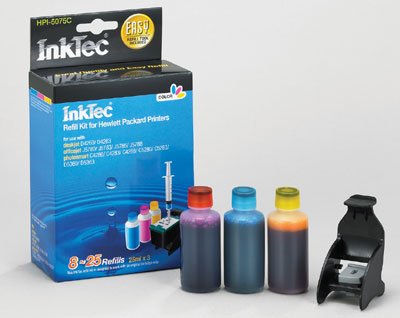
The InkTec Refill Kit for HP 75 and 75XL cartridges (Model No: HPI-5075C) includes 25ml of black ink in three bottles, a refill clip, syringes, gloves, and a manual, making it a comprehensive solution for eco-conscious users looking to save on printing costs without sacrificing quality.
F**T
These kits will save you money
I've been using these inkjet refills for years and they've done their job in saving me quite a bit of money. The process is pretty simple: You place the provided sticker on top of the ink cartridge to help you locate where you should inject the ink; fill up each syringe with the proper amount; inject into the specified locations; use the special syringe to get the ink nozzles primed, and you're done.It should be noted that if your ink cartridge has been running dry for a while, the success of refilling is limited because the nozzles may have clogged by then. If this is the case, you might be able to unclog them by taking a paper towel or napkin, soaking it in hot water and then applying it to the print heads to clear them up. Just don't forget the priming step.The reason why this product doesn't get a 5-star rating is because of the continual price hikes the product keeps going through. But this is solvable by just buying your ink somewhere else and then using the kit to continue your refilling duties.
J**.
Dosent work
I opened the packaging and it looked like it should work, the syringes are not sharp so they wont poke you if you drop it. I followed the instructions to the word and I didn't over fill it, and I put the cartridge in my printer and it leaked everywhere in the printer, I had several cartridges to try it on and it leaked still, I don't recommend this, better to have costco refill it for you, that way if they messed up they give you a replacement.
P**L
Good product, saves money
This product works fine with my printer. The directions were easy to follow. However, being a pharmacist and working with needles, I recommend drawing some air into the syringe first (a little over the amount of ink you want to remove from the bottle) and injecting it into the ink bottle to make it easier to withdraw the ink. Also, I didn't use the sticker thing that comes with the kit - I just pulled off the old sticker from my ink cartridge and injected directly into the port with no problems. The colors of the ink kit aren't as nice as the HP brand and I wouldn't recommended this for photo printing. For all other general printing purposes, this ink is highly recommended.
C**R
Great value easty to use HIGHLY RECOMMENDED!
I got this along with the black for my HP Officejet J6480 All-in-One printer. I refilled the black a couple months ago & it has been working great. Just refilled the color & it works great too! The only drawback is that my printer doesn't recognize the ink levels but that's no biggie. FYI: I read online that the printer reads the gold contacts on the back of the cartridge to tell if it's new, so if you keep about 3 cartridges on hand you can rotate them & the printer will think it's new & the ink levels will show.TIP 1: Poke the needle through the ink cartridge for the color you are filling BEFORE you fill the syringe with ink. I learned the hard way that if you put the ink in first like the instructions say, the pressure from trying to puncture the cartridge will cause ink to run out everywhere.TIP 2: Fill the cartridge with less ink than recommended 1) because the cartridge is probably not completely empty 2) creates less mess since doing this may help avoid ink leaking out of the top & if you don't overfill you can skip taking ink out of the bottom (which is a waste imo). For my XL is says 3 ml so I put 2 or 2.5 ml. Also fill the ink slowly in case it does start to leak & it helps the sponge absorb the ink better.TIP 3: Keep some tissues and alcohol or hand sanitizer nearby to quickly clean up any spills and wipe off the bottom of the cartridge where the ink comes out.I LOVE THIS!!:)
F**R
Skin tones not good
Mechanically, this kit has you covered. Follow the instructions and you won't have an issue. I didn't need the gloves when all was said and done. Be aware that they only want you to refill original HP cartridges, so if you're trying to refill a knockoff you might have issues. That being said, the color quality is somewhat lacking (frankly, this is no surprise). Skin tones on my printouts have a distinctly green cast to them although the print quality tests indicate that all colors are flowing well and haven't contaminated each other. For business printouts, charts, graphs, casual web page prints, etc it's excellent. For photo printing you're going to want first party ink.
W**I
Crap!
Don't buy this refill kit, it will ruin your printer! I purchased the correct black ink and color ink refill kits for my model HP printer and refilled my depleted original HP cartridges following the provided directions. They worked for about five pages, noting that the printer software indicated that the cartridges were empty, then the color cartridge failed. The black cartridge worked for a dozen or so more pages, then it too failed and now the printer no longer recognizes that ink cartridges are even installed! Even after reinstalling an original HP color cartridge, the printer won't recognize it. My printer is now useless!
B**L
Best refill experince.
I have tried inkjet refills before with less than stellar results. They either make a mess while refilling, leak after, or their color reproduction looks like something by Andy Warhol. This kit came with everything I needed to make the process as mess free as I could hope for. I have experience no issues with excessively leaky cartridges. And I am pleased that I can use it to produce color photos with what appears to be the quality of the factory ink (This is why I wanted to switch to refills in the first place, photos area huge ink sponge)I suggest if you are not confident that you watch the video on their website which walks you through every step of a pain free refill.The not so exceptional... I think this ink is sightly thinner than stock. I had to turn down the ink density in printer preferences to keep prints from being to dark. Once done though, prints turned out as well as the original cartridge.
Trustpilot
1 month ago
1 day ago