Desertcart purchases this item on your behalf and handles shipping, customs, and support to Japan.
๐ผ๏ธ Elevate your screen gameโflexibility and style that moves with you!
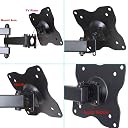
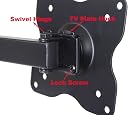
The VideoSecu ML12B is a sleek, full-motion wall mount designed for 19"-31" LED TVs, featuring a 15" extension arm, multi-angle articulation (tilt, swivel, rotate), and a sturdy alloy steel build supporting up to 44 lbs. Its space-saving retractable design and easy single-person installation make it a top choice for professionals seeking both functionality and style.


| ASIN | B003O1UYHG |
| Best Sellers Rank | #21,500 in Electronics ( See Top 100 in Electronics ) #319 in TV Wall & Ceiling Mounts |
| Brand | VideoSecu |
| Color | BLACK |
| Compatible Devices | Television |
| Customer Reviews | 4.6 out of 5 stars 12,738 Reviews |
| Enclosure Material | Alloy Steel |
| Global Trade Identification Number | 00753182732909 |
| Manufacturer | VideoSecu |
| Material | Alloy Steel |
| Maximum Tilt Angle | 5 degrees |
| Maximum-Supported Screen Size | 40 inches |
| Mfr Part Number | FBA_ML12B |
| Minimum-Supported Screen Size | 19 inches |
| Model Number | FBA_ML12B |
| Mounting Type | Wall Mount |
| Movement Type | Articulating |
| Number of Items | 1 |
| UPC | 791090662543 753182732909 |
| Unit Count | 1 Count |
L**R
Perfect
Works perfectly I installed in my work shop/ man cave using a tv and wifi holds my tv great
A**D
For the money
Well for the money this was not a bad deal. It is certainly not the Peerless Full-Motion Plus Wall Mount 22 - 40 Inches LCD, Black which I bought 2 years ago for a television I mounted in my kitchen. It also cost 1/3 as much so I would have to say it is good given the cost. The quality of construction of the actual device is approximately 1/3 the quality of the Peerless mentioned above. The finish is not as good the movement not as smooth, and there is no provision for cable management like is provided on the Peerless. The device moves freely but can be adjusted with the nylon nuts used throughout. I had some difficulty getting it to support my Westinghouse 24" Class 1080p 60hz LED LCD HDTV - Black EW24T3LW (9lbs) TV without drooping slightly. Using zip ties I secured the cables to the frame but it impedes movement somewhat, unlike the Peerless. I would have to agree with the other reviewers regarding the mounting hardware. It is of extremely low quality and I would recommend buying your own at a local hardware store. Expect to pay about $3.00 for the 2 lags and 4 screws required to mount on a stud. *** Under no circumstances would I consider using the included anchors to mount this in sheet rock unsupported by a stud. *** For any television mount I would recommend securely mounting it to a stud using quality bolts. If you absolutely must do that you need to find an anchor qualified for the task. I would recommend a substantial toggle bolt or high quality anchor, such as Toggler Toggle Anchors, Steel, Inch, Meets FF-B-588-D Type V Specifications , designed for mounting in sheetrock with a much higher rating than the weight of the television, given the extension away from the wall will provide leverage pulling against the wall mount far in excess of the weight of the television. I would look for a wall anchor with at least 100 lbs rating for up to the 22" TV (10 lb television) and at least 150 lbs for the larger televisions. Better yet find a stud. This mount met my need for a cheap Television mount, but I much prefer the Peerless mount. *** Oct 2013 I continue to use this mount and it works well. I have no problems recommending this and while the Peerless is a better mount, this is a very suitable alternative and is much more cost effective. There has been no issue arise with continued use. It still feels solid and works well.
G**R
Talk about BANG for your BUCK!
I've made a lot of purchases in my lifetime and when it comes to rating them on cost, versus their versatility, usage, convenience, ease of installation, durability, etc., this mount comes in second on my list. My number one best purchase is a 5.1 surround system for the computer in my office from Durabrand; it cost $26.00 at Walmart. I've had it for about seven years now and it's still going strong; but I digress and will save those kudos for it's review. Though I've only recently purchased these mounts (first I purchased one on 02/16/14 to mount my 23" Samsung computer monitor in my office; that worked out so well I purchased another one on 02/20/14 to mount my 27" Ilo flat screen TV also in my office; and then purchased a third one on 03/03/14 to replace the chintzy mount I had for my 27" Samsung flat screen TV/Monitor in my bedroom...see pictures), I'm pretty sure they will outlast the items they are being used to mount; the build quality is that good. They include a little "wrench" tool but to make things easier you can use a crescent wrench and you'll also need a Phillips head screw driver to remove the actual mount backing (that attaches to the back of your TV, monitor, etc.) from the arm. DON'T MAKE THE INITIAL MISTAKE I DID and unscrew the bolt instead of the screws! The other nice thing is they give you a choice of screws to "match" the unit you are mounting. There are also some rubber ("vanity covers" I call them, they serve no purpose but to cover up the bolts) that I didn't know what they were for initially...RIF - Reading Is Fundamental, lol. Also, when mounting, make sure you put the "circle" bolt hole at the top and the "oval" hole at the bottom. Initially the units are very hard to adjust (because all the bolts are tightened pretty tight) but after making the necessary adjustments (loosening up the bolts a little) they work fine. What I like the most about them is how they allow you to pull the units forward and turn them from left to right for easier viewing. You can literally spin the unit around in a circle if you want (that is if you didn't have the cables attached, lol). The only "limited" adjustment factor is in the tilting of the unit up and down, but I've had no issues in regards to not being able to tilt up or down for viewing purchases; these things in my opinion are close to perfect!
C**E
Very happy with my Triple Monitors Setup
I wanted to wall-mount three 24" monitors but didn't want them sitting on my desk. I researched tirelessly for the perfect triple-monitor solution that was all-in-one but the few available were $400-1k. As OCD as I am, I decided top try a more practical route and researched it to death. After reading all of the reviews I figured I would give this a try. To my delight these worked out nearly perfect! It took me about 30 minutes total to mount 3 monitors by myself (including fetching and putting away tools). The final result looks beautiful and I am very happy with how it tuned out. Here is how I did it: 1. Use a stud finder to locate a center stud and mark a rough spot (remember, I'm mounting 3 of these). 2. Mark a line to where you want the monitors mounted (for me, just above eye level). 3. With a level mark a line 16" in both directions (32" total width for standard wall stud-spacing 16" apart). 4. Validate outer stud centers along your like with stud finder. 5. Make a template with the back of the wall mount. 6. Center the template to the level line you drew in step #3. 7. Mark precisely where the holes would go. 8. Drilled pilot holes for lag bolts using 5/32" bit (I wanted the lag bolts to be snug).* 9. Remove the Vesa monitor plate from the mount arm and secure it to the back of the monitor. 10. Mount the brackets to the wall using the provided lag bolts.** 11. Place the monitors onto the mounts (you'll need to tilt them a little). 12. Install set-screws to secure the monitor plate to the arm. 13. Plug all of your cables in. 14. Position the monitors as desired. 15. Site back in glory of your handy work :-) *Suggestion: hold a vacuum hose 1" aside where you are drilling to catch the drywall dust so it doesn't get all over the place. You may need a friend to help. **Note: I used an battery-powered impact wrench to install the lag bolts. You can use a ratchet/socket orbox/open ended wrench if you do not have an impact wrench. Why only 4 stars? Well, as I said, they are NEARLY perfect... I would have liked there to be a vertical adjustment (not just tilt) but that would be a nice-to-have and isn't necessary since I mounted these perfectly the first time. For those unsure of vertical placement you may want to look for a mount that gives you that additional dimension. Otherwise, BUY THIS and be happy as you skip all of the way to the bank with all of the money you're saving over other solutions.
J**Y
Great Wall Mount!
After making a trip to Best Buy to buy a new 28" Vizio Smart TV, I was absolutely appalled at the price of the their wall mounts. The cheapest one to mount a 28" was about 30$! I couldn't believe that, so I instantly hopped onto Amazon, looked for a decent looking one, and bought. First of all, make sure your TV will fit! This only has two sizes it can handle, holes that are in a 3" square on the back of the TV, and holes in a 4" square. As long as your TV has these two sizes, it should work perfect. I was confused at first because it didn't say 28" in the title, but trust me, it works great! I'm sure I read something about an adapter to hold bigger TVs too, but with the extra cost, you might as well buy one made for your TVs size. The box comes with the actually mount (fully assembled, mount ready!), and a little kit with different sized screws, washers, anchors, and all you need to adjust the mount and hang it up. A few things that I didn't expect... - You might **NEED SEPARATE WASHERS**, because the screws that come with might be too long for the back of your TV, in which case you must put some washers between screw head and the mount. Which shouldn't be too big of a problem, I just found some random washers in the garage, popped them on there, and screwed the TV onto the mount. -You really cant fit the included wrench in the adjustable slot for adjusting the tilt and spin of the TV to tighten it down. So if you like a position of the TVs tilt and all, you can't lock it in really, it'll always be kind of adjustable. If you bump it, it will lose your perfect placement. -It **DOES NOT** come with an option to mount it in a hollow portion of drywall. The only included mount kits is anchors for a concrete wall, and screws for a wall stud. So be sure the place you want to mount this TV is either on a stud, or on concrete, or you might have to go out and buy special anchors to put it in hollow drywall. -You'll need a power drill to make pilot holes. -You'll definitely need a better ratchet with a 1/2 inch socket. It would be absolutely impossible to hand screw the included screws in the wall with the included wrench. Other than those unexpected things, I absolutely love this wall mount. It's cheap (Around 1/3 of the cost of a non-pivoting mount at Best Buy), yet still built very durably. It's very flexible in where it can be adjusted. It wont fall out of the wall, I promise. If you mount this bad boy right, there's no chance of it falling out and losing your precious TV. What more can be asked of from a mount? Be sure it fits, be sure you have the tools to mount it and level it, and you will be absolutely happy. 5 Stars!
A**R
-100% hands down BEST all around Articulating Wall Mount-
It's been a while since looking into getting a flat panel wall mount, mainly because they were very expensive and the ones that actually moved miss than just a couple inches were very bulky and suck too far out from wall. I think the purpose of a wall mount is to keep the tv as close to the wall as possible no matter what angle for viewing best fits you. With that being said, I have a 32" led Vizio smart tv. After a few months of having to set up in the bed to see the entire screen I figured what could it hurt to check....maybe wall mounts have changed in the past few years. I made the decision no matter what I wasnt spending over $20. The VideoSecu Articulating Arm is hands down the best wall mount I've seen. I've installed plenty of different wall mounts, some would mount very strong to the wall but would lack strength on the end holding the tv. Most that were strong on wall and tv had hardly zero movement (why not just put the tv directly on the wall in that case??) I didn't expect a strong solid mount when I ordered this simply for the price. I also didn't think it would get no where near close to the wall because of the arms that swing out. I was WRONG to say the least. The mount arrives in a smaller box than expected, don't let that get you worried. It folds up very nicely for all the movement you get out of it (one reason I think that it is able to collapse so nicely up against the wall) Another thing I like is the instructions are kept simple and printed right on the box itself, along with a paper copy inside. All hardware and tools needed is included along with extra size machine screws to fit different size tv's and additional hardware depending on if you can mount to a stud or do not have a stud in the area your mounting. Installation took right at 14 minutes....I timed it out of curiosity. I have no concerns what so ever about the tv coming loose or losing its level setting that I put it at or the worst concern: the mount breaking and saying goodbye to a tv. I used an 18volt drill to drill pilot holes for the wall mount screws. It can be put up with out a drill, just would take a little longer. In the end I highly highly recommend this mount for any flat panel tv up to a 42"-44" (I think the manufacturer might not say it's good up to that size but it's strong enough I would have no problems putting it on one personally. Always go by manufacturer ratings) Since installing this, I showed the head of IT at work and he has quit buying the $85 mounts that do not move and started buying this mount for the monitors in operator room. A++++++++
M**N
Very Sturdy and Stable
I bought this LCD monitor mount and use it with a 24" monitor, and it works very well for that. It swivels sideways at two different locations, so the monitor can face any direction in a 180 degree field, and can be moved more than a foot to the left or right. Please note that these hinges are not designed to lock in place, but they are stiff enough so the monitor will stay where you put it. This mount is also designed to swivel up and down 5 degrees, and rotate 360 degrees (so you could set your monitor as a tall-screen instead of a wide-screen if you wanted), and for this there is a nut that must be loosened. The advantage here is that you can lock this section in place once you have adjusted it to your liking. Installation is a breeze! This mount comes with hefty screws for direct use in wooden walls, and anchors for use with screws in concrete walls. Holes need to be drilled before installation, but instructions are provided to facilitate that. The plate that connects to the monitor itself is a separate piece that hooks onto the mounting arm and is then fastened with screws, so you don't even need a partner to help you install it. It's still safer to have a spotter in the room during this process, however. Once in place, the monitor mount is very stable and does not move unless it is voluntarily moved. Of course, an earthquake might make a difference, but I have not been so privileged as to see how it holds up under such conditions. Since the arm does not have locks to hold it in place and only relies on stiffness to remain stationary, I cannot guarantee that it will be as stable after a decade of adjustments. It is very solid and stable now, however, and unless you are always moving your monitor around, the mount will probably last past the lifespans of your next several monitors. If you want to mount your monitor to the wall and this kind of articulation suits your needs, this mount is a good choice considering durability and stability. Mine didn't even cost much, but I won't say what I paid for it because prices naturally change over time.
M**X
You get what you pay for I guess
Was looking for a really inexpensive wall mount for my new ultrawide monitor. So decided upon this one. I will say its not bad and is built well and seems like it would hold up to even heavier TV's/Monitors. But there is one glaring issue, the thing sags a lot. When I mounted the vesa mound to my monitor it was easy as pie but once I had it on the swing arm mount the monitor was pointing down at an 80 to 85 degree angle. I took the monitor back off the wall mount and double checked to see if anything was loose, and everything was tight and sturdy, The sag appears to come from the mounting space between the vesa mount and the wall mount piece that you screw in with a phillips head screwdriver. So either this is intentional or there is a defect. I was able to solve the sag issue by placing some folded up cardboard pieces into the space on the mount to make it face more upward. It was really janky and I dont like the way my monitor wobbles on the mount. I would not recommend this mount and would suggest buying one a little bit higher end. See my picture for what I had to do to fix the sag issue.
A**R
exactement ce que je cherchais
Bon produit bien fait
A**R
Three Stars
Thought there was more of a tilt
J**Y
Itโs ok
Just ok
Trustpilot
3 weeks ago
1 month ago