Desertcart purchases this item on your behalf and handles shipping, customs, and support to Japan.
🔵 Elevate your workspace with precision, comfort, and wireless freedom — don’t get left behind!
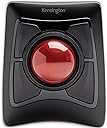
The Kensington Expert Wireless Trackball Mouse (K72359WW) combines a large 55mm precision ball with Diamond Eye optical tracking and a patented scroll ring for superior control. Its ergonomic, ambidextrous design includes a detachable wrist rest for all-day comfort. Connect wirelessly via Bluetooth LE or 2.4GHz USB dongle, with customizable buttons and scroll/cursor speeds through KensingtonKonnect software. Compatible with Windows, macOS, and Chrome OS, it offers smart power-saving features and comes with 3 years of coverage and lifetime support, making it a top-tier choice for professionals seeking productivity and style.


| ASIN | B01936N73I |
| Additional Features | Ergonomic Design, Touch Scroll, Wireless |
| Antenna Location | Office |
| Are Batteries Included | Yes |
| Are Batteries Required | Yes |
| Best Sellers Rank | #2 in Computer Trackballs |
| Brand | Kensington |
| Built-In Media | Trackball^Wrist Rest^Dongle^Batteries (2)^Quick Installation Guide^Warranty Insert |
| Button Quantity | 4 |
| Color | Black |
| Compatible Devices | Laptop, Personal Computer, Surface Pro 1st Edition 12" and Surface Laptop 1st Edition 13", Tablet |
| Connectivity Technology | USB |
| Customer Reviews | 4.2 out of 5 stars 5,358 Reviews |
| EU Spare Part Availability Duration | 3 Years |
| Embellishment Feature | Crystal |
| Enclosure Material | Plastic |
| Finish | Smooth Plastic |
| Global Trade Identification Number | 00085896723592, 07802880611214 |
| Hand Orientation | Ambidextrous |
| Hardware Platform | PC,MAC |
| Item Dimensions L x W | 8"L x 6.1"W |
| Item Type Name | Trackball |
| Item Weight | 1.4 Pounds |
| Manufacturer | Kensington |
| Mfr Part Number | K72359WW |
| Minimum Required Operating System Version | Windows 7 |
| Model Name | Expert Mouse |
| Model Number | K72359WW |
| Movement Detection | Optical |
| Movement Detection Technology | Optical |
| Number of Batteries | 1 A batteries required. (included) |
| Number of Buttons | 4 |
| Operating System | Chrome, Mac, Windows |
| Pattern | Mouse |
| Power Source | Battery Powered |
| Range | feet |
| Special Feature | Ergonomic Design, Touch Scroll, Wireless |
| Style Name | Wireless |
| Theme | Computer |
| UPC | 085896723592 |
| Unit Count | 1.0 Count |
| Warranty Description | 3 years parts & labor |
I**K
ABC.... Easy as 1,2,3... Do Re Mi .... that's how easy love can be
First I want everyone to know I have used a wireless mouse for years. Second, for most of those years, it has been a Logitech Trackball. I have been thru four of them. I work from home, and I think I just wore them out. Logitech is a great mouse. I have no regrets there. Then the other day, I left my home office for an appointment and when I returned home a few hours later, it was like my electronics went haywire. My mouse, dead. I mean dead. Not battery dead. But dead, dead. Every one of my Alexas, spontaneously disconnected from the wireless internet. Wireless Keyboard - also dead - but just the batteries - I had replaced them about a month ago, and traditionally replace them once a year on average. There was no power outage. and I have everything on surge protectors. My computer was fine. It was the peripherals that were winking out on me. It was bizarre. I thought maybe it was just time to investigate a new mouse after using my backup muse for half the day and literally wanting to huck it out the window. I read blogs and reviews. This Kensington Mouse was rated the number one choice for people in my industry, and to be clear, I was hesitant. I had been a loyal Logitech user for years. But with nothing to lose, I took the plunge, made this purchase - and KNEW I would know within minutes if I would like it or revert back. I received it less than two days later. Shipping was hyper fast. The pairing was incredibly easy. Getting it out of the package was harder than the pairing process, and it came with 2 batteries in the package. Because of my wireless habit, I always keep a healthy supply of batteries on hand, but it was nice to have them encased. Within 20 minutes of delivery I had it A.) out of the box, B.) Paired to my PC, and C.) Software downloaded and buttons custom configured. SHA-ZAM! I can absolutely tell you within minutes I am loving it. I thought the scrolling ring would be a bit tough to adjust to, but no. The scroll feature is probably one of the best things I like. No regrets. If you're on the fence - work in the tech industry, YOU WILL LOVE THIS MOUSE. I can't attest to gaming use, but then I'm not a pc gamer. Without hesitation- I know this will be my new go to. So worth the money.
D**E
Trackballs are more fun
This is a fantastic, well built track ball. I could always do with fewer wires on the desk so I love that it’s wireless and I can move it around. Bluetooth also worked great for me though I prefer to use the receiver since I switch computers often. I haven’t used a trackball in a long time but I wanted to try one and I have no regrets about trying this one. I have been using it constantly for the past week and I’ve got to say, I’m very happy with it. As far as ergonomics go, I’m not sure whether it’s better than my old mouse yet. I haven’t used a track ball in 15-20 years and it uses a different set of muscles depending on how you use it which has led to some muscles getting tired the first day. Being able to use it with my pointer finger, thumb, palm, or combination of digits, however, is a huge plus for me. I can adapt my grip for comfort or accuracy easily. It has a nice pad for my hand which I do like and is comfortable but sometimes prefer not to use as I’m used to having my wrist rest on the desk by itself. I also really like that the trackball stays in place and I don’t have to keep picking up my mouse to move it around. The scroll wheel also has a nice feel and I like I can scroll with my thumb, pointer, or middle finger instead of constantly using the same one and wearing it out. After a few days, I raised the sensitivity much higher as I felt the muscle control in my fingers was adapting. It may take a bit longer before I’ve really mastered this. As a side note, I tried a mouse accuracy test online and was able to achieve a slightly lower, but nearly the same, level of accuracy on the trackball vs a regular mouse. Even though I’m not regularly clicking circles on different sides of the screen often, I believe this ball can perform just as well as a regular mouse at any task. I even tried playing some FPS games just for the heck of it and it was fine, but I think it will take some getting used to before I prefer it. The hardware itself is beautiful. I love how it looks like HAL or a robot from Portal or something. The ball is a beautiful color. The cradle is rock solid. It goes well with the rest of my black colored accessories. The only negative for me, was the KensingtonWorks software on macOS Catalina. It was a pain to install due to security settings and required multiple reboots before it would detect the trackball. Even then it didn’t seem to update settings correctly. I should mention, Kensington support was phenomenal. They were available through chat right away and helped me get the software installed and working. Unfortunately I got sick of rebooting/troubleshooting and I ended up using another piece of software called BetterTouchTool that let me really jack up the sensitivity and assign Mission Control to the top buttons, a setup I’m quite happy with. I also turned off mouse acceleration on Mac since that gave it a weird feel I didn’t like. On my Windows machine, the KensingtonWorks software installed just fine, although I have noticed I can’t jack up the sensitivity any higher in KensingtonWorks which I’ve wanted to do after developing finer muscle control in my digits. I’m sure I will find a way when I get around to it. Overall, if you want a great wireless trackball, this is an excellent choice. You won’t be disappointed.
J**E
Great quality, great comfort
I did a lot of research when trying to find the perfect solution to my problems. I’m a developer and I do a lot of work with the keyboard and mouse. Normal clicking and wrist movement hurts over a long period of time for me, so I decided to get something more comfortable. After everything, I decided to get two mice and compare them. I got the Elecom HUGE and the Kensington Expert. Here goes the breakdown. I will comment on resting comfort. To clarify, this would be the comfort of simply resting my hand on the mouse without actually using it. This is different because sometimes you don’t want to actually use the mouse but you want to test your hand. I found the Elecom HUGE to be the most comfortable. It had a great padding and it’s shape was made to fit in a palm. However, I will now reference functional comfort. This would be the comfort of actually using the mouse. After a while, the HUGE began to strain my thumb from using the scroll wheel. The Kensington has never given me any kind of strain for using it. It’s design is meant to be ambidextrous so it’s not going to fit in your palm the same, but it is nice because you essentially use your whole hand to use it. It balances use and doesn’t strain any part of your hand. The palm rest extension on the Kensington is comfortable. It probably could be a lot softer, but it hasn’t given me any discomfort so I’m happy with it. The only thing I had to sacrifice when deciding to keep the Kensington was the functionality. I loved the buttons and programmability in the HUGE. There were a lot of buttons and it felt nice and convenient. However, I was pleasantly surprised with the software that the Kensington provided. There were a lot more options for commands to program to each of the buttons. I felt like I had to actually choose between useful functions. The HUGE had a lot of functions but not a lot of useful and Mac-specific ones. The Kensington has a lot specific to my Mac and made it nice to program. And it was not just the four buttons. The software allows you to program the four buttons separately, the two top ones together, and the two bottom ones together, giving you a total of 6 functions you can program to the mouse. The quality is by far the best and it’s a great mouse.
I**R
Scrollwheel could use some work, but overall this is (still) my favorite mouse of all-time.
I've owed Expert Mouses (plural) for decades now. Only recently did I buy this wireless version because my latest MacBook lacked the USB ports compatible with them. And I have no regrets. For those like me who've owned wired Expert Mouses, the not-terribly-smooth, slightly-noisy scrollwheel of the wireless version is exactly the same as it ever was. But it works consistently. Trackball itself is still buttery smooth, very responsive. The buttons are also still easy to click, and easy to customize. As an added perspective, I'd actually purchased a Slimblade first, assuming that something as sleek-looking as it was would certainly perform better. Long-story-short, I couldn't be happier about returning the Slimblade and going back to this updated version of the Expert Mouse. Favorite Mouse Ever.
D**I
Great trackball
I used the wired version of this trackball for many years before I moved up to the Slingblade trackball, which I like better. However, I recently wanted to get a wireless trackball and the Slingblade doesn't come in a wireless version (Kensington, please offer a wireless version of the Slingblade!). So I got the Expert Wireless Trackball here. It looks like and operates just like the wired version, which is great. It can use Bluetooth or 2.4 GHz wireless with the included USB dongle, both have worked equally well. My only complaint is that when the trackball goes to sleep to save power after a period of non-use, you can only wake it up by clicking a button. Rolling the ball does not wake it up, which I would prefer. It is a minor issue in my opinion though. I've used it on Mac and Windows. Regarding why I like this trackball style and the Kensington brand over over others: the ball is very big and centrally placed, so you use it with your fingers, not your thumb, so it is far less fatiguing. Kensington has proven to be very durable for me, lasting many years. The friction between the contact points and the ball is lower than other trackballs I have tried, making it easier to use. Spinning the ball (Slingblade) and spinning the ring (Expert Trackball) to scroll are very intuitive, I took to it immediately. I've gotten several instances of the Expert Trackball and the Slingblade over the many years since they were introduced, both for work and for home. I hope they keep producing it for as long as I need to use an input device like this. I'll keep buying it.
J**4
Embarrassingly Poor Product and Service
It's really frustrating just how poor this product (Wireless Expert Trackball) is despite the price you're paying. I remember the red trackball used to be a cool mouse that professionals used in their studios or desks. Now I question why. Here's a quick summary of things. I was going to write out in detail everything, but here's just the points: 1) Scroll wheel doesn't work. A mouse needs to do at least, AT LEAST, two things: 1) Click on things; and 2) scroll. This mouse does only half of what is expected from it.; 2) I thought it was just software/driver issues, so I double checked everything. Apparently the manual packaged with the product is outdated and tells you to download an old version (KensingtonWorks) instead of the new version (Kensington Konnect) despite the change earlier this year. Regardless, old or new - nothing fixed my issue; 3) Upon further research, it seems that the scroll wheel being broken is a common issue due to sloppy alignment or placement of the IR transmitter/receiver; 4) I requested a replacement, completely understanding that sometimes you just get a faulty product. And if the replacement works as intended, then cool. I was approved immediately for a replacement and notified I would get a replacement next day. Sweet. 5) Next day came, no replacement. Was told that there is a delay due to supply issues and they'll let me know when I'll get a replacement. 6) I'm literally looking at the product page right now and if I pay $87 (again), I can get the product delivered tomorrow. But since they have my money after sending a broken product the first time, they're telling me to wait and see when they can send me a replacement. I'M LITERALLY LOOKING AT FREE DELIVERY FOR TOMORROW IF I JUST BUY ANOTHER ONE. I got this because I do a lot of editing - for video and photography. I also do a lot of work involving excel sheets, accounting software, creating forms and etc etc Boring computer stuff mostly. My current trackpad isn't up to snuff with how fast I tend to work anymore so I wanted an upgrade. This product is great, I won't lie. I really like it. I've been using it to at least see if a trackball does make a difference, and does it ever. The trackball tech is really great compared to standard mouse and trackpads. But how do they mess up the most common feature of all mouses? I can live with a faulty product every once in awhile. That's life.That's why there's return/replacement policies. But between this being a common issue apparently for years now, the fact that they're still sending outdated manuals and material despite new software being needed to use their product, and having my replacement cancelled from next day to "we'll see" unless I just buy a whole new product, I'm left extremely disappointed. This is the first 1-star review I've given for a product (that I can remember), and I tend to buy a bit from Amazon and am even part of the Amazon Vine program where I review things from time to time. But this experience just left me extremely disappointed.
K**G
Molasses in January
Full disclosure: I have Fibromyalgia which effects the movement of my hands. I spent more than 40 years working in IT. I am an old female online gamer (not many of us around). I used to play Star Trek on the mainframe back in the '70s. I use my computer all day long, from espresso to bedtime. Let's start with the competition. Logitech M570 Wireless Trackball - Now I will admit I have never used this device but I have used it's grandfather. This is a thumb trackball. I used to have one at the office and one at home. I loved it and used it for seven years until my thumb stopped working. I stopped using it over 15 years ago. Recently I started getting thumb pain for no apparent reason. Then I realized that even though I had quit using it I still had trackball thumb and was getting arthritis in it. It is kind of like quitting smoking and then 20 years later getting lung cancer. Use at your own risk. Logitech Trackman Marble Mouse - This is what I currently have and am trying to get away from. This is a finger ball like the Kensington Expert. We will start with the good. It has a smaller ball which I prefer. Due to the ball and the software your pointer will fly across your screen at the speed of light which I like. I have found the buttons are put in a convenient location. They take very little hand effort to press which I like and need. The bad is the universal scroll which is not so universal. For me it works in my Firefox browser and it will work with Microsoft programs and that's about it. If you want to zoom in or zoom out (which is quite common) in another program you are out of luck. So if you play MMORPG's like WOW, Rift, EVE, SW, GW2, TSW you are out of luck. If you play single player games like CIV 6, HOMM7, MOO, Endless Space, Gal Civ III, Stellaris, you are out of luck. I had to write my own code and assign it to keyboard keys so I could zoom and I don't have a programmable keyboard. It sounds like Logitech needs to hire better help. My dogs are pretty good coders and they only charge $50 an hour. This device may be usable if you only do office work. Now let's get to why we are here, the Kensington Expert Wireless Trackball. I know there have been complaints about the scroll ring but I don't know why. I love it. It is a thing of beauty. It is located in just the right place and requires just the right amount of pressure to operate. People who don't like it need to get out more. I find the ball really big making it a bit awkward for me. It takes some getting used to. It is also quite heavy. Even with the software set to the fastest speed it takes some hand effort to get the pointer across the screen. It's like watching molasses in January. This is something I don't need. After a couple of hours I end up with hand pain. I need a trackball I can use all day. I find the upper buttons awkward to use. Reaching across that big ball every time I want to do a double-click is a bit awkward. I haven't been able to double-click in 25 years. I have to have a button do it for me, so yeah, this is awkward. Having four buttons beneath the ball I think would be a better design. The good news is you don't have to be a programmer to use this device. Summary Logitech M570 Wireless Trackball - use if you are a masochist Logitech Trackman Marble Mouse - use if you are only going to do office work or you are a programmer Kensington Expert Wireless Trackball - use if you have healthy hands and are not a programmer
A**.
Love this mouse but my situation might be unique.
I love trackballs. My favorite being the Logitech M570, of which I have owned three with two still working. However, the M570 sucks if you are left-handed. I am not, but my wife is a lefty, back to the Kensington Expert Wireless Trackball Mouse. As my boys got older and more interested in PC gaming, we decided to get a second desktop PC because I am very much a PC gamer. Honestly, this mouse sucks for PC gaming UNLESS it is something like Civilization, XCOM, or any other turn-based strategy game. For first-person shooters, this mouse is useless IMO. In my case, our second PC was added with wall mounting. I mounted the monitor on a wall mount next to the recliner in our game room. It's keyboard tray slopes downward and was not a good fit for the Logitech M570 as it was uncomfortable to use as it sat and would continuously slide down when you let go. Enter the Kensington Expert Wireless Trackball Mouse. It fits perfectly in the keyboard tray as it is enormous. I was shocked at how large it was when I first got it. I would almost deduct a star for the Bluetooth connectivity because it is always disconnecting and reconnecting. However, I switched back to the dongle, and it works flawlessly, better than Bluetooth. In the end, I did not deduct a star because I am not sure if it is the fault of Kensington or Windows. If you want a large trackball, this is your mouse.
K**N
Best for Music Producer ❤️
Great product after Using it you can't go back for normal mouse
A**Z
Perfecto para trabajos de precisión
Desde que lo uso ya no se me cansa la muñeca, a pesar de que lo utilizo unas seis horas al día. He ganado en productividad porque, gracias a su gran bola, puedo situar el cursor exactamente donde quiero a gran velocidad. Los cuatro pulsadores de que dispone son grandes, sensibles y cómodos para usar. Aunque puede configurarse para que la pulsación conjunta de dos botones adyacentes sea equivalente a otro botón, esto no me resulta práctico porque es difícil hacer la pulsación simultánea.
D**R
A few flaws, but I'm a trackball convert anyway!
A trackball is nothing I would have considered in the past as most of my PC time is used for gaming and being able to do work has always just been a "bonus" of the platform. However, over the course of the wonderful year of 2020, I had to find solutions to working from home and purchased not just one, but two trackballs. I first started with Logitech's M570 (wireless) and followed it up a couple of months later with the Kensington Expert Wireless. Chances are that if you're seriously considering transitioning to a trackball, you are looking at exactly these two models or their wired siblings. Both solved a very simple problem of making the most of confined space. For my gaming and personal PC, I have a typical desk setup with a brick of a gaming mouse, but for the work laptop I lugged home with me, the idea was that it was a temporary thing and I'd be back in the office with a full desk in no time. Three quarters of a year later and the work machine is growing roots in an old TV table. I managed for a very long time as I was quite comfortable with simply using the built-in trackpad, but when they replaced my machine with a new one, I could no longer work without wanting to throw it out the window. The 'brilliant' minds that designed the new trackpad clearly never used one as they removed the physical buttons that bisected the pad and made the pad itself one giant button that would only right click if you used the very bottom right corner. So now I needed a mouse, but TV trays don't have the runway for effective mouse use. Enter the trackball. Since trackballs stay put, they can sit comfortably in a small space and you still have full use of your cursor. The second thing both trackballs solved was the right-click issue. While the M570 has more traditional placement of buttons like a regular mouse, the Kensington Expert (herein "Expert") has four fairly large buttons that can be tapped easily regardless of what hand position you take. Since the laptop's trackpad cut the right-click distance by 2/3rds and I live and die by context menus, I needed that functionality without feeling the need to break equipment. The above issues are solved by pretty much any trackball device available in the market today, so what it really comes down to aside from general reliability and longevity is preference. First off, while the M570 seems sturdy enough, the Expert feels like a tank. It has a fairly large footprint compared to the relatively mouse-sized M570, but the Expert also has a much larger ball (maybe three times bigger?) and is heavier and kept in place with rubber feet. As mentioned above, it has four large programmable buttons surrounding the trackball and a rubbery ridged wheel that provides you with your scrolling (compared to Kensington's Slimblade which has you twisting the ball in the socket to scroll instead). The Expert uses the bottom left button (by default) for left click and the bottom right for right click. Since the ball is finger operated as opposed to thumb-operated M570, you typically use your thumb and pinky to click and right-click respectively. It takes some getting used to, but it really becomes second nature pretty quickly. On top of that, you get two extra programmable button assignments by clicking the top two or the bottom two buttons together. Despite its wider footprint, the Expert has become my go-to device for work while the M570 has been repurposed for the media machine I have connected to my TV. While it comes with a very sturdy wrist pad to help with your ergonomics, since I sit higher than the Expert instead of level with it, I find it feels better without the pad attached. The larger ball is much easier to manipulate and makes more logistical sense than when using the thumb ball of the M570 and Kensington's software allows you to set up keyboard hotkeys to assist with accuracy. For example, I can hold the Ctrl key to drastically slow down the cursor (this is completely customizable) so I can select specific things or position the cursor with precision. For cleaning, the ball is held in the device by gravity only and can be easily lifted out without having to lift the base unit (and it's kinda fun to do that anyway). Underneath you'll have access to the sensor as well as the three beads or skates that the ball rides on. I don't find that the ball is a dust magnet, but normal use will see crud accumulate either on it or on the skates. It's easy to simply lift the ball and give everything a wipe down. There's only two things that I am nitpicky about when it comes to the Expert. First, the ball has a very high profile (exactly half of it is exposed) and while I find it very comfortable to use throughout the day and experience no wrist strain whatsoever, it would have been nice if the 'horizon' or the plane of the base unit was a bit higher and the ball sunk a bit lower (things addressed in the Slimblade). The second thing is that this thing puts itself to sleep, which is admittedly a good thing. However, you cannot wake it by rolling the ball or scrolling the wheel; you must click one of the buttons to wake the device from sleep, but the click is actually registered with the OS and is not thrown away. Therefore, unless you're expressly positioning your cursor safely when you go idle, then you need to be careful on what button you press to wake your device. Neither are dealbreakers, but I really find the registration of the wake input to be weird. Overall, I am very happy with both of my purchases, but the Expert won out as my day-to-day solution for work. I would never use the device for gaming (at least competitively), but its customizable configuration from speed to keystrokes with Kensington's lightweight software easily make it a power-user's device. It may be unintuitive at first, and I was always first in line to mock these devices, but I have completely turned around on them. I think wherever I go in my professional life, the Expert will come with me.
R**O
Atention à l'installation
Avec ce produit il faut faire très attention à l'installation, dans le sens qu'il faut suivre à la lettre les indications du manuel. J'ai fait l'erreur de ne pas trop faire attention et le produit ne marchait pas. Là j'ai fait un tas d'essais sans résultat. J'étais près de renvoyer le produit comme défectueux. Alors j'ai tout déconnecté et j'ai recommencé de zéro. A ce point l'appareil fonctionne parfaitement. J'avais déjà la version filaire qui marchait très bien et j'ai voulu acheter la version sans fil pour plus de confort dans mon bureau. Je signale que le Trackball est le loin la meilleure souris sur le marché : sa grande boule permet de ne bouger presque pas le poignet, tout se contrôle à bout de doigt. C'est quelque chose d'unique et aucun fabricant à réussi à faire quelque chose de comparable. Je recommande chaleureusement ce produit. Je reviens, 3 mois après le commentaire ci-dessus, pour exprimer mes réserves à propos de ce produit. Il est vrai qu’après les manœuvres décrites il fonctionnait normalement, mais de façon intermittente : un jour ça marche, un jour pas. Il faut continuellement déconnecter, réconnecter pour que le produit soit reconnu par l’ordinateur – enfin, j’ai décidé de retourner au filaire. Je ne peux plus conseiller ce produit, car à chaque fois que j’allume l’ordinateur je ne sais pas si j’aurai la souris fonctionnant. C’est beaucoup de nuisance pour 116 euros que j’ai payé pour ce produit.
H**H
Excellent product.
Love a trackball as it’s much easier to control.
Trustpilot
2 days ago
1 month ago