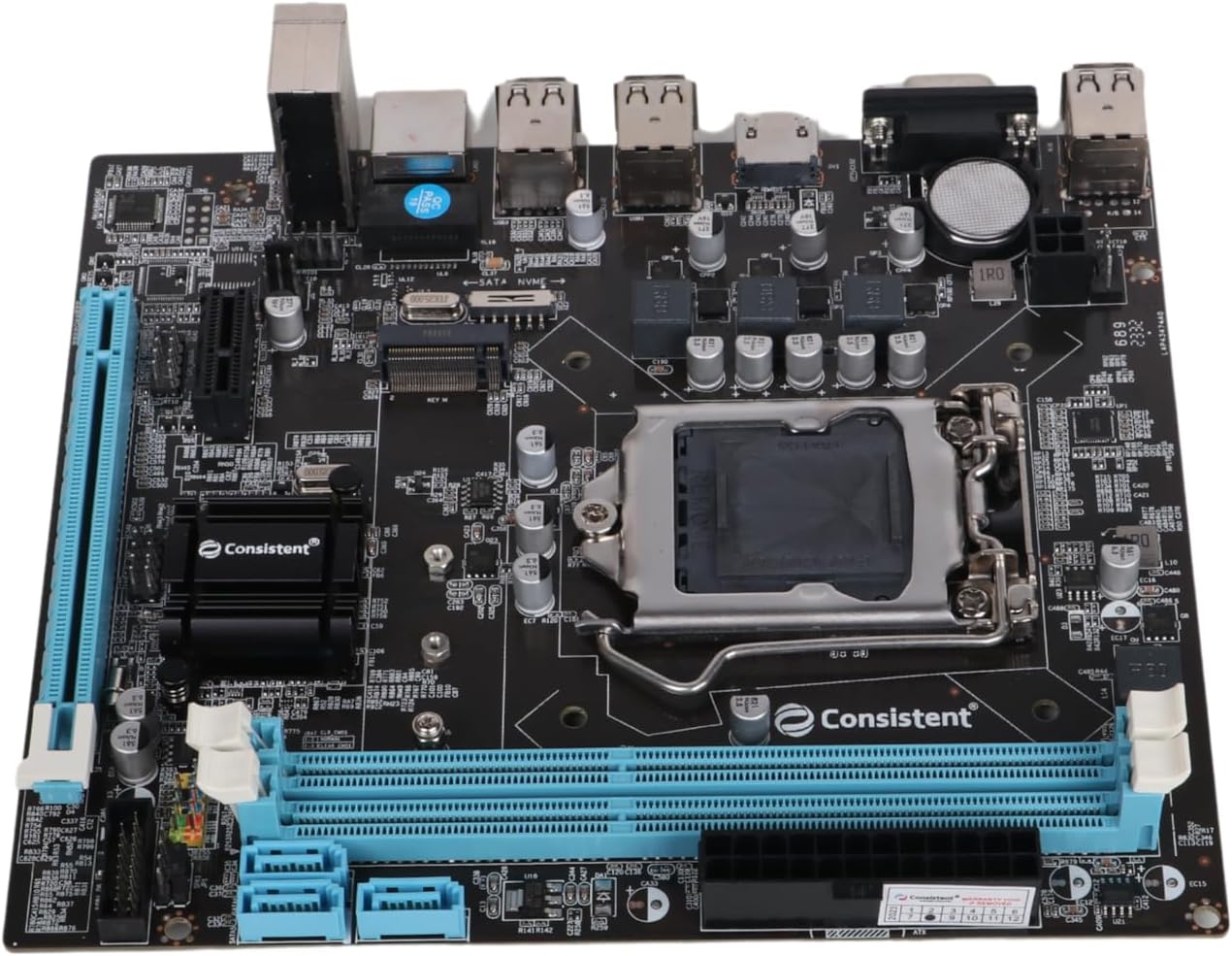



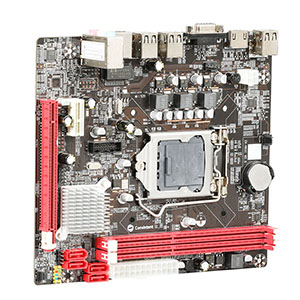
Consistent DDR3 Motherboard CMB H61 with NVME Slot
Product ID: 221880261
Details
- BrandConsistent
- CPU Socketlga 1207 LGA
- Compatible DevicesKeyboard mouse
- RAM Memory TechnologyDDR3
⚡NVMe slot for fast storage
💾16GB max DDR3 RAM
🔌LGA 1155 CPU socket
Desertcart purchases this item on your behalf and handles shipping, customs, and support to Japan.
⚙️ Elevate your workstation with the Consistent CMB H61 — where reliability meets speed!
The Consistent DDR3 Motherboard CMB H61 is a robust Intel H61 chipset platform featuring an LGA 1155 socket compatible with a wide range of Intel Core processors. It supports up to 16GB of DDR3 RAM at 667 MHz and includes an NVMe slot for ultra-fast storage solutions. Designed for professionals seeking dependable performance, it offers multiple USB and HDMI ports and comes with a 3-year replacement warranty, ensuring long-term reliability and seamless connectivity across Windows and Linux systems.



| Asin | B078QZ1X25 |
| Best Sellers Rank | #1,399 in Computers & Accessories (See Top 100 in Computers & Accessories) #1 in Motherboards |
| Brand Name | Consistent |
| Chipset Type | Intel H61 |
| Compatible Devices | Keyboard mouse |
| Compatible Processors | Intel Core i3-3220, Intel Core i5-3450, Intel Core i7-3770, Intel Core i5-3330, Intel Core i7-3820, Intel Core i5-3470, Intel Core i7-3930K, Intel Core i5-3570K, Intel Core i7-3770K, Intel Core i5-3350P, Intel Core i7-3820/3930K/3960X (Haswell), Intel Core i5-4460, Intel Core i7-4770, Intel Core i5-4670K, Intel Core i7-4770K, Intel Core i5-4570, Intel Core i7-4790K (Haswell Refresh) |
| Country Of Origin | India |
| Cpu Model | Core i3 |
| Customer Reviews | 3.6 3.6 out of 5 stars (907) 3.6 out of 5 stars |
| Drivememory Storage Capacity | 16 GB |
| Graphics Card Interface | PCI |
| Item Dimensions L X W X H | 26L x 20.6W x 5.4H Centimeters |
| Item Weight | 500 Grams |
| Main Power Connector Type | 24-Pin |
| Manufacturer | Consistent |
| Manufacturer Part Number | CMB-H61 |
| Memory Clock Speed | 667 MHz |
| Memory Slots Available | Yes |
| Model Name | CMB H61 |
| Model Number | H61 |
| Number Of Ethernet Ports | 1 |
| Number Of Items | 1 |
| Number Of Ports | 4 |
| Platform | Linux, Windows 10, Windows 7, Windows 8, Windows 8.1 |
| Processor Socket | LGA 1155 |
| Ram Memory Maximum Size | 16 GB |
| Ram Memory Technology | DDR3 |
| S Pdif Connector Type | Optical |
| System Bus Standard Supported | SATA 2 |
| Total Hdmi Port | 3 |
| Total Usb Ports | 4 |
| Unit Count | 1 Count |
| Warranty Description | 3 Years Replacement Warranty |
User
One of the best H61 motherboard with nvme in this price range
Sharing this update after 28 days of full fledged working of consistent motherboard ,few days almost 24/7 operation.Had purchased this to support my 3 rd generation processor as my old asus H61 motherboard was at its end of life.Was searching a board which has nvme support with 2 pci express slots ,one for wifi card and other for graphics card.Plan was earlier to go for zebrionics H61 but since latest updated motherboard from them only features 1 pci express slot and one nvme ,I had to drop it as it didn't suit my build.After many searching and seeing YouTube videos finally closed on this consistent H61 motherboard.Pros:Built quality similar to old asus board.All solid capacitors used.HDMI slot,which old asus board didn't haveMain issue I faced while building this pc was only 1 ram slot was getting detected out of two.Tried many ram options but same issue.Then finally complained to amazon team , Initially their response was as this is not returnable they have to take up with their higher ups and will come back with the best feasible solution within 8 days.In the mean time I was just checking through some YouTube videos on issue on new motherboards if only 1 ram was getting selected .In one of the videos this was the advice given.This I'm sharing to all the people who have similar issues while purchasing this mother board from Amazon site(pls try yourself issue should get resolved).# There are only 2 reasons ,either CPU or the ram slot has some issues with the component burnt otherwise there should be none.# Check clearly both the areas.In my case ram slot checked no issues but while checking the back of processor few of the contact points were fully black or burnt ,tried cleaning but no luck.It so happened I had old core i5 3 rd generation processor with me,which I put in this new board and voila the issue fully resolved.Basis on my experience ,written reply mail to Amazon team on the resolution of the issue to avoid any further wastage of their time.System build:Core i5 3 rd generationRam 12 gb,8+4 ,DDR3,1600mhzNvme SSD:256 gb samsung 970 Evo plusGPU:Gtx960Os:Windows 11 23 H2Till date no issues ,booting time hardly 5 secs with nvme.No lag in opening chrome or any software.Only gap which all will find is understanding the bios ,we may have to select bootmanager manually if windows is installed in nvme.This happened to me when moving from HDD to Nvme SSD.Final conclusion :Go for consistent brand1) Good built quality2) Good pricing3) 2 pci express slots ,one you can use for wifi card and other for GPU card.4) Boot time,very best with old 3rd gen processor and nvme.
User
difficult one to review
If you have a very high end still working processor like i7 of 2nd or 3rd generation, then only you buy this CMB-H61 motherboard. All available H61 chipset motherboards are more or less have the same configuration.None of the H61 chipset motherboard including this Consistent's CMB-H61 have support for USB 3.0 which is really difficult to digest. Although all available H61 chipset motherboards in the market are providing support for NVME, your high end NVME will only be using 2 lanes that mean NVME 4x4 or 3x4 SSDs will run at 2x2 because of inherent chipset limitations. but still you will get better speed than SATA SSD. You will not be able to utilize full potential of NVME SSD. There is 20 pin header which is supposed to be for USB 3.0 adapter and bios also says that USB 3.0 is enabled, however here again this motherboard does not support USB 3.0 adapter. That 20 pin header is for additional USB 2.0 ports only.For some people their old desktop system will be rejuvenated and for some it will be waste of money, that is why I said in the subject that this one is difficult to review. However most of the old motherboards were having electrolytic capacitors which bulge after certain period of time, they degrade and by now most of them would have failed. But this motherboard has all solid state capacitor which is good part. Pl, note rejuvenating old processor system using this kind of motherboards will still draw more power as compared to next generation processors. But again you need less power as compared to old HDD because you might be using NVME SSD. Do not try to build i5 processor based system using this motherboard unless you want to use PC for document editing and web browsing.In fact nowadays there are much better and cheaper options available which uses ITX motherboards and need DC power adapter and entire unit can be attached to monitor. Otherwise you can say that it is only 1200 INR and if that is the case go ahead and try. It is Chinese product but let me emphasize that this is not a garbage product.If your old motherboard is still working fine, I would suggest using PCI express expansion cards for NVME and USB3.0
User
Recommed to Buy for H61
LIKED : I install this Mother Board successfully and it is working Fast ! All USB port and other parts are working properly. While, installing Windows 10, i got the error as Windows cannot be installed to this Disk. This computer hardware not support booting to this disk. Ensure that the Disk's controller is enabled in the computer's BIOS menu. THANKS TO GOOGLE & YANDEX search engine. After searching, i found the solution that I would need to change the BIOS menu in UEFI and need to Disable CSM in BIOS. Apart from this, i would need to burn the ISO file using GPT Boot. Earlier i had done the USB boot option in legacy method. So, the above error came. After burn the ISO in GPT, with the help of Rufus, the above error Solved. Windows 10 Pro installed successfully and now i am typing this review using the said Consistent Board PC. Today, I have also placed another one Consistent Board for the purpose to assemble the PC and I would need to GIFT the PC to one Poor needed person. I have all other accessory as Backup for this new one. Thanks to Amazon and Seller ! DISLIKED : 1)Windows 10 Drivers are not available in Given CD (Photo is attached). 2) Received the Outer Pack in 30% Opened Condition in one side. Due to this, i hesitate to received the pack from Delivery Man. However, Based on my TRUST with amazon, i accepted it and informed the OTP. The inner Consistent Box Board is just open condition. However, the Last Inner Plastic Pack was sealed condition. They need to pack in professional manner as like as Gigabyte / Asus Boards. 3) Front Panel pin is not printing the details suchas POWERSW, PLED-, PLED+, RESET, HDD-, HDD+. 4) Power Plug was not included. 5) Mother Board SCREWS are not available in the Box ? VERDICT : Because of Competitive Price, it is worth to buy this product. While comparing all other "local company" product(s), this Consistent H61 Board is some more Better and therefore, Recommend to Buy. While checking other web, i found that, Amazon Price is Rs.100 less than others. Thanks to Consistent and Amazon.in
User
Good product but poor service by consistent and amazon
Motherboard is of good quality, working smoothly. But i've faced an issue with nvme m2 ssd. The solution was very simple but consistent company and amazon technical team lack in providing solution.I've used nvme ssd but it didn't worked or detected by motherboard. So i contacted consistent and asked them for solution. Funny thing, the service provider girl had poor or no knowledge about the products. She said the motherboard works with nvme not nvme m.2 ssd, rather than arguing i said ok so what should i do to make it work? She said motherboard didn't detect it so motherboards is defective, ask amazon to exchange or send motherboard to local consistent store for replacement.Contacted amazon, they asked me to take pic of motherboard with current date and my name and submit it to amazon & wait for 3 days for solution. Did the same but no response. Tried contacting them and they asked me to submit the pic again and wait for 3 days again, followed the process and did the same but still no response from amazon.Than i was ready to send motherboard to consistent store for replacement as it was the only option but I don't know from where i got the idea, i just felt what if i have to turn nvme on or off may be? so i opened the motherboard packing and checked it there and boom!! There was a switching right/left button to nvme or sata just above the nvme slot. It was set to sata so I switched to nvme and done. It detected the nvme m.2 ssd and worked.So consistent product may or may not have good quality but the customer service is definitely not good to resolve the issue rather than asking to send your device for repair.
User
Too many compromises, but could possibly work
Reviewing a LGA1155 motherboard in 2021 seems odd, but this a pretty odd year anyway.I have a few leftover components from the era, which I'm farming into backup PCs in case my file server goes down.The H61 motherboard here is almost exactly the same as the ones sold under the Zebronics/Frontech etc brand names. Made by the same OEM, just different features and slightly different layout.This specific one has 2 USB 3.0 ports at the back panel, and header for an additional 2 on the front - though the electrical connection is only USB 2.0 so they will be capped at 480mbps. Rest is cosmetically identical to the 'PowerX' branded motherboard (That I also purchased previously).The presence of USB 3.0 without an add-in chip points to a custom chipset, either an Asia-specific unit or a redesign for China specifically. While this is not an issue, the long-term reliability of these kind of motherboards is suspect at best.There's also a standby LED and an operation indicator, both are handy to have. No legacy ports at the back - except a VGA connector.There are two severe issues with the motherboard that prevent me from recommending it. The first is the lack of any sort of hardware monitoring. This means no voltages, no chipset/motherboard temperature and no fan speed monitor, let alone control. This means that emergency shutdown for CPU fan failure are not possible. The second big issue is the CPU never downclocks on this motherboard. It stays pegged at maximum multiplier all the time, which increases power consumption and reduces CPU lifespan.It is more or less understood that with such old platforms you'd be stretched to find good options, but there's better out there.
User
motherboard H61
nice one. working fine . recommended.
User
Don't buy any consistent products After 6 month Review
1. The motherboard is very bad not even used for 3 month even so motherboard was dead & I have to replace it2. After 3 month of use Again motherboard was dead then I go to the service center they give me old rusty repaired motherboard. I ask them why they gave me this they told me that after 3 month you get only replacement with old ones not new once.3. Then After 3 month Again motherboard was dead now I don't have time to go to service center that why I send the product to the service center trough courier. After receiving it they told me it's got damaged because motherboard pin got end I told them I have the video that when I package it the is no damage is there any video that you guys proof that you don't damaged the product they keep arguing at the end they cut the call and send the package with out fixing it.4. Fully Waste of money don't buy any consistent product there stuff is very rude & unprofessional no manners don't know how to talk And The product is very bad not reliable at all.
User
An Okay Motherboard for the Price with some missing features
So, i bought this motherboard because i wanted to create a NAS box using my old second gen i5 processor and some left over ddr3 RAM. I saw a few people saying this motherboard has a NVME M2 SSD slot. So, i thought i will use the NVME M.2 SSD instead of the normal Hard disk or SSD.However i had to face a few problem with selecting M2 SSD as a boot drive. I was not able to install the NAS Operating system, that is OpenMediaVault on the M2 SSD because it was not supported. I had a SATA ssd and i was able to install OpenMediaVault NAS OS on that. However i was not able to install it on NVME M.2 SSD.Also i was not able to install Windows 10 on the NVME M.2 SSD. It was giving me an error message saying that Windows can't be installed on this device. It asked me to change some settings in BIOS. But the settings mentioned were the same in BIOS as well. So, there is nothing that could be changed in BIOS. Then i checked if i am able to install Windows in a SATA SSD using this Motherboard and i was able to install it without a problem.And the crazy part was i was able to install Ubuntu 22.04 without a problem on the NVME M.2 SSD without a problem. So, the issue could be with a BIOS and because i didn't want to brick the motherboard without knowing exactly what i am doing i decided to do anything to the BIOS.The motherboard also does not have any feature by which you can do Hardware monitoring. So if the CPU fan fails then there is no way the PC would shutdown on its own and that might reduce the life of the CPU. That is one more problem i found. Other than these i would say it is an overall good motherboard for the price.Don't get carried away by the NVME M.2 SSD slot. You can't install windows 10 or any windows OS on that drive. You can install an Ubuntu or a Linux OS on NVME M2 SSD. If these things are not a concern for you then you can go ahead with buying this motherboard.
Trustpilot
1 week ago
2 months ago