Desertcart purchases this item on your behalf and handles shipping, customs, and support to Japan.
๐ก Illuminate your productivity with precision and style โ never miss a detail or a deadline!
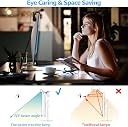
The TORCHSTAR LED Computer Monitor Lamp is a USB-powered, aluminum light bar designed for 21-32 inch monitors. Featuring auto-dimming, CRI 97 high color accuracy, and adjustable brightness and color temperature, it reduces eye strain and glare while saving desk space. Its touch controls with memory and timing functions offer personalized, hassle-free lighting ideal for gaming, office work, and e-reading.


| ASIN | B08B63WTQ5 |
| Additional Features | Auto-dimming & manual dimming, Brightness & color temperature adjustable, Memory function & timing function, No screen glare & eye protection, USB-C powered for easy charging, 2 years warranty |
| Base Material | Aluminum |
| Best Sellers Rank | #384,985 in Tools & Home Improvement ( See Top 100 in Tools & Home Improvement ) #156 in USB Reading Lamps #1,289 in Desk Lamps |
| Brand Name | TORCHSTAR |
| Bulb Base | E26 |
| Bulb Shape Size | A19 |
| Color | Black |
| Connectivity Technology | USB |
| Control Method | Touch |
| Controller Type | touch |
| Customer Reviews | 4.4 out of 5 stars 191 Reviews |
| Finish Type | Matte |
| Finish Types | Matte |
| Included Components | Accessories |
| Indoor Outdoor Usage | Indoor |
| Installation Type | Tabletop |
| Is Waterproof | False |
| Item Dimensions D x W x H | 1.57"D x 15.28"W x 2.76"H |
| Item Type Name | USB Lamps |
| Item Weight | 1.2 pounds |
| Lamp Type | Desk Lamp |
| Light Source Type | LED |
| Lighting Method | Downlight |
| Manufacturer | TORCHSTAR |
| Manufacturer Warranty Description | 2 years. |
| Material Type | Aluminum |
| Model Number | 94265 |
| Mounting Type | Tabletop |
| Number of Items | 1 |
| Number of Light Sources | 1 |
| Number of Pieces | 1 |
| Power Source | USB |
| Product Dimensions | 1.57"D x 15.28"W x 2.76"H |
| Recommended Uses For Product | Reading |
| Room Type | Office |
| Shade Color | Black |
| Shade Height | 2.76 inches |
| Shade Material | Aluminum |
| Shape | Straight |
| Specific Uses For Product | Reading, Studying, Painting, Gaming, Work from Home Office |
| Style Name | Modern |
| Switch Type | Touch |
| UPC | 676753051141 |
| Unit Count | 1 Count |
| Voltage | 5 volts |
| Water Resistance Level | Not Water Resistant |
| Wattage | 6 watts |
K**Y
Excellent light quality, great spring clamp mount
I've been looking at the "name brand" screenbar for quite some time, but just couldn't justify the price. This light seems almost identical so I finally purchased one for my home office. I am very satisfied with the quality. The advertised CRI light quality seems valid. The mount seems even better than the brand name version as it has a spring clamp that can expand for thicker monitors, and a small piece is included to provide a tight fit for thinner monitor frames. I ordered a second one for the kids desktop computer to give them better light when working on assignments in front of the computer. Update: I'm adding two pictures of the light shining on the wall to compare the light shaping vs the screenbar from another brand. You can see that with this light the majority of the brightness is only on one side (in front of the monitor) which is what you want. In contrast, cheaper screenbar lights that don't tune the light path shine back on the monitor itself, causing unwanted reflections and glare and defeating the purpose of these lights.
S**N
Spring Loaded mount is TERRIBLE, but the value is there!
This light does what it says it does, it lights up. Light coverage is more than adequate, and very wide. This illuminates the grand majority of my desk, and this will be a larger area the higher your monitor is. You're probably checking these reviews because you're trying to find an alternative to the BenQ that is so popular, yet almost prohibitively expensive considering what it is. This is a good value for the money, especially if you use the $-20.00 coupon that other reviewers have mentioned. Is it as good as the BenQ? If it meets your requirements and satisfies your expectations, then yes. The budget minded individual will like this product, but if budget is not a concern - the alternative is better. Overall, if the mounting mechanism is improved upon, is wider - and more stable with more weight, this would be my ideal choice if I purchased another in the future. The light is acceptable, pleasing to the eye and meets most my expectations. That being said, there are pro's and con's to every product, and I'll list my major factors below. PROS a.) USB-C on the lamp-side, standard USB connector on the other end. It comes with enough length that this can be plugged into a USB hub if your monitor doesn't include a USB port (most older monitors do not; it's a handy feature and should be considered if you're purchasing a monitor.) b.) Appearance is a near clone of it's more expensive unrelated cousin, is satin black in color unlike it's expensive matte silver competitor - but it's a couple of inches shorter in overall length. This will relate to less light, however the coverage this Torchstar provides is more than adequate. The higher your monitor, the wider & softer the beam pattern. c.) Visibility while on, when sitting dead center of a larger monitor does not have much if any glare on the monitor. You will see dust on the screen, in which case this will alert you to clean the screen. But there is no glare, which is really nice. I use a 27" VG27AQL1A from ASUS, which is an IPS panel and I can't really tell a difference between the light being on, or IPS glow. In fact I can only see a difference if my screen is literally off. d.) The bar can be slightly rotated in it's mount to adjust direction. There exists a drawback which could only be avoided by a built-in shroud on the user side. If you rotate the bar away from the monitor, you get less directional light directly below your monitor, but you can see the physical LED's and at brighter settings, this can be very distracting - and bright. It's like bright headlights of an oncoming car. The pro to mention here, is that if you rotate it down so that you don't see the LED's, the glare on the monitor is almost non-existent and won't cause issues unless you're a frequent-sneezer, and aim at your screen instead of covering your mouth. CONS - and I mention this because they are really important factors to consider before purchasing. a.) The mounting mechanism is TERRIBLE. This MAY fit your monitor. I say that, because the depth of the spring-loaded mount doesn't go very deep, and, it's also not long enough on the rear to really grab anything. The counterweight on the rear needs to be considerably heavier for it to be of any respectable benefit. The weight is designed to pull the mount into the corner of the monitor giving it a good bite. Since there's hardly any weight, the mount is unstable/unreliable. You'll need to tinker with how it's mounted to get it 'just right', and don't touch it. On monitors with a larger bezel, and a square back - this will grip okay as the mount itself is spring loaded to compensate for it's lack of stable counterweight. My monitor has an extremely thin bezel - about 1/8" at best. If I mount the bar as intended, it will protrude about 1/4" onto my screen. Not good being spring loaded - accidentally hit the bar with something and you risk damaging your panel. I have the mount placed as high as possible to still get bite, and I'm considering using some double sided stick tape on the counterweight to reduce the chance of movement, which will cause the bar to fail. Since the rear of my monitor (read: most monitors) is slightly curved, this mount has no provision to overcome that so you're relying on chance alone. b.) There are four brightness settings, and four color temperature settings. If you're trying to match color temps with other ambient lighting, you may not be able to do so. Furthermore, I am finding the brightness to be either too bright, or not enough. When it's dark, the lowest setting is almost perfect you don't want glare and reflections off your desk. That being said, I'd like it slightly brighter. Say, maybe 1.5. The same goes for color temperature. The lowest setting is VERY yellow, and is about perfect matching temp to 40-60W incandescent soft-white bulbs. If you have LED lighting, this may be warmer or cooler than your ambient lighting. If you can overcome this, it won't bother you. Just keep it in mind. c.) More about the mount - it really needs to be wider. It's about 1.5" wide, and since I have to mount it at the very highest possible point, it sticks up above my monitor just enough that I'm distracted by it. I literally can't breath on it, or it can fall off. If you prefer function over form, this won't bother you. At $70 price point, I would expect this to be a tad better designed for aesthetic purposes. In the end, I think the value is there. It's a cheaper alternative (nearly half the cost of the BenQ) which is a real bonus, as I think the competition is really overpriced by comparison. Would I buy one again? Perhaps. The mount really irks me and I really dislike good products that aren't executed well in design. A longer version would be great, the mount definitely needs revised and there should be more than 4 brightness/color temp settings available. 10 would give this bar the edge it needs functionally, and a better mounting design would do wonders to the marketability of this light bar. As a budget bar, I think it's right up your alley. I could justify an additional cost for additional features. Smooth gradient adjustability for brightness and temperature would be a fantastic feature. A remote dial like the competition would allow all of the above, and the convenience of adjusting on your desk vs reaching to the top of your monitor is really valuable.
B**R
Must have desk accessory!!
This is a great accessory for your desk hands down! It works perfectly for my setup! The light is bright and dimmable so you can find the right brightness level for you. It casts the light perfectly on to your work area without shining in your eyes or washing out your monitors image. The versatility is great as well you can change the color temp between varying warm and cool white. You can also change the lights angle to adjust it to your setup. The only feature I don't completely like is the auto-dimming. It tends to just always be a bit too bright for me, but that's ok with me. I just use the manual dimming to get my perfect lighting. To conclude my ramblings it is a great product at a great value for your money. Similar products with the same features sell for typically $30 or more than this one. Definitely give this one a shot before you decide to spend more on other brands with the same features. I give it a five star recommendation!
D**J
Pretty much same as the expensive one
I tried the BenQ monitor light for $99 and it was such a great monitor lamp. But it never sat good with me to pay so much for a light. So I searched around and found this TorchStar lamp at half the price. It is pretty much the same lamp, AT HALF THE PRICE! Some will mention the build quality and led brightness as being superior on the more expensive lamp. As far as build quality, they are almost identical. Same size, material, feel, buttons, etc... The brightness might be slightly brighter on the BenQ but for me that wasn't an advantage really. I don't need a lamp that close to me being that bright. I keep the lamp on the warm setting and let the auto dimmer adjust it. Works perfect. Included image of the TorchStar sitting above my Acer 27inch monitor and it is the perfect size for that size monitor.
A**R
Great value when considering price
When compared price, this is great. However, benq is better than this. Also, benq is much more expensive. If you donโt care money, buy benq instead of this one.
T**O
Very good quality
Really good stuff,worth every penny!
V**T
Good, not amazing. Great if on a budget and coupon still works.
TL;DR Great budget option that still delivers while not breaking the bank. Would recommend if budget is a concern and you don't want to settle for the cheapest of the cheap chinese knockoffs (assuming you get it at the $50-$60 price point). Overall this light was very solid and I honestly would have kept it if I didn't enjoy the BenQ light more. This review will mostly be a comparison to the BenQ Screenbar and I will be posting a similar review on that product as well. A bit of background: I've always used/preferred task lighting when it comes to working at my desk and doing work on my computer. Up until about a week ago an architect style lamp from Ikea was filling the bill, but then I upgraded to a monitor stand for more desk real estate and now my my monitors are too high for that style lamp. After doing some research, I came across the BenQ Screenbar and similar styled lamps (i.e. TORCHSTAR Computer Monitor Light)--shopping around and reading reviews I narrowed it down to those 2 (thanks especially to Ken Y). I went ahead and purchased both from Amazon and after some light use decided to keep the BenQ Screenbar. At the time of purchase, the BenQ light was $99.00 and the TORCHSTAR $57.99 ($77.99 with a $20 off coupon) before tax. I've included photos to show the "differences" between the 2 lights--for all pictures the lights are at maximum brightness and maximum "warmth" or "coolness". All Photos are also captured at the same exposure settings with the same white balance for consistency. PROS: -Cheaper than BenQ while nearly being a clone -There's a diffuser over the LEDs (less harsh on the eyes, but this may be a choice on the BenQ as diffused light scatters more) -Smooth when dimming (slight flicker on the BenQ which might be a pro though because on the torchstar sometimes I can't tell if it's working) -Auto mode disables if you tap it again (it doesn't on the BenQ) -Torchstar came with an allen key to adjust the clamp tightness (I think the BenQ has a similar access panel but no key) CONS: -Not as bright (not sure if the LEDs themselves actually get brighter or there are just more, but this was a big reason I chose the BenQ) -smaller illumination area (about 3.5" shorter than the BenQ which translates to a decent amount of space) -Auto LED is blue and kind of sharp in the dark (the green on BenQ is very mild) -Clamp feels cheaper -Controls feel less responsive and intuitive (sometimes I felt like I wasn't sure if the torchstar was working but I always knew if the BenQ was. Also with the Torchstar the brightness or color ALWAYS alternated between touches making it kind of difficult to reach exactly the right settings) -Flat cable USB on the BenQ feels more premium SIMILARITIES: -Both work fairly well with curved monitors. (I use a Samsung CF398 27" as my primary display and a CF390 24" as my secondary) -Both have directed LED strips to minimize glare on the monitors (some of the chinese knockoffs aren't built well and create a ton of glare) -They honestly both just work well At the end of the day, I can kind of recommend both light bars, but I just personally preferred the BenQ more and am willing to pay the premium for it. My complaints with the TORCHSTAR are mostly minor and especially if you don't change the settings much won't even be very noticeable. I will continue to update this review with usage as well as try to answer any questions that might come up. Please click the helpful button if you find my reviews helpful
C**E
Works good
Works good. No complaints on light level. I like being able to choose light value - cold/bright vs. medium warm. I use the warmer level. Due to shape of the back of my monitor, I can't clamp it on tightly. It does weight enough to secure it well enough. It sits securely enough and doesn't wobble. I do not like the way you have to press and hold the buttons to raise/lower light levels and change light value. I can live with that, not a deal breaker. I like the way it looks on my monitor, it doesn't stand out like a sore thumb. Like the USB cord vs having to plug it into the wall/power strip.
Trustpilot
1 day ago
5 days ago