Desertcart purchases this item on your behalf and handles shipping, customs, and support to Japan.
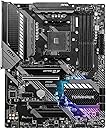
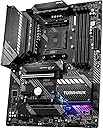
๐ฅ Power Your Ambition with MSI MAG B550 TOMAHAWK โก
The MSI MAG B550 TOMAHAWK is a high-performance ATX motherboard designed for AMD Ryzen 3rd Gen and future processors. It supports up to 128GB of DDR4 RAM at speeds up to 4866MHz (OC), features PCIe 4.0 x16 for next-level graphics, and dual LAN ports including a 2.5G connection for ultra-fast networking. Enhanced with premium thermal solutions and customizable RGB lighting, it delivers a perfect blend of power, speed, and style for professionals and gamers alike.


| ASIN | B089CWDHFZ |
| Available Memory Slots | 4 |
| Best Sellers Rank | 89,184 in Computers & Accessories ( See Top 100 in Computers & Accessories ) 722 in Motherboards |
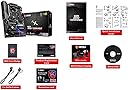
| Box Contents | CARD, m BOARD |
| Brand | MSI |
| Brand Name | MSI |
| CPU Model | Ryzen 3 |
| CPU socket | Socket AM4 |
| Chipset Family | AMD B550 |
| Chipset Type | AMD B550 |
| Chipset type | AMD B550 |
| Compatible Devices | Personal Computer, Desktop |
| Compatible Processors | AMD Ryzen 3rd generation, future AMD Ryzen processors |
| Compatible devices | Personal Computer, Desktop |
| Compatible processors | AMD Ryzen 3rd generation , future AMD Ryzen processors |
| Customer Reviews | 4.6 out of 5 stars 6,933 Reviews |
| Global Trade Identification Number | 04719072728625 |
| Graphics Card Interface | PCI Express |
| Item Dimensions L x W x H | 30.5L x 3.8W x 24.4H centimetres |
| Item Type Name | MSI MAG B550 TOMAHAWK MOTHERBOARD |
| Item Weight | 1.3 Kilograms |
| Main Power Connector Type | 24-Pin |
| Manufacturer | MSI Computer |
| Manufacturer Part Number | MAG B550 TOMAHAWK |
| Memory Clock Speed | 5100 MHz |
| Memory Storage Capacity | 128 GB |
| Model Name | MSI MAG B550 TOMAHAWK |
| Model Number | 7C91-001R |
| Number of Ethernet Ports | 2 |
| Number of Items | 1 |
| Number of Ports | 17 |
| Platform | Windows 10 |
| Processor Socket | Socket AM4 |
| Product Warranty | 3 Year Manufacturer |
| RAM Memory Technology | DDR4 |
| RAM memory technology | DDR4 |
| Ram Memory Maximum Size | 128 GB |
| S/PDIF Connector Type | Coaxial |
| System Bus Standard Supported | SATA 3 |
| Total PCIe Ports | 1 |
| Total SATA Ports | 6 |
| Total USB Ports | 9 |
| UPC | 824142217627 |
| USB 2.0 | 6 |
| Unit Count | 1.0 count |
K**T
If you want a solid AM4 board for a Ryzen build, this is a great foundation
If you are looking at the MSI B550 Tomahawk and wondering whether it is a dependable base for a Ryzen PC build, yes. A motherboard is not the flashiest part of a build, but it is the part you really want to feel solid and well laid out. This board feels sturdy, the layout makes sense, and the connections are where you expect them to be. The M.2 support, PCIe options and 2.5G LAN make it feel like a board with room to grow rather than something bare minimum. My tip would be to update the BIOS if needed, plan your front-panel and fan headers before fitting everything, and enable the right memory profile once built. Strong board and five stars.
K**B
A great choice at the right price
I just upgraded to this board coming from an aging Gigabyte board with a Ryzen 7 1700. Thankfully this board was at a good price and lets you flash the bios to allow it to take the latest 5000 Ryzen CPUs. You can do this with no other hardware attached to the board apart from the power supply in the 24 pin and 8 pin connectors. Nice and east too. Just grab the latest NON-BETA release, pop it on a formatted (Fat32) flash drive and make sure you set the extension to .ROM on the downloaded bios file (See YouTube for a guide) Then plug the stick in the highlighted USB port on the rear IO and press the button above it (It's recessed, so us a pencil or something) It took about 5 mins, but you might want to wait another 5 mins after it stops flashing, just to be sure it's complete. I then powered down, added my hardware and that was that. It took about 15 mins from getting the file to being ready, and that's factoring in extra waiting times to be sure. The board is built well and weighs a fair bit, thanks to it's chunky heatsinks. I've overclocked a 5800 to 5Ghz with no issues apart from temps, which are a little higher on the 5800X anyway, due to how they are made. I'm not running it at that though, I've decided to keep it at 4.8 and get the voltages down as much as possible. I'm really pleased with everything! Motherboards have come a long way over the years and this one is very capable. If you get it on offer then go for it. You're likely looking at x570s too, so keep those in mind when comparing prices. The MSI x570 is another good choice if it fits your budget too and you want the extra bells and whistles. This board has 1x Gen 4 NMVe slot and a single PCI-E 4.0 slot for the GPU. So you're still getting good specs. Check out the specs in full vs some of the others out there as they do differ... some by a fair way too. I'd buy MSI again for sure (Coming from a long time Gigabyte customer) It just fits perfect and has been trouble free. The bios is awesome to work with too.
A**R
Great board for the price - has almost everything you'll need.
First of all before going into anything further, I'd like to point out the review below me is incorrect and your older GPU's will be fine. It is likely that the user beneath me reporting his GTX 980 didn't work, did not have an up to date BIOS on his board (mine had a BIOS revision compatible with the Ryzen 9 5900x CPU, if he had a Ryzen 5000 series CPU, it's likely he had to flash it if he was recieving no video) and didn't do enough research. Your older graphics cards will work with this board, I originally had a GTX 960 in here and it worked right away. I also didn't have to flash my BIOS... some boards made prior to 2021 of this variant might need a flash - in which case, look up a YouTube video for it - it's a pretty simple process and doesn't require a compatible CPU to do it... just a USB pen! Easy installation into most modern ATX cases as no having to mess around the I/O shield as it's pre-applied to the board as part of the heat sink... long gone are the days of messing around with those unless you go for a cheaper board. There's enough space between the PCIE x16 4.0 slot for your GPU to the lower down PCIE x16 3.0 slot for another peripheral with a modern graphics card installed... although I'm not sure about the width/bulk of RTX 3090, a RTX 3070 fits here fine with enough space inside a Corsair 4000d Airflow. Lots of system fan headers for a good case to have everything connected individually for monitored RPM usage on most, if not all your fans (depending on how many you have!) without having to connect multiple fans to the same header. The CPU PUMP header can be used as a CPU OPT header also (optional CPU fan) if you say, want to monitor both fans of a cooler like the very popular Noctua NH-D15. The only cons here I'd say are as follows: Two PCIE x1 ports... really? Just make them X4's or X16's are PCIE 3.0 - so many modern peripherals don't fit an X1 slot and need the wider variant. if the PCIE x16 3.0 slot is in use, I believe the lower M.2 slot also become nulled... I've not treid this myself, but the manual mentions it. Please look up the manual and read about this yourself for more information if having two NVME M.2 drives is a necesscity for you... (the lower M.2. slot is also 3.0, not 4.0) for me, it isn't, and the one NVME 4.0 slot is enough.
S**S
Reliable B550 Board with Great VRMs and Features for the Price
Iโve been running the MSI MAG B550 TOMAHAWK since April 2024 in a mid-range gaming and productivity rig, and it's been an excellent experience all around. Setup & BIOS Booted up with a Ryzen 7 5800X and 32GB (2x16) of G.Skill DDR4-3600 without any hiccups. BIOS was easy to navigate, with MSIโs Click BIOS offering a clean layout and decent fan control. Flashing BIOS was painless using the Flashback button โ no CPU required, which is a huge bonus if you're planning to future-proof or use an older BIOS chip. MSI also keeps BIOS updates frequent, which is reassuring for long-term support (especially on AM4, even late in its lifecycle). Connectivity & I/O Rear I/O is generous for the price. You're getting: -2.5G LAN (Realtek) โ big upgrade over standard gigabit -Plenty of USB ports (including USB 3.2 Gen2 Type-A and Type-C) -Optical S/PDIF out โ rare at this tier -6x SATA and 2x M.2 slots (top M.2 supports PCIe Gen 4, bottom is Gen 3) It doesnโt include built-in Wi-Fi or Bluetooth, but I knew that going in and added a PCIe Wi-Fi 6 card. Easy enough fix. VRMs, Cooling & Performance One of this boardโs standout features is its VRM design โ the 10+2+1 phase layout with decent heatsinking keeps things cool even under heavy loads. Iโve done moderate overclocking (PBO and curve optimizer tweaks) and havenโt seen VRM temps go over 65ยฐC, even with sustained multicore loads. Plenty of fan headers and good PWM control in BIOS or via MSI Center (if you use it โ not everyone likes it). Audio Comes with Realtek ALC1200 codec. Not โaudiophile-grade,โ but more than enough for casual gaming and media. I do appreciate the clean signal with no background hiss when using my headphones directly through the rear jack. Build Quality The board feels sturdy โ reinforced PCIe slot for your GPU, metal heatsinks with decent mass, and a well-labeled layout. No flex, no cheap-feeling components. M.2 shields are a nice touch too, though theyโre not the thickest around Minor Issues -No built-in Wi-Fi or Bluetooth, so factor that in - -
G**E
A great board
Bought as part of an upgrade to my existing system. As with every PC part you buy these days, you have to have flashing RGB colours and this seems to be an important spec. You can turn this off. Everything you need to know about this board has been written already but at a high-level, this comes well-packaged, is easy to install and is great quality. Little touches like including a high-quality M.2 heatsink reassure you that a lot of thought has gone into this. Other than that, it runs like a dream with my Ryzen 7, DDR4 RAM, Sapphire Nitro card and M.2 SSD*. Whilst, even at the time of buying, this has already been superseded with boards for newer CPUs, Memory etc This is an extremely capable and stable foundation for a system that you can throw anything at. ------- * One thing I read that may be of interest is that both M.2 slots share the same bus, or, the 2nd slot shares the same bus as something else on the system; I can't remember which so you best look it up. This means that if you populate the 2nd slot, you may throttle the bandwidth of something somewhere else. If you only use the main M.2 slot then this isn't an issue.
S**.
One of the nicest B550 motherboards I've had the pleasure of building systems with
One of the nicest B550 motherboards I've had the pleasure of building systems with, well built, nice layout and is just a really nice board to use as a base for an AM4 system. Performance is top notch, have built with Ryzen 5 5600 and Ryzen 7 5800X CPUs and they've been impeccable in terms of performace vs cost. It's a very understated little board, it's a tank in disguise. My small gaming PC comprising of this board, 32Gb Klevv 3600mhz DDR an AMD Ryzen 5 5600 and nVidia 2060 Super still plays games at an acceptable FPS at 1080 with medium settings and a few performance tweaks to make it acceptable to my needs and eyes ! Can't fault it at all .. especially as it has an ARGB LED setting in the BIOS which can be set to OFF !! Top board, really nothing negative to say about it at all.
D**N
Very robust
I was very intrigued by this product as it was marketed as a tomahawk and yet it in no way at all resembled a traditional throwing tomahawk. Through this tomahawk costs three times as much as a traditional one, I knew instantly that I needed to buy this product and try it for myself. Upon receiving the Tomahawk I took it down onto the local range for some throwing practice. Before I threw the Tomahawk I paid careful attention to all the fancy sci-fi techno gadgets on the giant throwing square, I noticed that there was some batteries and resistors on there that could definitely allow the Tomahawk to be a corrosive weapon, this I thought was an absolute technological innovation for the Tomahawk community. My mates were dead impressed by the tomahawk, they thought it were well cool. After throwing the Tomahawk at my portrait of Margaret Thatcher (on the range) it completely shattered into something like eight pieces. I wasn't expecting this Tomahawk to be singular use, I was a bit disappointed at first, but after analysing the damage I soon realised that this was the Tomahawk equivalent of a shotgun pellet, if I threw this at a wild deer up in Nottingham, the odds on are that the deer would be taken down much easier than a traditional Tomahawk, this would get its legs & arms & 'ead (Not even mentioning the corrosive properties and the potential electrical damage that could be caused to neutralise the wild deer threat) I bought like five of them after that, did a bit of a dent in my financial pocket but I'd go out there and say it was worth it. Took me pop with me on a hunt, using these Tomahawks like bludde sci-fi Frisbees, we managed to get one, took a real nice photo of me dad after the hunt. I highly recommend this product to everyone, it has amazing compatibility with 5rd Gen Ryzen processors and it has great RGB controls for the computer system. I'm going to give this 8/10 for the sole reason that it is a costly component, if it were cheaper it would be a 10/10
R**D
Top reliability at a mid range price.
This PCB has 6 layers - normally (2021) a feature of top end boards. The heat sinks on the VRMs are very well designed - The highest mainboard temperature I managed to achieve under various loads was 58 ยฐC. And that in a roomy, but simple air cooled (2 fans) Tower case. Also in this respect you buy top end performance for a mid range price. +++ Push button BIOS upgrade worked fine - as this particular exemplar was not prepared for Zen 3 CPUs, initially my Ryzen 5600x was not recognized ("No CPU" LED on), but AFTER the BIOS upgrade everything was OK. XMP - once switched on in the BIOS - also gives me the 3600 MHz of the RAM I bought. Only snag so far: A bug in the BIOS: If I set the USB-DVD as 1st boot option, the NVMe as 2nd and the HD as 3rd, then booting with an empty DVD-drive in a USB-port results in a boot from the (3rd boot option) Hard Drive instead of the (2nd boot option) NVMe. A pretty harmless bug - the simple work-around is of course to boot with the USB-DVD unplugged, or alternatively demote it in the boot order. +++ The MSI product registration procedure is too bureaucratic - it requires opening the case and finding a 3-digit code on the MB, and uploading a copy of the invoice. I gave it a miss. The serial number on the box really should do. +++ With its excellent heat management this board should also offer good overclocking potential - a lot of parameters can be manipulated in the BIOS and from the (Windows 10) custom software coming on the DVD. I am however perfectly happy with the performance I've got and forgo the overclocking for the sake of our environment and my electricity bill. I got it from an amazon Warehouse Deal - ONE OF THE BEST PURCHASES I EVER MADE.
E**O
De lo mejor de msi sin duda
Actualmente es mi tarjeta madre y la adoro
L**E
Works for Ryzen 5000 after relatively painless bios update
I bought a Ryzen 5600x and you need a bios update to run these chips for any mobo currently available as far as I'm aware, none will run these new generation Ryzen chips out of the box. This mobo does have the feature where you can flash a bios update without a CPU installed. This is VERY key, if like me, you do not already have a compatible AMD chip. 1st Mobo I bought did not have the BIOS flash ability. And would not post. Nada. I found out the hard way that the only way to update the bios, unless the mobo has the CPU-less bios flash ability, is to A) already have a compatible Ryzen chip on hand or B), I guess AMD will send you a chip on loan to perform the bios install. Those are the only solutions, seriously?? Would have taken weeks seemingly to get the loaner chip in the mail and what a colossal PITA. Nowhere in that mobo's description was any of this mentioned. It just said the BIOS could be updated without elaborating on how painful it was going to be and how many prerequisites and hoops to jump through. Great. False advertising, I call that. So I sent back the mobo and got this one. Got the proper bios install file onto a thumb drive, put it into the proper USB slot on the mobo, pressed the button, waited with baited breath....and it actually worked. You can google the instructions. It's not too hard. So now I'm rocking the new Ryzen 5000 chip, this mobo was pretty easy to work with, seems well built, good connectivity, no Wifi but I didn't need it. You don't need to futz around with a back plate, which is a long overdue improvement in mobos as far as I'm concerned. I did have to go into the Bios and change a setting, UEFI to CSM I believe, to get it to boot out of bios and into the windows boot drive. I do kinda wish there were a few more USB ports. But the fact that it was relatively painless to update this mobo's bios, and the fact that the process for doing so *actually worked*, is invaluable. I also got significantly faster transfer speeds via PCI between hard drives than I was used to with the old setup. I'm up and running and happy with this mobo.
C**W
The best Motherboard in this price range!
My MSI B550 Tomahawk motherboard worked perfectly with my Ryzen 7 3700X! Build quality , colors, feel were all premium. Instructions with QR code YouTube videos was a plus! The DVD drivers were all easily loaded and setup. My fav driver is the MSI Mystic Light LED controls, easy to use and coordinates the light effects :) Thanks Amazon for the great price and speed of service!
R**Y
Great Quality and Reliable After 1 Year
The MSI MAG B550 Tomahawk arrived quickly and was very well packaged and protected. Installation was straightforward, and it has performed exactly as expected. After a full year of use, I havenโt experienced any issues at all. Solid performance and reliability โ definitely a great purchase
W**J
Great product
As described. Great packaging. All legit. Rebuilt my computer with this MB. Love it :)
Trustpilot
3 weeks ago
1 month ago