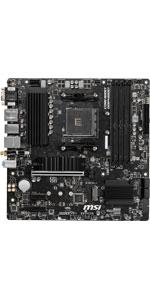
🚀 Power your pro build with MSI B550M PRO-VDH WiFi — where speed meets stability!
The MSI B550M PRO-VDH WiFi motherboard supports AMD Ryzen 5000 and 3000 series processors with PCIe 4.0, up to 128GB DDR4 RAM at 4400 MHz, and integrated Wi-Fi/Bluetooth. Designed for professional workflows and gaming, it features advanced thermal solutions, Core Boost power delivery, and a Flash BIOS button for easy updates, making it a reliable, future-ready Micro-ATX platform.


| ASIN | B089D1YG11 |
| Best Sellers Rank | #3 in Computer Motherboards |
| Brand | msi |
| CPU Model | AMD Athlon MP |
| CPU Socket | Socket AM4 |
| Chipset Type | AMD B550 |
| Compatible Devices | Personal Computer |
| Compatible Processors | Supports AMD Ryzen™ 5000 & 3000 Series desktop processors (not compatible with AMD Ryzen™ 5 3400G & Ryzen™ 3 3200G) and AMD Ryzen™ 4000 G-Series desktop Compatible Processors Supports AMD Ryzen™ 5000 & 3000 Series desktop processors (not compatible with AMD Ryzen™ 5 3400G & Ryzen™ 3 3200G) and AMD Ryzen™ 4000 G-Series desktop See more |
| Customer Reviews | 4.5 out of 5 stars 5,593 Reviews |
| Global Trade Identification Number | 04719072733698 |
| Graphics Card Interface | PCI Express |
| Item Dimensions L x W x H | 9.6"L x 1.5"W x 9.6"H |
| Item Weight | 1.1 Kilograms |
| Main Power Connector Type | 24-Pin |
| Manufacturer | MSI |
| Memory Clock Speed | 4400 MHz |
| Memory Slots Available | 4 |
| Memory Storage Capacity | 128 GB |
| Model Name | B550M PRO-VDH WIFI |
| Model Number | B550M PRO-VDH WIFI |
| Number of Ethernet Ports | 1 |
| Number of Ports | 14 |
| Platform | Windows 10 |
| Processor Socket | Socket AM4 |
| RAM Memory Technology | DDR4 |
| Ram Memory Maximum Size | 128 GB |
| S/PDIF Connector Type | Optical |
| System Bus Standard Supported | SATA 3 |
| Total Number of HDMI Ports | 1 |
| Total PCIe Ports | 3 |
| Total SATA Ports | 4 |
| Total Usb Ports | 6 |
| UPC | 767531799406 824142219393 |
| USB 2.0 | 12 |
| Warranty Description | 3 Years |
E**O
Wonderful motherboard
It is a great quality for the am4 platform. It has excellent boot time the USB ports are at the perfect number and have various generations for the speed you need. It is very easy to install and work with. This works well with pcie 3.0 out put for 4k gaming. It is rated for 4.0. the CPU I have is a beast. AMD is the way to go for diy builds. It is compatible with a wide variety of AMD CPUs from r5 5500 to r9 5850x and everything that is am 4. It is great at wifi works with windows 11. Just make sure to get the right PSU for your CPU and GPU combo as well as the right CPU cooler. This will last me a long time. I am happy with this as a diy builder. Worth every cent.
S**R
Still Performant & Cost Effective in Late 2025
Had some DDR4 laying around from an old Ryzen 7 1700 system. Looking at the current insane pricing the MSI B550M Pro and a Ryzen 5 5500 seemed like a solid, cheap upgrade. I was not wrong. This is all older hardware but now getting modern enough performance at reasonable heat and power levels - excellent Proxmox workhorse node for my home lab. Probably good enough for gaming as well - I need to try it with my old GTX-3070. Grab these older gems and you'll be good for at least another year while AI steals all our lunches.
S**D
Support 3 monitors with APU. 8 SATA for HDD/SSD. Avoid using drivers on MSI Centre.
Great value for $110-ish! It supports 3 onboard connections to 3 monitors (HDMI, DisplayPort, and VGA), with an APU such as Ryzen 7 5700G. HDMI is 2.1, but DisplayPort is only 1.2, so check on your monitor's resolution. The motherboard comes with BIOS version 7C95vH8, so the BIOS does not need to be updated to support Ryzen 7 5700G. Version 7C95vH0 and above supports this CPU/APU. It supports up to 8 SATA storage devices, so it's great for future expansion on HDD or SSD. It works perfectly with a case like Phanteks Eclipse G500A (This case also provides front panel type-C USB connector to this board). Note that the M.2_1 slot support Gen3 PCIe SSD, unless your CPU/APU supports Gen4. Practically there is not much difference between Gen3 and Gen4 PCIe SSD anyways for either gaming or daily use. The compatibility list on the MSI website was last updated on FEB 2023, and the tech support is not very helpful on finding anything other than that list. The newer versions of DRAM should mostly be compatible, and you just have to plug them in and see if they pass the onboard EZ LED light debug checking sequence at booting. If so, then your DRAM is good to go. Caution: Do NOT install the B550 chipset drivers through the MSI Centre prompt! If you do it, it will mess up your system and make it not bootable. Then you'd have to restore the system to the last recovery point. Just go with the drivers on the MSI website (and the AMD website for your CPU/APU), and you are good to go.
N**I
Great budget board.
This is a pretty dang good motherboard, for only $80-90 it can be used for some nice mid-ranged AM4 builds. It comes with WIFI installed, which is super nice. It has 4 RAM slots, a few M.2 slots for lots of storage, and is pretty easy to build with. Do note that this motherboard only supports Ryzen 300 series out of box, and if you want 4000 or 5000 series processors then you will need to do a Flash BIOS update (which is really easy). Overall a pretty nice board for budget building!
K**U
Buy it if you're on a budget, otherwise it's worth paying a bit more for better.
Definitely a budget motherboard, shows in quality and looks, not much room, some part positions are too close to others, some things are a tight fit in general, and there's a lot of pointed small pins and metal pieces dotted around the top and bottom. Otherwise it has good specs and features, works fine under good or ideal conditions, but ensure your setup is not cheap and you use it in a cool room, else this board will fail within less than a year.
D**E
Solid Mid-Range Board That Gets the Job Done
I used this board in a compact gaming build and it’s been reliable for everyday use. Setup was straightforward, though I did need to flash the BIOS before it recognized my CPU, which was a bit of a hassle. Once running, it handled games smoothly and multitasking was no issue. The built-in WiFi saved me from stringing cables across the room, though it’s only WiFi 5, which feels a little dated. My kids like to play Minecraft and Roblox on the system, and it runs them without a hitch. For the cost, it’s a good deal compared to pricier boards, offering plenty of features without overspending.
E**S
Great motherboard
Had 0 issues installing this motherboard. It is my first board with built in bluetooth and wifi which are really convenient. Don't forget to screw in the antennas as they support both wifi and bluetooth. If you forget (like I did at first) your signal will be trash. After the antennas were screwed in I got good signal.
T**E
Great value for the price, BUT you probably have to flash the BIOS (or could have other issues)
Despite being relatively tech-savvy, this motherboard was used in the first PC I built from scratch. During that process, I learned three things everyone should know. 1) If you put an AMD Ryzen 5 or newer processor (mine was originally the 5500 and I swapped it to the 5500 GT), then you need to flash the BIOS. Even if you did everything correctly, you could still be missing monitor output. As scary as it sounds because people have bricked their MOBO before, flashing the BIOS isn't especially difficult. All you need is a spare 8GB Flashdrive that you can reformat. I won't go through the full list of instructions, but there are plenty of tutorials out there. 2) This is an optional step, but I /highly/ recommend getting a CPU with integrated graphics (remember, I swapped from the 5500 to the 5500 GT). It costs a little more money, but it can make the initial Windows install and driver updates infinitely easier. If the BIOS is flashed, then the CPU should work. If the CPU works, and you have integrated graphics, then you can do the entire setup process and have a much easier time troubleshooting any GPU problems you could encounter. 3) I ran into very, very weird compatibility issues with one of the off-brand RX 580s you can find on Amazon (hence recommending integrated graphics for troubleshooting). The GPU worked, but it only worked when I slotted it into my PC I've had since 2019. It never worked on this motherboard. I slotted a random, old GPU I had sitting around (9500 GT), and it DID work on this motherboard. Despite using the other GPU to install Windows and drivers, I could never get any display output using that RX 580. That said, I wouldn't blame the motherboard for issues with an off-brand component originally manufactured 7 years ago. Ended up shelling out an extra $60 to get an RTX 3050 just to get something from a reputable company. Your mileage may vary with this motherboard, but so long as you have integrated graphics, buy a reputable GPU, and are willing to learn how to flash the BIOS (which isn't bad at all on this motherboard), then you'll probably get an amazing value.
Trustpilot
5 days ago
1 month ago