


Desertcart purchases this item on your behalf and handles shipping, customs, and support to Japan.
๐ฆ๏ธ Own your microclimateโweather wisdom at your fingertips!
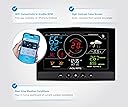
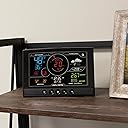
The AcuRite Iris 5-in-1 Weather Station delivers professional-grade, hyperlocal weather data including temperature, humidity, wind speed/direction, barometric pressure, and rainfall. Featuring a direct-to-Wi-Fi wireless display with a 330-foot sensor range, it enables remote monitoring and real-time alerts via the AcuRite NOW app. Its sleek LCD interface offers comprehensive weather insights alongside time and date, while integration with Alexa, Google Home, and Weather Underground connects you to a global weather community. Ideal for home or business, it empowers you to stay ahead of the weather with precision and style.




| ASIN | B086WNW3Z8 |
| Additional Features | Thermometer |
| Best Sellers Rank | #8,839 in Patio, Lawn & Garden ( See Top 100 in Patio, Lawn & Garden ) #6 in Weather Stations |
| Brand | AcuRite |
| Brand Name | AcuRite |
| Color | Wi-Fi Connection to AcuRite NOW |
| Connectivity Technology | Wi-Fi |
| Customer Reviews | 3.6 out of 5 stars 796 Reviews |
| Display Type | LCD |
| Global Trade Identification Number | 50072397015443 |
| Included Components | Display, outdoor device, mounting bracket and hardware, power adapter, manual |
| Is Used Where | Indoor, Outdoor |
| Item Dimensions D x W x H | 0.8"D x 8"W x 5.7"H |
| Item Type Name | Wi-Fi Connection for Home (01544), |
| Lower Temperature Rating | 32 ยฐF |
| Manufacturer | AcuRIte |
| Material | Plastic |
| Material Type | Plastic |
| Model | 01544 |
| Number of Batteries | 4 AA batteries required. |
| Number of Items | 1 |
| Part Number | 01544 |
| Power Source | Corded Electric |
| Recommended Uses For Product | Home |
| Sensor Technology | Radio Frequency (RF) |
| Shape | Rectangular |
| Special Feature | Thermometer |
| Specific Uses For Product | Date, Humidity, Pressure, Temperature, Time |
| Style Name | Wi-Fi Connection to AcuRite NOW |
| Temperature Accuracy | 1.11 ยฐC |
| Upper Temperature Range | 122 ยฐF |
| Warranty Description | Limited One-Year Warranty |
J**.
Solid Weather Station
I've had this product just less than a month. Right now it seems to operate perfectly and I am quite satisfied overall. Out of the box, the sensor was straightforward to install. But I had trouble connecting the display to my WiFi and saw reviews here describing that setup in greater detail than is given with the product. I would call that a deficiency - the installation instructions are sparse and say only "Connect to the Wi-Fi signal coming from your displayโ, lacking the necessary detailed specification to look for the network "AcuRite 01544MCB_XXโ where XX is the last 2 digits of the displayโs MAC address (shown inside the battery compartment). I had to find those instructions in these reviews. Even so, once I discovered that network, it was frustratingly difficult to hold the network connection to the display. The network would repeatedly appear and disappear, and this went on for over half an hour before I finally happened to time it perfectly to a) connect to the AcuRite network, then b) hit 192.168.4.1 in a browser to grab the setup page. Note this was virtually impossible using a phone or tablet, I was successful only using my computer. After a week or so, it appeared the measured barometric pressure seemed way off. I went to the AcuRite support site and sent a message reporting this. They quickly replied, asked a few questions, then promptly sent me a new display. The new display was far easier to connect to my Wi-Fi, in fact the AcuRite network came up immediately on my tablet and I had no trouble connecting to it and accessing the Wi-Fi setup page. This new display has been in full operation now for almost two weeks and shows a much more accurate barometric pressure (although still in โlearningโฆโ mode). Of note, I live at altitude (6800โ) so must specify โAdjustedโ vs โStationโ Pressure in the device settings.
S**G
Pain to set up poor instructions worked for 4 months after set up nightmare RUN
OK came back to modify this review after 4 MONTHS! It quit communicating to the indoor unit. Thinking it was the batteries, we replaced them in the outdoor unit. (Indoor one is plugged in and the batteries don't keep it running when unplugged!) I get stuck with Online Chat support because they have no 800# and the instructions including online โarticlesโ are almost as worthless and the one page instruction manual that has zero details. Chat person has me bring the outside unit inside, remove batteries change the channel on indoor and outdoor units. Doesnโt work but I do discover that the outdoor unit has SPIDERS in it! Back outside it goes. Long story short I now have to send this POS back for โtesting and inspection by their QC teamโ 5-10 days from when they receive it before I hear anythingโฆ So since I got it, I have about 4 hours of screwing with it for under 4 months that it worked. Do yourself a favor and choose a different brand. Or at least if you do buy one of these and it doesnโt work right, donโt hesitate to send it back to amazon for a refund BEFORE the time to do so runs out. This unit is not worth the hassle it created and I am sorry I ever bought it. I love the display, and getting the unit operations itself is pretty straightforward. The only reason I gave it 3 star instead of 5 is the set up! The problem is they sell it as being wifi compatible so you can access your station from the ap on your mobile device. When you begin the set up process you are prompted into multiple very confusing set up pages across multiple devices with incomplete information. Like "enter device ID Number" with no explanation of which device or where to find the numbers. After about and hour of reading articles on their website with more of the same incomplete information, I tried to get support. (But hey, we have nothing better to do then google multiple steps left out of the instructions and articles right?) Chat support is available between certain hours.. yet there is no button to activate it and no 800 number! You have to submit a request and wait God knows how long for someone to get back to you...FOR LIVE CHAT? So I went to youtube to search it, and got yet another video from them showing how simple it is to set up but with absolutely ZERO detailed information on the steps. In 2021 there is not excuse for incomplete instructions and worse, no detailed videos to help. Yes I finally got it working after at least and hour+ of frustration and googling. If you are good at figuring out puzzles, you'll love this unit. It really does work great once you figure it all out. I just really don't think you should have to spend and hour scavenger hunting and piecing all the info together that should have came in the box with it to get it to work.
K**R
Needs More Setup Info
Needs to come with more literature. The basic set up instructions are too basic for the information you need. (At least for what we received with 06100M) If you are reading reviews before you buy, also download the manual in the description. I also needed to go to the website for full setup instructions. We had lost communication a few times within the first day Then I moved the display out of the kitchen (away from microwave & security monitor), and a bit closer to the location of the sensor. We have had no problem since! If you are having problems, check out the FAQ on their site. Things I wish I knew upon set up: 1. When going to the display router, do not hit enter, go to your Wi-Fi & select the display name, then back to the browser page. 2. The rest of the credentials needed for the mac address are inside the battery compartment (on my model). 3. Display and sensor need to be no more than 330 ft apart. 4. Don't put display close to microwave or other electronic objects that can interfere.
J**H
Great weather station
I am pleased with the new unit. I had a previous Iris 5-in-1 from about 2019 which I loved, but it was starting to have problems. With the new unit, the wind speed on the sensor was not working. AcuRite took care of it and sent me a new sensor via overnight, which was much appreciated. Everything now working. I really like the wifi connection and the app on my phone. For future improvements, it would be great to also have access to the inside temperature on the app when we are traveling, although I have a new "smart" thermostat that should do it, but have not yet installed it. The new unit also shows the strength of the signal from the sensor, which is great.
J**I
OK personal weather station. Read my Pros and Cons
I purchase this to have real time indoors and outdoors weather information. I fly a lot of drones and this information is crucial. Pros: 1- Easy to set up - At least it was for me. But you do need to know a little bit about WiFi networks. 2- Mounting base for the sensors is included and super easy to install. 3- Clear Display (within 3 feet), I can read all parameters easily. As I have it on my desk top. The display is not meant to be read from across the room. I say anything further than 4 to 8 feet from you eyes will make it hard to read. Cons: 1- The purple parameter display section for Dew Point, Heat Index, Wind chill, is set to display 1 of those 3 readings automatically. It determines which of the 3 is the info it will be "useful to you". This is head scratcher. I was why can I leave it on Dew Point which is what I want and is useful to me? You can toggle cycle on the 3 readings, but it will automatically revert back to what it thinks is "best for you to know". Which baffles me, again Why don't they let you set what you deem useful? 2- The refresh intervals from the sensor is not real time. Is 15 to 30 seconds behind. So actual wind direction and speed is you guess it 15 to 30 seconds ago. Not a huge issue but not real time. 3- The Acurite App and online site do not display ANY indoors readings. This is a really crappy miss. Get this you have to be home in order to know inside temp and humidity levels. So if you thought you can monitor your indoors remotely look for a different product because this is not it. 4- Lastly you can not add any additional sensors AT ALL... (to the 5 in 1 system), I wanted to add a lighting detector since I am in Florida, that would have been handy. But again you can add anything. So in a nutshell will I buy this again. The answer is NO. If you want a basic weather station readings, there are less expensive alternatives. I threw out the boxes and I am too lazy to get new ones to return this item. Otherwise I would have return it. Had I known all the limitations of this unit I would have looked at something else.
R**A
Step by Step instruction to setup the WiFi connection With Update
It appears a lot of people are having difficulty connecting the Display unit to their WiFi. Just follow these instructions and it should work for you. Setting up this weather station is not that difficult. Just READ THE DIRECTIONS! Connecting to the WiFi just requires a gathering some information before you start the WiFi setup. First go to Wunderground.com and either login or create a new account. Go to 'My Profile' you will see a Tab labeled 'MY DEVICES', click on that Tab. Then click on the 'Add New Device' Button. Select 'AcuRite 5-in-1 Weather Station with WiFi' from the drop-down list. Then click on the 'Next' button. The next screen will display your Station ID and Station Key. Copy down this information, you will need this information BEFORE you start your WiFi setup Use these two values for the Wunderground Station ID and Wunderground Key when you have connected to the AcuRite WiFi. WiFi Setup Press the Gear button on the display. This will turn on the AcuRite Wifi for a few minutes. The instructions state it will be on for 30 minutes, but actually it's a much shorter time. Connect to that WiFi, go to a browser and enter in the IP Address 192.168.4.1 A webpage will display, enter in your WiFi name and password. Then below that enter in the Wunderground Station ID and Wunderground Key that was generated from Wunderground.com Now on the same page, near the bottom, click on the 'Save' button. The screen will change with a message stating to wait a few minutes. After a short time, the screen will change stating you have successfully connected to your WiFi. At any time you need to start the AcuRite WiFi, just press the 'Gear' button on the display. Don't forget to reconnect to your WiFi once you have completed the above. AcuRite App From the menu go to Setting, Manage Devices. Click on the 'Add Device' button. Enter the name for this device (i.e. Home). Enter the Device ID. The Device ID is found on a white label in the battery compartment when you remove the battery cover on the Display unit. Select your Country and add your Zip Code. Now follow the 'Next' button a few more times to setup that device. Your done. ************************************************************************************************************************ Update: I've had this PWS for a month. It's performance has been flawless. The connection to my WiFi has been rock solid. The only time it was not sending data was when my internet provider performed service on our connection. We were without internet a few hours. As soon as the our internet connection was reestablished this unit reconnect to our WiFi and begin transmitting data again. Within a few days of installing this, Weather Underground attached a Gold Star to the account for consistent reporting and consistent data. We've already had high winds here. The unit has set me numerous high wind warnings to me. I have the high wind warning set to 25 mph. So far our highest recorded wind speed has been 32 mph. I'm very pleased with the performance of this unit.
K**L
Easy set up
I bought the version of this that linked with Weather underground so I could watch the weather at my house online. Dealing with whether underground and their set up process was a horrible experience and I would never recommend that process or their organization for anybody. The Acurite product is excellent, but dealing with Weather Underground sucks. In contrast, the setup with this was simple. Less than 10 minutes and everything was online and working. If you want to set it that works easily, has an easy setup, and works online, this is an excellent product for that.
J**B
Great when it works but not reliable.
I have had this weather station now for 5 months. Everything started off great for the few months and then the digital display started loosing connection to the weather station randomly. The customer service for AcuRite is not very helpful. There is no number to call so you must communicate via email or chat. Troubleshooting involved doing a hard reset and sending pictures of the display loosing connection to the weather station. After many back and forth emails the issue has not been resolved. Their last response was that my wifi must be the issue. However yhe wifi does not have anything to do with the weather station not connecting to the display that comes with the product. The display actually constantly stays connected to the wifi but looses the signal from the weather station just outside the window. From my experience, I would not recommend this product.
Trustpilot
1 month ago
1 month ago