


🚀 Elevate your MacBook Pro setup—dock smarter, work cooler, and own your workspace!
The BrydgeSpace-Saving Laptop Stand is a vertical docking station designed exclusively for the 15-inch MacBook Pro (2016-2019). Featuring dual Thunderbolt 3 ports with 40 Gbps data throughput each, it supports dual external displays and offers one-handed docking for instant connectivity. Its solid metal space grey chassis not only saves desk space but also integrates active cooling vents to maintain optimal device temperature during intensive use.
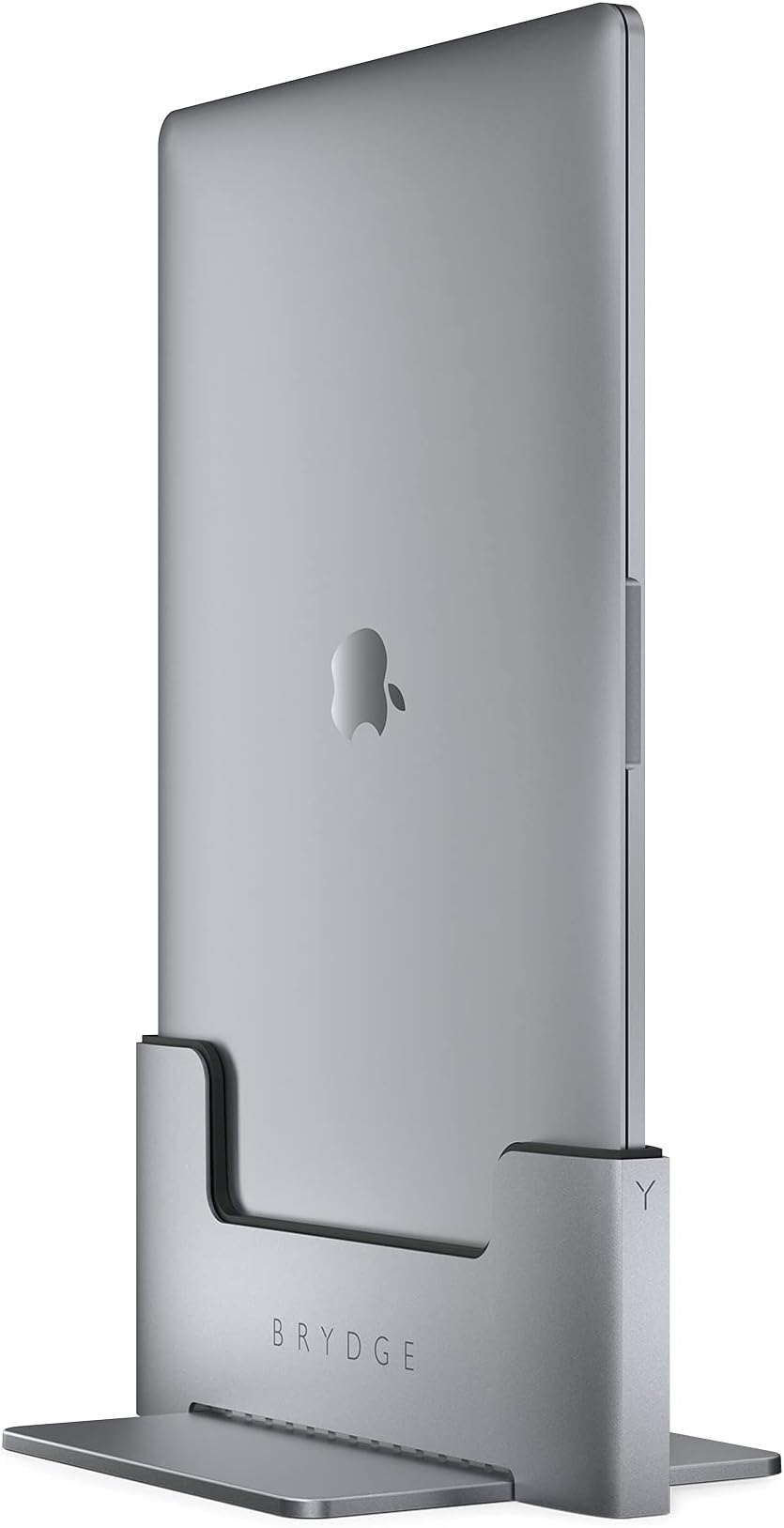


| Total Usb Ports | 2 |
| Number of Ports | 2 |
| Hardware Interface | USB, Thunderbolt |
| Compatible Devices | MacBook Pro 15 |
| Item Weight | 4.2 Pounds |
| Item Dimensions L x W x H | 9.92"L x 6.26"W x 4.88"H |
| Color | Grey |
S**L
Great Solution for Limited Desk Space and a Large Dissplay
This is my second Brydge docking station. I love the vertical orientation, which was a necessity for me once I switched to a XL monitor, and didn't have nearly enough space for the laptop and the display. It was great value--assuming the price dropped because of my older Macbook's dimensions.Solid weight--that feels super sturdy. You do have to assemble it, but it comes with a tool and is really only 2 parts.And just a reminder you will use the functionality of any touch devices of your laptop--I only miss the fingerprint scanner, which now forces me to manually log into everything. Otherwise really no drawbacks.
M**G
Great Vertical Docking Station
Great docking station for my 2017 15" Macbook Pro. Good looking product, but even better, it's solid as a rock. No tipping or swaying. The only issue (not sure if it's a negative or not) is that it can be a bit tricky actually docking the laptop. It came with these little clear stickers that looked as if you put them on a USB-C port or cord, but no instructions. I left them off, so not sure if that's the issue or not. In all fairness, the instructions do state that you should be careful when docking your laptop. Could easily be the angle at which I'm using the station. You can see it in the right corner behind the monitor. Luckily I don't need to remove it that often.
L**S
Docking station never worked properly
I ordered this docking station to give my home setup a bit of an upgrade from a simple stand for my 15-inch MacBook Pro (2018) which connected directly to my old 27-inch Thunderbolt Display. I really liked the design in space grey and was looking forward to having more desk space. The dock arrived and I followed the instructions to connect it which was pretty straight forward. After putting it to work I detected the following problems: The dock did not provide power to my Thunderbolt ports which I used for printer, iPhone charging station etc. The audio of the Thunderbolt display was not working anymore. Audio was only played directly from the MacBook. Then getting the display to wake up after sleep was not immediate and took many, many strokes on the external keyboard. And after a couple of days in use my external screen started flickering randomly while working. I contacted Tech Support to get help. At first, the person seemed to be on top of it and I provided them with videos of my setup and an explanation. But in the end they never achieved to solve any of my problems. The only real solution step I was provided with in a thread with the Tech Support (which lasted for over 2 weeks!) was to reset the SMC. Surprisingly, this did not help either. The time in-between my mails and the support's replies was always a minimum of 2 business days. Way too long when I needed help with a pretty expensive device which was not working and ended up sitting on my desk catching dust (I did revert very quickly to my simple stand because my patience was exhausted). I am used to much better and more efficient Tech Support! In the end, Tech Support wanted to open a warranty claim and get me to send the docking station back to them to get it checked but I had had enough of it by then. I told them I did not want to wait another couple of weeks to get another docking station which again might not work. So I asked for a refund and they referred me back to Amazon since they could not do it themselves. And this is what I did. I sent the docking station back to Amazon, got my refund and am happily using my old simple setup again where everything works perfectly. I am very disappointed by the Tech Support. For the price of this docking station I would definitely expect more! That's why the Tech Support gets 1 Star; 5 Stars for the quality of the material and the design of the docking station. If only it was working as it should...
A**S
Really wish this actually worked for the advertised uses. It unfortunately does not.
I really really wanted this to work. I had my eye on the vertical dock that was originally created by Henge for forever. Though I did not purchase until it was this model and now called Brydge. I love being able to vertically dock, I love that there's 2 Thunderbolt 3 ports..and that's about my love for it stops.Plugging in a Thunderbolt 3 cable that is connected to a powered device to daisy chain does not work for me. I can see that it is connected, but it says "Not charging" in the battery level on my MacBook Pro 15". So I have to connect the MacBook Pro charger to the top side of the computer to charge since I need both ports that are built in to the Brydge for the TB3 to HDMI and my external hard drive, completely making this thing look like a mess.I'm also VERY often wondering why my monitors aren't detecting my computer. It's because throughout the night, or even just after a few hours, the Brydge pushes my computer back up and it's no longer connected, assuming due to it's spring load. I always have to press it back down again because it auto pops up. This is extremely frustrating since it's continuously disconnected my external drive without ejecting properly.I would rather them remove this spring load feature because it's clearly too much and does not hold the computer in place. Either that, or create a locking switch on Brydge so that you can prevent it from auto-popping up. Between the auto disconnecting, and the inability to properly charge through daisy chained devices, this is a big deal breaker and unfortunately cannot recommend.
C**L
Been using it a year and works great
I've been using my dock for about a 1/2 year. Overall its worked great for me. I have two 13" MBP along with two LG 4k monitors. It's nice to switch between my work and personal laptops quickly. I tend to use USB-connected devices that hook into the monitors, not to deal with Bluetooth switching. The monitors charge my laptops correctly, so I don't have to use the apple power cord.I do have two issues; the spring inside the dock is pretty strong and sometimes pops my laptop out of place when I'm using it. This happens from time to time and is slightly annoying. The second is that Mac OS will sometimes swap my monitor positions for no reason. Again a slight annoyance that doesn't happen very often.I've read the one-star reviews; outside of the dock popping out of place, I've not had most of the issues people are reporting, at least with the 13" version.
Trustpilot
5 days ago
3 days ago