Desertcart purchases this item on your behalf and handles shipping, customs, and support to Japan.
⚡ Power your space with gigabit speed—no cables, no compromises!
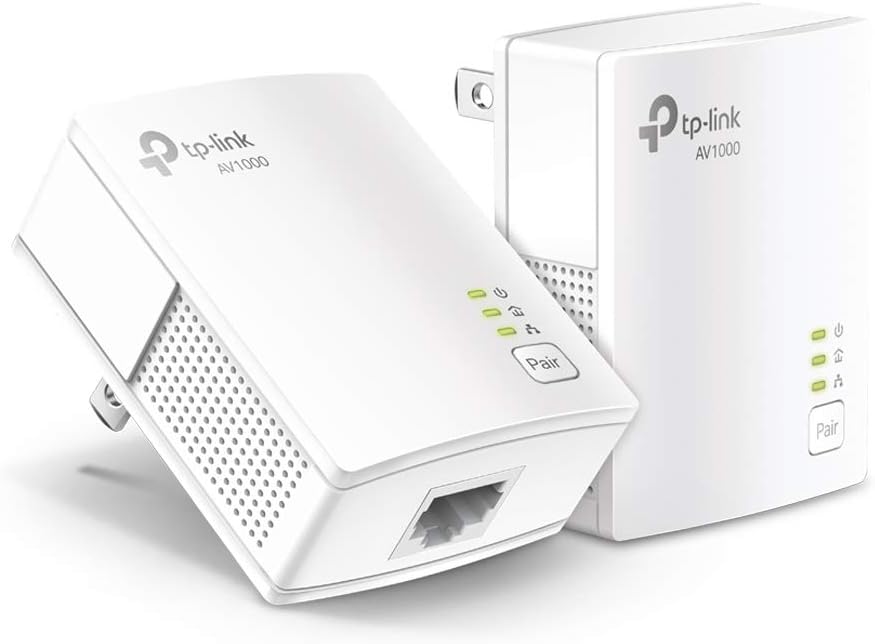
The TP-Link AV1000 Powerline Ethernet Adapter KIT leverages HomePlug AV2 technology to deliver up to 1000Mbps wired speeds through your home’s existing electrical wiring. Ideal for overcoming Wi-Fi dead zones in multi-story homes or thick-walled spaces, it features a compact design, gigabit Ethernet port, and energy-saving mode. Easy plug-and-play setup ensures a stable, secure connection for desktops, smart TVs, and gaming consoles without the hassle of running new cables.


| ASIN | B084CZMYNM |
| Best Sellers Rank | #1 in Powerline Network Adapters |
| Brand | TP-Link |
| Built-In Media | 6.5 ft. (2 m) Ethernet cable (RJ45), Powerline Ethernet Adapter, Quick Installation Guide |
| Color | white |
| Compatible Devices | Desktop, Laptop |
| Customer Reviews | 4.2 out of 5 stars 7,647 Reviews |
| Data Link Protocol | Ethernet |
| Data Transfer Rate | 1000 megabits_per_second |
| Hardware Interface | Ethernet |
| Item Dimensions L x W x H | 2.56"L x 2.05"W x 1.12"H |
| Item Weight | 13.6 ounces |
| Manufacturer | TP-LINK |
| Mfr Part Number | TL-PA7017 KIT |
| Model Number | TL-PA7017 KIT |
| Product Dimensions | 2.56"L x 2.05"W x 1.12"H |
| UPC | 845973089054 840460605908 |
| Unit Count | 1 Count |
| Warranty Description | 2 year manufacturer |
C**E
works great!
It works really well! Obviously, you shouldn’t expect to get up to 1GB/S as advertised, my room is right above my router and I get around 200mbps. You have to do a lot of tinkering around to get the adapter to a good speed, but it’s extremely stable. It’s also really well designed, and looks really sleek. It’s really light so it’s easy to move around. It’s extremely simple to set up, all you really have to do is plug it in and press the pair button on both devices. It’s discreet and it works with anything that has an Ethernet port. It’s nice that you can add additional adapters too.
M**Y
Easy Setup and Reliable Connection—Great Alternative to Running Ethernet Cables
I bought the TP-Link AV1000 Powerline Adapter kit because I needed a stable wired connection in a room far from the router, and it solved the problem without running long cables through the house. Setup was truly plug-and-play—plug both units into wall outlets, connect the Ethernet cables, and it was up and running in minutes. The connection has been much more stable than Wi-Fi for work and video calls, with consistent speeds and no random dropouts. That said, performance does depend on your home’s electrical wiring, so speeds may vary a bit depending on the circuit. I also found it works best when plugged directly into the wall, not a power strip. Overall, it’s a practical, no-fuss solution if you need reliable internet in another room and don’t want to deal with drilling holes or running cables everywhere.
R**C
Great solution to a tricky problem
I have a garage with power about 100' from my house. I built a barn about 100' from this garage and ran a cat 6E cable between the two. On the barn I have a solar array that can connect to the internet. My problem was getting the internet to the garage. I installed an outlet in the line to the garage in my house near my router. I then plugged this power line adapter into that outlet and ran an ethernet cable from my network switch to the power line adapter. I then plugged the other end of the powerline adapter into an outlet in the garage and ran an ethernet cable from the power line adapter to the ethernet cable that goes to my barn, connecting them with an RJ45 coupler. Works like a charm. The connectivity is great and I put an Eero in the barn and internet is great. The value is wonderful as the alternative is to dig a trench and bury an ethernet cable. The ease of installation was a breeze - although I have been using power line adapters for over 10 years - always TP-Link.
K**L
Reliable Powerline Ethernet Solution – But Only If on the Same Circuit
The TP-Link AV1000 Powerline Ethernet Adapter KIT (TL-PA7017 KIT) is a solid option for extending wired internet without running long cables. I like the plug-and-play setup—you just connect one adapter to your router and the other to your device, and you’re online in seconds. The gigabit port gives fast speeds, perfect for streaming, gaming, or even powering network gear in places where WiFi isn’t stable. That said, the big catch is that it only works if both adapters are on the same electrical circuit. If they’re on separate breakers or panels, they won’t communicate. This limitation means it may not work in all homes or larger setups. ✅ Pros: Easy setup—plug, pair, and play Gigabit port for fast wired speeds Compact, unobtrusive design Energy-saving mode helps cut power use when idle ❌ Cons: Must be on the same electrical circuit to work Performance can vary depending on wiring quality Doesn’t replace running a dedicated Ethernet line in tricky cases 💡 Tips: Before buying multiple sets, test in your home to make sure the outlets are on the same circuit. Avoid plugging into power strips or surge protectors—plug directly into the wall for best performance. If you need coverage across multiple circuits, consider a mesh WiFi system instead. Bottom Line: If your outlets are on the same circuit, this kit delivers fast and stable Ethernet without the hassle of long cables. Just be mindful of the electrical wiring limitations.
B**N
Good for a wired solution
Keep in mind that any powerline adapter is ETHERNET ONLY. You cannot use a powerline adapter to extend your wifi or mesh. This is really good for somebody who really really needs a wired Ethernet connection but is too far from the router and doesn’t want to run a 100 plus foot cable onto the wall/floor and around things with a possible signal loss due to cable length. Disclaimer: Our ISP is coaxial only. We can’t get fiber at our house and cable is the next best option. My review is based on that type of connection. Here’s how it worked for me: I also ordered a couple of cat8 Ethernet cables (overkill maybe but I want the best speed and latency possible at any given time no compromises and the cat8’s were about 5 bucks each so why not go all in?) and this system. They also came with their own Ethernet cables I had no idea they would but the stock ones I’m not using. I was surprised to find that it actually worked on its own without any paring needed. At first I had the router end plugged into the far corner of the living room on its own outlet but that one was too far and the speed was pretty low. I moved it to a busier outlet that was a bit closer to my room from the living room and still managed to get it plugged in on its own and the speed jumped right back up. The other end goes to my console, and while my in-game performance was doing pretty well over wifi, there would be occasional spikes. This seems to have eliminated that but at first when i had it on the far outlet the latency seemed much much worse than wifi. In game latency at first setup jumped from 32 (over wifi) to over 70-80 with this system but then after a few days it came back down. I also do remote play sometimes so this helps a little on the sending end with stability. The consoles NATIVE speed test now shows around 28-36ms ping (I was getting that over wifi too) and about 40 or so in game. Interesting enough my in-game used to stay around 30 or so but those spikes seem to be gone so the extra 8-10 loss in my game doesn’t feel too big for the better stability that I now have. I thought this might just be a server issue but I use the same server as I did before and it’s just a little higher not noticeably. Keep in mind you HAVE to plug both adapters directly into an outlet no matter what for these to be effective. Absolutely no surge protectors or extension cords or none of that. Overall this works good for me, it fixed most of what I needed it to, and provides a wired Ethernet connection without being close to the router as I’m unable to anyway. Speeds remain the same as before though no change.
M**K
Barely works
Bought this to connect from my router in one room to my computer in the next room. Did not want to run a long cable around the wall, thru the door, and back to the computer. Also did not want to drill a hole through the wall. Seemed like it should work. Everything on the same network - in fact, two outlets on the opposite sides of the same wall. Hooked up, and it connected immediately. Problem is that I am getting 600Mb out of the router, but only 40 Mb out of the powerline and to my computer. I checked through their FAQ's and online docs, and they say I should get up to about 200Mb. Nothing remotely like the 1000 or 1GB numbers they show in their advertisements. Even when I plugged both powerlines into the same outlet I could only get a little over 200Mb. So, basically, it works, but not well enough to be useful. Sending it back.
A**S
⭐⭐⭐ Decent in theory, disappointing in practice
I really wanted to like this. The idea is great - just plug in and boom, wired internet through your power lines. Setup was super easy, literally plug-and-play, no complaints there. But performance-wise? Meh. It technically works, but I was getting lower speeds than my already-mediocre Wi-Fi. I tested it multiple times and in different outlets, and yeah... consistently underwhelming. Might be okay if you really can’t get Wi-Fi in a spot and just need a stable (but slow) connection. Otherwise, don’t expect miracles.
A**3
Know that same circuit means
In homes there are two phases or “circuits”. Each phase is 120volts to ground. Between the two phases is how you get 240volts. This doesn’t need to be on the same circuit, as in the same breaker as the item it will be providing internet to. It just needs to be on the same phase. Most homes the circuits are broken up evenly between the two phases. So you have a 50/50 shot that that your router and whatever you’re supplying internet to will be on the same phase. If they’re not then you need an electrician to move the breaker(s) to the same phase. Mine works fantastic. My son uses it for sim racing so it’s requiring a fast connection.
Trustpilot
1 month ago
4 days ago