Desertcart purchases this item on your behalf and handles shipping, customs, and support to Japan.
🎨 Elevate your creative game with precision, portability, and power in one sleek package!
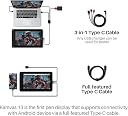
The HUION Kamvas 13 is a 13.3-inch drawing tablet featuring a full-laminated anti-glare screen with 120% sRGB color gamut and 8192 levels of pen pressure sensitivity. It includes 8 customizable shortcut keys, supports Android connectivity via Type-C, and boasts an ultra-slim, lightweight design ideal for professionals seeking a portable, high-precision creative tool.


| ASIN | B0859D63ZG |
| Active Surface Area | 13.3 pulgadas |
| Best Sellers Rank | 33,095 in Computers & Accessories ( See Top 100 in Computers & Accessories ) 72 in Graphic Tablets |
| Brand | HUION |
| Brand Name | HUION |
| Colour | Black |
| Connectivity technology | USB |
| Country of Origin | China |
| Customer Reviews | 4.4 out of 5 stars 1,210 Reviews |
| Display Type | LCD |
| Item Dimensions L x W | 21.7L x 36.7W centimetres |
| Item Highlight | PenTech 3.0, 8192 Pen Pressure, Fully Laminated Anti-Glare Glass, Works with Windows, Mac and Linux for Illustration Creation |
| Item Weight | 980 Grams |
| Manufacturer | HUION |
| Manufacturer Part Number | Huion Kamvas Pro |
| Model Name | kamvas |
| Model Number | Huion Kamvas Pro |
| Model name | kamvas |
| Native Resolution | 1920x1080 |
| Network Connectivity Technology | USB |
| Number of Items | 1 |
| Operating System | Android |
| Operating system | Android |
| Pressure Sensitivity | 8192 Levels |
| Pressure sensitivity | 8192 Levels |
| Product Features | slim |
| Screen Size | 13.3 Inches |
| Special feature | slim |
| Specific Uses For Product | Drawing |
| Target Audience | Teacher |
| Unit Count | 1.0 count |
J**W
Using the Kamvas for photo Editing, some thoughts after a while.
I bought this for photo editing not drawing I'm not an artist, and couldn't draw a circle unaided. I have owned conventional drawing tablet (no screen) in the past but never got on with the whole looking at the monitor and using the pen on the tablet bit, it put me off taking it further. The cost of Professions Drawing monitors from the well known brands is way out of my league and I could never justify it. Having seen these on Amazon and considered the price not outrageous I decided to take the risk and try again. I wanted one to allow me to have better control when making selections or creating custom masks for correction or retouching photographs as they always have dust, hair, creases or scratches. Using a mouse to try and follow a shape always leads to the mouse going off track and faffing about, using a pen seems so natural an so much more accurate, and to be able to see on the tablet and draw on the area I was looking at is brilliant. Using the tablet for retouching with old photographs or negatives is a revelation. It is so much quicker than using a mouse, plus the buttons on the tablet allow you to zoom in and out without stopping to navigate around the photograph. The other buttons on the side can be set in the software to perform other functions as you decide and can be set to act differently in individual programs. As the pen is pressure sensitive I find that I adjust brush size less often as the harder I press the larger the effect. Is it perfect ? The size at 13in can seem at first too small but as you zoom in and out to retouch it's actually no problem neither is that its not 4K for the same reason, and means its easier to hold and transport being smaller. It also requires less real estate in the terms of desk space imagine putting your existing monitor face up on the desk next to everything else there. Screen quality is very good with clear sharp images, the design means that there is very little difference between where you think the pen is and its actual location (think looking a a ruler from above or the side, parallax) meaning you are drawing where you think you are. You will need the stand to use it comfortably and at the right angle for prolonged use and this isn't included in the price. If you want to use it just via a usbc cable (rather than the 3 in 1) that is also an extra at about £25. The plug on the tablet is at the bottom of a moulding and so a standard cable wont reach unless you feel like trying to trim the plug down, maybe not the greatest design choice (form should follow function). The Kamvas is not a touch screen which at first seems counter intuitive after all the I pads/phones/tablets we are all used to, and you will find yourself trying to tap on it but you do get used to it. I use the tablet purely for the retouching and masking aspects of editing because I find that the pen is not very good at sliders when adjusting colour or exposure I preferer to use my mouse for that but maybe that's old habits. I haven't been able to find out how to set an accurate colour calibrated profile and make it stick when I reconnect it so I wouldn't rely on the tablet to assess the image in that way a larger monitor is always better for that anyway. I have no regrets in purchasing this kamvas tablet and would do so again with the new one looking even better. Would I like a larger one, yes but I couldn't justify the extra cost at the time. Having now used it I would certainly like to be able to have one of the larger ones. I've found it really useful particularly with a lot of old photographs my mother has dug out, that I'm trying archive, so they can seen well into the future but many require some work to be seen at their best.
H**Y
Fantastic value and performance
I had been considering the Wacom Intuos Pro non display tablet to help with working from home. However after seeing this Huion Kamvas 13 with pretty much all the features of the Intuos pro, but bigger, and with a built in screen for nearly £100 less I decided to give it a go. I am really pleased I did because it has exceeded all my expectations. It is so much more useful and easier to draw on a display tablet like this compared to a non-display tablet, and it can even function like a conventional non display tablet too for controlling other screens at the press or a button. The drawing suface has a much more natural texture/feel compared to other pen tablets that I have used, including wacom tablets. This Huion really feels like writing on paper and it is extremely accurate. Pen is very comfortable and the whole tablet has solid build quality. The display is good quality with nice colour balance. I find it extremely useful as a compact portable 2nd monitor. My unit does have a small amount of backlight bleed in the 2 top corners, but it is really only noticeable on black screens, and it doesnt bother me when it is actually displaying something. Having the option for the usb-c connector is also really handy for keeping cable clutter down, although I wish the usb c cable had an angled connector (like the 3 in 1 cable does). If you make sure you buy it from "Huion fullfilled by Amazon" then it has a good warranty. I did have an issue when I first receieved the tablet with a faulty cable however the Huion customer service quickly resolved the problem and sent a replacement cable. They were good to deal with and friendly. Drivers are solid and easy to use and work well so far. Overall I am extremely pleased with it, it has been fantastic for marking up pdf files, taking notes and sketching diagrams on onenote, and works well in painting packages like Krita. ‐-------------------------------------------------- Update after 4 and a half years (Dec 2025): This has been absolutely fantastic. I use this every single day at work. I have been basically paper-free since I got this and it has allowed me to keep all my handwritten notes and diagrams organised in One Note. Total game changer and several of my colleagues have now got one too. Now that I work in the office again most days, this tablet has survived being unpluged, packed into my laptop bag, transported to the office and then back home in the evenings most days of the week for years and shows only minor cosmetic wear scratches on the back. This thing is an absolute tank. The screen is still perfect condition and the light-bleed went away soon after I got it. It feels much more natural to write on than my galaxy tab s8 or s24 ultra, and the pen is still on its first nib despite heavy use every day. If this tablet broke tomorrow I would buy a new one immediately it has been amazing value for money. The only area for improvement is that sometimes the screen could be brighter if in direct sunlight, but this is a minor criticism. I rarely write reviews, and even more rare for me to like something so much i would come back and update the review years later, so hopefully that tells you something about how impressed I am with this device.
J**I
Almost perfect right out of the box... for Right-hand users
Don't get me wrong, this is a fantastic product. If you are going to but this for your Mac or PC, then it would be 5/5. But for lefthanded users like me, this is what I noticed: 1. If you try using it for android devices, it is calibrated for right-handers and there is no monitor/pen calibration for android use (Huion Sketch App). Plus there is no cursor when used in pen tablet mode only. 2. While using it on my Mac the tablet gets a little warm on top right. Not hot but a little warm. And if you rotate your monitor to 180 dregrees (for left hand use), the warm part will be on the bottom left of the device which could give you an uncomfortable feeling. So I am stuck using it while in right hand mode. 3. Because of #2, I am not able to utilize the shortcut keys. So it breaks my workflow while drawing or sketching. I am thinking if I will return the product because of these issues. I mean it is not a total deal-breaker and I am not a professional artist. But these little things are a bit annoying when trying to get some things done. I have this for less than a week now and we will see in the next few days whether I should keep it. Besides, it can still work as a secondary monitor for additional productivity. But yeah... Overerall, great product and worth your hard earned money but it is not the best for lefties.
L**D
Works great, set up fiddly.
Works great is small enough to fit on a slide out desk tray too! works great with or without the screen support (not included). however your best way to guarantee easy installation is to use an active 4k hdmi to displayport to plug the tablets HDMI cable into, as most GPUs do not have 2 HDMI slots and this screen will take over your monitors slot etc. also £10+ for an active 4k hdmi to displayport is far cheaper that the usbc-to usbc cable from huion which costs four times as much (and didnt work for connecting my PC to the tablet...) The tablet works great, easy to understand and customize the buttons along the side to perform functions you like, however if you are left handed this may be an issue for you as the buttons are on the left hand side. monitor can be left on for ages and doesnt tend to heat up too much except for around where the power supply plugs in, you wont notice if you are wearing the little glove that comes with the tablet. the stylus (pen) that comes with the tablet is longer than expected but not heavy so it is easy enough to use and sort of feels like drawing on paper. overall 9/10 for quality (just needs an easier way to set it up).
M**Y
It's so smooth!
It's so easy to use and takes under 5 minutes to get it set up. My teenage daughter has used it constantly for the last 3 months with no issues and finds it much easier than the tablets without screens after using a wacom for the last 2 years. The screen is very responsive and good quality it makes digital drawing much quicker and easier. As a parent I obviously needed to see what all this digital drawing/art fuss was about so gave it a go and wow! It's just like drawing on paper but so much better, my daughter quickly taught me the basics and I quickly got to grasps with the layers, it was so much easier than using a pencil and rubber. It felt so smooth and was instantly responsive. The pen was also great, just the right size, and didn't cause cramp also the grips are in a good position. I loved it and lost a few hours doodling away, I can see the appeal. Parents if you're reading this because your child likes digital art, I'd recommend this, it's very good quality for the price in comparison to some others and will definitely help your child unlike their art class. After all, children today won't be retiring until at least 2075 so who knows what jobs they will be doing. Plus, Nfts have made digital art big business. So definitely a must for any digital artist.
D**A
Great Product - Has compatibility issues with Mac
Im a professional graphic artist (book covers mainly). I wanted to explore freehand illustration in a digital medium and bought the Kamvas13 during Prime Day. Pros: It is great, light and easy to use. A++ customer service. Great compatibility with PaintPro, Photoshop etc. The screen is impressive, better than my 2013 MAC Retina Cons: - Does have connection issues with older mac models. - Slotting the right cable into specific ports does need attention. - Has an overly complicated 3 point cable system. Ther usbc to usbc cable on purchase (additional by like 40$) is better. I love it.
J**B
Fantastic device at a great price-point
I decided that now was the moment to upgrade to a display tablet from previous graphics tablets. The reason for this was due to the USB-C support. I built a PC with a thunderbolt enabled motherboard with exactly this sort of hassle-free connectivity in mind. After searching reddit and purchasing a USB-C extender and long and capable enough USB-C cable, the device works perfectly. The drawing experience is excellent, the display is sharp and the pen is accurate after calibrating. Set-up is very easy and the Huion software is very polished. Customer support were also very helpful when there were issues with my delivery. A great entry into the display tablet environment at an affordable price - highly recommendable.
M**N
Very difficult to set up… or faulty product?
Not sure if the item was faulty but nothing worked. It wouldn’t connect and the screen wouldn’t share just kept saying no signal and going into save power mode. Tried all scenarios with the leads, spent hours troubleshooting. I made sure we had the correct drivers etc but nothing worked. I have a brand new windows laptop so shouldn’t have had problems. Unfortunately have had to send back.
L**B
Excellente tablette pour débuter le dessin numérique
Je recommande cette tablette graphique à tous ceux qui souhaitent se lancer dans l’art digital. Ma femme n’avait jamais utilisé ce type de matériel auparavant, et pourtant, après seulement quelques jours d’utilisation, elle la maîtrisait comme si elle l’avait depuis des années. La prise en main est très intuitive et l’adaptation se fait rapidement. La tablette est agréable à utiliser, réactive et fait parfaitement le travail pour apprendre à dessiner en numérique. Pour débuter sans se ruiner, c’est un excellent choix. Très satisfait de cet achat, je recommande sans hésiter.
J**E
Great price to quality - Goede prijs-kwaliteit
Ik heb de Huion Kamvas 13 al enige tijd in gebruik. Tot zover een toppresteerder gezien andere merken zelfs tweedehands een hogere prijskaartje heeft. Deels is dat mogelijk te relativeren aan de bouwkwaliteit, maar voor deze prijs krijg je waar voor je geld. Ook gezien je features (vb. 8192 drukniveaus op de pen) krijgt die bij andere teken tablets in een hoger prijssegment zitten. Het enige gebrek dat ik kan noemen is dat hij niet met een standaard wordt meegeleverd, maar deze is gedurende schrijven met korting erbij aan te schaffen. - I've been using the Huion Kamvas 13 for a while. So far it's been a top performer considering other brands have a far higher price tag even second hand. Partially that could be contributed to possible build quality differences, but for this price you're getting your money's worth. Also considering you're getting features(i.e. 8192 pressure sensitivity levels on the pen) found in a higher price segment. The only shortcoming I can mention is that the stand is not included, but that as of writing purchasable with a discount.
A**O
Tavoletta grafica di buona qualità, cavo collegmento diretto USB-c to USB-c da acquistare a parte
Premetto di essere alla prima esperienza di acquisto di una tavoletta grafica e dopo un po' di valutazioni ho scelto questa che mi è sembrata avere un ottimo rapporto qualità-prezzo, anche perchè trovata in offerta a tempo! Cercavo una tavoletta che mi permettesse di vedere il supporto dove scrivere (a me serve per didattica a distanza) e ho trovato questa soluzione. Possibile anche utilizzarla come schermo nero, come fosse un tappetino e la penna il mouse (è possibile anche ridimensionare l'area di movimento del mousepad ad una parte dello schermo, a secondo delle preferenze). Forse sono stato fortunato, non ho avuto bisogno di fare regolazioni, infatti non ho riscontrato problemi di puntamento o parallasse da sistemare, tasti di scelta rapida personalizzabili, penna con una impugnatura comoda, non mi sembra indispensabile dover indossare il guantino in dotazione. Avevo un po' di titubanza per l'installazione e impostazione, letta qualche recensione, ma, in realtà, devo ammettere di non aver avuto nessun problema (a riprova di questo, ho eseguito l'installazione su un PC gaming e due portatili, anche di generazioni differenti ma tutti con W10 v20H2: nessuna difficolta di riconoscimento e installazione in nessuno). Soddisfatto io e i miei figli! Unica pecca: pubblicizzata la possibilità di collegamento diretto USB-c to USB-c, evitando di utilizzare il cavo 3 in 1 in dotazione, però poi non fornito il cavo. Cavo che per di più deve essere proprietario, infatti non va bene un comune cavo simile, anche se rispondente alle specifiche tecniche di capacità e velocità di trasmissione: la dimensione dello spinotto di inserimento nella tavoletta è stato ristretto così da renderlo non compatibile con le dimensioni esterne dei comuni cavi. Salvo artifici manuali di "adattamento" del cavo comune, si deve acquistare a parte il cavo proprietario di connessione che ha un discreto costo!
N**E
Kamvas 13
Excellent!. Funkar bra.
P**E
Outil idéal pour débuter
Bon rapport qualité prix, attention que ce produit ne fonctionne qu’avec un pc ce n’est pas un outil autonome
Trustpilot
1 month ago
1 month ago