Desertcart purchases this item on your behalf and handles shipping, customs, and support to Japan.
🚀 Unlock lightning-fast SSD power with zero fuss!
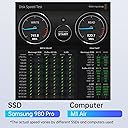
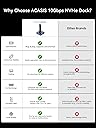
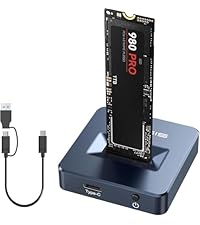
The ACASIS 10Gbps M.2 NVMe & SATA SSD Docking Station delivers ultra-fast USB 3.2 Type-C data transfer up to 10Gbps, housed in a premium aluminum enclosure for superior heat management. Its tool-free, toaster-style design enables quick SSD swaps without drivers, supporting both NVMe and SATA M.2 SSDs up to 8TB. Compact and cross-platform compatible, it’s the perfect on-the-go solution for professionals needing rapid, reliable external storage access.


| ASIN | B084ZKLQR8 |
| Best Sellers Rank | #16 in Enclosures |
| Brand | FREEGENE |
| Built-In Media | M2 SSD ENCLOSURE |
| Color | Dark Gray |
| Compatible Devices | Personal Computer |
| Connectivity Technology | USB |
| Customer Reviews | 4.5 out of 5 stars 1,221 Reviews |
| Data Transfer Rate | 10 gigabits_per_second |
| Enclosure Material | Aluminum |
| Hardware Interface | USB |
| Hardware Platform | Windows |
| Item Dimensions L x W x H | 1.93"L x 1.93"W x 0.47"H |
| Item Weight | 56 g |
| Manufacturer | ACASIS |
| Material | Aluminum |
| Memory Storage Capacity | 8 TB |
| Mfr Part Number | M04 |
| Model Number | M04 |
| Product Dimensions | 1.93"L x 1.93"W x 0.47"H |
| Supported Devices Quantity | 1 |
| UPC | 705338038977 |
| Unit Count | 1 Count |
| Warranty Description | 1 Year Warranty |
N**G
Small and fast, makes daily NVMe drive work easier
If you work with bare NVMe drives often, this does the job and stays out of the way. I format and access multiple NVMe drives every day, and this adapter is a noticeably quicker way to get to a drive than what I was using before. Plug the drive in, get to work, move on. The design and size is the part I keep coming back to. It is small and compact, easy to keep on the desk or drop in a bag, and it does not crowd everything else around it. For someone cycling through drives regularly, that matters more than it sounds like it would. Feels heavy and good quality for how small it is. It has done exactly what I bought it for, and I have no complaints so far. Easy recommendation if you handle NVMe drives often.
J**R
EXCELLENT M2 style ssd docking station! Solved TWO problems.
This is a great tool. Excellent quality. Great design with on/off switch on the base. HIGHLY recommend if you have loose m2 style drives, or in my case, a Macbook air/pro 2015 ssd that I couldn't find a good reliable enclosure for but did find a good adapter. Recommended if you don't need to use the ssd all the time, or just need to read a few loose m2 drives from upgrades or as a backup tool. Nice compact size, comes with a USB C - male C with an A adapter. I expected it to be much larger from the image, so this makes this a very handy and portable tool. I needed this because another adapter I found - "chenyang 12+16Pin MAC SSD to Motherboard M.2 NVME NGFF M-Key Convert Adapter Card" was able to read a Macbook Air/Pro 2015 m2 style drive while using my SSK enclosure with the case off. BUT COULD NOT FIND AN ENCLOSURE THAT WOULD HANDLE THE LENGTH OR HEIGHT WITH THAT ADAPTER... Now I can plug that adapter and 2TB mac ssd into this DOCK to transfer files, or backup a system. IT is a useful DOCKING TOOL! I would NOT recommend using this as a "permanent" auxiliary drive mainly because the drive is standing up in the socket and could easily be bumped while in use and possibly corrupt a file or filesystem. This is a great TOOL and worth the price, but this is NOT a permanent solution for constant use, unless you can put this out of the way. It should work fine in continued use as the drive is open to the air for cooling and the base is metal. The mac ssd adapter worked perfectly in this DOCK, but its design made it longer and taller than a standard enclosure. So, I was very happy to find this product. It solved TWO problems for me: 1) being able to use a "loose" mac 2tb ssd and 2) seeing what's on other M2 drives I have in my bin from laptop upgrades. This is a very handy tool for file transfers, or if you're reinstalling the OS on your laptop, FIRST install the new m2 ssd in your laptop, configure, then plug in your old m2 into this dock and copy files onto your fresh drive. If you were planning on simply moving to a larger ssd, then you could put the NEW ssd in this docking station, properly format it and then use RSYNC or other tools to copy the entire OS and files over to the new drive, test it, then save the ORIGINAL drive if the new drive fails or you sell the laptop. This would work well as a backup tool for any system, especially if you are using Linux or MacOSx as you could completely copy the drive using RSYNC. (can use --exclude for any directories you don't want to save, like /tmp or ~/.ssh )
R**N
Efficient and Convenient NVMe Docking Station for Easy Access to Your Drives 🔌💾
The ACASIS NVMe to USB Docking Station is a fantastic tool for accessing, transferring, and backing up data from your M.2 NVMe SSDs with ease. With its sturdy aluminum alloy housing for effective heat dissipation and plug-and-play design, this docking station makes working with NVMe drives fast and simple. Why it’s a great choice for your SSD needs: Quick and seamless access: The USB connection supports fast data transfer speeds, making it perfect for moving large files or quickly accessing data stored on your NVMe SSDs without installing them into a device. ⚡📂 Sturdy aluminum housing: The aluminum alloy casing not only adds durability but also helps dissipate heat efficiently, ensuring your SSD remains cool even during intensive data transfers. 🌡️✨ Tool-free design: No tools or screws are needed—just slot your NVMe SSD into the docking station, and you’re ready to go. Perfect for tech enthusiasts, professionals, or anyone needing quick, hassle-free access to SSDs. 🛠️💾 Wide compatibility: Compatible with various operating systems like Windows, macOS, and Linux, it’s a versatile option for different workflows. The docking station works seamlessly with most M.2 NVMe SSDs (2280 size supported). 🖥️🔌 Portable and compact: Its small, lightweight design makes it easy to carry around, whether for office use, home setups, or on-the-go data backups. 🧳✨ Perfect for backups and cloning: Whether you’re backing up data, migrating systems, or testing multiple drives, this docking station is an efficient and reliable solution. Bottom line: The ACASIS NVMe to USB Docking Station is a convenient, durable, and user-friendly tool for anyone working with M.2 NVMe SSDs. With its aluminum housing, fast performance, and plug-and-play functionality, it’s a practical choice for professionals and casual users alike. 🔌💾✨
T**R
Super useful
Outstanding tool! Had a failing m.2 that I was able to pull all of the data off of to backup and transfer to a replacement drive. Drives function like hot-swappable jump drives, with no required program installs.
S**P
Great M.2/NVMe SSD Dock for Frequent Drive Swaps
Great little dock connects via USB-A or USB-C and makes it super convenient to swap out various M.2/NVMe SSDs - including boot drives - which was why I purchased. (Needed to clone to my new gaming laptop!) Like that it has a power button and power/drive activity light. I would have given this dock 5 stars if the included USB-C cable was a foot longer - though you are free to substitute with your own cable!
A**R
Works great.
I use this a few times a month and it works great. Its small and simple. Not really much else to say.
U**O
The device is small and portable, making it easy to take with me wherever I go.
Back on Dec 15, 2023, I purchased ACASIS NVME to USB Docking Station and have been extremely happy with its performance. The device is small and portable, making it easy to take with me wherever I go. It is also very easy to use - simply insert the M.2 SSD into the appropriate slot and connect it to your computer via the USB port. One of the things I appreciate most about this docking station is its versatility. It is compatible with both M Key and B+M Key M.2 NVMe SSDs as well as SATA-based SSDs, so it can accommodate a wide range of different drives. It is also compatible with Thunderbolt 4 and 3, so it can be used with a variety of different computers and devices. I have used this docking station to transfer data between different computers and to make backups of my files, and it has worked flawlessly every time. The transfer speeds are fast and reliable, and I have not experienced any issues with data corruption or loss. Overall, I would highly recommend the ACASIS NVME to USB Docking Station to anyone in need of a reliable, high-quality device for transferring data between M.2 SSDs and their computer. It is a great value for the price and has exceeded my expectations in terms of performance and convenience
D**R
Worked great and for a low cost!
I used it to clone my 2TB M.2 drive onto a 4TB M.2 drive that has a heatsink. It worked fine for me, transferring about 1.4 TB of data in around an hour. The cable supplied is pretty short, but I ended up cloning it twice due to a mistake I made. One mistake I made was to use a USB cable that I already had because it was longer. The first time I cloned it, it took 10 hours to copy the data. The second time I did it, I used the provided short cable (which was labeled as being capable of 10 Gbps) and it only took a little over an hour. I also switched my boot type from MBR to GPT after verifying the clone was successful, and then after changing from legacy boot to UEFI, the drive booted up just fine. If I had more confidence in the process of switching over to GPT, I probably would have tried changing the original to GPT first, then I probably wouldn't have had to move the recovery partition to the end of the unallocated space because it probably would have allocated all of it. That happened because MBR is limited to 2TB partitions.
J**.
Good built/ design, convenient and practical!!
Initial review: Package arrived on time and in a sealed box. No defects or damage observed. Product is too cool - Full alu. construction and good design - small foot print makes it easier to carry - convenient and practical to use. No more screw drivers and thermals pads - open design would assist in heat dissipation. Only issue is, user needs to be careful when using this, as the ssd is vulnerable to contact damage since its open. Otherwise great product...
B**N
Works well, decent price
This is a compact little dock that does what it's supposed to. I used it with a WD SN770 and had no issues. I didn't measure any transfer speeds, so can't give stats on exactly what this will do, but I was happy with the performance when cloning my old M.2 before resetting Windows. I also haven't (and won't) use it heavily and/or frequently, so can't say if it will stand up over time, but to be honest, I had no intentions of using it a lot, so that's why I went with this one rather than a higher end device from a name brand. So if you are looking for a cheap solution to use when cloning some drives and/or moving data around for some routine maintenance, this is a great, cheap option that will get the job done. One thing to note is that this requires no set-up. You just plug the drive in and turn it on. I had originally bought a little m.2 housing for doing this type of thing, not realizing that those are really geared towards putting a drive in and leaving it there. With those you have to open up the case, insert the drive, apply the thermal pad then close it up. With that I ended up leaving the case off to keep the temperature down as I didn't want to install the thermal pad since the drive would be swapped into the PC after cloning. I'll eventually stick a "permanent" drive in that and use it as a portable drive. This design is much better for working with multiple m.2 drives.
S**N
Good Fit
Great Device to enable using anf checking of M@ SSD unit outside of a PC or a External Drive Case
P**7
ACASIS AC-M04 M.2 NVMe & SATA SSD Gehäuse
Prima, klein und fein, funktioniert einwandfrei, würde ich wieder kaufen!
J**A
コスパ良し、SSDのアップグレードに!
中古PCのSSD(256GBを1TBに)アップグレードする為に購入しました、コスパ良いしコレ、可成り使えます!
Trustpilot
2 months ago
3 weeks ago