🔥 Level up your desk game with pro-grade RGB and precision control!
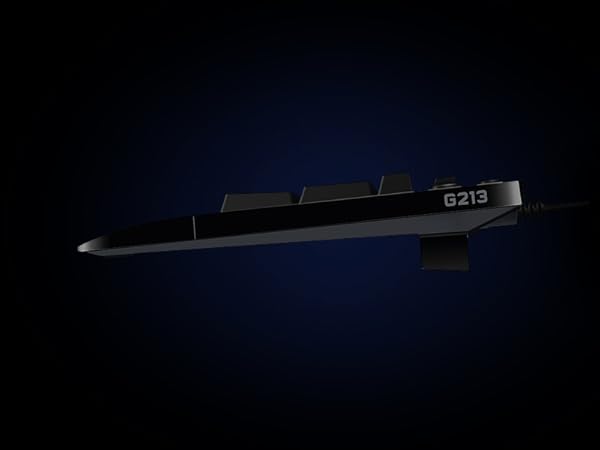
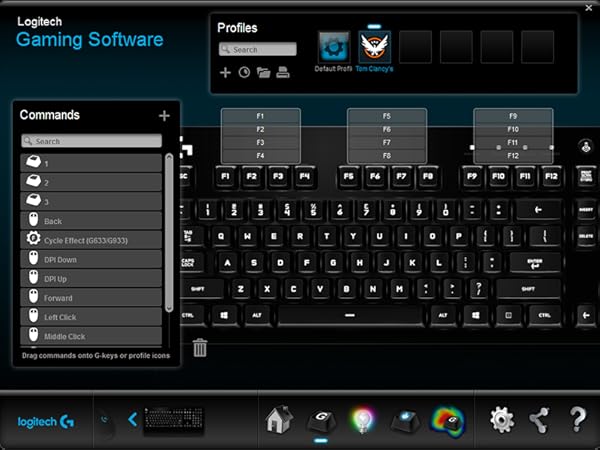
The Logitech G213 Prodigy is a full-sized, wired gaming keyboard designed for both gamers and productivity enthusiasts. Featuring customizable LIGHTSYNC RGB backlighting with 16.8 million colors across 5 zones, spill-resistant durability, ultra-responsive tactile keys with anti-ghosting, and dedicated multimedia controls, it offers a perfect blend of style, performance, and comfort. Its integrated palm rest and adjustable feet ensure ergonomic use during extended sessions, while Logitech G HUB software enables deep customization to match your workflow or gaming style.


| ASIN | B07QGHK6Q8 |
| Additional Features | Lighting |
| Antenna Location | Gaming |
| Best Sellers Rank | #399 in Video Games ( See Top 100 in Video Games ) #30 in PC Gaming Keyboards |
| Brand | Logitech G |
| Built-In Media | USB Cable |
| Button Quantity | 19 |
| Color | Black |
| Compatible Devices | PC |
| Connectivity Technology | USB, Wired |
| Customer Reviews | 4.3 out of 5 stars 6,983 Reviews |
| Enclosure Material | durable, spill-resistant material(s) |
| Generation | 3rd Generation |
| Global Trade Identification Number | 00097855151391 |
| Hand Orientation | Ambidextrous |
| Item Dimensions L x W x H | 8.58"L x 17.8"W x 1.3"H |
| Item Height | 33 millimeters |
| Item Type Name | Gaming Keyboard |
| Item Weight | 1000 Grams |
| Keyboard Backlighting Color Support | Single Color |
| Keyboard Description | Gaming |
| Keyboard Layout | QWERTY |
| Language | English |
| Manufacturer | Logitech |
| Mechanical Keyboard Switch Model | logitech_romer_g_tactile |
| Model Name | G213 |
| Model Number | 920-009284 |
| Number of Keys | 104 |
| Number of Sections | 3 |
| Power Source | Corded Electric |
| Style Name | Keyboard only |
| Switch Type | Tactile |
| Theme | Gaming |
| Total USB 2.0 Ports | 1 |
| UPC | 097855151391 |
| Warranty Description | 2 Year Limited Hardware Warranty |
| Water Resistance Level | Water Resistant |
W**Y
Good keyboard replacement for the older 740 model.
My old keyboard is a Logitech is a backlit K740. I really like this keyboard and I still do. It works great and since it's wired USB I never have to worry about constant battery replacement. The problem was that after years of use it's beginning to show its wear. So I came back to Amazon looking for the same model - don't do that. You'll find them for $300. Crazy! So, what did I do? I bought this Logitech G213 Prodigy keyboard. I like it. The keys are tactile and easily used. The keyboard will default to a crazy adolescent rainbow color program. This was the only thing that gave me pause but I'm getting up there in age and the eyes aren't like they used to be and I really needed a backlit keyboard. So, here's the solution: I'm not sure what you would need to do if you're on a Windows environment. You'll need to do your research. However, I'm on Linux Mint and found that two simple commands allowed me to set the keyboard color to white. For you Linux users just open a terminal and install the g810-led app. To set your keys to white, the command is: g810-led -a ffffff. That's it. If you want to adjust the brightness of the backlight, the option is -b followed by a brightness percentaage. So, if you want to set the backlight to white and the brightness to be not so bright then enter: g810-led -a ffffff -b 50 This sets the color to white and the brightness to 50%. Easy. You can also set the function keys to a different color than the rest of the keyboard or any number of other options. Or, you can just let it do its crazy rainbow color shifting psychedelic randomness. Bottom line, once I gained control of the colors and the brightness, the keyboard was absolutely what I needed. The keys do sit a tad higher than the 740. But they feel good. The print is large enough to easily see and not obnoxiously large. For the kids, the keyboard has a game mode that disables some keys so gaming is not interrupted. This is done with the push of one button. It has a 10 key pad on the right plus some nicely positioned keys that control computer sound as well as video controls. The backlight can be toggled on and off with one button. The keyboard looks like it's constructed well and of Logitech high quality. It's a handsome board. I will hang on to my 740 though like a well used favorite shirt. It will sit in reserve in the event I need another board. But for this one, the price was right and it fit my needs.
J**R
Very nice keyboard that'll last a long while.
First brand name keyboard I've gotten. I used to get 3rd party ones that would last a year, maybe two if I'm lucky, and then I'd have to replace them. I decided to splurge for a Logitech since I have the MMO mouse by them and know they make good stuff and I have a very strong feeling I won't need to replace this one for a long while. It looks clean, feels snappy, and best part, I only have to use one bit of software for it and my mouse. RGB lights are bright and customizable, though I usually just keep them on cyan otherwise they distract me.
P**L
Way better than expected.
Had it a few days and so far amazing. Maybe I have a bias because I came from a worn keyboard but compared to my last one it is a upgrade in every single way. Typing and gaming is good. It even has a game mode button that does a lot but my favorite is that windows key doesn't pop up windows so you can possibly use it as a extra keybind or atleast not open windows mid game on accident. Lightwight for its size and seems durable. LED's are easy to control and synce. All the audio buttons are comfortable, nice quality and additions on the top right actually come in super useful. The bottom comes out to support your hand more and makes it way more comfortable Loving it so far. UPDATE: After having this keyboard for a few months the only possible complaint I could make if I was being super picky are.1 LED are not the brightest.(More than bright enough for me) 2 The keyboard is bigger and takes up more space, ( I personally love it because of comfort.) 3 It's definitely not silent when typing but from my experience on the quieter side than most keyboards.
G**S
great kybd with some flaws = ***
the g213 is by far the best kybd i've ever used and i've been in the 'puter industry since the 70's! most of the reviews attest to the brilliance of its design and feel. i get it. ooh, let me add, a gamer i'm not, k, but the razor cynosa and a red dragon boards i had over the previous 10 months, can't begin to compare. in fact, the cynosa already started to show some wear on the shift and ctrl keys - poor. also, razor software support is horrific! so back to the g213's issues and i'm now on my third in less than 6 weeks. problem 1) it will not illuminate during bios boot just prior to the win10 login screen. yes, i've tried the light button but when you press that during a boot, it only leads to - problem 2) after a light button press during a boot, the kybd remains dark forever. yes, FOREVER! doesn't matter if lightsync/g-hub software is running or not, reboot or not. in fact, lightsync is not a real-time app. it simply shows your last configuration. the fix is to unplug and re-plug, then all's well again. problem 3) the latest release (09 '21) of lightsync/g-hub has a confusing if not outright difficult user interface. worse, they have not updated their online user guide, so u've gotta tough it out on your own. this is especially true if you use "freestyle" which supports zone lighting. problem 4) when viewing the kybd at an angle, there are lighting hotspots that are noticeable through the keys. yes, this is a nit but becomes somewhat annoying after hours of use. . . . and that is why it only gets 3 stars. now the brilliance part - oh what a kybd! the keys feel great and u have color ONLY where it's needed. 1) the colors are great. u have 17m of them but don't expect a lot of color accuracy. the lighting can be adjusted with the app. what i like most is that the colors do not bleed through under the keys. the keys illuminate including shift characters and nothing else. what a joy! this should be standard for all kybds - what gives?!! 2) the kybd is divided into 5 lighted zones. these zones are chosen arbitrarily but are ok for my use. the numeric section on the right along with the media keys above it, are a zone; the print key section including the arrow/cursor keys below are yet another zone, and the remaining fn and type keys are divided into the remaining 3 zones. very nice. 3) there's a default setting when initially plugged in but if the light key is pressed and held while pressing a numeric key (0-9), other options appear. why this info is not in a user guide is beyond my thinking, as it's especially nice to know should one have no interest in the lightsync/ghub app. while not noise free - it's very quiet and if you type softly, noise is barely perceptible. an experienced typist should expect some audible feedback - that's subjective. hopefully logitech will have a fw update that fixes my bios boot issue, cause for those rare times when some bios configuration is required, u'll need a flashlight. yes, it's possible that behavior could be a personal problem but i've tried 3 boards and no change. i have kept the last one (see UPDATES) and returned the others to amazon. one other point, the serial number on the g213 box does not match the serial number on the actual g213 kybd inside; not sure who's doing the packaging but that's just weird. don't really use the wrist-rest and could care less but it doesn't get in the way and frankly it's a bit of a plus. many have written about key problems especially, the space bar. i can only hope it's a low percentage problem (see UPDATES). i've only had this for 2 days now but will likely buy again, if i must. it just feels and looks that good in the dark. 1st UPDATE (2nd g213): so it's been about 10 days now and yes, these kybds (2) have some issues. 1) it does not light prior to the win 10 os load when booting. (2 different kybds now) 2) some combo key presses (ctrl+shift+m) are hit and miss. this was a defect with the kybd. i suspect they have an engineering problem with some m-boards. if i shutdown with the kybd turned off, it will not light again after a reboot. the work-around is persnickety and i will call support. btw, they're quite responsive. 2nd UPDATE (3rd g213): 1) i'm becoming more convinced that the g213 has difficulty with the msi z490-pro m-board. all 3 exhibit the same no-illumination bios boot behavior after the initial use. 2) these kybds do have quality issues as all 3 had different behaviors with illumination. at least this last one seems to be recoverable. when the lights do not come on after a button press. the g-hub sw usually fixes the problem. 3) my 2nd kybd did have a combo key press defect with ctrl+shift+m keys and the need to be unplugged for several minutes before lighting. this one works much better but still no lights during the bios boot phase.
R**W
Game on!
A seriously well performing, good tactile feel, and quieter clicking keyboard. Maturity is realizing you don’t need super clicky, bulky keys when you game. This is that board. I want to say I disagree completely with people saying it stops registering your keystrokes. It seems accurate and reliable but I will update in the event that changes.
S**M
Great Keyboard! Lasted for 5+ years
This wired keyboard is an oldie but goodie! It has great quality for the keys, and the build quality is solid. Feels light to the touch, but it does NOT miss that great Logitech build quality! I have had this keyboard for over 5+ years, and it has never failed me. No key failures, no breaking of the keyboard, nothing. It worked terrifically, and I was able to keep it until I eventually bought a new one. This keyboard has nice RGB and works with the Logitech G Hub application, if you wish to use that. It is a WIRED keyboard, so be aware of that, but honestly, you already know that! This keyboard is much older, but still so good! It is affordable, but the build quality is SO nice that I don't really have any complaints. I changed out of this keyboard, NOT because it broke, just because I wanted to change my setup from a black setup to a white setup that I changed not long ago! I still use a Logitech keyboard, just instead, upgrading to a Logitech G715, as it was a nice white keyboard, with clicky keys.
M**L
- - LOGITECH IS NO LONGER A SUPERIOR BRAND . . STAY AWAY . . FAILURES GALORE - -
This is single handedly the worst computer keyboard I have ever purchased/used . . On the first day i had problems with the space-bar working, and the lights on the keyboard functioning properly, so I downloaded and installed the Logitech G-Hub app thinking that would help solve the issues . . . . NO!!!! By the 6th day of use, the multitude of failures with this clunky, overpriced keyboard had me contacting Amazon to return it . . I just couldn't stand it another minute. My OLD Logitech K740 lasted for 17 years before it showed any signs of an issue. It was soft-touch, low-profile, and a joy to use, unfortunately Logitech appears to have 'JUMPED THE SHARK' so to speak when it comes to quality, and quality control, they are no longer a superior product.. I am so grateful for Amazon's customer support, they have never let down, even when the original; packaging was not in the best of shape, or even there at all . . They understand that when a product doesn't live up to the hype, they're going to take care of it, and I truly appreciate them for that . . . . .
J**K
Nice and Quiet Keyboard
This keyboard is ideal. The keys are quiet which is great! Lightweight, easy to install, fantastic price and black is always my preferred color for computer items. Though white was available.
Trustpilot
2 months ago
1 month ago