Buy anything from 5,000+ international stores. One checkout price. No surprise fees. Join 2M+ shoppers on Desertcart.
Desertcart purchases this item on your behalf and handles shipping, customs, and support to Japan.
🖱️ Elevate your workflow—comfort, control, and customization in the palm of your hand!
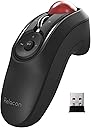
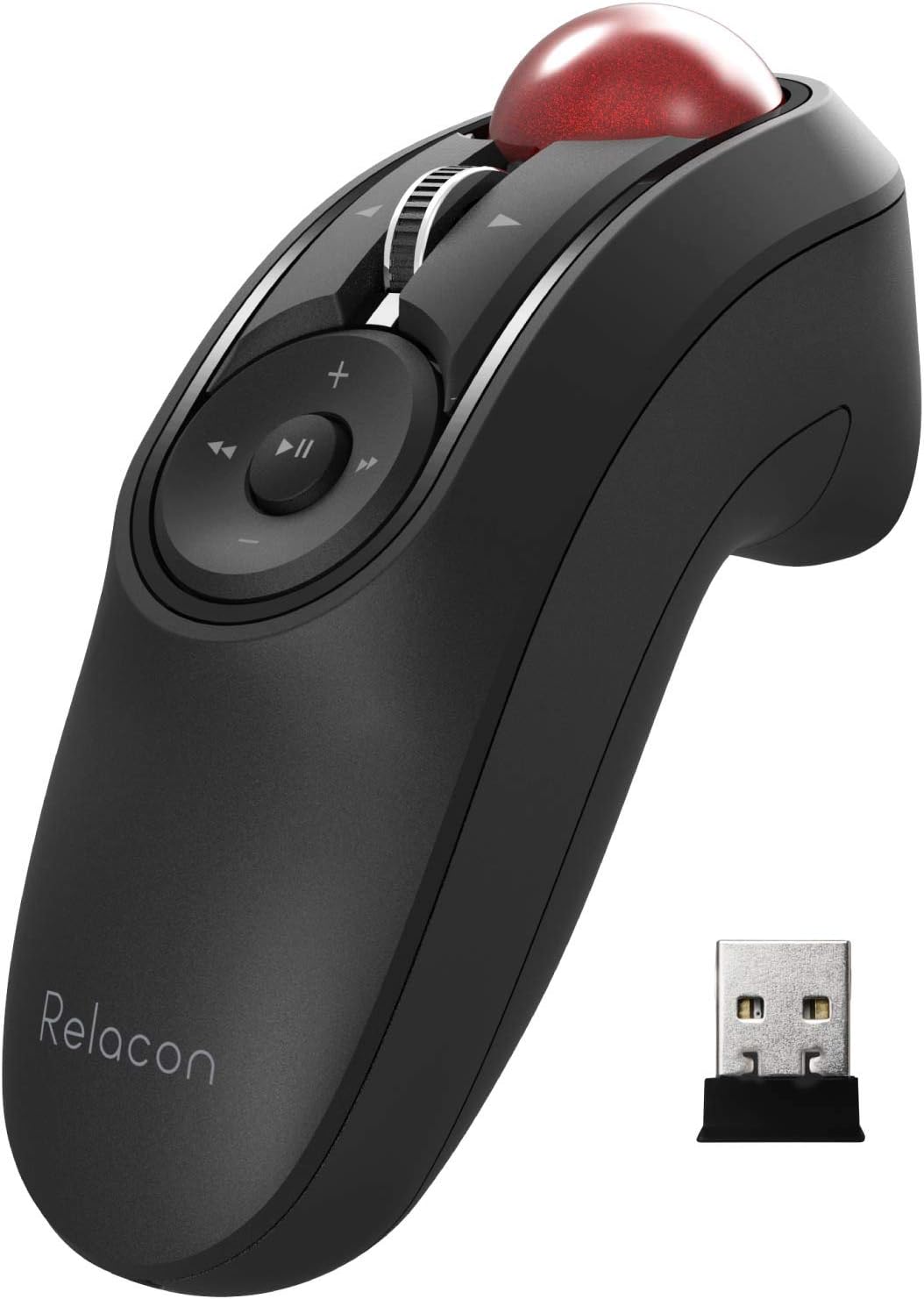
The ELECOM Relacon Handheld Trackball Mouse offers an ambidextrous ergonomic design with a sensitive thumb-operated trackball, 10 programmable buttons, and a stable 2.4GHz wireless connection. Featuring adjustable DPI settings (500/1000/1500) and durable artificial ruby ball bearings, it delivers smooth tracking with minimal maintenance. Compatible with Windows and MacOS, it includes 2 AAA batteries and supports up to 10 meters wireless range, making it a versatile tool for professionals seeking comfort and precision.


| ASIN | B07ZKL66GY |
| Antenna Location | Gaming |
| Are Batteries Included | Yes |
| Are Batteries Required | Yes |
| Best Sellers Rank | #9 in Computer Trackballs |
| Brand | ELECOM |
| Button Quantity | 10 |
| Color | Black & Red ball |
| Compatible Devices | Desktop PC, Laptop |
| Connectivity Technology | Wireless |
| Customer Reviews | 3.8 out of 5 stars 1,837 Reviews |
| Enclosure Material | Plastic |
| Hand Orientation | Right |
| Hardware Platform | PC, Mac |
| Item Dimensions L x W | 1.61"L x 4.41"W |
| Item Type Name | ELECOM Handheld 2.4GHz Wireless Thumb-operated Trackball Mouse, 10-Button Function with Smooth Tracking, Precision Optical Gaming Sensor, Left / Right Handed (M-RT1DRBK) |
| Item Weight | 2.7 Ounces |
| Manufacturer | ELECOM |
| Mfr Part Number | M-RT1DRBK |
| Model Name | Relacon |
| Model Number | M-RT1DRBK |
| Mouse Maximum Sensitivity | 1500 Dots per Inch |
| Movement Detection | Optical |
| Movement Detection Technology | Optical |
| Number of Batteries | 2 AAA batteries required. (included) |
| Number of Buttons | 10 |
| Operating System | Mac OS X 10.7 Lion, Windows 10, Windows 7, Windows 8.1 |
| Power Source | Battery Powered |
| Range | 10.0 meters |
| Style Name | 2.4GHz |
| Unit Count | 1.0 Count |
| Warranty Description | 1 year manufacturer |
M**.
Mostly great, but a bit of a struggle with doing precision work or twitching to typing
I really like this mouse in a lot of ways, but there are other times when I've struggled with it, and I've ended up not using it as my daily mouse (I keep it on hand in case my daily mouse dies, like my Logitech finally did). I could see it being great for specific situations (like the listing that shows using it with a laptop at a non-desk location, using as a media controller, etc) but as my everyday mouse at my desk it just didn't work out. I've been using a trackball super happily for about 5 years, so all of the pros and cons below I'm approaching as already being a trackball user. (If you're not already a trackball user... hang in there. Once you get used to it it's GREAT.) PROS ------ - Can hold it in really any position, and it doesn't have to be up on your desktop. I just held it down in my lap a lot, or next to my side when I'm using a standing desk, but you can also rest your hand on the edge of the desk in different positions too. Even set your hand on a luxurious pillow if you want. :D - It's ambidextrous, so it works great for righties and lefties. I'm not ambidextrous myself at all, but if my right wrist is really bothering me I can switch to my left hand; it slows me down a little, but I'm still perfectly able to keep doing what I was doing. - Super flexible in that it allows you to hold it basically however you want. I wish I could adjust the curve of the underside (like have the finger groove hold my other fingers further back) but I don't know how you'd possibly make that adjustable), but just being able to not have your wrist on a desk is a pretty big deal by itself. I've had a lot of wrist pain over the years and this DEFINITELY helps. - Programmable buttons are nice! I don't need them mostly and even the ones I would use (like the back and forward web browsing buttons) I just forget they exist, but if I used it for a long time I'm sure I'd eventually make use of them. It also has a tilting scroll wheel... I had to look up what that even was for, but turns out it's for scrolling horizontally. The more you know! :D I never used it, but it's often just nice to have more options rather than less with anything. - The driver/controller program for it lets you set which button does what, and things like your scroll speed and how to make the wheel do a speed-scroll, plus there's a DPI controller on the mouse itself. CONS ------- - Switching between mousing and typing is just prohibitively annoying. Because it's not on the desktop, every time you want to type two-handed you have to either put the mouse completely down or set it on its stand. And if you're holding down in your lap like I do it you're reaching up and down a ton (which to be fair you'd be doing to reach the keyboard anyway). I just wound up doing a lot of hunt-and-peck typing with my left hand only, which made me remarkably slow at what I was doing compared to what I was doing with my previous trackball. - The stand is basically there to hold the mouse when not in use, but it's a little bit precarious. If you set the mouse down carelessly, it might slide off. I've knocked it off by jostling my desk. My cat's knocked it off. (Why is my cat on my desk? I'd also like to know this!) I'm working in a room with carpeted floor so it hasn't been a serious problem, but if I was using this in my previous workplace with concrete floors, it'd be extremely broken by now. This issue AND the problem mentioned above could be solved by a more substantial base where you could set it (and it would stay) that could turn it temporarily but SECURELY into a desktop mouse. If the stand allowed you to more easily actually USE the mouse while it's set there, it'd become like 90% easier to work with it when you also have to type. - Precision work (like for instance trying to draw or erase an area in Photoshop) was surprisingly difficult. I'm not sure why; I've been doing that work with a trackball mouse for years, so maybe this one's just a bit more sensitive or the ball's a little looser? I really had a hard time producing any sort of non-wobbly line, and no amount of fine-tuning the speed or DPI or anything really helped. - It's a little small, so if you have huge mitts it might be too little for you. For reference, I typically wear a medium in latex/nitrile gloves, and a large in outdoor type gloves, and it fits my hand pretty great. I think smaller hands would probably be fine also, I just think it might be uncomfortable for folks with really big hands. - If you need to get the trackball out to try to clean out gunk, it's surprisingly hard to get it out. It is surprisingly EASY to get it out however if it's knocked on the floor. - I really needed this to have a storage space for the USB dongle, like my old Logitech did. That one you could store the dongle inside the battery compartment; this one's a little weirder shaped but it has an entire base that could have had, if not a screw-top compartment or something, a little slot built into it. I don't think it's terribly overpriced or anything for what it is, but an upgrade on the stand design would make it so much better. In summary, it's a good mouse and if you've got problems with your wrist and don't need to switch constantly between mousing and typing, it's worth a try. For me after about four days of trying I've switched away to another type of ergo desktop model (wish me luck lol) but I'll have it on hand if I need it. Possibly all bagged so I don't lose any components. :D
M**G
The Best Hand-held Mini Trackball Out There
I've searched all over for a one handed mouse to be able to use my laptop given my current setup, and all of the options were garbage until I found this one. I was hesitant at first because of the price and how often these devices turn out to be duds, but this one did not disappoint. In fact it is amazing and had fulfilled all of my needs almost perfectly. The mouse is comfortable and all the buttons are in the right places for my hand size (7in x 3.5in). You can use it with either hand and I usually use it with my left. In spite of what some other reviews say I never accidentally hit the dpi button even though it is resting in my left palm. The only negative about this mouse is the scroll wheel which is not smooth and sometimes not very responsive. It's a minor issue though as there is autoscroll built into the downloadable software. The trackball also doesn't fall out if you tilt it sideways. It just pops up a little and then goes back down when righted. The fact that this is Japanese made is a huge bonus for quality. I love this mouse. Update 4/14/23 - The scroll wheel has become almost unusable. It is not aligned anymore and it squeaks when I use it. It takes so much effort to scroll that I try to avoid it as much as I can. The scroll wheel needs to be majorly improved.
C**R
Pretty good. Mine died within 3 weeks, but they replaced it in 2 days without any hassle.
I've been using a similar product from different company for two years (handheld mouse with a teal colored trackball). Instead of getting the same one, I decided to spend more money in hopes of buying a better quality product. Definitely felt better to use than the different product. Pros. Even less wrist pain when using compared to similar product I tried. Uses 2 AAA batteries, so I don't need to replacement them very frequently. Semi-customizable buttons. Cons. DPI button placement is bad for people using the mouse with left hand, and it's one of the only button that can't be customized/disabled. Trackball is very sensitive and it's prone to rattling. The bottom is rounded so you need a separate base to hold the mouse when not in use, which reduces desk space. Mouse wheel stopped working after 18 days of use. Giving the company benefit of the doubt and rating them 4 for now, but might have to make changes based on how warranty replacement goes. Edit. Elecom emailed me a return label about 30 minutes after I put in the request for a warranty replacement, and another email with shipping information for the replacement unit they sent (before I dropped off the broken device for return), no questions asked. I received a brand new replacement today, and happily using it now. Great customer service. Changed to 5 stars. Hoping the new one lasts much longer and I don't have to edit the review any further.
D**R
Died after only two uses.
Died after only using it twice. I bought the Elecom Relacon handheld mouse and used it in my theater room back in August. I went to use it again in December, but it refuses to work. Tried it in a different computer and it still does not work. The return window is terrible allowing only a month and the contact phone numbers are no longer are in service. Turns out, it was sold as new and arrived as used. I did not realize it till I started to look into it and it had a sticker on the back of the package that read "Thanks to you, this product has a second life". What a scam this is, shame on you Amazon. Selling something as new and it's used and that fact is hidden from the buyer during the purchase. I did complain and they are refunding a portion of the total price, another scam? Buyer beware, Amazon is no longer trustworthy in my book. And I had such high praise for them before this happened.
N**R
Decent Mouse, but Suffers From Quality Issues
I have now owned three of these mice and use it daily for work. The first one I owned was the bluetooth version and the latest two have been the 2.4Ghz version. Each one has suffered from some different quality issue after 6-8 months of use. On the current one I am using (2.4Ghz), the center click on the scroll wheel no longer functions. So, center clicking to rapidly scroll through web pages and PDFs is no longer an option for me. Other buttons failed on the previous ones, forcing me to by a new one roughly every year. On the positive side, the functions on the mouse that do work, work well, it feels good in my hand, and allows me to use either my left or right hand, which relieves shoulder stress that I experience from using a traditional mouse. I also like the customization software. I have used it to customize the media buttons for copy-paste, etc., which makes my computer use more efficient. At this price point, I would expect a mouse that lasts at least a few years. Unfortunately, they have a failure after less than a year of normal use.
H**R
The Ultimate Ergonomic Daily Mouse
Used for 2 years now, have dropped it plenty of times, the ball has come out multiple times, but there are no visible marks or damages to it, it still works great, and it is always extremely comfortable. Will be buying a second eventually in case my first ever poops out because I can not see any using any other mouse anymore. Seriously ergonomic since you can use your mouse in your lap and does not demand you rest your hand/wrist on a desk. This is even better than the upright, Shark-fin mice. It does the job during games but definitely takes some getting used to. The biggest complaint is the DPI buttons location, which tends to accidentally get pressed. An inconvenience. The other button placements, like right and left click, are extremely intuitive and comfortable. Overall, takes getting used to, but once you do, this is the ultimate mouse for ergonomics on your arms.
C**N
Lots of jiggle in the trackball
Review after a couple days of use. This is bad product for this price. The trackball is way too loose. The scroll wheel clicks are enough to rattle the trackball so that your pointer drifts around every time you scroll. Also, there is so much jiggle in the trackball that it's hard to move the pointer accurately. For example, it's hard to place your cursor exactly where you want it in a string of text. This does not happen with cheaper handheld trackball mice that you can find on amazon Trust me. I'd know. This is my 4th handheld trackball mouse. On the other hand, cheaper alternatives break down after a few months. Hopefully this one will last longer. Ergonomics are decent. Bluetooth setup is easy. The mouse is very responsive, with absolutely no lags. All in all, it's aight, but overpriced. EDIT1: I bought this two months ago and it's already not working well. It doesn't help that there is no quick way to open it to clean the sensor under the trackball. At this point, the cheaper alternatives seem better.
D**S
Good Artist Tablet Macro
I've had this mouse for about 2 years now, and I've been happy with it 95% of the time. I've started wearing the logos off of the buttons. I use this as as shortcut/Macro for my drawing tablet, rather than as a literal mouse. You can configure all of the mouse buttons to do up to 3 simultaneous inputs. This works great for drawing software for things like brush size, tool swapping, etc. The shape itself is very ergonomic, and easy to casually hold in an offhand. It's very similar to a Wii-mote nunchuck. I much prefer it to other macro accessories that are usually rectangular or oddly shaped. I took the trackball out to keep it from jostling while I draw, since the trackball is easily removed and replaced. I haven't checked for an updated version of the driver/macro software since buying it, but it works well for the most part. When I first got it, I had some issues getting it to connect without a computer restart, but I've since been able to use it mostly flawlessly. I keep it plugged in with my other mice/keyboards, and just turn the power switch on when I'm ready to use it; it doesn't seem to interfere with any of the other drivers. The software is default to Japanese, so you'll need to swap it over, but its relatively intuitive. If you're setting up your own shortcuts in the software, use the 'Arbitrary key' button setting from the drop-down. My only complaint is that you always have to have one of the buttons bound to left click (doesn't matter which one), so you're always down one button for shortcuts. That said, you still have 9 buttons left to set a shortcut to, and a scroll wheel.
P**K
Mouse Trackball alternativo (dolori al Tunnel Carpale)
S**I
Super 👍
Le prix vaut le coup pratique à utiliser et il fonctionne bien avec un adaptateur USB sur un smartphone Android
B**G
Excellent piece of ergonomic equipment
I teach at a university and this device is perfect for moving around all my screen work presentations while moving around the lecture room. The range is very good and works even from the back of a large room. It is very easy to conceal and use in each application. I very much like the ergonomics of the device and the smooth roll of the ball. The holder would benefit from having some grip but apart from that it does what it needs to do. Sometimes slips but a small price to pay for a lovely mouse experience. Definitely recommend it for any teacher or presenter.
H**I
الكرة غير دقيقه والمؤشر يهتز
الجوده لاتستحق اكثر من ربع القيمه الكوره فيها اهتزاز ويجب الضغط عليها وعند رفع الاصبع يقفز المؤشر الى مكان اخر الازرار تعمل البلاستيك سيء الجوده وخفيف
H**.
Mostly perfect
2 years now and I love this mouse. This mouse is perfect for the couch surfer, you can set up a pc TV connection and do all your activities in blissfull comfort. Whether it's streaming, websurfing, video editing, gaming, or anything else, this thing is sidekick. In fact, I think it could be the ultimate gaming mouse with a few tweaks and Im suprised there are so few similar options on the market. I would suggest this company design a second product from this, and adjust some functions for improved accessibility. The trigger buttons for example, they are not easy to have both covered for long periods, the ergonomics of the button placement is not ideal. One finger is fine, so 95% off ehat you do, you will not have a complaint with this, but in game it's almost a game breaker. You need to have both index and middle finger naturally positioned on buttons for proper gameplay. Next, rethink the middle mouse button. Alot of times in a game you need to hold the middle mouse button while moving the mouse, and this controller makes that a two handed or awkwardly painful process. Not The controller would. Benefit greatly from a grip button function, so this could be explored. And finally, improve the ball design. It's pretty good, but it's loose in the well and jiggles or moves as you move your hand. This creates mouse pointer instability. Put a lock on collar around the top with replaceable felt liners to firm up that feel to smooth AF. And add some buttons along the side for the thumbs. And give it a belt clip for the wrist strap. It needs to hang from the waist line with a short lead so you can walk around with it and drop it freely. I'm going to 3d print one, but it would just be a tiny little thing to include and it would go a long way. Those few things will take this thing to be the ultimate living room, home theater, gaming, or conference companion. Seriously. I had the surface mouses and the the surface rested trackball mouses. This thing is superior anywhere other than a desk. It's also tough. Dropped it probably well over 100 times now. Sometimes the ball goes flying, but it still works great and isn't damaged. And batteries last forever in it. Would suggest getting Bluetooth to reduce number of USB plug in devices, also because others report the the 2.4 ghz transmitter failing and they aren't standard channel transmitters either so you can't really replace them with a universal one. It would be incredible if they made both left and right handed versions, mirror imaged. Then users could buy two and then no keyboard game as well. And no, it's not the same as a xbox controller experience. I would pay $200CAD for each controller if it were available.
Trustpilot
1 week ago
2 months ago