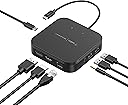
⚡ Power your productivity with the Thunderbolt 3 Core—where speed meets seamless connectivity.
The Belkin Thunderbolt 3 Core dock is a premium connectivity solution designed for Mac and Windows Thunderbolt 3 laptops. It supports ultra-fast 40Gbps data transfer, dual 4K displays at 60Hz, and delivers 60W charging through a compact 20cm cable, enabling a clutter-free, high-performance workspace.


| ASIN | B08438H4GM |
| Best Sellers Rank | 38,697 in Computers & Accessories ( See Top 100 in Computers & Accessories ) 358 in Docking Stations 6,260 in Tablet Accessories |
| Guaranteed software updates until | unknown |
| Item model number | F4U110bt |
| Language | German |
| Manufacturer | Belkin |
| Product Dimensions | 3.8 x 13.2 x 16.5 cm; 213.8 g |
A**R
Works well
It works really well. Plug and play with a Macbooc pro
T**S
I works as intended
The product works this far. I think the product is a bit pricey even though I got a discount. The cable from the hun to the laptop in only 10-15 cm which is a bit short in my opinion. An additional USB C port for charging would make the product perfect.
L**N
small, neat and does its job
So far so good with m1 macbook. A little slow waking up my aoc monitor, and ive had an occasional flicker when plugging back in after using laptop and flicking between apps but nothing major that would out me off buying it again if it was abducted by borrowers.
S**E
Core version: a dinky but powerful little dock
I’m reviewing the “Core” version of this item here; it’s quite a different shape and spec to the Plus and Pro models, so some of my comments only apply to the Core version. This is a neat little block of a dock. It’s a modest, matt black little square with two (fairly bright) LED lights on it, and it looks quite smart and professional. It works well and does what it ought. From my test Macbook I can happily drive a triple-monitor set-up- the laptop’s own monitor plus the DP and HDMI outputs from this, both of which handle my monitor’s maximum resolutions- which chugs along nicely with no apparent processor struggles or blips. I can run my ethernet connection through it and be reading files from a USB drive through it at the same time, and it just ticks along elegantly with no apparent problems and no sense of slowdown. I’ve run it for several hours straight in this set-up and it gets gently warm but I certainly wouldn’t describe it as overheating. The cable from the dock to the laptop is really quite short, just over 20cm, which will suit some desk arrangements more than others. I can store the dock underneath my laptop stand and have the cable curve round and connect with my laptop on top, which is quite a neat solution which hides a lot of cables (until the laptop’s removed)- but it’s quite tight and there’s not a lot of spare. Other people may well find they prefer to add a little USB-C extension cable into the equation to give a bit more flexibility. It’s hard-wired at the dock end so it has to be an extension, not a replacement. With cable connections on all four sides of the box, it’s quite a difficult box to arrange in an organised fashion, and simply plugging cables into it makes it look instantly messy, if that’s the kind of thing that bothers you. The Plus and Pro have a longer thinner layout with cables mostly on two sides, and that intuitively feels a bit neater. But if you have no concerns about cable management, and many don’t, then the compact size of the Core dock becomes a virtue. I want to give Belkin extra credit for the fully recyclable packaging as well. Tech manufacturers (including Belkin in the past) have often used excessive plastic showy packaging, shop-style packaging, even for online orders where the customer doesn’t need it- so I was pleasantly surprised to see Belkin are shipping these in sturdy cardboard. A big improvement. Some of the other reviews on this product seem to indicate that Belkin have had to revisit and revamp this product after initially making something that had problems. On the evidence of the one I received, everything seems to be sorted out now. For what it can do, it isn’t the cheapest dock on the market, and depending on the specs and speed that you need, there might well be a sub-hundred-quid dock on this site that’s just as capable of doing what you need it to. Nevertheless this does its job well, and in a nicely understated way. Reliability (this time) from Belkin.
E**E
Great little compact dock, works perfectly with my dual screen set up.
This is a sleek looking dock that is small but powerful. It has all the ports you would want on a dock and works with you laptops existing USB C power adaptor. It's a neat single cable solution that works out the box with no issues so far. It doesn't get too hot and works great with my dual screen setup, hardwired network connection and USB peripherals.
A**L
Good connectivity, but image output not as good as expected
This is a review for the Core version of this dock, which is important as the pro version, also on this product page, has issues, according to Belkin themselves. This Core version works well; it's literally plug and play, and, once installed, the transfer speeds seem really good. The included thunderbolt cable is rather short (only about six inches), but this is good in some ways as you don't get feet of cable dangling everywhere. The ports all work well for attaching most devices, but connecting a monitor via the display port seems to be a bit hit and miss; the image quality is not as good as I thought it should be (and not as good as when using another brand of dock), being seemingly somewhat less clear. Other than that, it's okay; however I have to knock off a couple of stars for the slightly disappointing video output.
C**S
Belkin Thunderbolt 3 Dock Core w/ Thunderbolt 3 Cable
This is a decent, compact hub that makes my MacBook Air 2020 more usable*. The cost seems astronomical for what it is, but Belkin is always good quality. It's a bit like having a desktop "hub" - you can easily "dock" with one USB Type C cable. The packaging for mine was very minimal - a plain brown box with a small white label on it. Overall I recommend the F4U110bt. UPDATE: *I've noticed it doesn't doesn't give you any (extra) USB Type-C ports 🏆 Reducing my rating to 3* 💷 Also, the price seems ridiculously high for a USB hub? Sure, Belkin are very good quality but I still don't understand it. I will do more investigation. If it transpires that it's doing special stuff then I will increase my rating to 4*. But as of now I cannot recommend it. UPDATE 2: ======== ❓What's confusing to me is that this says "does not support USB-C laptops".. but thunderbolt 3 is the exact same shape as USB Type-C. • It seems like the special thing this device does is Thunderbolt - "WORLD'S FIRST THUNDERBOLT™-CERTIFIED DUAL-POWERED DOCK" • It supports dual 4K UHD displays @ 60Hz • "this dock is a streamlined way to create an expanded, high-performing desktop through a single tethered cable" UPDATE 3 ======= • Okay i seem to have found out what's special about "Thunderbolt". ⚡ • It is "8x faster than USB 3.0 and 4x more video bandwidth than HDMI" • Features: Dual 4K @60 Hz, 40 Gbps Transfer Speeds, 60 W Upstream Charging
C**E
Works perfectly with my MacBook Pro with M1 Pro chip. I have two 4k@60 monitors, ethernet, webcam, power, and speakers all working great! Such a good deal compared to other thunderbolt docks. Only issue is the short cable, but a thunderbolt extension cable addressed that.
G**Y
Compact, good price and a reputable brand. Not a lot of ports but enough to connect a laptop to 2 monitors and provide charging all via one cable between dock and laptop. Won't sufficiently power laptops that need more than 60-65W.
C**I
After a couple of days, it works good for my case, and I frequently switch between two MacBook Pro produced in recent years, 2018-2020. Pro (not sure how it works on the older/Windows laptops) - Compact - Easy to use, just plugin Cons - The built-in cable is too short. - USB ports are less, no USB-C data transport port
C**R
Lenovo Thinkpad dizüstü bilgisayarımda sadece 1 adet HDMI giriş yeri mevcut. Bilgisayar şarj aleti takılı eş zamanlı olarak çift monitör kullanmak imkansızdı. Bu ürün ile aynı anda çift monitör kullanabiliyorum ve makinam şarj olabiliyor. Kullaklık girişi ve 2x USB girişlerinin olması da iyi bir özellik teşkil ediyor. Ürün 3 gün içerisinde Almanya Amazon tarafından gönderilerek teslim edildi. Çok memnunum ve tavsiye ediyorum.
N**R
I have had this for almost an year. It was great value for money for supporting 2(two) 4K monitors. I had searched a lot and there was nothing available at this price. To that extent this is good. BUT ..2 issues 1) It’s a bit wonky and sometimes doesn’t recognise the signal & I don’t see anything in the monitor…so I have to reboot the windows machine. It’s happened sufficient number of times that it does bother me. 2) the rigid short cable that connect to the laptop invariable gets disturbed if the machine moves just even a bit and that has resulted in the usb-c port on the machine becoming loose ie again sometimes it just doesn’t connect and I have to fiddle with it which is not good for the port. Otherwise, it seems to work well…I use it both for my Dell XPS and now mostly for my Mac Mini M1(it will stay on it from now on)
Trustpilot
2 months ago
2 weeks ago