


Desertcart purchases this item on your behalf and handles shipping, customs, and support to Japan.
⚡ Upgrade your rig with cool speed and effortless style!
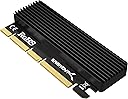
The SABRENT M.2 NVMe SSD to PCIe X16/X8/X4 Adapter Card is a versatile, tool-free adapter designed to fit multiple M.2 NVMe SSD sizes (2230 to 2280). It requires a PCIe x16/x8/x4 slot and motherboard BIOS support for NVMe drives. Featuring a robust aluminum heatsink and thermal pads, it ensures optimal heat dissipation for sustained high performance. Compatible with Windows 7 (with hotfix), 8, 10, 11, and Linux, this adapter is perfect for professionals seeking to expand and accelerate their desktop storage with ease.


| ASIN | B084GDY2PW |
| Best Sellers Rank | #13 in Heatsinks |
| Brand | SABRENT |
| Built-In Media | Item |
| Color | Black |
| Compatible Devices | Motherboards with PCIe X16/X8/X4 Card |
| Connector Type | Pcie |
| Customer Reviews | 4.5 out of 5 stars 6,241 Reviews |
| Finish | Aluminum |
| Global Trade Identification Number | 00840025214163 |
| Item Dimensions | 3.94 x 1.18 x 0.39 inches |
| Item Weight | 80 g |
| Item dimensions L x W x H | 3.94 x 1.18 x 0.39 inches |
| Manufacturer | SABRENT |
| Mfr Part Number | Sabrent |
| Model Number | EC-PCIE |
| Number of Items | 1 |
| Number of Ports | 4 |
| Package Quantity | 1 |
| Power Plug Type | No Plug |
| Specific Uses For Product | Expanding desktop storage performance with high-speed NVMe SSD |
| UPC | 840025214163 |
| Unit Count | 1 Count |
| Warranty Description | 1 Year limited. Register your product at Sabrent.com for an extended 5 Year limited Warranty. |
| Warranty Type | Limited |
J**N
Well-Built, Easy to Install, and a Great Value
I bought this SABRENT NVMe-to-PCIe adapter to add an M.2 NVMe drive to an older Dell workstation, and it has been an excellent little upgrade. The card itself feels very well made, the included aluminum heatsink is substantial enough to be useful rather than decorative, and installation was straightforward. Once installed, the NVMe drive was detected and worked exactly as expected. What impressed me most is the value. I also own an OWC PCIe NVMe adapter, which is a very good product, but this SABRENT card compares extremely well in overall build quality and function while costing considerably less. For a simple passive PCIe-to-NVMe adapter, I honestly don't feel like I'm giving much up by going with the SABRENT. It is also a great option for extending the usefulness of older workstations that have available PCIe x4/x8/x16 slots but lack enough native M.2 NVMe connectivity. Just keep in mind that your system still needs the appropriate BIOS/UEFI NVMe support if you intend to boot from the drive. For the price, quality, included heatsink, and trouble-free installation, I think this is a very good deal. I would absolutely buy another one. 5/5 stars.
T**O
Great upgrade for my aging Dell OptiPlex 5040 MT — zero hassle
I bought this SABRENT adapter so I could add another NVMe SSD to my Dell OptiPlex 5040 MT which I am using as a Proxmox server, and I’m really impressed. The PC recognized the drive instantly in BIOS, and Proxmox/Debian had no trouble detecting or using it. Performance is right where it should be at 2.5 Gbps, and the included heatsink keeps temps under control. Super easy install, no compatibility issues, and it just works. Fantastic little upgrade for older systems.
A**B
Excellent Product, Instructions Lacking
I just installed this last night in my HP EliteDesk 800 G9 SFF. I needed to add a second NVMe (M.2 2280) drive, but the location of the SSD2 slot wouldn't allow for a 2280-sized drive (the chipset heat sink was in the way). So Using the PCIe slot with an adapter was the solution. Here's my experience: I found the instructions very sketchy, especially with regard to the thermal strips. A product video by Sabrent adequately describes the disassembly/re-assembly and at least mentions the thermal strips but still doesn't provide any guidance for which ones or how many to use. I finally resorted to using an AI chatbot, which suggested for my particular drive to use the thick strip on the top only (of course, removing the protective film layers first of course). I found no difficulty in the drive installation using the drive hold-down screw/nut combination, and the enclosure re-assembly went without a hitch with the provided screws. Installation into the slot was literally and figuratively a snap. I monitored drive temperatures while doing AI-assisted photo editing (Topaz and Luminar Neo); at its heaviest load, it never exceeded 38 degrees C. As far as I'm concerned the product itself is great and would recommend it with the caveat that the instructions are definitely inadequate, requiring the user to consult additional information.
K**.
Great cooling performance, Quality Control Issues (Missing retaining screw)
I am updating this review to 4-Stars because I did figure out that the limitations the drive tested was experiencing in my screenshot were partly Samsung Magician 'weird'. I tested a different PCIe Gen4 drive in the Sabrent card with CrystalDisk & saw 6.9GB/s Write speed & 6.4GB/s read speed... here's my original review: So I want to start this review with what I don't like/what isn't good. The packaging is basic, which can be expected from something in this price range, the reason that I gave it 3 stars instead of 5 is 2 simple things: 1: THERE WAS NO RETAINING/MOUNTING SCREW IN THE PACKAGE. The instructions LITERALLY say "screw in retainer screw to hold your SSD in place" and there's no screw to do so with. Also, I tried an M.2 screw from a motherboard's M.2 drive screw set, and the threads are not compatible so I couldn't even use that. I ended up just installing the drive with the included thermal pad with no mounting screw or brace in place (I later replaced this Thermal Pad with a better one & the drive runs even cooler now). 2: *(This comment is now inaccurate because of newer testing I've done on the product, but I'm leaving in this part so others that experience it know it's not just them - Do not use Samsung Magician to benchmark your drive speeds, use CrystalDisk if you must get numbers - just remember any benchmark is putting the drive under unnecessary strain and you shouldn't run it regularly). The read speed on the drive is performing inferior to the M.2 slots that are on my actual motherboard. I have 5 M.2 drives total, 3 (including this one) are 990 Pro models, the 2 990 Pros that are installed in the motherboard hit 6400-7400MB/s read speed on the same test in the picture I included with this review, this card's drive is stuck in the sub 5000MB/s category. It's not a huge deal, but it is something that detracts from the value imo. Couple of things to point out because I asked the question myself & got no answer: The card does run at full x4 4.0 speed & the interface with the M.2 is x4 4.0 according to Samsung Magician, so it is running at full speed as advertised, which I know some other off-brand cards have issues with (I've returned one that did before, Sabrent does not have this problem) The positives: 1: Installation, other than the retaining screw being missing, was quite simple & straight forward, you unscrew the backplate, it comes apart, you use the right size thermal pad (I recommend the thicker one to ensure good interface with the heatsink), put your M.2 drive in, put the thermal pad on it, and screw it back together, then pop it in your PCIe slot. 2: Temperatures are excellent - one thing to point out, I do have active airflow over the area with a fan which is also providing airflow over my GPU's intakes, so it is in a pretty optimal cooling scenario, but, I did a full test on the drive (which is what's shown in the picture) and it topped out at 42C on the main drive temp, with 52C on the "Drive 3" (which I assume is Controller temp), according to HWInfo 64. Pretty great temperatures, so the cooling is definitely good. 3: Quality of build/material is pretty good, I would question the longevity of the screws used to put it together because they are very small with VERY small threads, so they may not last long with repeated install/removal, but the heatsink/card itself feels very quality. So I knocked it 1 star (updated) overall for the missing screw & the read speed being a bit low. If they had just included that screw or a better mounting-holding thing for the drive installation, I would've given it 5 stars.
C**N
Perfection for Pcie
I have a 2tb Predator 7200 speed drive, that I put in this. I put this in a full slot and have experienced only the slightest decrease in speed, almost completely unnoticeable, and will never be a factor in gaming. This is a perfect drive with over-the-top efficiency, and a better temperature than my base pc with extra fans. Could not be more impressed with the seating on it either, every small frame, a lock in like on a graphics card, and a light indicator that's easy to see. This cost about double the competitors with less slots, but comes with a big built in heat sink, and better pretty much everything else, compatibility, speed, and durability. If you don't mind the increased price, this is just a safe option.
J**N
Solved a very specific problem, but did it exceptionally well!
I bought this Sabrent adapter card because my motherboard has a free physical PCIe x16 slot at the back of the case but zero M.2 slots, and I wanted to put a fast NVMe drive in my main gaming PC without spending the money to replace a motherboard that otherwise works fine. I have a 2280 Samsung 970 EVO Plus in the drive bay I pulled out of an older laptop build, and I needed a way to get that drive into a desktop where my storage options were a spinning HDD and a small SATA SSD that was filling up. The x16 slot physically fits the adapter, and because the card is a direct pass-through with no controller, the drive shows up in the BIOS as a standard PCIe-attached NVMe device, which is exactly how I wanted it to. I am running Windows 11 on the main drive, and the new NVMe drive was recognized the moment I booted up after installing the card, no drivers to hunt for, no hotfixes to apply, no driver CDs to dig out of a drawer. For a Windows 10 or 11 system, this part of the process is completely invisible. You slot the card, you boot, you see the drive, and you format it. If you are on Windows 7, the listing mentions you need the NVMe hotfixes, and I have not tested that path, so I will leave it to the people who are still running that OS to speak from experience. Installation took me maybe fifteen minutes, and I want to walk through it because the included extras are actually useful. The box has the adapter card, an aluminum heatsink, a stack of thermal pads in a couple of thicknesses, a small set of screws, and a tiny Phillips screwdriver. I laid the 2280 SSD on a cloth, peeled the backing off one of the thermal pads, pressed it onto the NAND side of the drive, set the heatsink on top of the pad, and then screwed the whole assembly onto the M.2 bracket on the adapter card using the included screws. The screwdriver they include is small but it worked fine, and I did not have to dig through my own toolbox. The heatsink is a solid piece of extruded aluminum, not a thin stamped piece of metal, and it covers the main body of the drive where the NAND chips and the controller live. The included thermal pad between the drive and the heatsink makes a real difference once the drive is under load. I ran a full drive clone to the new NVMe and then ran a sustained 4K random write benchmark for about twenty minutes, and the drive held its rated write speed the entire time without throttling. Before I installed the heatsink, the same drive in a basic unheated M.2 slot on a different board would start dropping to a fraction of its speed after about five minutes of heavy writing. With the heatsink on this card, the temperature stayed flat and the speed stayed up. For a drive that is sitting in a PCIe slot at the back of a case where airflow is decent but not amazing, that heatsink is doing its job. One thing I want to be very clear about, and I wish the product title made it more obvious, is that this card only works with M.2 NVMe drives that use the M-Key notch, and it only fits a physical PCIe x16, x8, or x4 slot. If your M.2 drive is a B-Key or B+M Key SATA drive, it will not plug into this adapter, and if your motherboard only has a physical x1 slot, the card will not fit at all. I say that because I have seen people in the Q&A section and in forum posts asking why their SATA M.2 drive does not show up, or why the card will not physically fit in their x1 slot, and the answers in this listing cover those cases, but the title does not, so a skimmer might miss it. I also want to mention the motherboard support angle. This is a passive card, which means it does not have its own controller or its own firmware. It simply extends the PCIe lanes from the slot to the M.2 connector. That means your motherboard BIOS has to actually know how to enumerate an NVMe drive over a PCIe x16 slot, and on a modern board from the last eight or ten years, that is a given, but on a very old board, you might slot the card in and the drive just will not appear. I have a 2016 motherboard I use for a test bench, and it did see the drive, but I have seen reports of people with very early 2014 boards where the BIOS did not, and they had to update the BIOS to get it to show up. Check your board, check your drive, check your slot, and then buy this, and you will be fine. After about three months of daily use, the stability of the setup is the thing I appreciate most, and I want to talk about that a little because it is the part of a storage solution that you only notice when it fails. I use this drive as my primary game library and as a scratch disk for video editing, so it sees a mix of heavy random reads during game load times, sustained sequential writes when I am copying large files, and background activity from Windows updates and antivirus scans all happening at the same time. Over that entire period I have not had a single instance of the drive dropping off the PCIe bus, a single blue screen, a single unhandled I/O error, or a single moment where a game refused to load because the drive went unresponsive. The PCIe connection is physical and direct, and because there is no controller, no firmware, and no software layer in between, there is nothing that can quietly fail or need a driver update to keep working. The drive just sits there and behaves like a native M.2 slot would, and that consistency is what I wanted. I also checked the S.M.A.R.T. data a couple of times during that period, and the drive's health metrics are completely normal, no reallocated sectors, no pending sectors, no unusual error counts, which tells me the adapter is not introducing any subtle signal issues that would show up as drive degradation over time. The versatility of this card is also worth a mention because it is not locked into one specific use case. I have it in my gaming PC right now, but the same card and the same drive would work just as well in a home server running a Linux distro, where I could use the NVMe drive as a fast boot volume or a small cache layer for a larger array. It fits a physical x16, x8, or x4 slot, so if I ever move the drive to a different system with a different slot layout, the card goes with it without needing a different adapter. The fact that it supports 2230, 2242, 2260, and 2280 M.2 sizes means I am not stuck with one drive form factor, and I have already swapped my 2280 drive out for a 2242 drive from an old ultrabook to test it, and the bracket handles both without any issue. It works on Windows 10 and 11 without extra software, it works on Linux without extra software, and the passive design means there is no firmware to flash and no driver stack to maintain if I ever reimage the system. For a piece of hardware that is basically a piece of metal and a heatsink, the range of scenarios where it is the right tool is pretty wide, and that is a good thing to know before you buy it. On the value side, I paid a small amount for the card, the heatsink, the thermal pads, the screws, and the screwdriver, all in one box, and for a piece of hardware that lets me use a drive I already owned in a slot I already had, the cost was about the same as a couple of hours of my time and a coffee. I did not have to buy a new drive, I did not have to buy a new motherboard, and I did not have to buy a separate heatsink and thermal pad kit from a different vendor and hope the pad thickness matched. Everything I needed was in the box, and the drive in question was already sitting in a drawer. If you are in the same boat, which is a PC that has a free PCIe slot, a drive that is too fast for your current storage setup, and a budget that does not include a motherboard upgrade, this card is the cheapest and most straightforward way to get that drive into the machine and running at full speed with adequate cooling. It is not a fancy product, it is a passive piece of metal and a heatsink, but it does the one specific job it was made for, and it does it well.
T**O
Working like a champ so far in my Mac Pro…
Bought this to give some new life to a Mac Pro 4,1 that I'd flashed the firmware on to 5,1. It's working well as the boot drive for OS X 10.14.6 (Mojave)—just needed to make sure the Mac Pro firmware was updated by the Mojave installer prior to installing the adapter; I used a Samsung 970 EVO plus ssd in the adapter. I only have a few quibbles with the Sabrent adapter… Performance: The 970 EVO plus maxed out for the PCIe 2.0 bus on the Mac Pro; 1480MB/sec write, 1450MBs/sec on writes. Regrettably, I forgot to benchmark when I initially had the adapter-drive combo in my PC for a brief second. Guess I was to intent on getting the Mac Pro rocking the fast ssd booting…and perhaps I can be forgiven for that! ;/ Update 1 (Oct 9, 2023) : I really like the adapter—it has blinky led lights on the top so you can tell when the drive is being accessed if you have a view of the mobo. This is really handy when doing CPU/component swaps and you aren't seeing anything on the screen. This feature helped me greatly when doing a complex dual Xeon upgrade to my computer. Thanks, Sabrent for this well designed adapter! My one major quibble is that it was unclear which of the two thermal adhesion pads to use with the 970evo+ ssd. If you get the same drive I got, use the thin pad, not the thick one like I did. I decided to leave the thick on anyways, so as not to waste a pad needlessly, etc, but had to loosen the screws on the adapter drive case plate a bit so would be less stress on the 970evo+ board inside. At least the next time around, I won't make this Sabrent adapter rookie mistake. A minor quibble is the number of screws required to get everything setup properly in the adapter. It takes 5. I'm not a design wiz or anything but seems like there's gotta be a better way to snap the drive case closed without having to resort to four small screws, especially considering that, once the drive is setup inside the case, the thermal paste adhesion strip is basically there to stay. Another minor quibble is the adapter's black case, making it hard to find a place to use a permanent marker notes on the adapter that are readily visible. It would be nice if there was a white strip on the back of the adapter suitable for just penciling that in. As it was, I had to go looking for some white tape. In retrospect, maybe I should have used a labelmaker? Anyways, if you're doing a bunch of these installs at the same time, with different ssds in some of them, it'd be easier if one just had that little white space already handy to mark each adapter with its ssd model number and storage cap, the date installed, etc. Other notes: You need a full 4 lane PCIe slot form factor bus for the card. It also has a little notch on the back for locking into slots that have that tab.
C**Y
Excellent.
I've used one of these for about a year now and its held up well. I can't speak about the write speeds or anything of that sort, but it seems to be pretty swift. I simply needed more storage for media, but having used up all of my other slots on my board is when I looked into something like this. Temperatures are within normal levels and it does what I need it to do. If you need another M.2 drive and don't have a slot for it, but have a PCIe slot or two open, then you can't go wrong with this one.
D**O
Excellent adaptateur NVMe PCIe, simple et efficace
J'utilise cet adaptateur Sabrent dans mon serveur MINISFORUM MS-S1 Max avec un Samsung 990 PRO 2 To, intégré à une configuration RAID 1. L'installation est très simple : le SSD se fixe correctement sur l'adaptateur, le dissipateur thermique est bien conçu et l'ensemble s'installe directement dans le slot PCIe. Le SSD a été immédiatement reconnu sous Ubuntu Server et fonctionne parfaitement comme membre du RAID. Les performances sont excellentes et la connexion est parfaitement stable. Le dissipateur est également appréciable pour un SSD NVMe performant utilisé en continu dans un serveur. La qualité de fabrication est sérieuse et l'adaptateur remplit exactement son rôle, sans pilote ni configuration particulière. Très satisfait de ce produit, particulièrement adapté pour ajouter un SSD NVMe à une machine disposant d'un slot PCIe libre.
S**N
ممتاز لزيادة مدخل الm.2
استخدمته لي فوق السنة وشغال زي العسل
F**A
Produto de boa qualidade e funcionalidade ok
Apreciei a qualidade do produto, aliás consultei o site do fabricante... Fácil de instalar, não causará danos ao Pciex. Sim, barramento é X4, rodando com SSD Crucial M.2 P3 500MB. [obs. Pciex Asus sabertooth 990FX é 2.0, conforme foto, velocidade de leitura e gravação foi a máxima adquirida para este Pciex 2.0... SSD é para Pciex 3.0.] RECOMENDO o produto e vendedor, produto chegou antes do prazo estipulado pelo Amazon. Obs. Para este modelo de Main board, afim de fazer boot Windows 10, tive que atualizar para a última versão de BIOS afim de ser detectável SSD M.2 NVME, então é obrigatório consultar compatibilidade de funcionamento da Main board para com este periférico SSD M.2 NVME.
S**E
Passt und scheint zu tun was es soll
Um einer älteren Dell 7910 Workstation ein bisschen mehr Schwung zu geben, haben wir diesen Adapter zusammen mit einer Samsung 990 PRO NVMe M.2 SSD rein gebaut. Und siehe da, alles geht ein bisschen schneller :). In der Verpackung sind 3 Wärmeleitpads, zwei dünnere und ein etwas dickeres. Das dickere ist immer zu dick (unten, oben und auch unter der SSD), die Dünneren etwas zu dünn. Da weiß man nicht so richtig wo was hinkommen soll. Der Hersteller sollte da noch ein bisschen nachbessern und dokumentieren. Aber so wie es am besten gepasst hat scheint es halbwegs zu funktionieren.
E**C
Werkt perfect!
Werkt perfect en precies zoals omschreven voor mijn 1Tb Samsung EVO 970 Nvme SSD, in combinatie met een Gigabyte X99 moederbord. Read speed 3535 Mb/s en write 3050 Mb/s. Voor de bijgeleverde blauwe koelstrips wordt in de manual niet toegelicht hoe ze gebruikt kunnen worden. Ik heb 1 dikkere strip onder de SSD geplaatst en 1 dunnere variant bovenop de SSD. Er zijn Youtube videos installatie videos te vinden, zoals deze: https://www.youtube.com/watch?v=vB87WNisVJA.
Trustpilot
3 weeks ago
2 months ago