⚡ Power your productivity, connect your world.
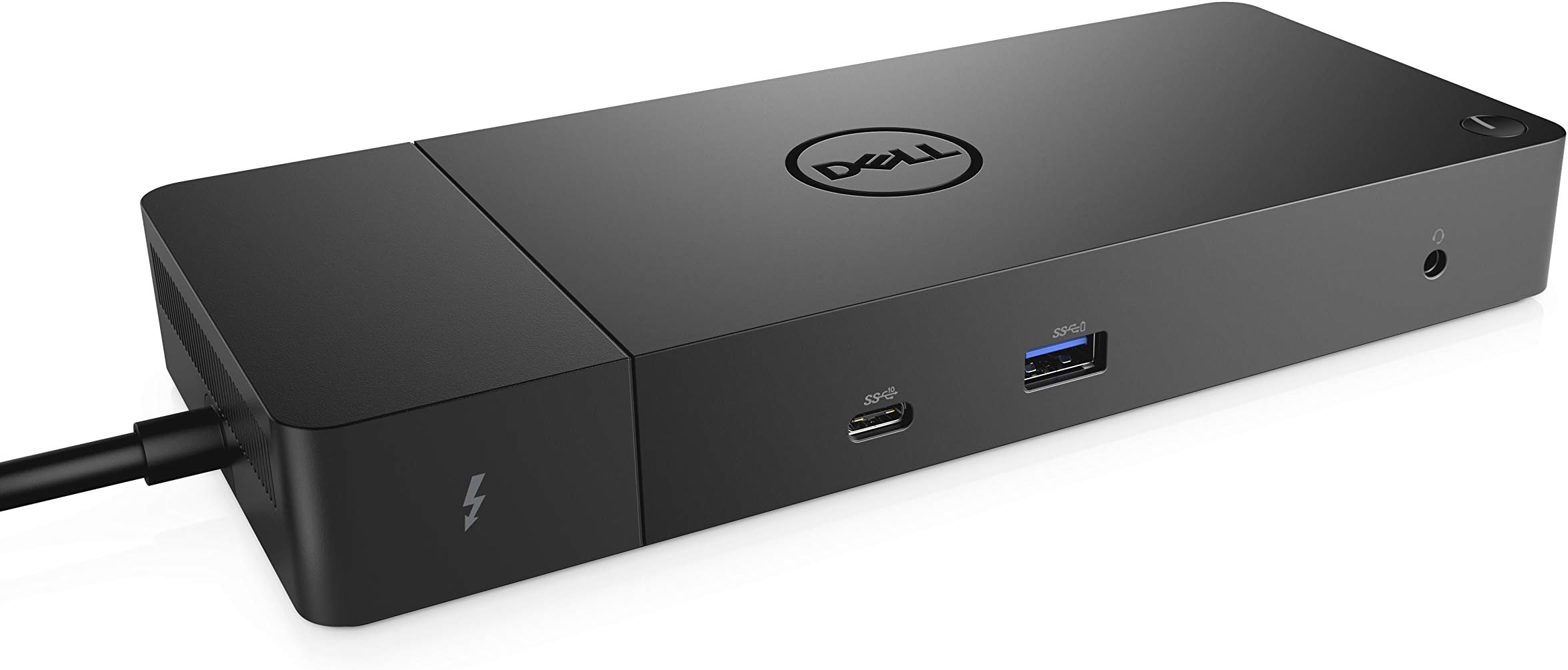
The Dell WD19TB Thunderbolt Docking Station is a professional-grade hub featuring a robust 180W power adapter with 130W power delivery, 12 versatile ports including USB-C, DisplayPort 1.4, HDMI, and Gigabit Ethernet. Designed for seamless multi-device connectivity and dual 4K display support, it’s compatible with Mac OS and Windows. Its compact form factor and intelligent power management make it an essential upgrade for any modern workspace.

| ASIN | B07V867LW4 |
| Batteries Included | No |
| Batteries Required | No |
| Best Sellers Rank | #246,865 in Electronics ( See Top 100 in Electronics ) #93 in Docking Stations |
| Brand | Dell |
| Colour Screen | No |
| Compatible Devices | Laptops |
| Customer Reviews | 3.6 3.6 out of 5 stars (1,367) |
| Date First Available | 3 June 2019 |
| Does it contain liquid? | No |
| Generic Name | Docking Station |
| Hardware Interface | Ethernet, HDMI, Thunderbolt, USB |
| Has Auto Focus | No |
| Importer | Divyasree Greens, Challaghatta-Annex Koramangala INR Ring Road, Varthur Hobli Bangalore Karnataka 560071 |
| Includes Rechargeable Battery | No |
| Item Dimensions LxWxH | 8.9 x 20.6 x 2.8 Centimeters |
| Item Weight | 1 kg 430 g |
| Item model number | WD19TB |
| Manufacturer | Dell Computers |
| Model | WD19TB |
| Mounting Hardware | Adapter |
| Number of Ports | 12 |
| Number of items | 1 |
| Operating System | Mac OS |
| Packer | Divyasree Greens, Challaghatta-Annex Koramangala INR Ring Road, Varthur Hobli Bangalore Karnataka 560071 |
| Power Source | Corded Electric |
| Product Dimensions | 8.89 x 20.57 x 2.79 cm; 1.43 kg |
| Programmable Buttons | No |
| Total USB ports | 3 |
| Wattage | 180 Watts |
S**H
Working flawlessly on Mac OS
Both 1080p ultrawide and 1440p 16:9 144hz in 90 degree orientation working flawlessly. Easily powers my Mac and iPhone and all other peripherals perfectly all day long without much heat output. Highly recommend!
K**S
No warranty
The docking station stopped working after an year. Amazon advertised it as a 3 year manufacturer warranty product, but when I checked the dell service centre the product warranty was expired even before the purchase date.
R**R
Nice
Packaging looked but the product is awesome. Thanks
A**N
Go for it
Good, works fine with Dell, Mac with no issues. With Msi it struggles with display but after couple of attempts it works for that too. Except mac none of laptops has thunderbolt port still works fine.
H**M
Good One but looks like got a opened pack
It works with my Dell Latitude 5420. Extending screen in 2 monitors is working. Glad that it's working. But the inside cable packs are puffed ones. Looks like product is used and repacked
S**A
Wow.
Heavy stuff, like a small brick. Have been using it for a few days. I am satisfied with the performance. A bit expensive, though, but that's DELL.
A**R
All my usb devices fried because of this dock.
After using for months, since last few days, whenever I put any usb devices e.g. keyboard's/mouse dongle, pendrive etc all gets fried, they no longer work in any other laptop. Such a poor dock from reputated brand.
K**R
Review after extensive use
Does the job perfectly. No heat. Compact and no issues thus far. ~ 3 months continue usage
R**A
Compré este producto hace un mes y medio. Funciona bien pero tiene un problema, comenzó a fallar, a tener algo así como "alto voltaje"; cuando conecto mi computadora se siente como la energía está sobre la carcasa de esta, he llegado a tener ligeras descargas eléctricas. Definitivamente hay algo mal con el producto, por desgracia ya no puedo devolverlo ya que ha pasado más de 1 mes.
A**R
I purchased this docking station to run two 4K displays and a handful of peripherals from a Dell Latitude 7490 laptop with Thunderbolt 3. As an experiment I plugged in a 2019 15" MacBook Pro to see if it would also work. Initially I had an issue where both 4K displays were mirroring the same activity instead of working independently. The system preferences provided no solution (neither "Detect Displays" worked nor the "Mirror Displays" checkbox—it was unchecked). I reviewed my connections. I was using the two display port connectors on the dock to run the two 4K displays. After some Googling I learned this configuration will not work as both display port connectors are on the same bus. To run both 4K displays each must be on its own bus. I had an extra Thunderbolt 3 to HDMI cable on hand. After removing one of the display port cables then using the Thunderbolt 3 to HDMI cable, which is on a separate bus, the issue was resolved! Now I can simply plug the main Thunderbolt 3 cable that comes out of the dock into either the MacBook Pro or the Dell Latitude 7490 and all the peripherals connected to the dock work with either laptop. This is fantastic!
M**U
J'ai bien reçu le WD19TB, malgré certains commentaires négatifs de d'autres personnes, j'ai décidé de l'acheter quand même et JE NE SUIS PAS DÉÇU ! 🙂 Fonctionne très bien avec mon Dell inspiron 17 7000 ! Je n'hésiterai pas à en commander un autre pour mon travail ! 😀
D**L
Do not buy from Canada Connect. I purchased what was advertised as a new Dell WD19TB docking station. What I got was a refurbished WD19 which is not the Thunderbolt version. The WD19 unit is much less expensive than the WD19TB but they did a bait and switch and gave me the cheaper model. To add insult to injury the unit is not new as advertised. It was missing the warranty and the items were repackaged. Reading the reviews this has happened to several other people in Canada. Save yourself the headache and disappointment and do not buy through Amazon. Call Dell and show them the reduced price and they will match it and you can get a legitimately brand new and the correct device for around $300. I called Amazon and they didn't seem to care about this and gave me a $5 coupon which is not worth all the shenanigans and headache.
B**D
Let me save you hundreds of dollars and share my experience. I run two of these docks on two different dells. A low powered small one, and a high draw workstation. USB's switch on and off, they have random fan and power warnings, the headphone jack does not work on both. Drivers are updated, and the Laptops are less than 6 months old. I've spend hours trying to get these to work as expected and they just do not perform as well as the old doc that used to hook into the bottom of your laptop. If you are working remote, or need these docs for anything other than charging, I would absolutely avoid this tech if the laptop had enough ports to support 4 usb ports and two additional display ports. My coworkers are struggling with several of these problems too, so it is not just an unlucky batch. I suspect Driver and hardware issues. What to expect if you do buy: The issues will slowly unroll on you. First it will be the F1 power supply problem.. you will have to boot through the warning. Second, you will notice lag on your other monitors. Third the fan will have problems and will constantly run, and give failure warnings. Third, your USB ports and Mic Jack will randomly fail. Suggested Fixes, update drivers, move as many usb's to your laptop ports, and get a usb mic with a built in headphone jack. Keep the power brick, and dock brick on something lifted so air can get under it.
Trustpilot
1 week ago
2 months ago